











SlideDog Discount - Up to 15% off
Multimedia presentation solution providing real-time presentation broadcasting, audience interaction features and remote control by app
Get discountCategory
Church Presentation Software


What is SlideDog?
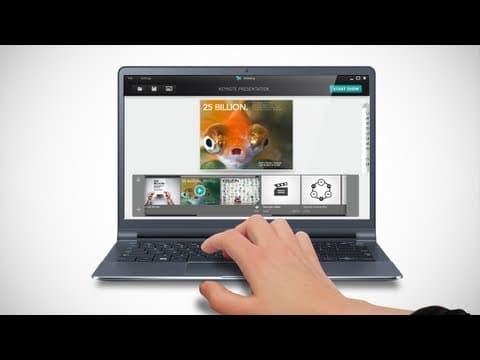
SlideDog is a Windows application that enables seamless integration of various presentation media, including PowerPoint, PDFs, Prezi, videos, and web pages, into a single, cohesive presentation. Its key features include:
– Presentation Playlist: Create custom playlists by dragging and arranging different media files, ensuring smooth transitions without interruptions.
– Real-Time Sharing: Share slides live with the audience, allowing them to follow along on their devices.
– Remote Control: Use iOS or Android devices to control presentations, switch between media, and read slide notes.
– Interactive Elements: Engage audiences with live polls, Q&A sessions, and feedback surveys.
– Seamless Transitions: Ensure smooth switching between different media types, maintaining the flow of presentations.
SlideDog is ideal for professionals seeking to deliver dynamic and interactive presentations.
Looking for a great deal on SlideDog?
Good news! SlideDog is currently offering discounts of up to 15% off regular subscription rates. This is your chance to leverage premium photo editing tools to enhance team coordination and productivity at a significantly reduced cost.
- Supports multiple file types and formats
- Seamlessly blends slides, videos, websites together
- Easy drag-and-drop playlist assembly
- Remote control via iOS/Android app
- Live sharing and audience interaction options
- Simple, intuitive user interface design
Eligibility
Number of Seats/Users: SlideDog offers discounts based on the number of users or seats. A higher volume typically leads to a better discount structure, especially for enterprise-level usage.
Commitment to a Long-Term Contract: Discounts are often provided to companies that commit to using the service for a longer period (e.g., 1-year or 3-year contracts). A longer commitment shows SlideDog that the company is serious and willing to invest in the platform long-term.
No Active Discounts: Companies that are not already receiving other active discounts may have a better chance of qualifying for additional discounts from SlideDog. SlideDog reserves discounts for new customers or those not currently under promotional pricing.
Volume or Usage Commitment: SlideDog offers discounts if you agree to a minimum amount of usage or transaction volume. This could be based on data storage, transactions, or other metrics tied to how much you will use the platform.
Enterprise-Level Negotiation: Companies that qualify as “enterprise” due to their size or complexity (e.g., having large teams, multiple departments, or geographical presence) may be eligible for additional discounts from SlideDog. Such companies are often in a position to negotiate for better pricing.
Early Renewal or Prepayment: SlideDog often offers discounts if you renew early or prepay for the entire contract period. This is a common approach to securing a lower price.

SlideDog - Up to 15% off
Reviews
Here at Spendbase, our internal data shows that SlideDog is highly appreciated for its ability to smooth out live presentations, especially when switching between different media types and presenters. Clients say it saves time and sanity by letting you create playlists with PowerPoints, PDFs, websites, videos, and more—all in one seamless flow.
Top positives our clients mention:
– Ease of use: Most Spendbase clients say SlideDog is super intuitive. The drag-and-drop interface and clean design come up again and again.
– Wide file support: It’s a real winner for managing presentations with mixed formats—almost any file type will work.
– Live sharing and audience engagement: Integrations like polls, feedback, and broadcasting presentations directly to attendees’ devices boost interaction.
– Mobile remote control: Presenters love SlideDog’s phone app for controlling slides and keeping presentations rolling without tech mishaps.
– Customer support: Spendbase clients appreciate the fast and friendly support, especially when problems pop up close to big events.
– Organization: SlideDog helps clients keep events running smoothly, allowing effortless switching between different presenters and media.
However, some Spendbase clients have flagged key drawbacks:
– Mac compatibility: The lack of support for Apple devices is a frequent concern. Many would like SlideDog to work natively on Mac.
– Price point: The premium version is a sticking point for smaller organizations and educators. Many rely on the free version, but would like more flexible, affordable payment options.
– Real-time editing: You can’t always insert, delete, or rearrange items on the fly, which can be tricky if last-minute changes crop up.
– Stability hiccups: Occasional crashes happen, especially when dealing with larger presentations or multiple media types.
– Limited creation/editing features: While clients love the playlist concept, some wish SlideDog had basic editing tools for small fixes directly within the app.
Spendbase client use cases include:
– Church services and nonprofit events
– Trade shows and company meetings
– Education and classroom presentations
– AV production and entertainment shows
Common requests for improvement:
– Native Mac support
– Lower, single-payment price options
– More advanced editing controls while presenting
In summary, our Spendbase clients see SlideDog as an indispensable tool for multi-media presentations, especially for events with several presenters. If you’re running events or mix a lot of media, SlideDog’s streamlined workflow and reliable performance stand out—just keep in mind the price and system limitations. For those needing a discount, our team is always ready to help find the best deal to stretch your budget!
See how much you can save on your stack
Pick your team’s tools!
Click to select one or more tools.


What’s your company size?
Just click to select.
What’s your business email?
We'll send you calculations right away
The email is flying to your inbox!
Beyond discounts, you may qualify for up to $100K in AWS credits.

FAQ
1. Do you offer volume discounts?
Yes, purchasing two or more SlideDog licenses qualifies you for volume pricing, with discounts up to 40%.
2. Is there an educational discount available?
Yes, we offer discounts for educational institutions. Please contact us with your use-case for more details.
3. Can I activate my SlideDog Pro license on multiple computers?
Yes, each license key can be activated on two computers simultaneously.
4. What is your refund policy?
We offer a satisfaction guarantee. Submit a return request within 24 hours of purchase for a full refund.
5. How do I cancel my subscription?
Click the cancellation link in your original order email or any renewal notification email.
6. Do you offer a free trial?
Yes, SlideDog offers a free version to test features before committing to a paid plan.
7. Are there any current promo codes or discounts?
We occasionally offer promotional discounts. Please check our website or subscribe to our newsletter for the latest offers.
Related discounts

Song of Songs
Church Presentation Software
Up to 15% off

Praisenter
Church Presentation Software
Up to 15% off

OpenLP
Church Presentation Software
Up to 25% off

Presenter
Church Presentation Software
Up to 15% off

Big Screen
Church Presentation Software
Up to 25% off

Quelea
Church Presentation Software
Up to 15% off
Software cost optimization
SlideDog savings in five steps
Let’s estimate your potential savings and see how you can scale your cloud infrastructure.
One call. No cost. No commitments


meet vendor relationship EXPERTS
Our customers save millions with us



Save on SlideDog
It’s time to shrink your bill
Let our SaaS cost optimization experts check what deals you can get and how much you can save on your corporate subscriptions
See how you can:
- Learn about pricing benchmarks and discounts
- Present potential savings by vendor to your team
- Meet your SaaS and cloud cost optimization goals
Get SlideDog discount
We’ll email you back within 1 business day