











MaxBulk Mailer Discount - Up to 40% off
Bulk email software for macOS and Windows which send out press releases, marketing emails, and more.
Get discountCategory
Email Marketing


What is MaxBulk Mailer?
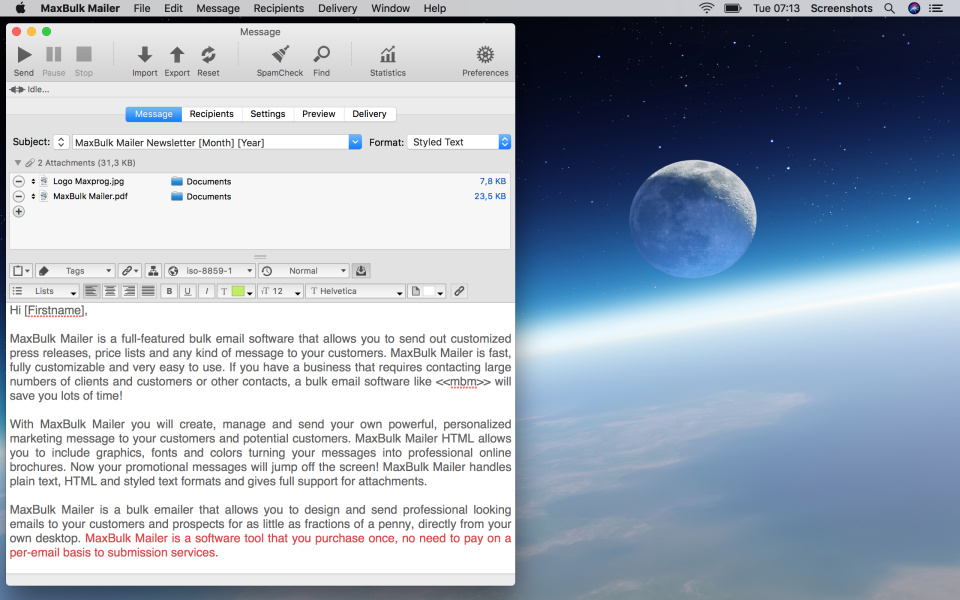
MaxBulk Mailer is a comprehensive bulk email and mail-merge software for macOS and Windows, designed to send personalized marketing messages, newsletters, and press releases to large contact lists. It supports both plain text and HTML emails, allowing the inclusion of graphics, fonts, and colors for professional-looking messages. Key features include advanced mail-merge capabilities with customizable tags, support for international characters, attachment handling, and conditional content based on recipient data. The software offers a versatile list manager, integration with databases like mySQL and postgreSQL, and scheduling for delayed mail delivery. Users benefit from a one-time purchase model without per-email fees, making it a cost-effective solution for businesses.
- Bulk email sending to large lists
- Personalized messages with mail-merge fields
- Supports HTML and plain text emails
- Works with many SMTP email providers
- Scheduling, throttling and delivery control options
- Subscriber list management with import/export tools
Eligibility
Number of Seats/Users: MaxBulk Mailer offers discounts based on the number of users or seats. A higher volume typically leads to a better discount structure, especially for enterprise-level usage.
Commitment to a Long-Term Contract: Discounts are often provided to companies that commit to using the service for a longer period (e.g., 1-year or 3-year contracts). A longer commitment shows MaxBulk Mailer that the company is serious and willing to invest in the platform long-term.
No Active Discounts: Companies that are not already receiving other active discounts may have a better chance of qualifying for additional discounts from MaxBulk Mailer. MaxBulk Mailer reserves discounts for new customers or those not currently under promotional pricing.
Volume or Usage Commitment: MaxBulk Mailer offers discounts if you agree to a minimum amount of usage or transaction volume. This could be based on data storage, transactions, or other metrics tied to how much you will use the platform.
Enterprise-Level Negotiation: Companies that qualify as “enterprise” due to their size or complexity (e.g., having large teams, multiple departments, or geographical presence) may be eligible for additional discounts from MaxBulk Mailer. Such companies are often in a position to negotiate for better pricing.
Early Renewal or Prepayment: MaxBulk Mailer often offers discounts if you renew early or prepay for the entire contract period. This is a common approach to securing a lower price.

MaxBulk Mailer - Up to 40% off
Reviews
Here at Spendbase our internal data shows that MaxBulk Mailer works very well for a specific type of team, but can be frustrating for others.
Overall sentiment
Most Spendbase clients are happy: strong cluster of 4–5★ scores, with a few neutral and one very negative outlier. The pattern is “great value and power, but takes work to set up and operate.”
What Spendbase clients like most
Our data highlights these recurring positives:
- Fast, reliable sending
- Easy to send personalized bulk emails (hundreds to ~10,000 at a time)
- Good fit for:
- Freelancers and small businesses
- Orgs with their own SMTP/Exchange servers
- Users comfortable with basic tech/admin tasks
- Strong value for money (low cost, used for many years)
- Flexible:
- Handles text and HTML
- Scheduling and throttling
- Works with various SMTP services
- Support is often described as responsive and helpful
Where clients struggle
The main friction points we see:
- Setup & technical complexity
- SMTP/server authentication can be hard
- Some ISPs block or limit bulk sends
- Gmail setup is a recurring pain
- List management & compliance
- List handling feels non‑intuitive
- No built‑in cross‑device sync for lists
- Unsubscribe workflows are not obvious or fully automated
- User experience
- Interface feels dated or “clunky” to many
- Menu structure can be confusing
- Some features require a lot of searching or trial‑and‑error
- Reporting & analytics
- Advanced reporting requires extra server setup
- Not ideal for teams that want plug‑and‑play analytics and dashboards
- Content handling
- Embedded images and multiple user‑specific attachments are not straightforward
Who it’s best for (from our savings and usage data)
MaxBulk Mailer tends to be a good fit when:
- You want a one‑time or low recurring cost instead of SaaS pricing
- You have internal technical capacity (or an IT partner)
- You value control over your own SMTP and lists
- Your campaigns are regular but not highly automated or behavior‑driven
It’s less ideal when:
- Non‑technical staff must self‑manage everything
- You need modern, visual reporting and automatic unsubscribe/compliance out of the box
- Your ISP or email provider is very strict on bulk sending
In those cases, Spendbase usually recommends comparing MaxBulk Mailer with more managed, cloud‑based email platforms, even if their list prices are higher, because the time and support costs can quickly offset the license savings.
See how much you can save on your stack
Pick your team’s tools!
Click to select one or more tools.


What’s your company size?
Just click to select.
What’s your business email?
We'll send you calculations right away
The email is flying to your inbox!
Beyond discounts, you may qualify for up to $100K in AWS credits.

FAQ
1. Are there any current discounts available for MaxBulk Mailer?
Yes, we offer multiple-user discounts starting at $49.90 for a single-user Standard license.
2. Do you provide discounts for non-profit organizations?
Yes, special offers are available for non-profits and educational institutions.
3. Is there a free trial available for MaxBulk Mailer?
Yes, a 30-day free trial is available to explore all features.
4. How can I upgrade my MaxBulk Mailer license?
Upgrades are available; prices vary based on your current version.
5. Do you offer bulk purchase discounts?
Yes, we provide license packs with discounts for multiple users.
6. Are there seasonal promotions for MaxBulk Mailer?
Yes, we occasionally offer seasonal promotions; check our website for current deals.
7. Can I get a discount if I refer a friend?
Currently, we do not offer referral discounts.
8. Do you offer discounts for students?
Yes, we offer special pricing for students; please contact us for details.
Related discounts

MailBluster
Email Marketing
Up to 45% off

ReachEngine
Email Marketing
Up to 45% off

B2B Lead AI
Email Marketing
Up to 50% off

Minutemailer
Email Marketing
Up to 20% off

Xert Precision Suite
Email Marketing
Up to 45% off

omniMarketer
Email Marketing
Up to 20% off
Software cost optimization
MaxBulk Mailer savings in five steps
Let’s estimate your potential savings and see how you can scale your cloud infrastructure.
One call. No cost. No commitments


meet vendor relationship EXPERTS
Our customers save millions with us



Save on MaxBulk Mailer
It’s time to shrink your bill
Let our SaaS cost optimization experts check what deals you can get and how much you can save on your corporate subscriptions
See how you can:
- Learn about pricing benchmarks and discounts
- Present potential savings by vendor to your team
- Meet your SaaS and cloud cost optimization goals
Get MaxBulk Mailer discount
We’ll email you back within 1 business day