











FileCenter Discount - Up to 40% off
FileCenter is an on-premise document management software that provides PDF scanning, editing, and secure sharing capabilities.
Get discountCategory
Document Management Software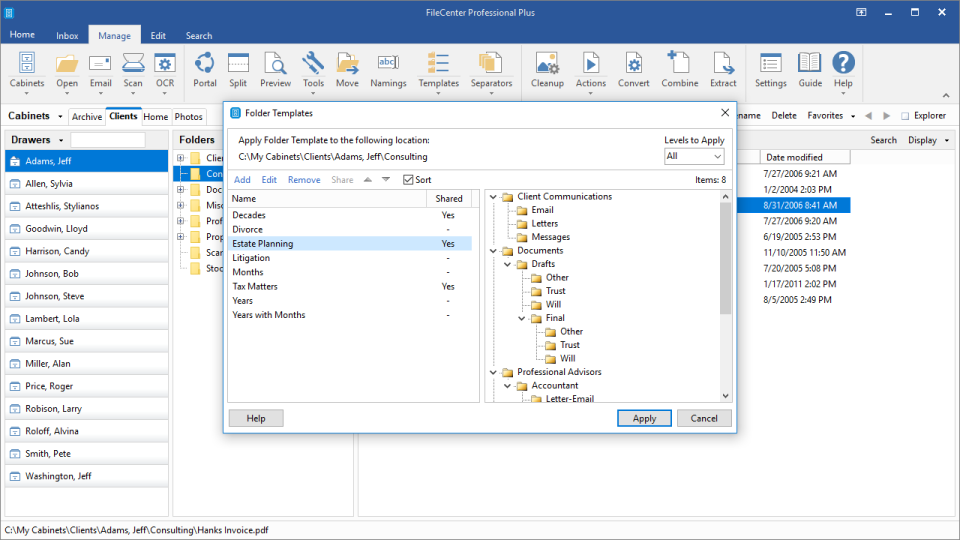

What is FileCenter?
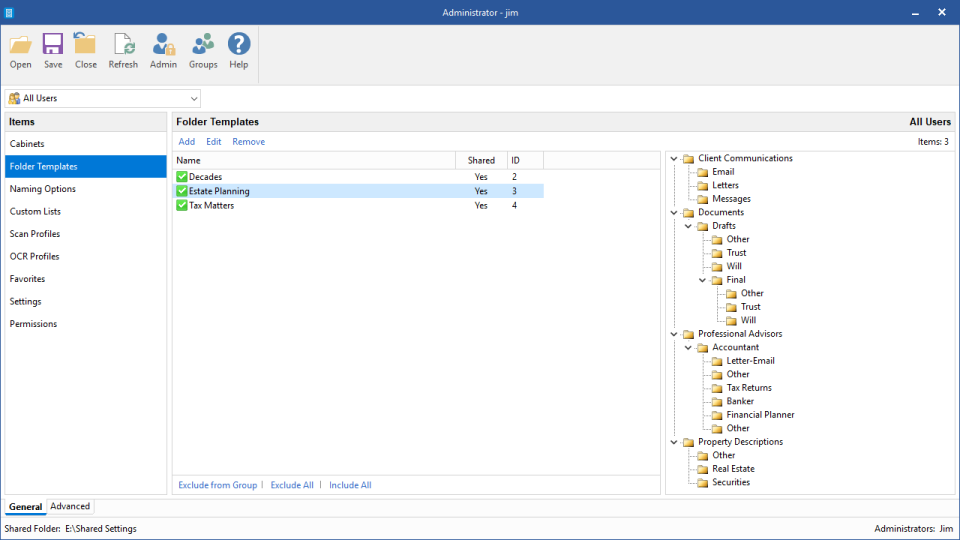
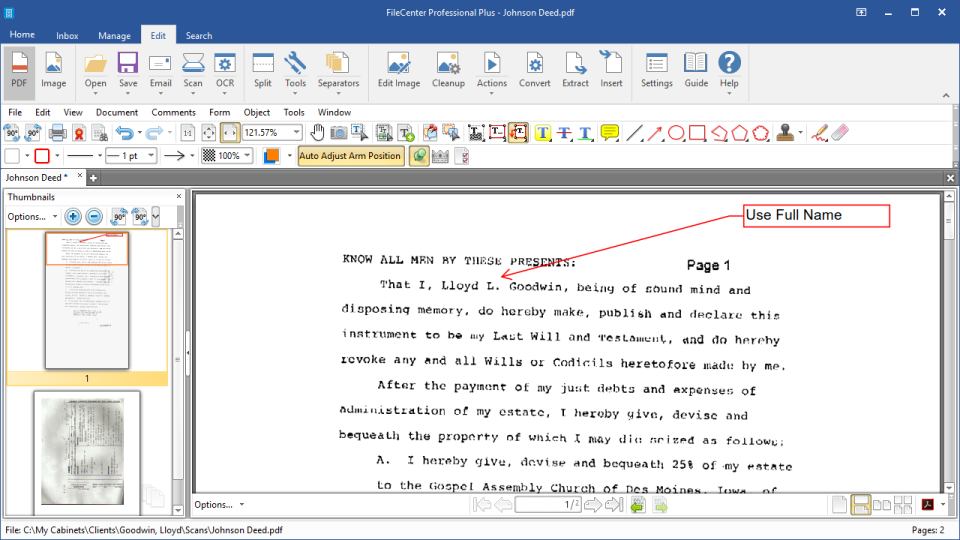
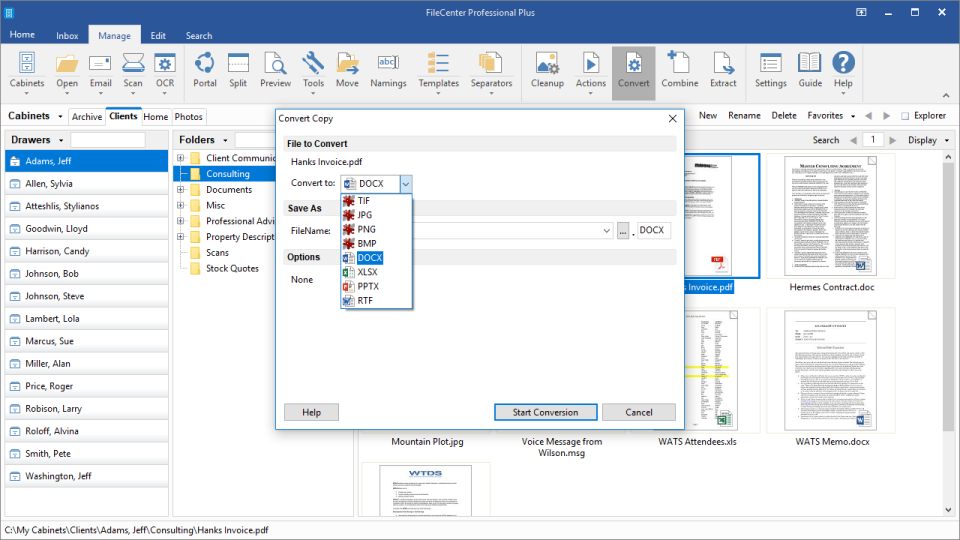
FileCenter is a document management software that transforms Windows desktops into comprehensive document management systems. It features document scanning, OCR conversion, PDF editing, and secure file sharing options. The software digitizes paper documents into high-quality PDFs while allowing users to make changes and annotations to existing files. FileCenter also integrates with cloud services including Google Drive, OneDrive, and Dropbox, enabling convenient access to documents. The system organizes files in consistent folder structures that can be templated for team use. Documents are automatically classified and filed based on content, streamlining the organization process. The software includes a client portal for exchanging digital files securely. Additionally, FileCenter combines file management, scanning, and PDF editing functions in one interface, eliminating the need for multiple applications while maintaining a straightforward user experience.
- Integrated document scanning with OCR conversion
- Built-in PDF editing and creation
- Cabinet-style organization with automatic document filing
- Cloud integration: Google Drive, OneDrive, Dropbox
- Secure client portal and password-protected sharing
- Fast file search, preview, and management
Eligibility
Number of Seats/Users: FileCenter offers discounts based on the number of users or seats. A higher volume typically leads to a better discount structure, especially for enterprise-level usage.
Commitment to a Long-Term Contract: Discounts are often provided to companies that commit to using the service for a longer period (e.g., 1-year or 3-year contracts). A longer commitment shows FileCenter that the company is serious and willing to invest in the platform long-term.
No Active Discounts: Companies that are not already receiving other active discounts may have a better chance of qualifying for additional discounts from FileCenter. FileCenter reserves discounts for new customers or those not currently under promotional pricing.
Volume or Usage Commitment: FileCenter offers discounts if you agree to a minimum amount of usage or transaction volume. This could be based on data storage, transactions, or other metrics tied to how much you will use the platform.
Enterprise-Level Negotiation: Companies that qualify as “enterprise” due to their size or complexity (e.g., having large teams, multiple departments, or geographical presence) may be eligible for additional discounts from FileCenter. Such companies are often in a position to negotiate for better pricing.
Early Renewal or Prepayment: FileCenter often offers discounts if you renew early or prepay for the entire contract period. This is a common approach to securing a lower price.

FileCenter - Up to 40% off
Reviews
Here at Spendbase, our internal data shows that FileCenter delivers strong value for many teams, but there are a few patterns to keep in mind before you commit budget.
Overall sentiment
Most Spendbase clients are very positive about FileCenter, especially small and mid-sized offices moving toward a paperless workflow. A smaller, but loud, group reports reliability and support issues that can become costly if not planned for.
What Spendbase clients like most
Our data highlights these recurring strengths:
- All‑in‑one workflow
- Scanning, OCR, PDF editing, and file organization in a single interface
- “Print to PDF” and quick emailing directly from the system
- File organization
- Uses standard Windows folders (no lock‑in), with:
- Cabinets / drawers metaphor
- Folder templates
- Strong search and preview without opening files
- Cloud & sharing
- Smooth use with OneDrive, Google Drive, Dropbox, SharePoint
- Secure client portal and password‑protected PDFs
- Ease of use
- Fast onboarding, short learning curve for most office staff
- Good tutorial videos and (often) responsive support
Key pain points and hidden costs
Our internal data also shows consistent friction around:
- Stability & compatibility
- A minority report freezing, crashes, and scanner (TWAIN) issues
- Sometimes blamed on AV software or Windows updates, but downtime is still real cost
- Interface & usability
- UI feels dated or “busy” for some
- PDF editor has many features but they’re hard to find
- Pricing & maintenance
- Confusion between one‑time license vs. ongoing “maintenance” that’s needed for updates
- Annoying expiry pop‑ups and frustration about paying for bug‑fix updates
- At least one case of paid upgrade leading to data access problems, then paid support requirement
- Feature gaps
- Desire for deeper PDF editing, more third‑party integrations, and AI‑powered automation
Spendbase discount perspective
Given this pattern, our guidance is:
- Push for discounts on multi‑year maintenance and clarify exactly what’s included (updates, upgrades, support levels).
- Use competing tools (e.g., higher‑priced DMS and scanning suites) as leverage; several clients moved to FileCenter to escape higher monthly fees.
- If your use case is scanner‑heavy or mission‑critical, budget for pilot testing and potentially priority support, and negotiate that into the price rather than paying ad‑hoc later.
In short, FileCenter can be a very cost‑effective replacement for more expensive systems, as long as pricing, maintenance, and support expectations are nailed down upfront.
See how much you can save on your stack
Pick your team’s tools!
Click to select one or more tools.


What’s your company size?
Just click to select.
What’s your business email?
We'll send you calculations right away
The email is flying to your inbox!
Beyond discounts, you may qualify for up to $100K in AWS credits.

FAQ
1. Are there any current discounts available for FileCenter?
Yes, we offer a 25% discount on your first FileCenter license upon newsletter signup.
2. Do you provide discounts for multiple user licenses?
Yes, we offer special multi-user pricing. Please contact our Sales team for details.
3. Is there a discount for existing PaperPort or Neat users?
Yes, current PaperPort and Neat users may qualify for special pricing. Contact us for more information.
4. Do you offer seasonal promotions or discount codes?
Yes, we occasionally offer seasonal promotions and discount codes. Stay updated by subscribing to our newsletter.
5. Is there a money-back guarantee if I'm not satisfied?
Yes, we offer a 30-day money-back guarantee for purchases made directly from us.
6. Are there discounts available for educational institutions or non-profits?
We offer special pricing for educational institutions and non-profits. Please contact our Sales team for details.
7. Can I combine multiple discounts or promotions?
Typically, discounts and promotions cannot be combined. Please refer to the specific terms of each offer.
8. How can I stay informed about upcoming discounts and promotions?
Subscribe to our newsletter to receive updates on the latest discounts and promotions.
Related discounts

Gimmal Physical
Document Management Software
Up to 50% off

WordPress Download Manager
Document Management Software
Up to 45% off

eBiziiMS
Document Management Software
Up to 20% off

Greenway Document Manager
Document Management Software
Up to 50% off

iLovePDF
Digital Signature Tool
Up to 20% off

EasyDocMgt
Document Management Software
Up to 35% off
Software cost optimization
FileCenter savings in five steps
Let’s estimate your potential savings and see how you can scale your cloud infrastructure.
One call. No cost. No commitments


meet vendor relationship EXPERTS
Our customers save millions with us



Save on FileCenter
It’s time to shrink your bill
Let our SaaS cost optimization experts check what deals you can get and how much you can save on your corporate subscriptions
See how you can:
- Learn about pricing benchmarks and discounts
- Present potential savings by vendor to your team
- Meet your SaaS and cloud cost optimization goals
Get FileCenter discount
We’ll email you back within 1 business day