











Apple Remote Desktop Discount - Up to 40% off
Allows users to manage Mac computers remotely. It can be used to distribute software or updates & provide real-time online support.
Get discountCategory
Remote Desktop Software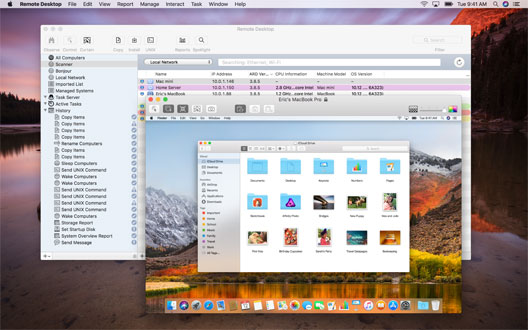
What is Apple Remote Desktop?
Apple Remote Desktop is a macOS application designed for remote management of Mac computers over a network. It enables administrators and educators to control, monitor, and assist multiple Macs simultaneously. Key features include remote software installation, real-time screen sharing, system monitoring, and comprehensive reporting. Users can perform tasks such as distributing software, copying files, gathering asset information, and remotely controlling system settings. The tool also supports remote assistance through screen sharing and text chat, facilitating efficient troubleshooting and user support. Additionally, it offers the ability to observe multiple screens, adjust system settings, and execute commands across multiple systems from a central location.
- Remote control of macOS computers
- Manage and monitor multiple Macs simultaneously
- Distribute software and system updates remotely
- Automate admin tasks with remote scripts
- Simple, intuitive interface for Mac admins
- Remote file management and settings customization
Eligibility
Number of Seats/Users: Apple Remote Desktop offers discounts based on the number of users or seats. A higher volume typically leads to a better discount structure, especially for enterprise-level usage.
Commitment to a Long-Term Contract: Discounts are often provided to companies that commit to using the service for a longer period (e.g., 1-year or 3-year contracts). A longer commitment shows Apple Remote Desktop that the company is serious and willing to invest in the platform long-term.
No Active Discounts: Companies that are not already receiving other active discounts may have a better chance of qualifying for additional discounts from Apple Remote Desktop. Apple Remote Desktop reserves discounts for new customers or those not currently under promotional pricing.
Volume or Usage Commitment: Apple Remote Desktop offers discounts if you agree to a minimum amount of usage or transaction volume. This could be based on data storage, transactions, or other metrics tied to how much you will use the platform.
Enterprise-Level Negotiation: Companies that qualify as “enterprise” due to their size or complexity (e.g., having large teams, multiple departments, or geographical presence) may be eligible for additional discounts from Apple Remote Desktop. Such companies are often in a position to negotiate for better pricing.
Early Renewal or Prepayment: Apple Remote Desktop often offers discounts if you renew early or prepay for the entire contract period. This is a common approach to securing a lower price.

Apple Remote Desktop - Up to 40% off
Reviews
Here at Spendbase, our internal data shows that Apple Remote Desktop is generally seen as a strong, reliable tool for managing Mac environments, but with a few cost and flexibility gaps you’ll want to keep an eye on.
What Spendbase clients like most:
- Simple onboarding
- Many clients highlight how easy it is to learn and then teach others.
-
The interface is described as intuitive enough for both IT admins and less technical staff.
-
Powerful remote control and management
- Centralized control of multiple Macs at once is a major win, especially for IT teams and technicians.
- Remote file management, settings customization, and system imaging are frequently used features.
-
In stable networks, clients report smooth sessions with little latency.
-
Productivity and business continuity
- Clients rely on it heavily for remote work, support during travel, and hybrid/remote setups.
- It’s considered more capable for Mac automation than many generic remote tools.
Main pain points our data surfaces:
- Ecosystem lock-in
- Only works in the Apple world; several clients want an official Windows client instead of relying on VNC.
-
No audio redirection is a recurring request.
-
Performance and maintenance
- Speed can drop on weaker connections, which is expected but still frustrating.
- Some clients had to apply multiple manual updates before things worked smoothly again.
-
Occasional connection quirks (like needing to re-enter IPs) pop up in a few setups.
-
Cost and support
- A number of Spendbase clients flag pricing as high versus similar tools.
- Support experience is described as limited or slow by some, especially when they actually need help.
From a Spendbase savings perspective, our internal data suggests:
- Apple Remote Desktop works best when you’re all‑in on the Mac ecosystem and actively using bulk management features.
- Teams that only need occasional remote access or have mixed OS fleets often overpay relative to their usage.
In those cases, we typically recommend:
- Auditing actual usage by user and device
- Consolidating underused seats
- Comparing against cross‑platform remote tools to ensure you’re not locked into a premium Mac‑only setup you don’t fully leverage.
See how much you can save on your stack
Pick your team’s tools!
Click to select one or more tools.


What’s your company size?
Just click to select.
What’s your business email?
We'll send you calculations right away
The email is flying to your inbox!
Beyond discounts, you may qualify for up to $100K in AWS credits.

FAQ
1. Are there any current discounts available for Apple Remote Desktop?
Yes, we offer a 50% discount on Apple Remote Desktop licenses, reducing the price to $40 per license.
2. How can I purchase Apple Remote Desktop at a discounted rate?
You can purchase the discounted Apple Remote Desktop license directly from our website or authorized resellers.
3. Is the discounted Apple Remote Desktop license a perpetual license?
Yes, the $40 discounted license is a perpetual license, meaning it does not expire.
4. Do you offer volume discounts for Apple Remote Desktop?
Yes, we provide additional discounts for bulk purchases. Please contact our sales team for more details.
5. Are educational institutions eligible for Apple Remote Desktop discounts?
Yes, educational institutions can avail special pricing. Please reach out to our support team for eligibility and pricing.
6. Is the discounted version of Apple Remote Desktop the latest version?
Yes, the discounted license provides access to the latest version of Apple Remote Desktop.
7. Can I upgrade my existing Apple Remote Desktop license at a discounted rate?
Yes, existing users can upgrade to the latest version at a discounted rate. Contact our support for upgrade options.
8. Are there any seasonal promotions for Apple Remote Desktop?
Yes, we occasionally offer seasonal promotions. Subscribe to our newsletter to stay informed about upcoming deals.
Related discounts

Telemote
Remote Desktop Software
Up to 35% off

Spia 4.2 Net Connect
Remote Desktop Software
Up to 35% off

Desktop+Plus
Remote Desktop Software
Up to 25% off
Software cost optimization
Apple Remote Desktop savings in five steps
Let’s estimate your potential savings and see how you can scale your cloud infrastructure.
One call. No cost. No commitments


meet vendor relationship EXPERTS
Our customers save millions with us



Save on Apple Remote Desktop
It’s time to shrink your bill
Let our SaaS cost optimization experts check what deals you can get and how much you can save on your corporate subscriptions
See how you can:
- Learn about pricing benchmarks and discounts
- Present potential savings by vendor to your team
- Meet your SaaS and cloud cost optimization goals
Get Apple Remote Desktop discount
We’ll email you back within 1 business day