











Calendly Discount - Up to 30% off
Calendly connects with your calendar to automate scheduling, prevent conflicts, and save time—so you can focus on the work that counts.Le
Get discountCategory
Calendar Software


What is Calendly?
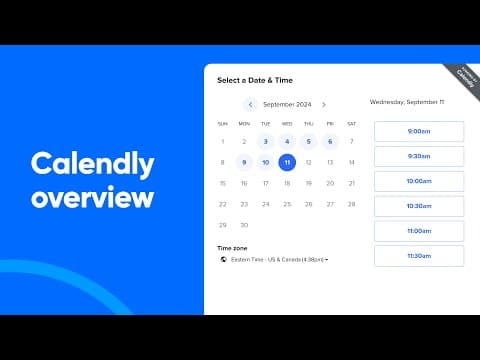
Calendly is a scheduling tool that streamlines appointment booking by allowing users to share their availability through customizable links, enabling clients to self-schedule meetings without back-and-forth communication. Key features include calendar synchronization with platforms like Google Calendar and Outlook to prevent double bookings, automated email and SMS reminders to reduce no-shows, and integration with video conferencing tools such as Zoom and Microsoft Teams for seamless virtual meetings. Additionally, Calendly offers customizable workflows, real-time scheduling updates, and supports payment processing through Stripe and PayPal, making it suitable for various professional needs.
- Link-based self-service scheduling for invitees
- Multi-calendar syncing prevents double bookings
- Automated reminders and workflows reduce no-shows
- Multiple event types with custom availability
- Integrations with video, email, CRM tools
- Team scheduling, including round-robin assignments
Eligibility
Number of Seats/Users: Calendly offers discounts based on the number of users or seats. A higher volume typically leads to a better discount structure, especially for enterprise-level usage.
Commitment to a Long-Term Contract: Discounts are often provided to companies that commit to using the service for a longer period (e.g., 1-year or 3-year contracts). A longer commitment shows Calendly that the company is serious and willing to invest in the platform long-term.
No Active Discounts: Companies that are not already receiving other active discounts may have a better chance of qualifying for additional discounts from Calendly. Calendly reserves discounts for new customers or those not currently under promotional pricing.
Volume or Usage Commitment: Calendly offers discounts if you agree to a minimum amount of usage or transaction volume. This could be based on data storage, transactions, or other metrics tied to how much you will use the platform.
Enterprise-Level Negotiation: Companies that qualify as “enterprise” due to their size or complexity (e.g., having large teams, multiple departments, or geographical presence) may be eligible for additional discounts from Calendly. Such companies are often in a position to negotiate for better pricing.
Early Renewal or Prepayment: Calendly often offers discounts if you renew early or prepay for the entire contract period. This is a common approach to securing a lower price.

Calendly - Up to 30% off
Reviews
Here at Spendbase our internal data shows that Calendly is delivering strong value for most Spendbase clients, especially for sales, marketing, recruiting and customer-facing teams that live in their calendars.
Overall sentiment and fit
– The large majority of Spendbase clients rate Calendly 4–5/5.
– It’s most useful where there are many external meetings: interviews, client calls, demos, training sessions, and consulting.
What Spendbase clients like most
– Time savings
– Link-based booking that removes back-and-forth emails.
– Real-time sync with Google and Microsoft calendars to avoid double-booking.
– Ease of use
– Simple setup of event types, durations, and availability.
– Clean, intuitive interface that even guests find easy most of the time.
– Automation & integrations
– Automatic Zoom/online meeting links.
– Email reminders, follow-ups, and workflows (surveys, prep questions, reconfirmations).
– API and CRM integration to create or enrich leads.
– Team features
– Round-robin and pooled availability for sales or support teams.
– Works well embedded in email signatures, websites, and campaigns.
Key pain points we see
– Plan and feature limits
– Free plan is quite restricted: limited event types, weaker customization, fewer workflows.
– Some advanced options (branding, deeper integrations, more reminders) sit behind higher tiers.
– Customization
– Limited control over branding, colors, custom domains, and themes.
– Editing the main scheduling page can feel confusing at first.
– Platform gaps & UX
– No native Apple Calendar support is a deal-breaker for a few clients.
– Less tech-savvy guests can occasionally struggle to complete a booking.
– Reliability, support, billing
– A few complaints about strict no-refund policies on renewals.
– Support feels slower or lighter on lower tiers.
– Occasional calendar connection glitches that require re-authentication.
Spend and discount insights from our side
– For solo users or very small teams with simple needs, our data shows the free or lowest paid tier usually offers the best ROI.
– Once you need workflows, reminders, and team scheduling, upgrading pays off through fewer no-shows and more booked meetings.
– Because pricing scales by seat, we often save clients money by:
– Reducing unneeded seats.
– Consolidating to team pages and round-robin instead of many individual accounts.
– Aligning contract length and renewal dates to avoid costly auto-renew surprises.
If you share your team size and use cases, we can usually pinpoint the cheapest Calendly tier that still covers all the features you actually use.
See how much you can save on your stack
Pick your team’s tools!
Click to select one or more tools.


What’s your company size?
Just click to select.
What’s your business email?
We'll send you calculations right away
The email is flying to your inbox!
Beyond discounts, you may qualify for up to $100K in AWS credits.

FAQ
1. Does Calendly offer discounts for educational institutions?
Yes, educational organizations receive a 25% discount on annual plans upon submitting tax-exempt documentation at checkout.
2. Are there any current promo codes available for Calendly?
Yes, various promo codes are available, offering discounts up to 67% off on Calendly plans.
3. Does Calendly provide discounts for non-profit organizations?
Yes, non-profits can receive a 25% discount on annual plans by submitting tax-exempt documentation during checkout.
4. Is there a free version of Calendly available?
Yes, Calendly offers a free plan with basic scheduling features suitable for individuals.
5. Can I get a discount by opting for annual billing?
Yes, switching to annual billing can save you up to 20% compared to monthly billing.
6. Does Calendly offer tiered pricing for larger teams?
Yes, Calendly provides tiered pricing where the cost per user decreases as your team size grows.
7. Are there any seasonal discounts or promotions for Calendly?
Yes, Calendly occasionally offers seasonal discounts, such as Black Friday sales with up to 50% off.
8. Does Calendly offer student discounts?
Currently, Calendly does not offer specific student discounts.
Related discounts

SkedPal
Calendar Software
Up to 25% off

Humanity
Calendar Software
Up to 25% off

Refills
Calendar Software
Up to 15% off

Wello Solutions
Calendar Software
Up to 35% off

UpKeep
Calendar Software
Up to 30% off

Moyae
Calendar Software
Up to 40% off
Software cost optimization
Calendly savings in five steps
Let’s estimate your potential savings and see how you can scale your cloud infrastructure.
One call. No cost. No commitments


meet vendor relationship EXPERTS
Our customers save millions with us



Save on Calendly
It’s time to shrink your bill
Let our SaaS cost optimization experts check what deals you can get and how much you can save on your corporate subscriptions
See how you can:
- Learn about pricing benchmarks and discounts
- Present potential savings by vendor to your team
- Meet your SaaS and cloud cost optimization goals
Get Calendly discount
We’ll email you back within 1 business day