











Deep Freeze Discount - Up to 50% off
System recovery software to protect Windows & Mac workstations against pre-existing vulnerabilities & threats by rebooting & restoring.
Get discountCategory
IT Management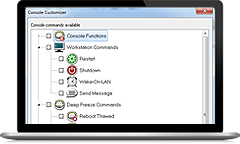
What is Deep Freeze?
Deep Freeze is a system restore software that safeguards computer configurations by reverting them to a predefined state upon each reboot. This ensures system integrity and minimizes downtime. Key features include:
-
Reboot-to-Restore: Automatically restores systems to their original state on restart, eliminating unwanted changes.
-
ThawSpace: Creates storage areas that retain data between reboots while the rest of the system remains protected.
-
Scheduling: Allows for automated maintenance, updates, and reboots during off-hours to reduce disruptions.
-
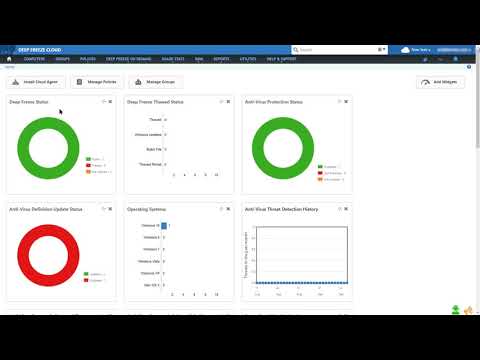
Cloud Console: Enables centralized management of endpoints from any location.
-
Enterprise Integration: Seamlessly integrates with Active Directory and other enterprise systems for streamlined administration.
- Restores pristine system state after reboot
- Protects against malware and unwanted changes
- Selectable drive freezing and thawing options
- Centralized console for remote management tasks
- Scheduling for updates, reboots, maintenance
- Simple installation, low maintenance, time-saving
Eligibility
Number of Seats/Users: Deep Freeze offers discounts based on the number of users or seats. A higher volume typically leads to a better discount structure, especially for enterprise-level usage.
Commitment to a Long-Term Contract: Discounts are often provided to companies that commit to using the service for a longer period (e.g., 1-year or 3-year contracts). A longer commitment shows Deep Freeze that the company is serious and willing to invest in the platform long-term.
No Active Discounts: Companies that are not already receiving other active discounts may have a better chance of qualifying for additional discounts from Deep Freeze. Deep Freeze reserves discounts for new customers or those not currently under promotional pricing.
Volume or Usage Commitment: Deep Freeze offers discounts if you agree to a minimum amount of usage or transaction volume. This could be based on data storage, transactions, or other metrics tied to how much you will use the platform.
Enterprise-Level Negotiation: Companies that qualify as “enterprise” due to their size or complexity (e.g., having large teams, multiple departments, or geographical presence) may be eligible for additional discounts from Deep Freeze. Such companies are often in a position to negotiate for better pricing.
Early Renewal or Prepayment: Deep Freeze often offers discounts if you renew early or prepay for the entire contract period. This is a common approach to securing a lower price.

Deep Freeze - Up to 50% off
Reviews
Here at Spendbase our internal data shows that Deep Freeze consistently delivers strong value, especially for shared and high‑risk environments.
Overall sentiment
Most Spendbase clients rate Deep Freeze very highly, mainly for stability, reduced support workload, and peace of mind. It’s seen as a “set it and forget it” safeguard for Windows and Mac machines.
Where Deep Freeze shines
Spendbase clients most often deploy it in:
- Public libraries and kiosks
- Schools and universities (labs, student PCs)
- Cybercafes and training centers
- Office shared PCs and conference rooms
- Nonprofits giving out or rotating devices
- Family or “everyone uses it” home PCs
Key value drivers our internal data highlights:
- Strong system protection
- Any changes, malware, or misconfigurations are wiped on reboot.
-
Great for “unsafe” usage (students, public access, malware testing).
-
Major time and cost savings
- Fewer reimages and support tickets.
-
Technicians can focus on hardware or higher‑value work instead of constant clean‑ups.
-
Management features that help ROI
- Central console for remote control (on‑prem and cloud).
- Scheduling “thawed” windows for Windows and app updates.
-
Batch file execution and Wake‑on‑LAN to automate maintenance.
-
Licensing and pricing
- Several Spendbase clients call out the one‑time, non‑subscription model as “best bang for the buck.”
Main pain points to factor into buying decisions
Our internal data also flags some consistent drawbacks:
- Data loss risk
- Any file saved to a frozen drive is gone on reboot.
-
No confirmation prompt before wiping new files, which has surprised some users.
-
Update and change friction
- Need to thaw, reboot, update, then refreeze.
- Multiple restarts can be time‑consuming in large fleets.
-
If the thaw window is too short, Windows updates can fail or cause instability.
-
Operational and security gaps
- Some malware can still exfiltrate data during a session.
- During thawed periods, systems are more vulnerable.
- Rarely, improper uninstall or software conflicts can cause issues.
Practical Spendbase takeaway
Deep Freeze delivers excellent value when:
- Devices are heavily shared or constantly “messed with.”
- You want to minimize support time more than you care about on‑device persistence.
It’s less ideal when:
- Users frequently need to keep new local files on the protected drive.
- You cannot tightly manage thaw/freeze schedules and processes.
See how much you can save on your stack
Pick your team’s tools!
Click to select one or more tools.


What’s your company size?
Just click to select.
What’s your business email?
We'll send you calculations right away
The email is flying to your inbox!
Beyond discounts, you may qualify for up to $100K in AWS credits.

FAQ
1. What is Deep Freeze?
Deep Freeze restores computers to their original state upon reboot, protecting against unwanted changes and ensuring system integrity.
2. Are there different versions of Deep Freeze available?
Yes, Deep Freeze is available in Basic, Premium, and Ultimate versions, each offering varying features to suit different needs.
3. Does Deep Freeze offer volume discounts?
Yes, we provide volume discounts. Please contact us with your requirements for a tailored quote.
4. Is there a trial version of Deep Freeze?
Yes, you can try Faronics Cloud free for 30 days without requiring a credit card.
5. Can I purchase a single license for personal use?
Yes, individual subscription licenses are available through our online store.
6. Is Deep Freeze compatible with both Windows and Mac?
Yes, Deep Freeze is compatible with both Windows and Mac operating systems.
7. How does Deep Freeze handle software updates?
Deep Freeze can be configured to allow software updates during maintenance periods, ensuring systems remain up-to-date.
8. What support options are available for Deep Freeze?
We offer technical support packages, including phone consulting and maintenance subscriptions, to assist with your needs.
Related discounts

Flexera SaaS Manager
IT Management
Up to 45% off

Infraon IMS
AIOps Tools
Up to 20% off

N-central
IT Management
Up to 40% off

PRTG Hosted Monitor
IT Management
Up to 20% off

SmartITSM
IT Management
Up to 50% off

ManageEngine Endpoint Central MSP
IT Management
Up to 50% off
Software cost optimization
Deep Freeze savings in five steps
Let’s estimate your potential savings and see how you can scale your cloud infrastructure.
One call. No cost. No commitments


meet vendor relationship EXPERTS
Our customers save millions with us



Save on Deep Freeze
It’s time to shrink your bill
Let our SaaS cost optimization experts check what deals you can get and how much you can save on your corporate subscriptions
See how you can:
- Learn about pricing benchmarks and discounts
- Present potential savings by vendor to your team
- Meet your SaaS and cloud cost optimization goals
Get Deep Freeze discount
We’ll email you back within 1 business day