











Gemstone Photo Editor Discount - Up to 50% off
Gemstone Photo Editor is a layered photo editing software that helps resize images, remove background, add layer effects, and more.
Get discountCategory
Photo Editing Software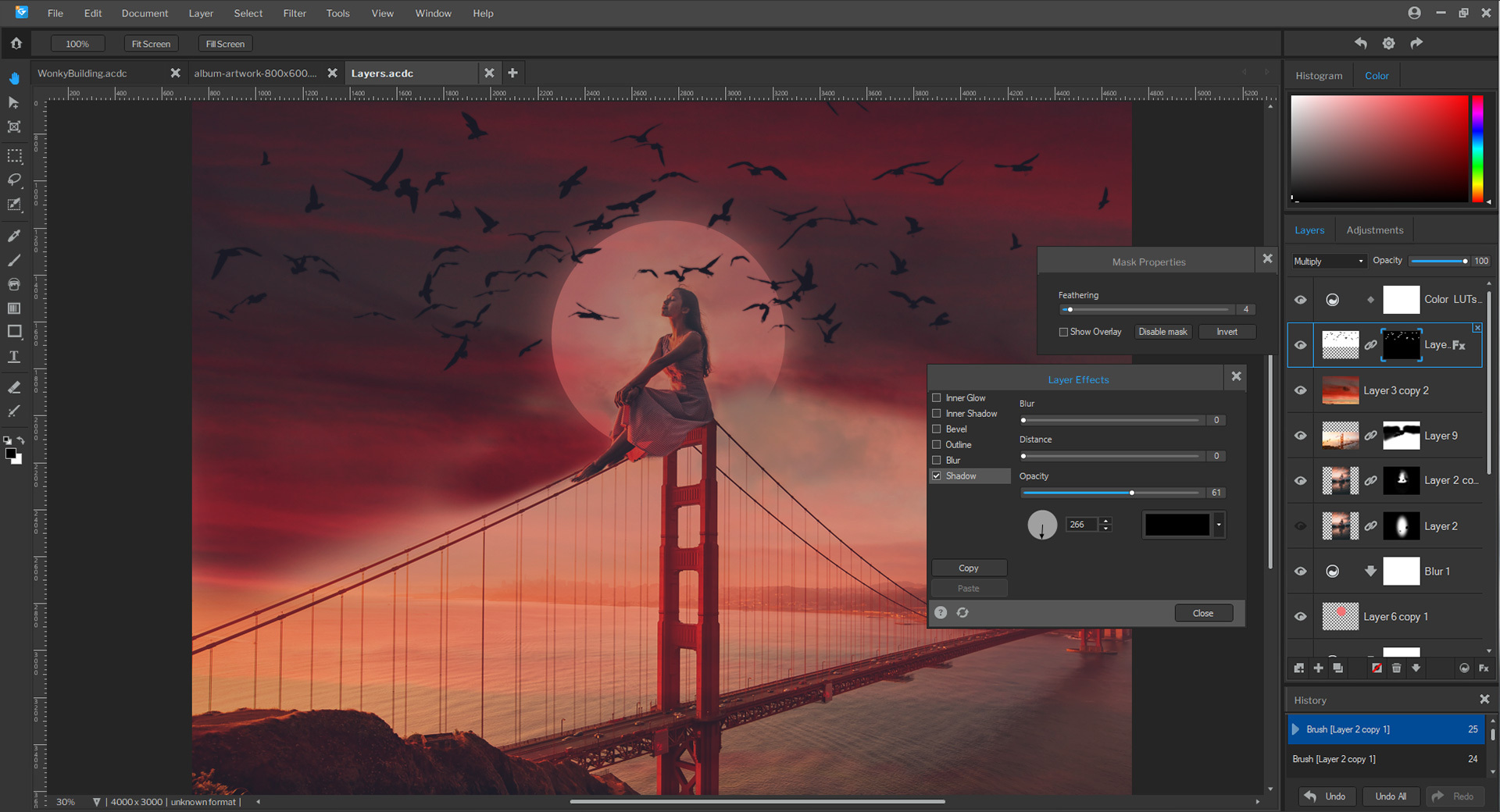
What is Gemstone Photo Editor?
Gemstone Photo Editor is a comprehensive photo editing software developed by ACDSee, designed to enhance and streamline image editing and graphic design processes. It features a Multi-Document Interface (MDI) that allows users to work on multiple projects simultaneously, facilitating efficient workflow management. The software includes ACDSee RAW for non-destructive RAW image processing, supporting over 750 camera models. Key features encompass AI-driven tools such as AI Super-Resolution for upscaling images with reduced noise and enhanced clarity, AI Object Masking for precise object selection, and AI Sky Replacement to seamlessly alter skies in photos. Additional functionalities include layer masks, curves, liquify, focus stacking, and customizable keyboard shortcuts, all aimed at providing a robust and user-friendly editing experience.
- Layer-based editing with advanced layer masks
- AI-enabled selection and enhancement tools
- Built-in ACDSee RAW image processing
- Fast performance handling large, complex files
- Extensive basic-to-advanced photo editing toolkit
- Batch editing for efficient workflow management
Eligibility
Number of Seats/Users: Gemstone Photo Editor offers discounts based on the number of users or seats. A higher volume typically leads to a better discount structure, especially for enterprise-level usage.
Commitment to a Long-Term Contract: Discounts are often provided to companies that commit to using the service for a longer period (e.g., 1-year or 3-year contracts). A longer commitment shows Gemstone Photo Editor that the company is serious and willing to invest in the platform long-term.
No Active Discounts: Companies that are not already receiving other active discounts may have a better chance of qualifying for additional discounts from Gemstone Photo Editor. Gemstone Photo Editor reserves discounts for new customers or those not currently under promotional pricing.
Volume or Usage Commitment: Gemstone Photo Editor offers discounts if you agree to a minimum amount of usage or transaction volume. This could be based on data storage, transactions, or other metrics tied to how much you will use the platform.
Enterprise-Level Negotiation: Companies that qualify as “enterprise” due to their size or complexity (e.g., having large teams, multiple departments, or geographical presence) may be eligible for additional discounts from Gemstone Photo Editor. Such companies are often in a position to negotiate for better pricing.
Early Renewal or Prepayment: Gemstone Photo Editor often offers discounts if you renew early or prepay for the entire contract period. This is a common approach to securing a lower price.

Gemstone Photo Editor - Up to 50% off
Reviews
Here at Spendbase our internal data shows that Gemstone Photo Editor (ACDSee’s editor) hits a strong sweet spot between power, speed, and price, especially for teams that don’t want to lock into heavy subscriptions.
Based on what Spendbase clients share with us, the main strengths look like this:
- Performance & workflow
- Very fast with large files and bulk edits (weddings, events, big libraries).
- Handles RAW images smoothly.
-
Good for quick operations: resize, crop, color correction, text, red-eye.
-
Ease of use (after onboarding)
- Interface feels intuitive to many, especially compared to “heavier” tools.
-
Non‑experts can still do professional‑looking edits after some practice.
-
Feature set
- Solid layered editing: masks, curves, liquify, focus stacking.
- AI tools are appreciated for simplifying complex edits when they work well.
-
Strong for both photo viewing/organization and editing in one place (depending on edition).
-
Cost & licensing
- Frequently described as affordable and “good value for money.”
- One‑time purchase model is a big plus for budget‑conscious teams and small businesses.
However, our internal data also highlights consistent friction points:
- Platform & ecosystem gaps
- No native Mac support is a blocker for mixed-OS teams.
- Limited 3D editing and weaker plug‑in ecosystem vs. Photoshop.
-
Some clients wish for more tutorials and community resources.
-
Functionality issues
- ACDSee Sync is reported as unreliable in newer versions.
- AI tools can be inconsistent or produce vague results.
- Facial recognition is seen as underperforming.
-
Missing or weak features some teams want:
- Cloud storage and syncing
- Batch image resizer (beyond current bulk tools)
- AI background removal
-
Learning curve & performance quirks
- First setup and discovering all capabilities can feel complex.
- On under‑spec machines, the app can slow down with very large photos.
From a Spendbase discount perspective, Gemstone Photo Editor is typically a strong fit for:
- Small studios and agencies needing pro results without enterprise pricing
- IT and marketing teams doing frequent bulk edits
- Businesses fine with Windows‑only setups
When we negotiate or optimize licenses, we usually focus on the higher-value editions that include RAW and layered editing, while ensuring hardware specs are adequate to avoid performance complaints.
See how much you can save on your stack
Pick your team’s tools!
Click to select one or more tools.


What’s your company size?
Just click to select.
What’s your business email?
We'll send you calculations right away
The email is flying to your inbox!
Beyond discounts, you may qualify for up to $100K in AWS credits.

FAQ
1. How can I apply a discount code to my Gemstone Photo Editor purchase?
Enter your discount code during checkout to receive the applicable discount.
2. Are there any current promotions for Gemstone Photo Editor?
Yes, we offer regular promotions. Subscribe to our newsletter for the latest deals.
3. Can I combine multiple discount codes on a single purchase?
Only one discount code can be applied per transaction.
4. Do you offer student discounts for Gemstone Photo Editor?
Yes, students can enjoy special discounts. Please contact our support team for verification and details.
5. Is there a discount for upgrading from a previous version?
Yes, existing customers receive a discount when upgrading. Check your account for upgrade options.
6. How long do promotional discounts last?
Promotional discounts are time-limited. Refer to the specific promotion details for expiration dates.
7. Are there bulk purchase discounts available?
Yes, we offer discounts for bulk purchases. Contact our sales team for more information.
8. Do you provide discounts for non-profit organizations?
Yes, non-profits are eligible for special discounts. Please reach out to our support team with your credentials.
Related discounts

FireShot
Photo Editing Software
Up to 45% off

PicWish
Photo Editing Software
Up to 15% off

NameCheap Logo Maker
Photo Editing Software
Up to 20% off

Desygner
Photo Editing Software
Up to 20% off

Alboom Designbox
Photo Editing Software
Up to 15% off

Mega Creator
Photo Editing Software
Up to 20% off
Software cost optimization
Gemstone Photo Editor savings in five steps
Let’s estimate your potential savings and see how you can scale your cloud infrastructure.
One call. No cost. No commitments


meet vendor relationship EXPERTS
Our customers save millions with us



Save on Gemstone Photo Editor
It’s time to shrink your bill
Let our SaaS cost optimization experts check what deals you can get and how much you can save on your corporate subscriptions
See how you can:
- Learn about pricing benchmarks and discounts
- Present potential savings by vendor to your team
- Meet your SaaS and cloud cost optimization goals
Get Gemstone Photo Editor discount
We’ll email you back within 1 business day