











Adobe Workfront Discount - Up to 15% off
The collaborative work management leader, helping teams get the right work done with greater visibility and improved productivity.
Get discountCategory
Task Management Software





What is Adobe Workfront?
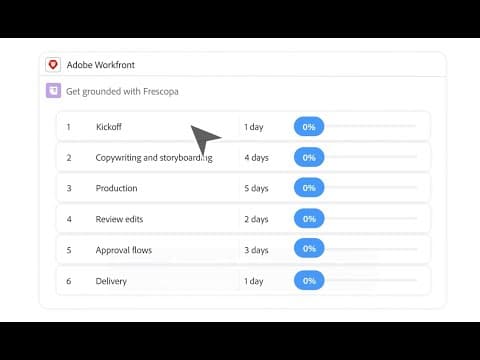
Adobe Workfront is a cloud-based work management platform designed to streamline project planning, execution, and collaboration across teams. It offers features such as project planning and scheduling with flexible views like calendars and Gantt charts, task management to break down projects into actionable tasks with clear ownership and deadlines, workflow management to automate recurring processes, and commenting and notes for contextual feedback directly on tasks and documents. These capabilities help organizations improve efficiency, reduce manual effort, and enhance team collaboration.
- Centralized project, task, and resource management
- Real-time collaboration, file sharing, feedback
- Seamless integration with Adobe Creative Cloud
- Highly customizable workflows and portfolio management
- Detailed reporting, analytics, and time tracking
- AI-powered workflow automation and approvals
Eligibility
Number of Seats/Users: Adobe Workfront offers discounts based on the number of users or seats. A higher volume typically leads to a better discount structure, especially for enterprise-level usage.
Commitment to a Long-Term Contract: Discounts are often provided to companies that commit to using the service for a longer period (e.g., 1-year or 3-year contracts). A longer commitment shows Adobe Workfront that the company is serious and willing to invest in the platform long-term.
No Active Discounts: Companies that are not already receiving other active discounts may have a better chance of qualifying for additional discounts from Adobe Workfront. Adobe Workfront reserves discounts for new customers or those not currently under promotional pricing.
Volume or Usage Commitment: Adobe Workfront offers discounts if you agree to a minimum amount of usage or transaction volume. This could be based on data storage, transactions, or other metrics tied to how much you will use the platform.
Enterprise-Level Negotiation: Companies that qualify as “enterprise” due to their size or complexity (e.g., having large teams, multiple departments, or geographical presence) may be eligible for additional discounts from Adobe Workfront. Such companies are often in a position to negotiate for better pricing.
Early Renewal or Prepayment: Adobe Workfront often offers discounts if you renew early or prepay for the entire contract period. This is a common approach to securing a lower price.

Adobe Workfront - Up to 15% off
Reviews
Here at Spendbase our internal data shows that Adobe Workfront is seen as a powerful, “all‑in‑one” work management hub, but it comes with a noticeable cost and learning curve that companies need to plan for carefully.
From what our Spendbase clients share, the main strengths cluster around:
- Centralized work hub
- Project, task, resource, and time tracking in one place
- Strong collaboration tools: comments, file sharing, approvals, client access
-
Good fit for complex, cross‑team workflows (especially marketing, creative, healthcare)
-
Customization and workflow control
- Highly configurable workflows and views
- Real‑time updates and dashboards
-
Integrations with Adobe Creative Cloud and other tools
-
Operational impact
- Better visibility into workload and schedules
- Easier delegation and tracking for multiple business lines
- Helps cut operational overhead by automating workflows and consolidating tools
At the same time, our internal data highlights consistent friction points:
- Pricing and budget impact
- Many Spendbase clients describe Workfront as “expensive” or “immense” in cost versus alternatives
- Smaller teams and businesses in cost‑sensitive regions feel the price pressure most
-
Lower‑tier packages can feel light on advanced features for what they cost
-
Learning curve and usability
- Steep ramp‑up, especially for custom workflows and reporting
- Some clients say onboarding and training resources could be stronger
-
Complex links between projects, tasks, and comments can make navigation confusing
-
Feature gaps and quirks
- Reporting is powerful but not always flexible or easy to tailor
- Occasional glitches or slowdowns, especially with larger teams
- Comments and updates can get “trapped” at task level and be hard to find
From a Spendbase discount and cost‑optimization lens, our guidance to clients typically includes:
- Match license tiers to actual usage (many users only need light access or timesheets).
- Avoid over‑customization early on; start with standard workflows to cut training time.
- Use Spendbase to benchmark Workfront against alternative tools and negotiate pricing, especially if you’re adding many seats or integrating across multiple business units.
In short, our internal data shows that Adobe Workfront delivers strong value for organizations with complex, multi‑team projects, as long as you actively manage both licensing strategy and enablement costs.
See how much you can save on your stack
Pick your team’s tools!
Click to select one or more tools.


What’s your company size?
Just click to select.
What’s your business email?
We'll send you calculations right away
The email is flying to your inbox!
Beyond discounts, you may qualify for up to $100K in AWS credits.

FAQ
1. Are there any discounts available for Adobe Workfront?
Yes, we offer various discounts on Adobe Workfront, including seasonal promotions and special offers for new subscribers.
2. Do students and educators receive discounts on Adobe Workfront?
Currently, our student and educator discounts primarily apply to Creative Cloud products. Please contact us for Workfront-specific offers.
3. Are there any discounts for non-profit organizations?
We offer special pricing for non-profit organizations. Please reach out to our sales team for more details.
4. Can I get a discount for purchasing multiple Adobe Workfront licenses?
Yes, we provide volume discounts for bulk license purchases. Contact our sales team to discuss your specific needs.
5. Are there any upcoming promotions for Adobe Workfront?
We periodically run promotions. To stay informed, subscribe to our newsletter or check our official website regularly.
6. Is there a discount for existing Adobe customers adding Workfront to their suite?
Existing Adobe customers may be eligible for bundled pricing when adding Workfront. Please contact your account manager for details.
7. Do Adobe employees receive discounts on Workfront?
Adobe employees have access to various discounts through the Employee Purchase Program, including on Adobe software products.
8. Are there any discounts for renewing Adobe Workfront subscriptions?
We offer loyalty discounts for renewing subscriptions. Please contact our customer service team for more information.
Related discounts

Pipe App
Task Management Software
Up to 45% off

Flexxter
Task Management Software
Up to 40% off

Hubstaff
Task Management Software
Up to 15% off

Swit
Task Management Software
Up to 30% off

Userback
Task Management Software
Up to 30% off

todo.vu
Task Management Software
Up to 25% off
Software cost optimization
Adobe Workfront savings in five steps
Let’s estimate your potential savings and see how you can scale your cloud infrastructure.
One call. No cost. No commitments


meet vendor relationship EXPERTS
Our customers save millions with us



Save on Adobe Workfront
It’s time to shrink your bill
Let our SaaS cost optimization experts check what deals you can get and how much you can save on your corporate subscriptions
See how you can:
- Learn about pricing benchmarks and discounts
- Present potential savings by vendor to your team
- Meet your SaaS and cloud cost optimization goals
Get Adobe Workfront discount
We’ll email you back within 1 business day