











Paymo Discount - Up to 35% off
Paymo allows you to manage tasks, track work time, invoice your clients, and measure profitability from the same platform.
Get discountCategory
Task Management Software






What is Paymo?
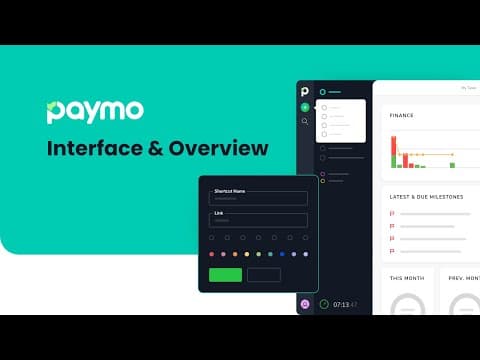
Paymo is a project management tool designed to help teams and freelancers manage tasks, track time, and handle invoicing within a single platform. Its key features include online time tracking, project time tracking, task editing, support for multiple projects, invoice creation, and invoice history. Users appreciate its intuitive interface, which simplifies navigation and enhances productivity. Paymo offers various pricing plans, including a free version with limited features and paid plans that provide additional capabilities such as unlimited clients, recurring tasks, and advanced project management tools. This comprehensive suite of features makes Paymo a valuable solution for efficient project management and billing.
- Integrated time tracking across tasks, projects
- Built-in invoicing from tracked billable hours
- Flexible task management with multiple views
- Project portfolio planning with advanced Gantt
- Detailed reporting for budgets and utilization
- Client collaboration through comments and timesheets
Eligibility
Number of Seats/Users: Paymo offers discounts based on the number of users or seats. A higher volume typically leads to a better discount structure, especially for enterprise-level usage.
Commitment to a Long-Term Contract: Discounts are often provided to companies that commit to using the service for a longer period (e.g., 1-year or 3-year contracts). A longer commitment shows Paymo that the company is serious and willing to invest in the platform long-term.
No Active Discounts: Companies that are not already receiving other active discounts may have a better chance of qualifying for additional discounts from Paymo. Paymo reserves discounts for new customers or those not currently under promotional pricing.
Volume or Usage Commitment: Paymo offers discounts if you agree to a minimum amount of usage or transaction volume. This could be based on data storage, transactions, or other metrics tied to how much you will use the platform.
Enterprise-Level Negotiation: Companies that qualify as “enterprise” due to their size or complexity (e.g., having large teams, multiple departments, or geographical presence) may be eligible for additional discounts from Paymo. Such companies are often in a position to negotiate for better pricing.
Early Renewal or Prepayment: Paymo often offers discounts if you renew early or prepay for the entire contract period. This is a common approach to securing a lower price.

Paymo - Up to 35% off
Reviews
Here at Spendbase our internal data shows that Paymo fits small agencies, creative teams, and consultants who live in time tracking and client billing every day, but it’s not perfect for complex collaboration or heavy customization.
Key strengths our Spendbase clients highlight:
- Time tracking & invoicing are the core win
- Very easy to start and stop timers, drag-and-drop in weekly timesheets, and use calendar views.
- Strong link between tracked time → reports → invoices → exports to tools like QuickBooks.
-
Especially loved by freelancers, consultants, and small agencies that bill hourly or by project.
-
All‑in‑one for small teams
- Tasks, projects, time, and invoicing in one tool means fewer subscriptions.
- Good fit for teams of 1–15 people who want a simple stack and clear project overviews.
-
Kanban boards, Gantt options, and dashboards give a decent “big picture” of workload and budgets.
-
Value for money
- Many clients call it “the best value we’ve found” rather than “the most advanced.”
- Stable product with incremental updates and responsive support, which reduces switching and retraining costs.
Where our clients feel friction:
- Task & collaboration depth
- Task delegation, subtasks, templates, and search are often described as “good, but could be better.”
-
Discussions and documentation tools feel basic; some teams still rely on external tools for that.
-
Resource & scheduling nuance
- Part‑time schedules and more granular time units (e.g., 20/40 minutes) are not fully supported.
-
Daily planning and small “micro tasks” views lag behind more specialized tools.
-
Customization & usability gaps
- Desire for more:
- Dashboard customization
- Invoice template flexibility without technical skills
- Color options, currencies, and rate handling
-
Learning curve can be noticeable for new users, especially around filters and project overviews.
-
Ecosystem limitations
- Mobile app is mostly useful for time tracking only.
- Some integrations and niche billing models (like price per word) are missing, forcing workarounds.
From a Spendbase savings perspective, Paymo works best when:
– The business bills primarily on time & materials.
– The team size is small to mid and doesn’t need heavy enterprise workflows.
– You want to consolidate multiple tools (time, PM, invoicing) into one subscription and are okay with some workflow compromises.
See how much you can save on your stack
Pick your team’s tools!
Click to select one or more tools.


What’s your company size?
Just click to select.
What’s your business email?
We'll send you calculations right away
The email is flying to your inbox!
Beyond discounts, you may qualify for up to $100K in AWS credits.

FAQ
1. How can I apply a discount coupon to my Paymo subscription?
Click the discount link received, choose your plan, and the discount applies automatically. Alternatively, enter the 6-digit code manually.
2. Are there any discounts available for non-profit organizations?
Yes, non-profits receive a 50% discount. Universities and colleges can get free access for students and professors.
3. Does Paymo offer discounts for annual subscriptions?
Yes, annual subscriptions offer up to a 40% discount compared to monthly billing.
4. Are there any current promotional codes for Paymo?
Yes, use code 'A7RJA5' for a 60% discount on monthly plans for three months.
5. Does Paymo offer discounts for startups or founders?
Yes, FounderPass premium members receive 30% off for six months.
6. Is there a discount for Revolut Business users?
Yes, Revolut Business users get a 60% discount for three months on any monthly paid plan.
7. How do I access Paymo's discounted apps marketplace?
Paid customers can access exclusive deals by clicking on their profile picture and selecting 'Deals & Discounts'.
8. Can I combine multiple discounts on my Paymo subscription?
No, multiple discounts cannot be combined; only one discount applies per subscription.
Related discounts

ZilicusPM
Task Management Software
Up to 35% off

Neotriad
Task Management Software
Up to 25% off

SAU
Task Management Software
Up to 50% off

BQUADRO
Task Management Software
Up to 30% off

OpsX
Task Management Software
Up to 30% off

Quire
Task Management Software
Up to 40% off
Software cost optimization
Paymo savings in five steps
Let’s estimate your potential savings and see how you can scale your cloud infrastructure.
One call. No cost. No commitments


meet vendor relationship EXPERTS
Our customers save millions with us



Save on Paymo
It’s time to shrink your bill
Let our SaaS cost optimization experts check what deals you can get and how much you can save on your corporate subscriptions
See how you can:
- Learn about pricing benchmarks and discounts
- Present potential savings by vendor to your team
- Meet your SaaS and cloud cost optimization goals
Get Paymo discount
We’ll email you back within 1 business day