











ChargeOver Discount - Up to 45% off
Manage accounts receivable with a tool that keeps you organized, accurately reports data, and automatically creates dunning & reminders
Get discountCategory
Accounts Receivable Software


What is ChargeOver?
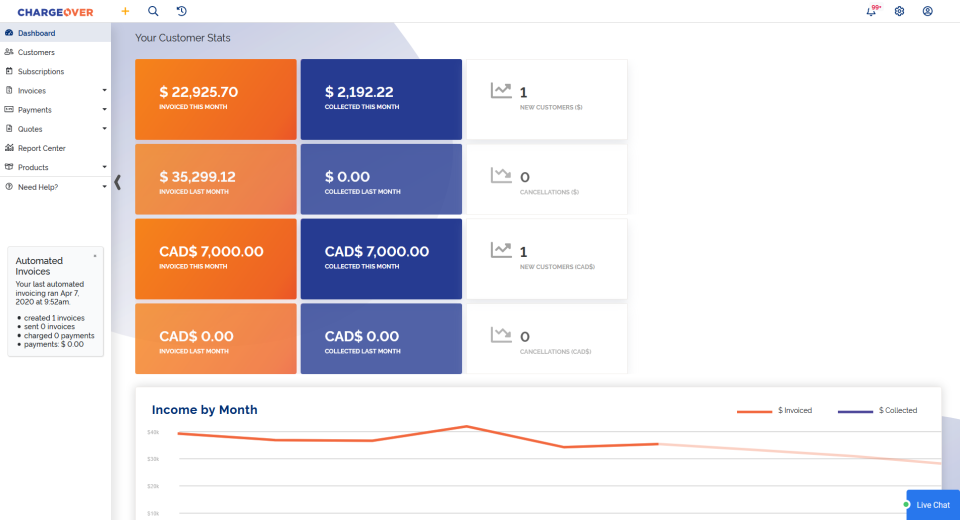
ChargeOver is a web-based application designed to automate subscription management, recurring billing, and payment processes for businesses. It offers features such as customizable invoices, dunning management to reduce late payments, and integration with accounting software like QuickBooks and Xero. ChargeOver also provides an API for seamless integration into existing applications. The platform supports various payment processing options, including credit card and ACH payments, and offers a client portal for customers to manage their accounts. Additional features include invoice history tracking, customizable email templates, and real-time reporting and analytics. ChargeOver aims to streamline billing operations, enhance cash flow, and improve customer satisfaction.
- Automated recurring billing and subscription management
- Deep integration with QuickBooks and Xero
- Supports many payment gateways, flexible processing
- Automated dunning, reminders, and collections workflows
- Powerful API, customization, and custom reports
- Flat-fee pricing and exceptional support
Eligibility
Number of Seats/Users: ChargeOver offers discounts based on the number of users or seats. A higher volume typically leads to a better discount structure, especially for enterprise-level usage.
Commitment to a Long-Term Contract: Discounts are often provided to companies that commit to using the service for a longer period (e.g., 1-year or 3-year contracts). A longer commitment shows ChargeOver that the company is serious and willing to invest in the platform long-term.
No Active Discounts: Companies that are not already receiving other active discounts may have a better chance of qualifying for additional discounts from ChargeOver. ChargeOver reserves discounts for new customers or those not currently under promotional pricing.
Volume or Usage Commitment: ChargeOver offers discounts if you agree to a minimum amount of usage or transaction volume. This could be based on data storage, transactions, or other metrics tied to how much you will use the platform.
Enterprise-Level Negotiation: Companies that qualify as “enterprise” due to their size or complexity (e.g., having large teams, multiple departments, or geographical presence) may be eligible for additional discounts from ChargeOver. Such companies are often in a position to negotiate for better pricing.
Early Renewal or Prepayment: ChargeOver often offers discounts if you renew early or prepay for the entire contract period. This is a common approach to securing a lower price.

ChargeOver - Up to 45% off
Reviews
Here at Spendbase our internal data shows that ChargeOver is generally a strong fit for teams looking to automate recurring billing and cut down on manual AR work, especially for SaaS and agencies.
Overall sentiment
– Average satisfaction is high (around 4.5/5).
– Most Spendbase clients stay on the platform long term and say it “changed our business” or “made our job a pleasure.”
What Spendbase clients like most
Our data highlights a few standout strengths:
1) Automation & time savings
– Automatic recurring billing, reattempting failed payments, and collections/dunning are repeatedly called out.
– Many clients moved from manual QuickBooks billing and say billing time and AR turnover improved significantly.
2) Integrations & pricing
– Deep integrations with QuickBooks Online, QuickBooks Desktop, Xero, plus many gateways (Authorize.net, PayPal, BluePay, ACH).
– Flat-fee pricing (not a % of revenue) is a big win for cost-conscious companies.
3) Flexibility & features
– Handles complex scenarios: subscriptions, one‑time charges, pro‑rating, discounts, installment plans, tax handling.
– API is viewed as powerful and flexible for custom integrations and automations.
4) Support quality
– Client feedback about the ChargeOver team is exceptionally strong: “top notch,” “unparalleled,” “responsive,” “delight to work with.”
– Custom reports and small feature tweaks are often delivered quickly.
Where Spendbase clients see gaps
When we negotiate or benchmark ChargeOver, we typically surface these pain points:
- Invoice & PDF customization
- Limited ability to modify invoice/receipt layouts.
-
Some ask for more control over “due soon” reminders and overdue workflows.
-
Dunning & notifications
-
Dunning logic is helpful but a bit basic for companies that want multi‑step sequences and granular rules.
-
UX / UI
-
While many find it intuitive, design-focused teams call the interface dated and sometimes not as easy as it could be for new users.
-
Reporting & sync details
- Reporting filters and dashboards can feel limited; some rely on custom reports or external tools.
- QuickBooks/Xero sync generally works well, but tax handling, credits, and refunds sometimes need manual cleanup.
From a Spendbase savings perspective, the combination of flat pricing, strong automation, and reduced AR workload often offsets the platform cost quickly—especially if you’re currently doing manual recurring billing in your accounting system.
See how much you can save on your stack
Pick your team’s tools!
Click to select one or more tools.


What’s your company size?
Just click to select.
What’s your business email?
We'll send you calculations right away
The email is flying to your inbox!
Beyond discounts, you may qualify for up to $100K in AWS credits.

FAQ
1. How do I create a discount in ChargeOver?
Navigate to Products > Discounts, click 'New Discount', fill in the details, and save.
2. Can I apply a discount to an existing invoice?
Yes, add the discount as a negative line item before the invoice is paid.
3. Is it possible to offer percentage-based discounts?
Yes, specify the percentage when creating the discount.
4. Can I disable a discount without deleting it?
Yes, edit the discount and set its status to 'No' to disable it.
5. How do I track discounts given to customers?
Use the 'Discounts Given' report under the Reports section.
6. Can I offer discounts through coupon codes?
Yes, create coupon codes that customers can enter during sign-up.
7. Is there a way to bundle products with discounts?
Yes, use the Bundles feature to combine products and discounts.
8. Can I apply a discount to a subscription?
Yes, add the discount as a line item in the subscription details.
Related discounts

Chaser
Accounts Receivable Software
Up to 25% off

Recovr
Accounts Receivable Software
Up to 50% off

DataServ SaaS AR Automation
Accounts Receivable Software
Up to 45% off

Qvalia
Accounts Receivable Software
Up to 30% off

PaidYET
Accounts Receivable Software
Up to 15% off

Intelligent Payment Portal
Accounts Receivable Software
Up to 30% off
Software cost optimization
ChargeOver savings in five steps
Let’s estimate your potential savings and see how you can scale your cloud infrastructure.
One call. No cost. No commitments


meet vendor relationship EXPERTS
Our customers save millions with us



Save on ChargeOver
It’s time to shrink your bill
Let our SaaS cost optimization experts check what deals you can get and how much you can save on your corporate subscriptions
See how you can:
- Learn about pricing benchmarks and discounts
- Present potential savings by vendor to your team
- Meet your SaaS and cloud cost optimization goals
Get ChargeOver discount
We’ll email you back within 1 business day