











VEGAS Pro Discount - Up to 35% off
VEGAS Pro is a customisable workflow for professional video editing. Features include color grading, special effects or audio editing.
Get discountCategory
Audio Editing Software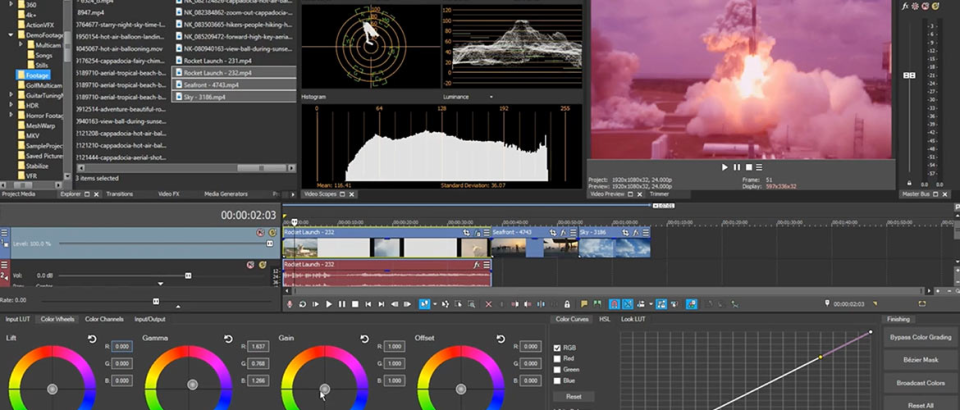
What is VEGAS Pro?
VEGAS Pro is a professional video editing software designed for non-linear editing on Windows systems. It offers real-time multi-track video and audio editing, resolution-independent video sequencing, and advanced compositing tools. Key features include a customizable workspace, integrated color grading, AI-powered tools like Smart Mask for object isolation, text-based editing, and automatic reformatting for various platforms. Additionally, it supports high-resolution formats up to 8K, HDR color grading, and provides a range of special effects and transitions to enhance video projects.
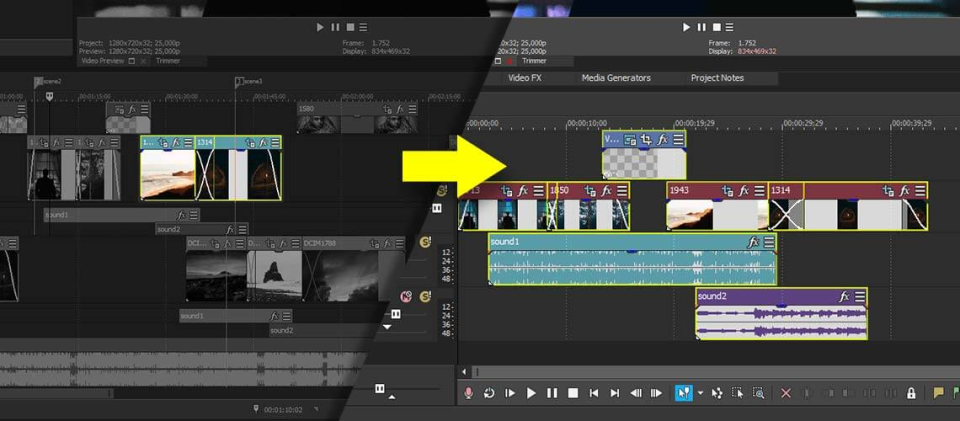
- Customisable timeline-based video editing workflow
- Integrated multitrack audio editing with plugins
- Intuitive interface, easy for beginners
- Powerful color grading and visual effects
- Hardware-optimized performance and real-time preview
- Extensive keyboard shortcuts for faster editing
Eligibility
Number of Seats/Users: VEGAS Pro offers discounts based on the number of users or seats. A higher volume typically leads to a better discount structure, especially for enterprise-level usage.
Commitment to a Long-Term Contract: Discounts are often provided to companies that commit to using the service for a longer period (e.g., 1-year or 3-year contracts). A longer commitment shows VEGAS Pro that the company is serious and willing to invest in the platform long-term.
No Active Discounts: Companies that are not already receiving other active discounts may have a better chance of qualifying for additional discounts from VEGAS Pro. VEGAS Pro reserves discounts for new customers or those not currently under promotional pricing.
Volume or Usage Commitment: VEGAS Pro offers discounts if you agree to a minimum amount of usage or transaction volume. This could be based on data storage, transactions, or other metrics tied to how much you will use the platform.
Enterprise-Level Negotiation: Companies that qualify as “enterprise” due to their size or complexity (e.g., having large teams, multiple departments, or geographical presence) may be eligible for additional discounts from VEGAS Pro. Such companies are often in a position to negotiate for better pricing.
Early Renewal or Prepayment: VEGAS Pro often offers discounts if you renew early or prepay for the entire contract period. This is a common approach to securing a lower price.

VEGAS Pro - Up to 35% off
Reviews
Here at Spendbase our internal data shows that VEGAS Pro hits a really nice sweet spot between beginner-friendly editing and semi‑pro workflows, but there are some clear trade‑offs clients consistently talk about.
From what our Spendbase clients tell us, the main strengths are:
-
Ease of use & learning curve (after day 1):
Many clients were able to cut, trim, and export their first usable video within 30–60 minutes. The timeline is intuitive, shortcuts are powerful, and the interface is less intimidating than tools like Premiere. -
Speed of basic editing:
Raw cutting, splitting, and rearranging clips is very fast. People doing YouTube, event videos, promos, and gaming content say it’s ideal for quick turnarounds. -
Strong audio capabilities:
Clients highlight the ability to handle full audio mixes, VST plugins, surround sound, and detailed track control in the same app as video. For some, VEGAS is still the “final stage” audio+video engine. -
Customizable workflow:
Dockable windows, external monitor support, and layout flexibility fit a range of editing styles. -
One‑time licensing option:
Several clients like that they can pay once instead of a monthly subscription, which matters a lot from a cost-optimization perspective.
At the same time, our internal insights also show recurring pain points:
-
Performance & stability:
Crashes, freezes, slow AI tools, and heavy CPU/GPU use appear often, especially on complex projects. Some clients solved this with tweaks, others gave up. -
Limited built‑in FX & “high‑end” features:
For heavy VFX, advanced color, or studio‑grade workflows, clients still lean on third‑party plugins or switch to tools like DaVinci Resolve or Adobe. -
Support & upgrade experience:
Multiple clients complain about difficult-to-reach support and pressure to upgrade when an older version starts misbehaving. This is a big risk factor when we evaluate long‑term total cost of ownership. -
Platform limitation:
VEGAS Pro is Windows‑only, which blocks mixed Mac/Windows environments. -
Initial learning for deeper features:
Basics are easy, but keyframing, complex motion, and some technical terms can be hard to grasp.
From a Spendbase savings standpoint, VEGAS Pro is a strong fit for teams that:
- Mainly use Windows
- Need fast, everyday editing with solid audio tools
- Prefer perpetual licenses over subscriptions
But we usually advise budgeting for:
- Occasional plugins for FX and transitions
- Hardware capable of handling heavier projects
- A backup plan if stability or support becomes a bottleneck
See how much you can save on your stack
Pick your team’s tools!
Click to select one or more tools.


What’s your company size?
Just click to select.
What’s your business email?
We'll send you calculations right away
The email is flying to your inbox!
Beyond discounts, you may qualify for up to $100K in AWS credits.

FAQ
1. Are there any current discounts available for VEGAS Pro?
Yes, we offer various discounts on VEGAS Pro products. Please check our official website for the latest promotions.
2. How can I apply a discount code when purchasing VEGAS Pro?
During checkout, enter the provided discount code in the designated field to apply the discount to your purchase.
3. Do you offer student or educational discounts for VEGAS Pro?
Currently, we do not offer specific discounts for students or educational institutions.
4. Is there a free trial available for VEGAS Pro?
Yes, we offer a 30-day free trial of VEGAS Pro to help you evaluate the software before purchasing.
5. Can I upgrade to the latest version of VEGAS Pro at a discounted price?
Yes, we offer upgrade pricing for existing users. Please visit our website for more details on upgrade options.
6. Are there seasonal sales or promotions for VEGAS Pro?
Yes, we occasionally offer seasonal promotions and discounts. Stay updated by visiting our website regularly.
7. Do you provide discounts for bulk or volume purchases of VEGAS Pro?
For bulk or volume purchases, please contact our sales team to discuss available discount options.
8. Are there any exclusive discounts for newsletter subscribers?
Yes, subscribers to our newsletter often receive exclusive discounts and early access to promotions.
Related discounts

Speakatoo
Audio Editing Software
Up to 30% off

Logic Pro
Audio Editing Software
Up to 25% off

RapidComposer
Audio Editing Software
Up to 25% off

Kingshiper Voice Recorder
Audio Editing Software
Up to 35% off

Ardour
Audio Editing Software
Up to 35% off

GoldWave
Audio Editing Software
Up to 40% off
Software cost optimization
VEGAS Pro savings in five steps
Let’s estimate your potential savings and see how you can scale your cloud infrastructure.
One call. No cost. No commitments


meet vendor relationship EXPERTS
Our customers save millions with us



Save on VEGAS Pro
It’s time to shrink your bill
Let our SaaS cost optimization experts check what deals you can get and how much you can save on your corporate subscriptions
See how you can:
- Learn about pricing benchmarks and discounts
- Present potential savings by vendor to your team
- Meet your SaaS and cloud cost optimization goals
Get VEGAS Pro discount
We’ll email you back within 1 business day