











1Click Invoice Discount - Up to 35% off
Web based solution that lets you easily create, manage and send quotes and invoices in any currency.
Get discountCategory
Billing and Invoicing Software


What is 1Click Invoice?
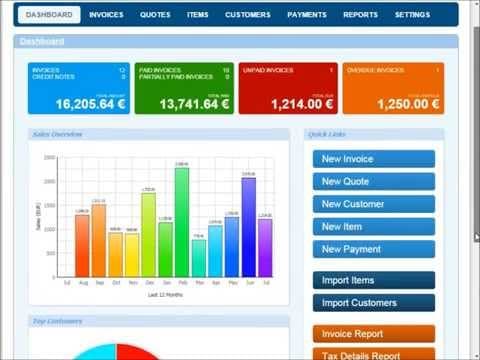
1Click Invoice is a web-based solution designed for creating, managing, and sending professional quotes, invoices, and credit notes in any currency. Key features include customer, product, service, and payment management; tracking unpaid and overdue invoices; converting quotes to invoices; generating credit notes; viewing sales reports; customizing invoices with logos and numbering systems; and secure data storage.
- Create and send professional multi-currency invoices
- Manage customers, products, services, and payments
- Convert quotes to invoices and credit notes
- Track unpaid, overdue invoices with detailed reporting
- Customize templates: logo, layout, numbering system
- Secure, web-based access from anywhere, anytime
Eligibility
Number of Seats/Users: 1Click Invoice offers discounts based on the number of users or seats. A higher volume typically leads to a better discount structure, especially for enterprise-level usage.
Commitment to a Long-Term Contract: Discounts are often provided to companies that commit to using the service for a longer period (e.g., 1-year or 3-year contracts). A longer commitment shows 1Click Invoice that the company is serious and willing to invest in the platform long-term.
No Active Discounts: Companies that are not already receiving other active discounts may have a better chance of qualifying for additional discounts from 1Click Invoice. 1Click Invoice reserves discounts for new customers or those not currently under promotional pricing.
Volume or Usage Commitment: 1Click Invoice offers discounts if you agree to a minimum amount of usage or transaction volume. This could be based on data storage, transactions, or other metrics tied to how much you will use the platform.
Enterprise-Level Negotiation: Companies that qualify as “enterprise” due to their size or complexity (e.g., having large teams, multiple departments, or geographical presence) may be eligible for additional discounts from 1Click Invoice. Such companies are often in a position to negotiate for better pricing.
Early Renewal or Prepayment: 1Click Invoice often offers discounts if you renew early or prepay for the entire contract period. This is a common approach to securing a lower price.

1Click Invoice - Up to 35% off
Reviews
Here at Spendbase, our internal data shows that 1Click Invoice is especially valued by Spendbase clients who want fast, low-friction invoicing without a steep learning curve.
Overall sentiment is strongly positive, with most Spendbase clients highlighting three main benefits:
-
Smooth, easy billing workflows
– Clients consistently mention that payment handling feels “seamlessly smooth.”
– The flow from quote → invoice → payment → credit note is clear and reduces confusion.
– Our internal data shows that teams new to invoicing tools adapt quickly, with minimal training. -
Clear separation of document types and settings
Spendbase clients like that 1Click Invoice keeps things structured with distinct areas for:
– Invoices
– Quotes
– Credit notes
– General / global settings
This structure makes it easier to stay organized and lowers the risk of mixing up financial documents.
- Professional, customizable output
– Clients appreciate being able to use their own logo and tweak invoice layouts.
– Multi-currency support is a strong plus for teams working with international customers.
– Our internal data shows that customization is seen as “just enough” – powerful, but not overwhelming.
At the same time, Spendbase clients point out a few usability gaps:
- Credit note numbering
- There is a separate number sequence for credit notes, which is viewed as a good control feature.
- However, the lack of an autofill / auto-numbering helper for credit note sequences causes minor friction.
-
Our internal data shows that finance teams would welcome smarter automation here to avoid manual mistakes.
-
Room for more automation
While the current workflow is clear and detailed, some clients would like: - More automatic population of fields (especially in credit notes)
- Slightly smarter defaults to speed up repetitive tasks
In summary, our internal data shows that 1Click Invoice is a strong fit for small to mid-sized teams that want:
- A clean, intuitive invoicing tool
- Clear handling of quotes, invoices, and credit notes
- Smooth payment workflows with minimal confusion
With a few small boosts to automation around numbering and autofill, Spendbase clients believe it could become an even more efficient part of their finance stack.
See how much you can save on your stack
Pick your team’s tools!
Click to select one or more tools.


What’s your company size?
Just click to select.
What’s your business email?
We'll send you calculations right away
The email is flying to your inbox!
Beyond discounts, you may qualify for up to $100K in AWS credits.

FAQ
1. What is 1Click Invoice Discounts?
1Click Invoice Discounts is our built-in feature that automatically applies agreed discounts directly on your invoices with one click during creation.
2. How do I activate 1Click Invoice Discounts on my account?
Simply enable discounts in your billing settings, define discount rules or percentages, and the 1Click button will appear on eligible invoices.
3. Can I set different discount rates for different customers?
Yes. You can assign custom discount percentages or tiers per customer or customer group, and 1Click Invoice Discounts applies them automatically.
4. Will discounts be clearly shown on the invoice my customer receives?
Absolutely. Discount lines are itemized on the invoice so customers see list price, discount value, and final total for full transparency.
5. Does 1Click Invoice Discounts work with taxes and multiple currencies?
Yes. Discounts are calculated before or after tax based on your settings, and work seamlessly with all currencies supported in your account.
6. Can I apply discounts to specific line items instead of the whole invoice?
Yes. You can choose to discount individual items, groups of items, or the entire invoice with a single click before sending.
7. Will using 1Click Invoice Discounts affect my existing payment terms?
No. Your payment terms stay the same. The discount only changes the invoice amount, not due dates or late-fee rules.
8. Can I report and track how much I give away in discounts?
Yes. Our reporting dashboard shows total discounts by period, customer, and item, so you can analyze profitability and adjust promotions.
Related discounts

TimeLive
Billing and Invoicing Software
Up to 40% off

Flint Mobile Payments
Billing and Invoicing Software
Up to 20% off

Henrri
Billing and Invoicing Software
Up to 50% off

NVOICE
Billing and Invoicing Software
Up to 45% off

CCRQInvoice
Billing and Invoicing Software
Up to 35% off

Timegate
Billing and Invoicing Software
Up to 35% off
Software cost optimization
1Click Invoice savings in five steps
Let’s estimate your potential savings and see how you can scale your cloud infrastructure.
One call. No cost. No commitments


meet vendor relationship EXPERTS
Our customers save millions with us



Save on 1Click Invoice
It’s time to shrink your bill
Let our SaaS cost optimization experts check what deals you can get and how much you can save on your corporate subscriptions
See how you can:
- Learn about pricing benchmarks and discounts
- Present potential savings by vendor to your team
- Meet your SaaS and cloud cost optimization goals
Get 1Click Invoice discount
We’ll email you back within 1 business day