











Billbooks Discount - Up to 50% off
Online invoicing software that includes auto-reminders, client history, invoices customization, inventory tracking tools.
Get discountCategory
Billing and Invoicing Software


What is Billbooks?
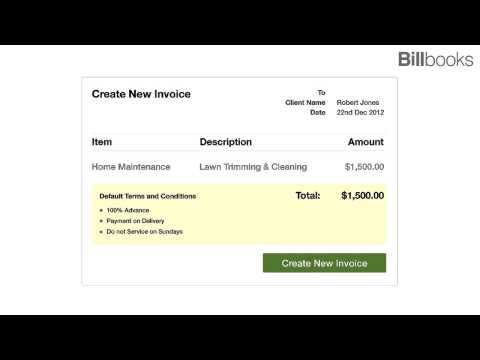
Billbooks is an invoicing software designed to streamline billing processes for businesses. It enables users to create and send professional invoices within 60 seconds, facilitating quick and efficient billing. The platform supports online payments, allowing clients to pay instantly, and operates on a pay-per-invoice model without lock-in contracts. Billbooks is utilized in over 120 countries, reflecting its global appeal. New users can start with three free invoices, providing an opportunity to experience its features firsthand.
- Create and send invoices in seconds
- Simple, intuitive interface for easy billing
- Pay-per-invoice, no lock-in contracts
- Accept instant online payments from clients
- Mobile-friendly; works smoothly on smartphones
- Supports global users across 120 countries
Eligibility
Number of Seats/Users: Billbooks offers discounts based on the number of users or seats. A higher volume typically leads to a better discount structure, especially for enterprise-level usage.
Commitment to a Long-Term Contract: Discounts are often provided to companies that commit to using the service for a longer period (e.g., 1-year or 3-year contracts). A longer commitment shows Billbooks that the company is serious and willing to invest in the platform long-term.
No Active Discounts: Companies that are not already receiving other active discounts may have a better chance of qualifying for additional discounts from Billbooks. Billbooks reserves discounts for new customers or those not currently under promotional pricing.
Volume or Usage Commitment: Billbooks offers discounts if you agree to a minimum amount of usage or transaction volume. This could be based on data storage, transactions, or other metrics tied to how much you will use the platform.
Enterprise-Level Negotiation: Companies that qualify as “enterprise” due to their size or complexity (e.g., having large teams, multiple departments, or geographical presence) may be eligible for additional discounts from Billbooks. Such companies are often in a position to negotiate for better pricing.
Early Renewal or Prepayment: Billbooks often offers discounts if you renew early or prepay for the entire contract period. This is a common approach to securing a lower price.

Billbooks - Up to 50% off
Reviews
Here at Spendbase our internal data shows that Billbooks performs very well for small businesses and freelancers who need fast, no-friction invoicing.
From what our Spendbase clients share, a few clear themes stand out:
What Spendbase clients like most
- Speed & simplicity
- Invoices can be created in under a minute.
- Workflow is easy enough to use daily without training.
-
Fits well into “on-the-go” billing, especially on smartphones.
-
Mobile-first usage
- Many clients run billing entirely from their phones.
- Interface is considered responsive and reliable across devices.
-
Good match for solo founders, field teams, and small shops.
-
Invoice quality
- Invoices are described as “beautiful” and “professional.”
- Easy to add:
- Multiple customers
- Tax percentages
- Basic line items
-
Works well for recurring, simple billing scenarios.
-
Fit for small, growing businesses
- Handles thousands of customers in a lightweight way.
- Useful for:
- Small retail/service businesses
- Bloggers and media teams
- Freelancers and agencies who need to bill clients quickly.
Pain points and risks
Our internal data also highlights a few recurring concerns:
- Input errors in fields
- Some Spendbase clients mention mistakes in invoice fields or parameters.
- This seems less about system bugs and more about:
- Limited validation
- Lack of guardrails for non-finance users
-
Result: occasional incorrect amounts or tax fields.
-
Limited advanced controls
- Perfect for simple billing, but may feel light for:
- Complex taxation rules
- Multi-entity accounting
- Deeper reporting or approvals workflows
Overall Spendbase perspective
- Billbooks suits teams that value:
- Speed over complex features
- Low commitment and pay-per-invoice flexibility
-
Simple, clean invoices and quick client payments
-
We usually recommend it when:
- You’re transitioning from spreadsheets to your first invoicing tool.
- Most invoices follow a simple pattern and are created on mobile.
- You don’t yet need heavy-duty finance/ERP integrations.
If you’d like, I can help map Billbooks’ strengths to your current invoice volume and suggest where a Spendbase-negotiated discount would give you the best value.
See how much you can save on your stack
Pick your team’s tools!
Click to select one or more tools.


What’s your company size?
Just click to select.
What’s your business email?
We'll send you calculations right away
The email is flying to your inbox!
Beyond discounts, you may qualify for up to $100K in AWS credits.

FAQ
1. What types of discounts does Billbooks offer?
Billbooks provides percentage-based and monetary discounts, applicable to plans, add-ons, or entire subscriptions.
2. Can I apply multiple discounts to a single invoice?
Yes, you can stack multiple discounts on a single invoice by enabling the 'Allow this discount to be used in conjunction with others' option.
3. How do I create a new discount in Billbooks?
Navigate to Products > Discounts and Coupons, click 'Create Your First Discount and Coupon,' and follow the four-step process.
4. Is it possible to set default item-level discounts?
Yes, you can set default discounts for specific items, which will auto-apply when the item is added to a sales transaction.
5. Can I apply discounts to both new and existing customers?
Yes, you can configure discounts to be available to new customers, existing customers, or both, based on your preference.
6. Are there any limitations on the number of discounts I can create?
No, Billbooks allows you to create and manage unlimited discounts and coupons to suit your business needs.
7. Can I set expiration dates for discounts?
Yes, you can set expiration dates for discounts, limiting their availability to a specific period.
8. How do I edit an existing discount?
Go to Products > Discounts and Coupons, find the discount you want to modify, and click 'Edit' to make changes.
Related discounts

Huppi
Billing and Invoicing Software
Up to 50% off

VBASoftware
Billing and Invoicing Software
Up to 40% off

Invoice Maker
Billing and Invoicing Software
Up to 25% off

CheddarGetter
Billing and Invoicing Software
Up to 30% off

Abak 360
Billing and Invoicing Software
Up to 40% off

SliQ Invoicing and Quoting
Billing and Invoicing Software
Up to 30% off
Software cost optimization
Billbooks savings in five steps
Let’s estimate your potential savings and see how you can scale your cloud infrastructure.
One call. No cost. No commitments


meet vendor relationship EXPERTS
Our customers save millions with us



Save on Billbooks
It’s time to shrink your bill
Let our SaaS cost optimization experts check what deals you can get and how much you can save on your corporate subscriptions
See how you can:
- Learn about pricing benchmarks and discounts
- Present potential savings by vendor to your team
- Meet your SaaS and cloud cost optimization goals
Get Billbooks discount
We’ll email you back within 1 business day