











Adobe Acrobat Reader Discount - Up to 35% off
Adobe Acrobat Reader is a cloud-based PDF viewer that enables users to read, print, search, and annotate PDF documents.
Get discountCategory
PDF Editor Software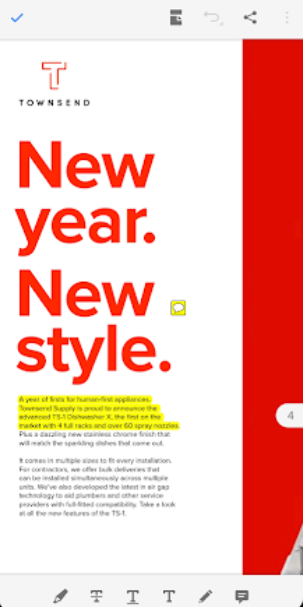
What is Adobe Acrobat Reader?
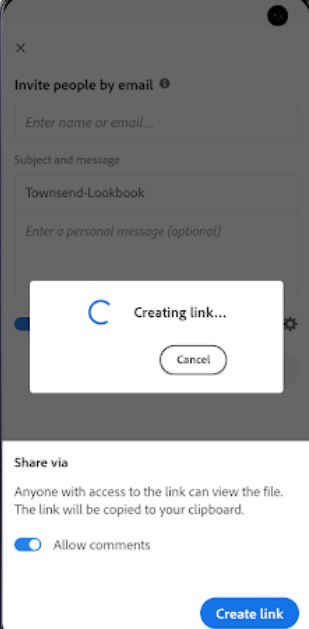
Adobe Acrobat Reader DC is a free application for viewing, printing, and annotating PDF documents. It allows users to highlight text, add comments, and fill out forms electronically. The software integrates with cloud services like Dropbox and Google Drive, enabling access to PDFs across devices. It also offers security features such as malware scanning and supports accessibility tools like screen readers. Additionally, Acrobat Reader DC includes a “Send for Signature” feature, facilitating electronic signatures directly within the application.
- Reliable PDF viewing and printing
- Annotation tools: highlight, comment, mark up
- PDF editing: text, images, forms
- Convert PDFs to Word, Excel, PowerPoint
- E-signatures and digital document workflows
- Cross-platform support and Microsoft 365 integration
Eligibility
Number of Seats/Users: Adobe Acrobat Reader offers discounts based on the number of users or seats. A higher volume typically leads to a better discount structure, especially for enterprise-level usage.
Commitment to a Long-Term Contract: Discounts are often provided to companies that commit to using the service for a longer period (e.g., 1-year or 3-year contracts). A longer commitment shows Adobe Acrobat Reader that the company is serious and willing to invest in the platform long-term.
No Active Discounts: Companies that are not already receiving other active discounts may have a better chance of qualifying for additional discounts from Adobe Acrobat Reader. Adobe Acrobat Reader reserves discounts for new customers or those not currently under promotional pricing.
Volume or Usage Commitment: Adobe Acrobat Reader offers discounts if you agree to a minimum amount of usage or transaction volume. This could be based on data storage, transactions, or other metrics tied to how much you will use the platform.
Enterprise-Level Negotiation: Companies that qualify as “enterprise” due to their size or complexity (e.g., having large teams, multiple departments, or geographical presence) may be eligible for additional discounts from Adobe Acrobat Reader. Such companies are often in a position to negotiate for better pricing.
Early Renewal or Prepayment: Adobe Acrobat Reader often offers discounts if you renew early or prepay for the entire contract period. This is a common approach to securing a lower price.

Adobe Acrobat Reader - Up to 35% off
Reviews
Here at Spendbase, our internal data shows that sentiment toward Adobe Acrobat Reader is strongly positive, especially for everyday PDF work across teams and departments.
Overall picture
Spendbase clients consistently call Acrobat Reader the “standard” or “gold standard” for PDFs. It is used daily for:
- Contracts, invoices, and internal financials
- HR and onboarding forms
- Medical and other industry-specific documents
- Marketing materials, flyers, and paychecks
What Spendbase clients like most
Our data highlights a few key strengths:
- Reliability and compatibility
- Opens almost any PDF and preserves formatting
-
Consistent rendering across Windows, Mac, mobile, and different browsers
-
Ease of use for core tasks
- Viewing, highlighting, commenting, and note-taking
- E-signatures and basic form filling
-
Sharing documents inside and outside the company
-
Business workflows
- Separating and encrypting paychecks
- Combining and organizing pages
- Converting PDFs to Word/Excel/PowerPoint (for those on paid tiers)
Where friction appears
Our internal data also shows recurring pain points:
- Pricing and feature gating
- Free tier is seen as very limited
- Advanced editing, conversion, and combining files often require the paid version
-
Many call the full product “expensive” relative to what they actually use
-
Performance and stability
- Can feel heavy or slow, especially with large or complex PDFs
-
Occasional glitches, crashes, and sign‑in issues
-
Interface and usability quirks
- Learning curve for some features (e.g., signing)
- Cluttered toolbars and layout changes after updates
- Confusion between Reader vs. full Acrobat and web vs. desktop flows
Spendbase discounts and optimization insights
From a cost-optimization angle, our data suggests:
- A large portion of users mainly view, annotate, and sign, which fits well in cheaper or free tiers.
- Only certain roles (legal, finance, marketing production) truly need full editing, redaction, and heavy conversion tools.
- Mixing license levels and trimming unused Pro seats typically yields meaningful savings without impacting workflows.
In short, Acrobat Reader is a dependable standard, but aligning feature needs to the right plan is where Spendbase usually unlocks the biggest value.
See how much you can save on your stack
Pick your team’s tools!
Click to select one or more tools.


What’s your company size?
Just click to select.
What’s your business email?
We'll send you calculations right away
The email is flying to your inbox!
Beyond discounts, you may qualify for up to $100K in AWS credits.

FAQ
1. Are there student discounts available for Adobe Acrobat Reader?
Yes, students can access discounted rates for Adobe Acrobat through Adobe's official Academic Store.
2. How can I verify my eligibility for an Adobe Acrobat student discount?
Eligibility verification typically involves providing a valid student ID or official school email address.
3. Do Adobe employees receive discounts on Acrobat Reader?
Yes, Adobe employees are eligible for discounted software through the Employee Purchase Program.
4. Can I gift discounted Adobe Acrobat subscriptions to friends or family?
Yes, employees can gift discounted one-year memberships to family, friends, or nonprofit organizations.
5. Are there any current promotions for Adobe Acrobat subscriptions?
Promotions vary; it's best to check Adobe's official website or authorized resellers for current offers.
6. Do nonprofits qualify for discounts on Adobe Acrobat?
Yes, nonprofits can access discounted rates for Adobe products through programs like TechSoup.
7. Is there a lifetime license available for Adobe Acrobat?
Adobe no longer offers lifetime licenses; all current versions require a subscription.
8. How can I avoid fake discount schemes for Adobe Acrobat?
Ensure you're purchasing from Adobe's official website or authorized resellers to avoid scams.
Related discounts

AmindPDF
PDF Editor Software
Up to 20% off

Scanner Go
PDF Editor Software
Up to 40% off

Icecream PDF Editor
PDF Editor Software
Up to 40% off

SkyPDF
PDF Editor Software
Up to 35% off

UPDF
PDF Editor Software
Up to 25% off

PDF Agile
PDF Editor Software
Up to 40% off
Software cost optimization
Adobe Acrobat Reader savings in five steps
Let’s estimate your potential savings and see how you can scale your cloud infrastructure.
One call. No cost. No commitments


meet vendor relationship EXPERTS
Our customers save millions with us



Save on Adobe Acrobat Reader
It’s time to shrink your bill
Let our SaaS cost optimization experts check what deals you can get and how much you can save on your corporate subscriptions
See how you can:
- Learn about pricing benchmarks and discounts
- Present potential savings by vendor to your team
- Meet your SaaS and cloud cost optimization goals
Get Adobe Acrobat Reader discount
We’ll email you back within 1 business day