











Canva Discount - Up to 40% off
Design and publish anything in a few clicks. From brochure to video, access thousands of templates, images, videos, and more for free.
Get discountCategory
Photo Editing Software





What is Canva?
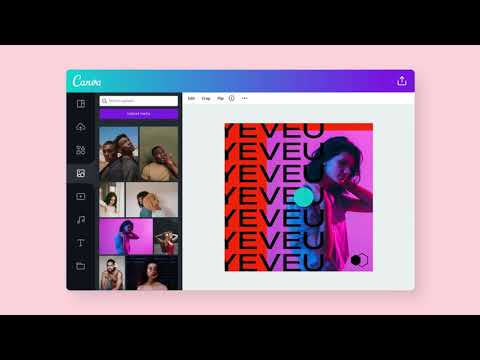
Canva is a user-friendly graphic design platform that enables individuals and teams to create a wide range of visual content, including social media posts, presentations, flyers, and more. Its intuitive drag-and-drop interface and extensive library of customizable templates allow users to produce professional designs efficiently. Key features include a vast selection of design templates, image editing tools, and collaboration capabilities, facilitating seamless teamwork and brand consistency. Canva also offers integrations with various platforms, enhancing workflow and productivity.
- Drag-and-drop, beginner-friendly design interface
- Large library of templates and elements
- Brand Kit storing logos, fonts, colors
- Real-time cloud collaboration and asset sharing
- Multi-format export for print, presentations, social
- AI-powered tools for images, video
Eligibility
Number of Seats/Users: Canva offers discounts based on the number of users or seats. A higher volume typically leads to a better discount structure, especially for enterprise-level usage.
Commitment to a Long-Term Contract: Discounts are often provided to companies that commit to using the service for a longer period (e.g., 1-year or 3-year contracts). A longer commitment shows Canva that the company is serious and willing to invest in the platform long-term.
No Active Discounts: Companies that are not already receiving other active discounts may have a better chance of qualifying for additional discounts from Canva. Canva reserves discounts for new customers or those not currently under promotional pricing.
Volume or Usage Commitment: Canva offers discounts if you agree to a minimum amount of usage or transaction volume. This could be based on data storage, transactions, or other metrics tied to how much you will use the platform.
Enterprise-Level Negotiation: Companies that qualify as “enterprise” due to their size or complexity (e.g., having large teams, multiple departments, or geographical presence) may be eligible for additional discounts from Canva. Such companies are often in a position to negotiate for better pricing.
Early Renewal or Prepayment: Canva often offers discounts if you renew early or prepay for the entire contract period. This is a common approach to securing a lower price.

Canva - Up to 40% off
Reviews
Here at Spendbase, our internal data shows that Canva is one of the go‑to design tools for small teams, churches, non‑profits, and growing businesses that need fast, repeatable visual content without hiring full-time designers.
From what Spendbase clients share with us, a few clear themes stand out:
What Canva does really well
- Extremely easy to use
- Drag‑and‑drop editing, simple interface, and low learning curve.
- Non‑designers can quickly create social posts, flyers, presentations, and basic videos.
- High value for money
- Many clients have fully replaced Adobe for day‑to‑day needs.
- Our internal data shows that non‑profits especially benefit from Canva’s free/discounted plans.
- Templates and Brand Kit
- Huge template library for “any occasion.”
- Brand kits, saved assets, and resizing tools are called out as big time‑savers.
- Collaboration and cloud
- Real‑time co‑editing, browser access on any device, and automatic saving help distributed teams work faster.
Common friction points
- Feature and editing limits
- Advanced layout and design needs still push clients back to Adobe: grids, precise snapping, intersecting shapes, path editing, and deeper photo/video retouching.
- PDF editing and print output quality are mentioned as weaker areas.
- Free vs Pro frustration
- Spendbase clients often dislike:
- Fonts and brand assets locked behind Pro.
- Pro‑only elements dominating search results.
- Pricing and feature structure changes over time.
- AI and automation
- Mixed feedback: some say Magic tools are hit‑or‑miss or low quality.
- Others actively want better AI: an in‑app chatbot, smarter guidance, and more intuitive automation.
- Performance and UX
- Slow downloads, lag on large files, confusing navigation, and lack of offline access come up regularly.
- Trust and support
- Complaints around weak customer service, artwork originality concerns, and general company practices appear in our client feedback.
How we think about discounts and plan optimization
Our internal data shows that many teams oversubscribe on Pro when:
– Only a subset of users truly need premium features (background removal, advanced brand kits, AI, print).
– Non‑profit eligibility or education discounts aren’t fully used.
As Spendbase discount specialists, we typically:
– Right‑size Pro vs Free seats.
– Make sure non‑profit and education discounts are applied.
– Flag underused AI/print features so you’re not paying for what your team doesn’t actually need.
See how much you can save on your stack
Pick your team’s tools!
Click to select one or more tools.


What’s your company size?
Just click to select.
What’s your business email?
We'll send you calculations right away
The email is flying to your inbox!
Beyond discounts, you may qualify for up to $100K in AWS credits.

FAQ
1. Does Canva offer student discounts?
Canva provides free access to Canva for Education for K-12 teachers and students, but no specific student discounts.
2. Are there any discounts for non-profit organizations?
Yes, registered non-profits can apply for free access to Canva Pro through Canva for Nonprofits.
3. Can I get a discount by choosing an annual subscription?
Opting for an annual plan saves you 16% compared to monthly payments.
4. Does Canva offer discounts during Black Friday or Cyber Monday?
Canva rarely offers discounts during major sales events like Black Friday or Cyber Monday.
5. Is there a referral program to earn discounts?
Yes, referring friends to Canva Pro can earn you free months of subscription.
6. Are there any valid coupon codes for Canva Pro?
Canva coupon codes are extremely rare; opting for annual billing is the best way to save.
7. Does Canva offer military or senior discounts?
Currently, Canva does not offer specific discounts for military personnel or seniors.
8. Can I stack multiple discounts or coupons on Canva?
No, Canva does not allow coupon stacking; only one discount can be applied per purchase.
Related discounts

Genmo
Photo Editing Software
Up to 35% off

Smartist
Photo Editing Software
Up to 50% off

Pixoate
Photo Editing Software
Up to 30% off

Square Photo Studio
Photo Editing Software
Up to 30% off

Artisse
Photo Editing Software
Up to 40% off

Nik HDR Efex
Photo Editing Software
Up to 20% off
Software cost optimization
Canva savings in five steps
Let’s estimate your potential savings and see how you can scale your cloud infrastructure.
One call. No cost. No commitments


meet vendor relationship EXPERTS
Our customers save millions with us



Save on Canva
It’s time to shrink your bill
Let our SaaS cost optimization experts check what deals you can get and how much you can save on your corporate subscriptions
See how you can:
- Learn about pricing benchmarks and discounts
- Present potential savings by vendor to your team
- Meet your SaaS and cloud cost optimization goals
Get Canva discount
We’ll email you back within 1 business day