











Dock Designer Discount - Up to 40% off
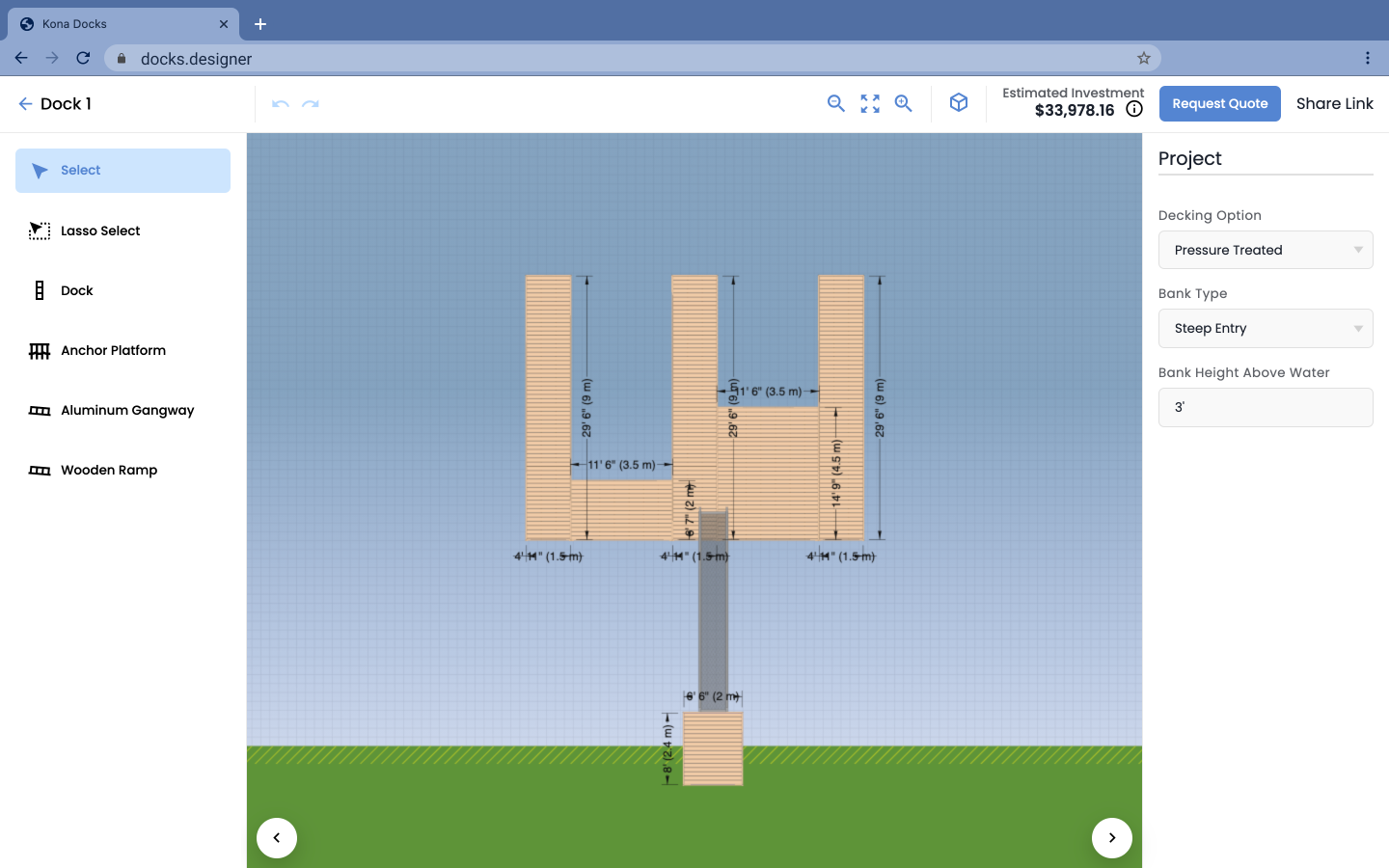
In a browser, you can design docks in 2D, see the designs in 3D, with access to instant estimates and seamless revisions.
Get discountCategory
3D Architecture Software
What is Dock Designer?
Dock Designer is a browser-based tool tailored for dock building companies, enabling users to design docks in 2D, visualize them in 3D, and obtain instant estimates, parts lists, and blueprints. It features augmented reality capabilities, allowing clients to preview their dock on-site. The software integrates with CRM and ERP systems, facilitating seamless management from design to installation. Key features include customizable templates, real-time pricing updates, drag-and-drop functionality, and detailed material selection. Dock Designer enhances collaboration between sales teams, designers, and clients, streamlining the quoting process and improving decision-making through accurate visualizations.
- Browser-based 2D dock design interface
- Real-time 3D visualization of docks
- Instant estimates, parts lists, blueprints generation
- Augmented reality preview on actual water
- CRM and ERP systems integration
- Supports sales process from design through installation
Eligibility
Number of Seats/Users: Dock Designer offers discounts based on the number of users or seats. A higher volume typically leads to a better discount structure, especially for enterprise-level usage.
Commitment to a Long-Term Contract: Discounts are often provided to companies that commit to using the service for a longer period (e.g., 1-year or 3-year contracts). A longer commitment shows Dock Designer that the company is serious and willing to invest in the platform long-term.
No Active Discounts: Companies that are not already receiving other active discounts may have a better chance of qualifying for additional discounts from Dock Designer. Dock Designer reserves discounts for new customers or those not currently under promotional pricing.
Volume or Usage Commitment: Dock Designer offers discounts if you agree to a minimum amount of usage or transaction volume. This could be based on data storage, transactions, or other metrics tied to how much you will use the platform.
Enterprise-Level Negotiation: Companies that qualify as “enterprise” due to their size or complexity (e.g., having large teams, multiple departments, or geographical presence) may be eligible for additional discounts from Dock Designer. Such companies are often in a position to negotiate for better pricing.
Early Renewal or Prepayment: Dock Designer often offers discounts if you renew early or prepay for the entire contract period. This is a common approach to securing a lower price.

Dock Designer - Up to 40% off
Reviews
Here at Spendbase our internal data shows that Dock Designer is generally seen as a strong, but slightly tricky, dock-configurator that shines in estimation and visualization, especially for sales processes.
From what Spendbase clients share with us, the main strengths look like this:
- Accurate visualizations
- 2D to 3D transition is seen as clear and helpful
- AR on the water is a big “wow factor” during client presentations
-
Good enough precision for practical planning and quoting
-
Strong for estimation and sales
- Fast cost estimation is consistently called out as a core benefit
- Helps sales teams respond quicker and more confidently
-
When connected to CRM/ERP, clients feel they have a smoother quote-to-installation flow
-
Solid fit for dock-focused businesses
- Tailored to dock builders rather than being a generic CAD tool
- Helps standardize how projects are scoped, priced, and presented
At the same time, our internal feedback also highlights some friction points:
- Learning curve and usability
- Several Spendbase clients say the tool is “a little tricky” at first
- Interface and workflows could be more intuitive, especially for non-technical sales reps
-
Some teams still compare it unfavorably with other software they’re used to
-
Perceived value vs. alternatives
- A subset of clients feel that while Dock Designer is useful, it is not always their final choice
- This usually comes down to familiarity with legacy tools or expectations around ease of use
From a Spendbase discount perspective, this pattern usually leads to:
- Best value when:
- You plan to integrate it with CRM/ERP and fully embed it in your sales process
-
You are ready to invest in short training sessions so the team gets past the initial learning curve
-
Savings opportunities we typically negotiate:
- Discounts for multi-seat sales teams
- Better terms for longer commitments when integration is part of the rollout plan
- Package deals focused on companies standardizing their dock design and estimation workflow
In short, our internal data shows that Dock Designer works best for teams who want accurate visual/price outputs and are willing to trade a bit of usability learning curve for dock-specific functionality and stronger sales enablement.
See how much you can save on your stack
Pick your team’s tools!
Click to select one or more tools.


What’s your company size?
Just click to select.
What’s your business email?
We'll send you calculations right away
The email is flying to your inbox!
Beyond discounts, you may qualify for up to $100K in AWS credits.

FAQ
1. How do I apply a discount code to my order?
Enter your valid code at checkout after meeting any minimum requirements; one code per order.
2. Do you offer student discounts?
Yes—verify with GoCertify to get a unique code. Excludes sale items, gift cards, and delivery; one code per order and not stackable.
3. Can I use multiple discount codes on a single order?
No—only one discount or offer can be applied per order.
4. Why isn't my discount code working?
Check minimum requirements, item exclusions, and correct entry; contact us with a screenshot if it still fails.
5. Do you offer military discounts?
Yes, our military discount is valid in-store only. Proof of service or valid military ID is required. Cannot be combined with other discount offers.
6. Are there any discounts available?
Check our site and socials for current offers; subscribe to the newsletter for early access.
7. Do you offer key worker discounts?
Yes—verify with GoCertify to get a unique code. Excludes sale items, gift cards, and delivery; one code per order and not stackable.
8. Can I still get a discount if I missed an offer?
Offers run for set periods only—sign up and follow us so you don’t miss the next one.
Related discounts

GardenBox 3D
3D Architecture Software
Up to 45% off
AGi32
3D Architecture Software
Up to 20% off

3ds Max
3D Architecture Software
Up to 25% off

Space Designer 3D
3D Architecture Software
Up to 20% off

LightningCad
3D Architecture Software
Up to 50% off

Wings 3D
3D Architecture Software
Up to 15% off
Software cost optimization
Dock Designer savings in five steps
Let’s estimate your potential savings and see how you can scale your cloud infrastructure.
One call. No cost. No commitments


meet vendor relationship EXPERTS
Our customers save millions with us



Save on Dock Designer
It’s time to shrink your bill
Let our SaaS cost optimization experts check what deals you can get and how much you can save on your corporate subscriptions
See how you can:
- Learn about pricing benchmarks and discounts
- Present potential savings by vendor to your team
- Meet your SaaS and cloud cost optimization goals
Get Dock Designer discount
We’ll email you back within 1 business day