











Dot Compliance Discount - Up to 15% off
Streamline Quality and Ensure Compliance With the #1 Electronic Quality Management Software (eQMS).
Get discountCategory
Document Control Software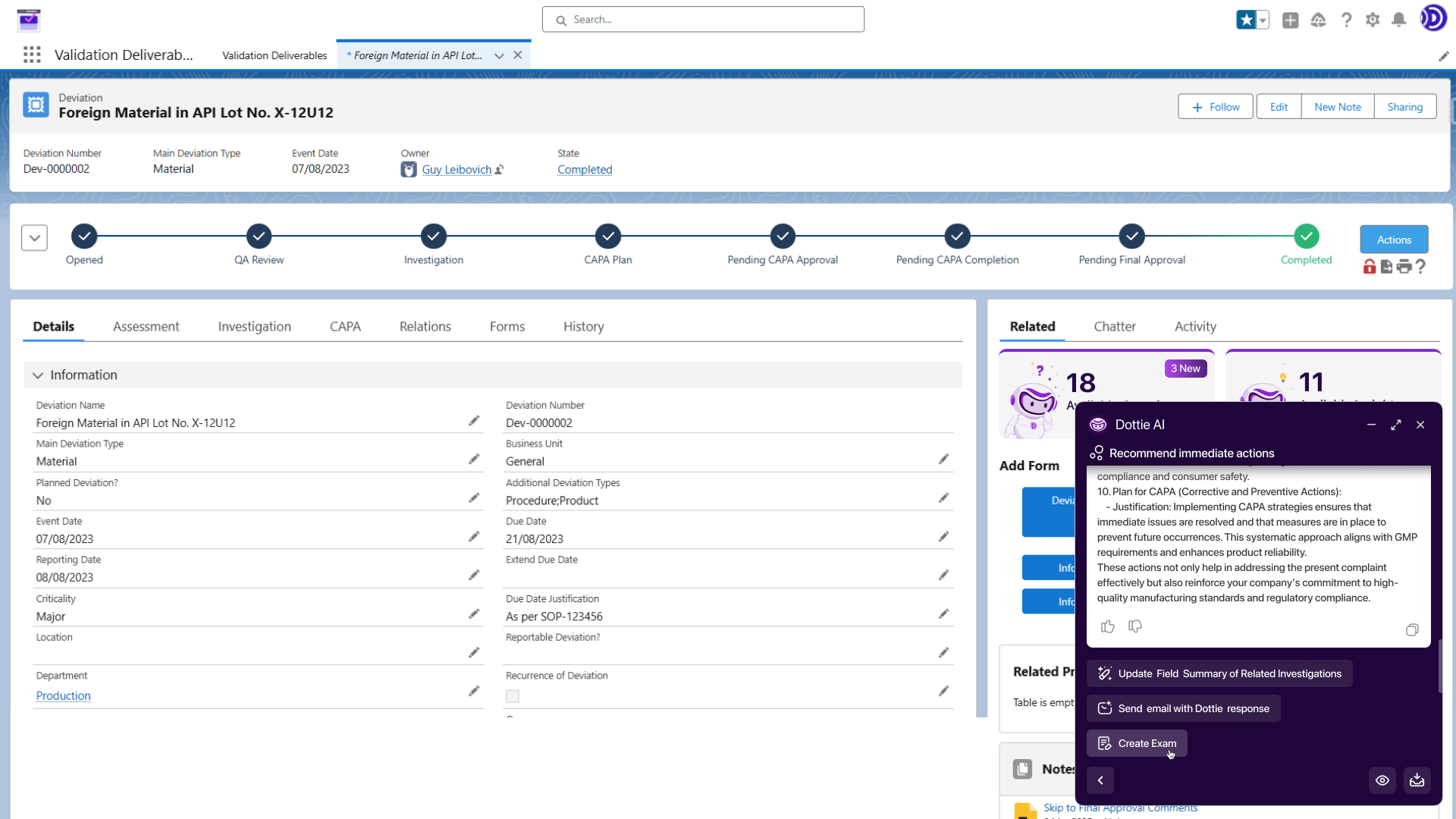
What is Dot Compliance?
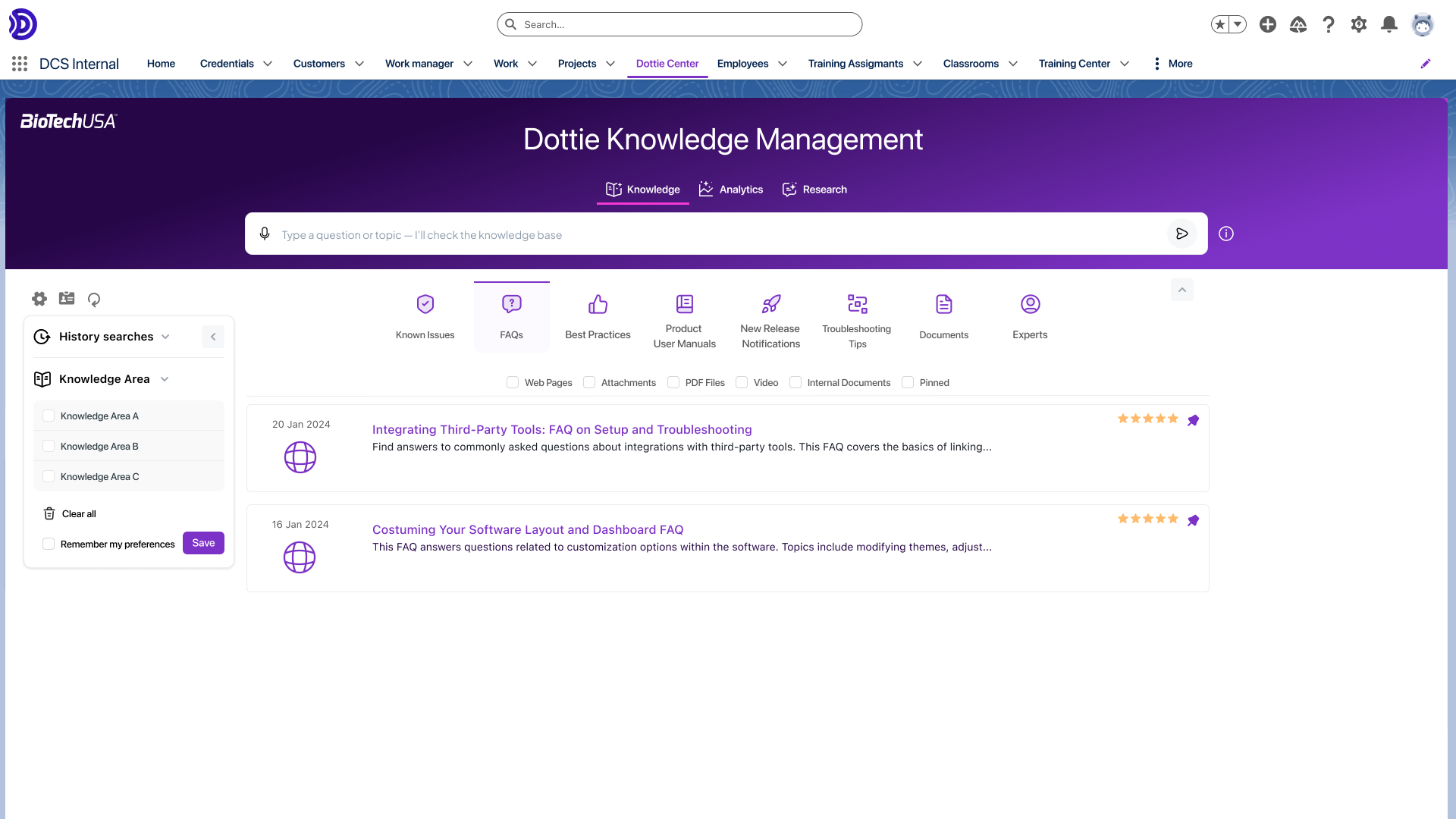
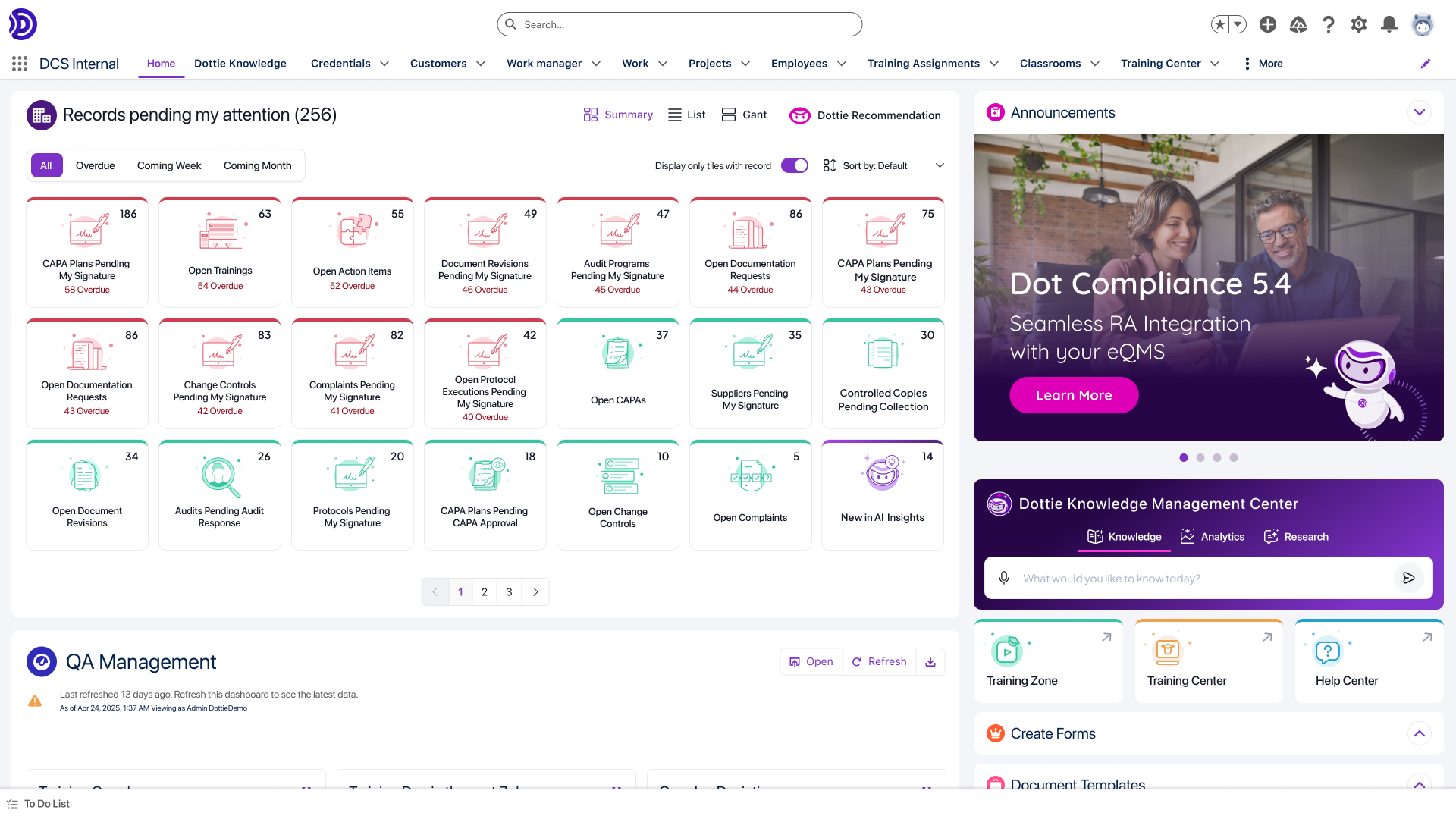
Dot Compliance is an AI-powered electronic Quality Management System (eQMS) designed for life sciences and regulated industries. Built on the Salesforce platform, it offers pre-built, pre-validated workflows that streamline quality, risk, and compliance management. Key features include document control, audit management, training systems, and an AI assistant named Dottie, which enhances compliance workflows and decision-making. The system ensures compliance with standards such as ISO 9001, ISO 13485, ISO 14971, ISO 27001, FDA 21 CFR Part 11 & 820, and EU Annex 11. Its integration with Salesforce provides scalability, security, and a consistent user experience.
- Salesforce-native, ready-to-deploy electronic QMS platform
- Robust document control with lifecycle workflows
- Integrated training management and qualifications tracking
- End-to-end quality events, CAPA, deviations management
- Built-in AI for proactive quality decisions
- Certified, audit-ready compliance with global regulations
Eligibility
Number of Seats/Users: Dot Compliance offers discounts based on the number of users or seats. A higher volume typically leads to a better discount structure, especially for enterprise-level usage.
Commitment to a Long-Term Contract: Discounts are often provided to companies that commit to using the service for a longer period (e.g., 1-year or 3-year contracts). A longer commitment shows Dot Compliance that the company is serious and willing to invest in the platform long-term.
No Active Discounts: Companies that are not already receiving other active discounts may have a better chance of qualifying for additional discounts from Dot Compliance. Dot Compliance reserves discounts for new customers or those not currently under promotional pricing.
Volume or Usage Commitment: Dot Compliance offers discounts if you agree to a minimum amount of usage or transaction volume. This could be based on data storage, transactions, or other metrics tied to how much you will use the platform.
Enterprise-Level Negotiation: Companies that qualify as “enterprise” due to their size or complexity (e.g., having large teams, multiple departments, or geographical presence) may be eligible for additional discounts from Dot Compliance. Such companies are often in a position to negotiate for better pricing.
Early Renewal or Prepayment: Dot Compliance often offers discounts if you renew early or prepay for the entire contract period. This is a common approach to securing a lower price.

Dot Compliance - Up to 15% off
Reviews
Here at Spendbase our internal data shows that teams using Dot Compliance generally see it as a strong, value-focused eQMS, with some predictable trade‑offs around usability, Salesforce constraints, and training effort.
Overall picture
– Sentiment skews positive: many Spendbase clients describe Dot as “fast,” “organized,” and “comprehensive.”
– Best fit: life sciences and regulated industries that need structured workflows, strong audit trails, and training management in one place.
What Spendbase clients like most
– Document & QMS coverage
– Centralized control of SOPs, quality events, CAPAs, deviations, investigations.
– Clear, linear workflows and strong traceability/audit trails.
– Training & collaboration
– Training module helps global teams track qualifications and completions.
– Mobile access and easy signatures improve training compliance.
– Implementation & support
– Ready-to-use, Salesforce-native setup reduces deployment time.
– Vendor support and project managers are consistently called out as responsive.
– Cost–value balance
– Often perceived as “good value for money” compared to heavier eQMS options.
Where friction and hidden costs tend to appear
Our internal data shows several patterns that can impact total cost of ownership:
– Usability and learning curve
– Non‑intuitive screens, many tabs, “lifecycles within lifecycles.”
– New users need structured onboarding, or productivity dips early on.
– Navigation and search
– Some clients struggle to find SOPs and training items quickly.
– Search often requires extra clicks (“show more”) or precise terms.
– Workflow & feature gaps
– Complex document lifecycles; extra effort to move documents through stages.
– Limited email notifications, text formatting options, and some risk/training features.
– Salesforce and licensing constraints
– Certain behaviors are fixed by Salesforce and not easily customized.
– Light user licenses can become a significant line item if many staff need read‑only access.
– Quality-of-life issues
– Occasional glitches (version rollbacks, rendering issues, training sign‑off friction).
– Session timeouts and unsaved text create user frustration.
Spendbase discount specialist takeaways
– Negotiate around:
– Light user pricing and expected read‑only user volume.
– Implementation and training packages to offset the learning curve.
– Budget for:
– Extra internal training/admin time to optimize workflows and reports.
– Possible configuration refinement post‑go‑live.
If you’re considering Dot Compliance, it tends to pay off most when you fully leverage its breadth (documents, training, quality events) and proactively manage onboarding and license mix.
See how much you can save on your stack
Pick your team’s tools!
Click to select one or more tools.


What’s your company size?
Just click to select.
What’s your business email?
We'll send you calculations right away
The email is flying to your inbox!
Beyond discounts, you may qualify for up to $100K in AWS credits.

FAQ
1. What is the Community Rating System (CRS) and how does it provide discounts?
The CRS is a voluntary program recognizing communities exceeding NFIP standards, offering premium discounts to policyholders in participating areas.
2. Which communities are eligible for CRS discounts?
All NFIP-participating communities can join the CRS; over 1,700 communities currently participate, benefiting more than 3.3 million policyholders.
3. Are there situations where CRS discounts do not apply?
Yes, discounts may not apply if policies exceed rate caps, buildings violate floodplain regulations, or for certain policy types like GFIP.
4. How can I find out if my community participates in the CRS?
You can check the NFIP Community Status Book to see if your community is part of the CRS program.
5. What steps can a community take to join the CRS and offer discounts?
Communities can join by implementing floodplain management practices exceeding NFIP standards and applying to the CRS program.
6. Do CRS discounts apply to all types of flood insurance policies?
Generally, yes, but exceptions include policies exceeding rate caps, non-compliant buildings, and specific policy types like GFIP.
7. How much can policyholders save through CRS discounts?
Savings vary based on the community's CRS classification, with higher classifications offering greater premium discounts to policyholders.
Related discounts
Digify
Digital Rights Management Software
Up to 25% off

DigiSigner
Collaboration Software
Up to 15% off

OM Plus
Document Control Software
Up to 25% off

PULZ Document Control System
Document Control Software
Up to 20% off
IT Glue
Document Control Software
Up to 25% off
CapLinked
Digital Rights Management Software
Up to 15% off
Software cost optimization
Dot Compliance savings in five steps
Let’s estimate your potential savings and see how you can scale your cloud infrastructure.
One call. No cost. No commitments


meet vendor relationship EXPERTS
Our customers save millions with us



Save on Dot Compliance
It’s time to shrink your bill
Let our SaaS cost optimization experts check what deals you can get and how much you can save on your corporate subscriptions
See how you can:
- Learn about pricing benchmarks and discounts
- Present potential savings by vendor to your team
- Meet your SaaS and cloud cost optimization goals
Get Dot Compliance discount
We’ll email you back within 1 business day