











Dr. Sum Discount - Up to 20% off
Business intelligence and data analysis tool providing firms with a database engine that optimizes data integration and aggregation.
Get discountCategory
Business Intelligence Software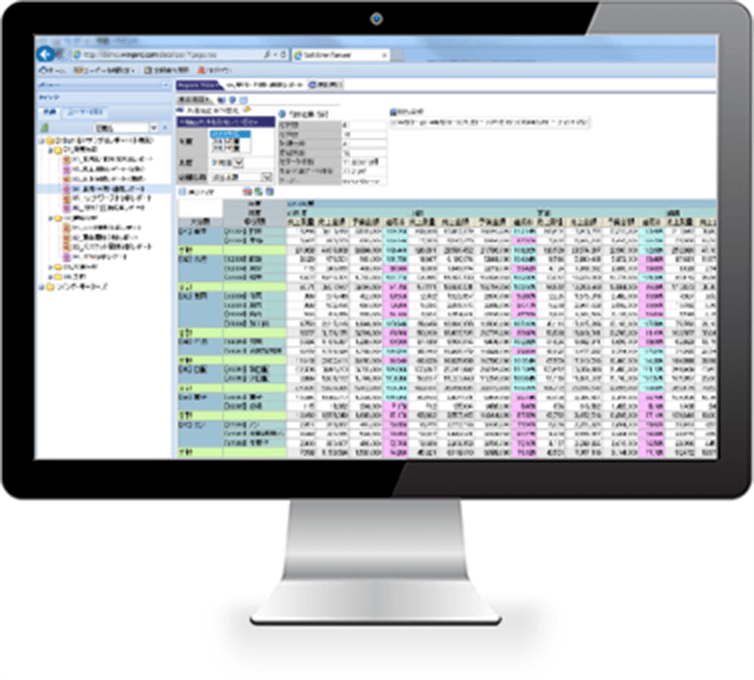
What is Dr. Sum?
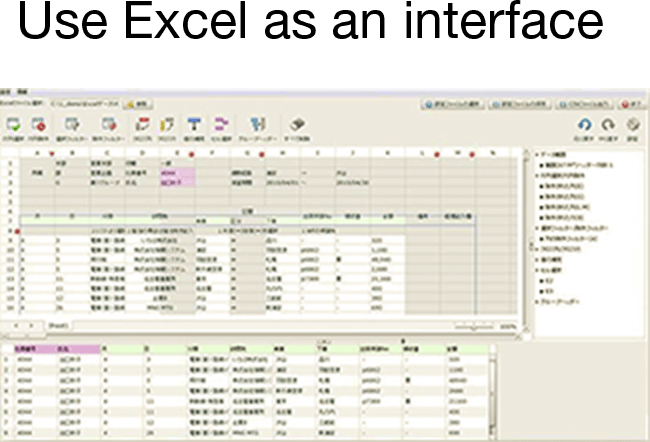
Dr. Sum is a data analysis platform designed to optimize data processing speed and enhance productivity by enabling users to perform multidimensional aggregations without the need for creating cubes or predefined indices. It allows seamless data import from Microsoft Excel, serving as an interface for aggregation and assessment. The software efficiently handles large data volumes and integrates information from various ERP systems and platforms. Key features include high-speed aggregation, multi-source data integration, and user-friendly interfaces accessible via Excel and web browsers. Additionally, Dr. Sum supports Python script execution for advanced data processing and offers AI assistance for improved usability.
- High-speed processing of large data volumes
- Multidimensional aggregation without cubes or indices
- Seamless Excel integration for analysis interface
- Consolidates data from multiple ERP systems
- Browser-based access with easy data export
- Scales enterprise analytics while reducing training
Eligibility
Number of Seats/Users: Dr. Sum offers discounts based on the number of users or seats. A higher volume typically leads to a better discount structure, especially for enterprise-level usage.
Commitment to a Long-Term Contract: Discounts are often provided to companies that commit to using the service for a longer period (e.g., 1-year or 3-year contracts). A longer commitment shows Dr. Sum that the company is serious and willing to invest in the platform long-term.
No Active Discounts: Companies that are not already receiving other active discounts may have a better chance of qualifying for additional discounts from Dr. Sum. Dr. Sum reserves discounts for new customers or those not currently under promotional pricing.
Volume or Usage Commitment: Dr. Sum offers discounts if you agree to a minimum amount of usage or transaction volume. This could be based on data storage, transactions, or other metrics tied to how much you will use the platform.
Enterprise-Level Negotiation: Companies that qualify as “enterprise” due to their size or complexity (e.g., having large teams, multiple departments, or geographical presence) may be eligible for additional discounts from Dr. Sum. Such companies are often in a position to negotiate for better pricing.
Early Renewal or Prepayment: Dr. Sum often offers discounts if you renew early or prepay for the entire contract period. This is a common approach to securing a lower price.

Dr. Sum - Up to 20% off
Reviews
Here at Spendbase our internal data shows that Dr. Sum works best as a high-speed, centrally managed aggregation and reporting engine, especially for companies that live in Excel.
From what Spendbase clients share, the main strengths are:
- Very fast aggregation, even on large datasets
- Stable performance with big data volumes
- Easy export to Excel and the option to use Excel as the front-end
- Good for standardized, recurring reports with fixed perspectives
- Browser access makes it simple for business users to pull pre-defined data
However, our internal insights also highlight some consistent friction points:
- Higher learning curve compared with more visual BI tools (often compared to Tableau)
- Data modeling and setup (especially table joins and multi-field join conditions) feel unintuitive
- True self-service analytics is limited:
- Hard for business teams to freely change dimensions, perspectives, or add new fields
- Admins end up doing most definition and maintenance work
- Requires a certain level of database knowledge to really unlock its value
In terms of use case fit, Spendbase clients typically see the best ROI when:
- The main goal is fast, repeatable aggregation rather than exploratory, ad-hoc analytics
- There is a dedicated admin or BI team to maintain definitions and support business users
- The organization is already heavily using Excel and wants to avoid retraining everyone on a new UI
- Data sources include multiple ERP systems and operational platforms that need to be consolidated
From a spend and discount perspective, our internal data shows that:
- Overbuying end-user licenses is common when teams expect Tableau-like self-service, then end up relying on admins anyway
- The most cost-effective setups usually:
- Keep a relatively small number of “power/admin” users
- Provide broader access via controlled Excel front-ends and predefined views
- Invest in initial data-model design and training instead of extra licenses
If your teams mainly consume fixed reports and Excel is the comfort zone, Dr. Sum can be a good value; if you need flexible, visual, self-service analytics, you may want to limit scope or negotiate more aggressively on pricing and training packages.
See how much you can save on your stack
Pick your team’s tools!
Click to select one or more tools.


What’s your company size?
Just click to select.
What’s your business email?
We'll send you calculations right away
The email is flying to your inbox!
Beyond discounts, you may qualify for up to $100K in AWS credits.

FAQ
1. What is the Subscribe & Save program?
Subscribe & Save delivers your favorite products regularly with 20% off your first and recurring orders. Modify or cancel anytime.
2. How do I manage my subscription?
Log into your account to pause, skip, cancel, or amend your subscription at any time.
3. Are there any additional benefits with Subscribe & Save?
Yes, enjoy complimentary shipping on your first and all subscription orders.
4. Can I change the delivery frequency of my subscription?
Absolutely, you can adjust your delivery frequency to suit your needs through your account settings.
5. Is there a minimum commitment period for Subscribe & Save?
No, there is no minimum commitment; you can cancel or modify your subscription anytime.
6. How do I apply a discount code to my order?
Enter your discount code at checkout to apply the discount to your order.
7. What should I do if my discount code isn't working?
Ensure the code is entered correctly and hasn't expired. Contact customer support for assistance if issues persist.
8. Can I combine multiple discounts on a single order?
Typically, only one discount code can be applied per order unless otherwise specified.
Related discounts

Geckoboard
Business Intelligence Software
Up to 50% off

Composable DataOps Platform
Business Intelligence Software
Up to 15% off

Peliqan
Business Intelligence Software
Up to 20% off

CleverMaps
Business Intelligence Software
Up to 20% off

CivGeo
Business Intelligence Software
Up to 45% off

Datalore
Business Intelligence Software
Up to 15% off
Software cost optimization
Dr. Sum savings in five steps
Let’s estimate your potential savings and see how you can scale your cloud infrastructure.
One call. No cost. No commitments


meet vendor relationship EXPERTS
Our customers save millions with us



Save on Dr. Sum
It’s time to shrink your bill
Let our SaaS cost optimization experts check what deals you can get and how much you can save on your corporate subscriptions
See how you can:
- Learn about pricing benchmarks and discounts
- Present potential savings by vendor to your team
- Meet your SaaS and cloud cost optimization goals
Get Dr. Sum discount
We’ll email you back within 1 business day