











eHopper Discount - Up to 20% off
eHopper is a POS system including free processing for bars to speed up operations and grow sales.
Get discountCategory
Retail Management Software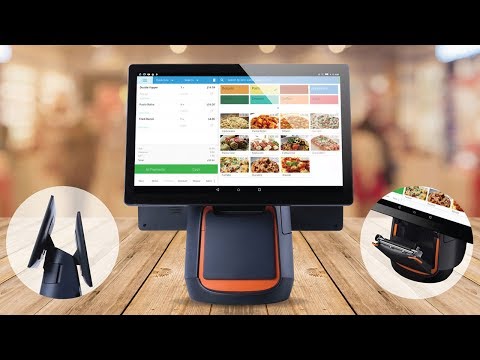


What is eHopper?
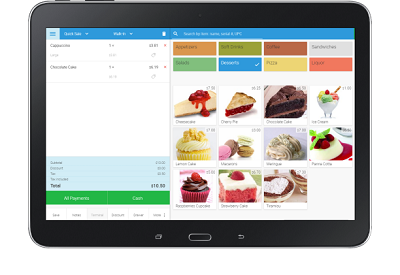
eHopper is a versatile point-of-sale (POS) system designed for small to medium-sized businesses, including restaurants, retail shops, and cafes. It operates on Android tablets, Windows PCs, and Poynt mobile terminals, offering flexibility across devices. Key features include free card processing, self-serve kiosks, online ordering websites, table management, kitchen display systems (KDS), order management, customer relationship management (CRM), inventory tracking, employee management, loyalty programs, and receipt/kitchen printing. These tools aim to streamline operations and support business growth.
Looking for a great deal on eHopper?
Good news! eHopper is currently offering discounts of up to 20% off regular subscription rates. This is your chance to leverage premium photo editing tools to enhance team coordination and productivity at a significantly reduced cost.
- Free card processing payments included
- Supports self-serve kiosks and eCommerce
- Comprehensive order and inventory management
- Built-in CRM and customer loyalty tools
- Receipt and kitchen printing supported
- Runs on Android, Windows, Poynt terminals
Eligibility
Number of Seats/Users: eHopper offers discounts based on the number of users or seats. A higher volume typically leads to a better discount structure, especially for enterprise-level usage.
Commitment to a Long-Term Contract: Discounts are often provided to companies that commit to using the service for a longer period (e.g., 1-year or 3-year contracts). A longer commitment shows eHopper that the company is serious and willing to invest in the platform long-term.
No Active Discounts: Companies that are not already receiving other active discounts may have a better chance of qualifying for additional discounts from eHopper. eHopper reserves discounts for new customers or those not currently under promotional pricing.
Volume or Usage Commitment: eHopper offers discounts if you agree to a minimum amount of usage or transaction volume. This could be based on data storage, transactions, or other metrics tied to how much you will use the platform.
Enterprise-Level Negotiation: Companies that qualify as “enterprise” due to their size or complexity (e.g., having large teams, multiple departments, or geographical presence) may be eligible for additional discounts from eHopper. Such companies are often in a position to negotiate for better pricing.
Early Renewal or Prepayment: eHopper often offers discounts if you renew early or prepay for the entire contract period. This is a common approach to securing a lower price.

eHopper - Up to 20% off
Reviews
Here at Spendbase, our internal data shows that eHopper is highly regarded among small businesses looking for a reliable, user-friendly POS system. Spednbase clients especially appreciate the straightforward setup and supportive customer service team. In fact, many highlight the helpfulness and patience of eHopper’s staff, often saying this support alone makes the product worth it.
Key strengths that consistently stand out in our data:
– Ease of Use: Spednbase clients frequently state that eHopper is intuitive and easy to pick up, even for users new to POS systems. Quick setup and clear navigation are commonly mentioned.
– Customer Support: Our insights show repeated praise for eHopper’s responsive and solution-focused support team. Clients mention quick resolutions, ongoing guidance, and very little time spent waiting for help.
– Value and Pricing: Competitive and flexible pricing are highlighted as major benefits. Clients are especially pleased with the ability to use their own devices, which keeps costs down and makes switching over easier.
– Feature Set: Functions such as inventory management, reporting, CRM, loyalty integration, and eCommerce setup cover a wide array of business needs, making it an all-in-one solution.
Some practical positives from Spednbase client feedback:
– Free card processing
– Simple employee management tools
– Self-serve kiosk options
– Customizable for retail, restaurants, and service industries
– Unlimited and hands-on onboarding support
Areas where our clients feel eHopper could do better:
– Device Compatibility: Some find the range of supported printers, scanners, or handhelds limited. Waiting for new device integration is a common theme.
– Reporting and Integrations: There is feedback about basic reporting options and occasional issues with syncing to accounting solutions like QuickBooks Online or Moneris.
– Occasional Technical Issues: Spednbase clients mention rare problems with terminal reliability (such as occasional freezing), although these are usually quickly addressed by support.
– Customization: Clients would appreciate more control over receipt customization, department display, and more flexible options for restaurant layouts.
In summary, eHopper shines for small to midsize businesses that want an easy, affordable, and well-supported POS system. The overall sentiment among our clients is positive, especially thanks to good customer care, clear onboarding, and solid core features. If your business needs a straightforward POS and you value responsive support, eHopper could be a smart fit—especially when paired with Spendbase discounts!
See how much you can save on your stack
Pick your team’s tools!
Click to select one or more tools.


What’s your company size?
Just click to select.
What’s your business email?
We'll send you calculations right away
The email is flying to your inbox!
Beyond discounts, you may qualify for up to $100K in AWS credits.

FAQ
1. What is the eHopper Cash Discount Program?
The eHopper Cash Discount Program offers customers a discount for paying with cash, debit card, or check, helping businesses offset credit card processing fees.
2. How do I set up a cash discount in eHopper POS?
Install the 'Merchant Fee and Cash Discount Programs' app in Back Office, configure the discount, and apply it to your store settings.
3. Can I apply discounts to individual items or entire orders?
Yes, eHopper allows applying discounts to both individual items and entire orders through the POS interface.
4. Does eHopper support surcharges for credit card payments?
Yes, eHopper supports adding surcharges to credit card payments to cover processing fees.
5. Are there any legal considerations for implementing cash discounts?
Cash discounts are legal in all states, but proper disclosure at entry points and on receipts is required.
6. How can I manage inventory with eHopper?
eHopper offers inventory management tools, including item creation, stock control, and barcode management.
7. Does eHopper offer a free version of its POS software?
Yes, eHopper offers a free version with limited features, suitable for small businesses.
8. Can I integrate eHopper with my online store?
Yes, eHopper provides an eCommerce app that syncs in-person and online orders.
Related discounts

Rithum
Retail Management Software
Up to 20% off

Retail Express
Retail Management Software
Up to 15% off

Bindo POS
Retail Management Software
Up to 15% off

authorize.net
Retail Management Software
Up to 25% off

TRIMS
Retail Management Software
Up to 20% off

ERPLY
Retail Management Software
Up to 15% off
Software cost optimization
eHopper savings in five steps
Let’s estimate your potential savings and see how you can scale your cloud infrastructure.
One call. No cost. No commitments


meet vendor relationship EXPERTS
Our customers save millions with us



Save on eHopper
It’s time to shrink your bill
Let our SaaS cost optimization experts check what deals you can get and how much you can save on your corporate subscriptions
See how you can:
- Learn about pricing benchmarks and discounts
- Present potential savings by vendor to your team
- Meet your SaaS and cloud cost optimization goals
Get eHopper discount
We’ll email you back within 1 business day