











eM Client Discount - Up to 40% off
Desktop email client that also helps businesses manage tasks, inspired by Getting Things Done method. Sync events, contacts & more
Get discountCategory
Task Management Software



What is eM Client?
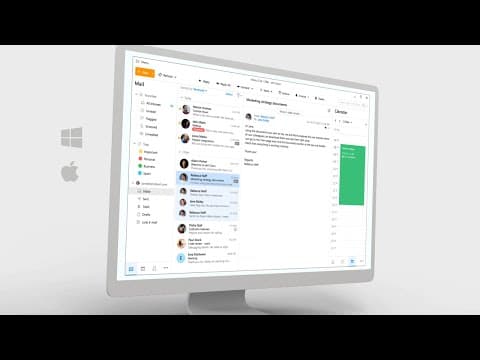
eM Client is a comprehensive desktop email client for Windows and macOS, integrating email, calendar, tasks, contacts, notes, and chat into a single interface. It supports major email services like Gmail, Exchange, iCloud, and Outlook365, with automatic setup and data import from other clients. Key features include AI-powered email composition, instant message translation, PGP and S/MIME encryption, cloud storage integration, and online meeting support for platforms like Zoom and Microsoft Teams. Users can customize the interface extensively and utilize tools like Quick Actions and Inbox Categories to enhance productivity.
- Unified email, calendar, tasks, contacts interface
- Strong Gmail, Google Workspace, Exchange integration
- Local email storage with robust backup
- Built-in PGP and S/MIME encryption support
- Conversation view and powerful search tools
- Customizable UI, templates, signatures, QuickTexts automation
Eligibility
Number of Seats/Users: eM Client offers discounts based on the number of users or seats. A higher volume typically leads to a better discount structure, especially for enterprise-level usage.
Commitment to a Long-Term Contract: Discounts are often provided to companies that commit to using the service for a longer period (e.g., 1-year or 3-year contracts). A longer commitment shows eM Client that the company is serious and willing to invest in the platform long-term.
No Active Discounts: Companies that are not already receiving other active discounts may have a better chance of qualifying for additional discounts from eM Client. eM Client reserves discounts for new customers or those not currently under promotional pricing.
Volume or Usage Commitment: eM Client offers discounts if you agree to a minimum amount of usage or transaction volume. This could be based on data storage, transactions, or other metrics tied to how much you will use the platform.
Enterprise-Level Negotiation: Companies that qualify as “enterprise” due to their size or complexity (e.g., having large teams, multiple departments, or geographical presence) may be eligible for additional discounts from eM Client. Such companies are often in a position to negotiate for better pricing.
Early Renewal or Prepayment: eM Client often offers discounts if you renew early or prepay for the entire contract period. This is a common approach to securing a lower price.

eM Client - Up to 40% off
Reviews
Here at Spendbase our internal data shows that eM Client is seen as a strong, affordable alternative to Outlook, especially for small businesses and power users who hate living in webmail.
From what Spendbase clients tell us, the main positives cluster around:
- Productivity & UX
- Clean, modern interface that feels familiar to Outlook users but lighter.
- Strong multi‑account support (often 4–20 inboxes in one place).
- Conversation view, quick task/calendar creation from email, and contact sidebar with past mail and attachments are big time‑savers.
-
Easy migration from Outlook, Thunderbird, and Google accounts.
-
Integrations & Features
- Reliable IMAP/Gmail and Exchange connectivity for mail and calendar (when stable).
- Local mail storage plus server sync is a key requirement for many teams.
-
PGP/S/MIME encryption setup during onboarding is appreciated by security‑sensitive clients.
-
Cost Structure
- One‑time license with optional lifetime upgrades is perceived as high value.
- Free tier works well for 1–2 accounts; paid is accepted as fair, though some wish it were cheaper versus free alternatives.
- For many, it’s “good enough to replace Outlook” at a fraction of the cost.
Our data also shows consistent friction points:
- Stability & Sync
- Some Spendbase clients see recurring sync issues (especially large mailboxes, Google Calendar, Yahoo IMAP) and occasional database checks/repairs that interrupt work.
-
A few signal repeated account rebuilds, making it risky in stricter business environments.
-
Calendar, Tasks, and Notes
- Calendar bugs (reminders reappearing, limited resource handling, missing conflict alerts).
-
Weak integration with Google Tasks (no subtasks) and no link to Google Keep, reducing its appeal as a full productivity hub.
-
Support & Updates
- Free users feel there’s “no support”; Pro/VIP support exists but is not always obvious.
-
Some mention slow or email‑only support, and one‑time license owners are frustrated by upgrade prompts and version confusion after OS resets.
-
UX Gaps
- Conversation ordering and how threads are grouped can be confusing.
- Minor annoyances: thin scrollbars, inconsistent folder column layouts, backup perceived as intrusive, unclear junk/spam behavior.
From a Spendbase discount perspective, eM Client tends to deliver the best value for:
– Teams needing many accounts in one client
– Organizations migrating from Outlook/Thunderbird
– SMBs that prefer a one‑time license over recurring SaaS
But we advise factoring in:
– Mailbox size
– Heavy Google/Yahoo use
– The need for responsive support and clear upgrade paths
See how much you can save on your stack
Pick your team’s tools!
Click to select one or more tools.


What’s your company size?
Just click to select.
What’s your business email?
We'll send you calculations right away
The email is flying to your inbox!
Beyond discounts, you may qualify for up to $100K in AWS credits.

FAQ
1. Are there any current discount codes available for eM Client?
Yes, we periodically offer discount codes. Please check our official website or subscribe to our newsletter for the latest promotions.
2. Does eM Client offer student discounts?
Yes, we provide student discounts. Please verify your student status through our website to access these special offers.
3. Can I combine multiple discount codes on a single purchase?
No, our system allows only one discount code per transaction to ensure fair use of promotional offers.
4. How often does eM Client release new discount codes?
We release new discount codes during special promotions and holidays. Stay updated by subscribing to our newsletter.
5. Is there a discount for upgrading to the latest version of eM Client?
Yes, existing customers receive special upgrade discounts. Please log into your account to view available offers.
6. Do eM Client discounts apply to both personal and business licenses?
Yes, our discounts are applicable to both personal and business licenses unless specified otherwise in the promotion details.
7. Are there any lifetime upgrade discounts available for eM Client?
Yes, we offer lifetime upgrade options at discounted rates. Please visit our pricing page for more details.
8. How can I stay informed about upcoming eM Client discounts?
To stay informed about upcoming discounts, subscribe to our newsletter or follow us on our official social media channels.
Related discounts

Bizer Team
Task Management Software
Up to 35% off

SeeSnap
Task Management Software
Up to 50% off

Daymi
Task Management Software
Up to 40% off

Operandio
LMS Software
Up to 20% off

AS2 Seller
Task Management Software
Up to 30% off

TakeOff Estimates and Reports 4.0
Task Management Software
Up to 20% off
Software cost optimization
eM Client savings in five steps
Let’s estimate your potential savings and see how you can scale your cloud infrastructure.
One call. No cost. No commitments


meet vendor relationship EXPERTS
Our customers save millions with us



Save on eM Client
It’s time to shrink your bill
Let our SaaS cost optimization experts check what deals you can get and how much you can save on your corporate subscriptions
See how you can:
- Learn about pricing benchmarks and discounts
- Present potential savings by vendor to your team
- Meet your SaaS and cloud cost optimization goals
Get eM Client discount
We’ll email you back within 1 business day