











Integrate Discount - Up to 50% off
Revenue acceleration happens when B2B marketers unify top of funnel.
Get discountCategory
Campaign Management Software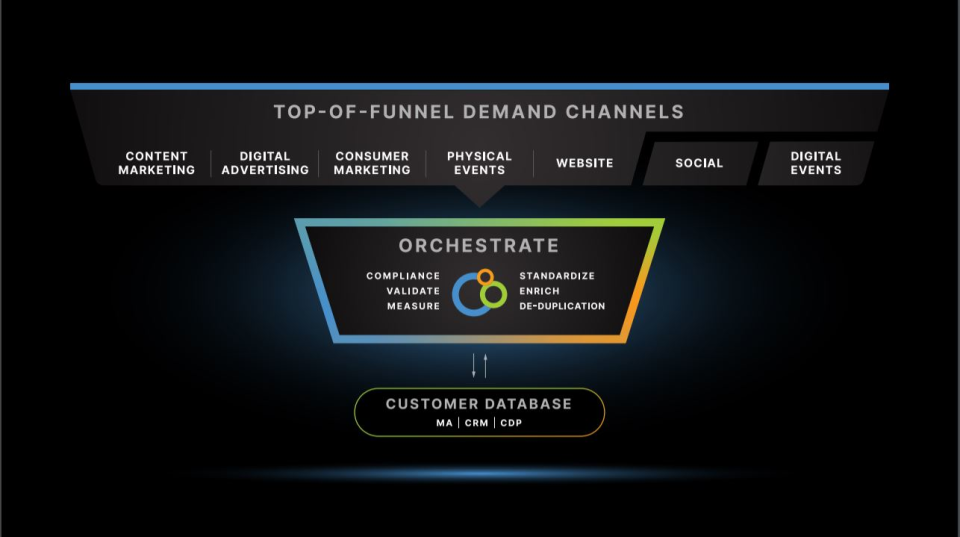
What is Integrate?
Integrate is a SaaS platform that unifies demand channels, ensuring leads are globally compliant, accurate, and intelligent before entering marketing and sales systems. Key features include campaign management, interaction tracking, lead capture, contact database, drip campaigns, and landing pages/web forms. Users praise its responsive and knowledgeable customer support. Some find navigation and response times challenging.
- Unifies demand channels in single platform
- Ensures compliant, accurate, validated marketing leads
- Strong, proactive account management and support
- Direct buyer-seller communication and negotiation
- Robust campaign search, setup, and reporting
- Flexible marketplace for buying and selling
Eligibility
Number of Seats/Users: Integrate offers discounts based on the number of users or seats. A higher volume typically leads to a better discount structure, especially for enterprise-level usage.
Commitment to a Long-Term Contract: Discounts are often provided to companies that commit to using the service for a longer period (e.g., 1-year or 3-year contracts). A longer commitment shows Integrate that the company is serious and willing to invest in the platform long-term.
No Active Discounts: Companies that are not already receiving other active discounts may have a better chance of qualifying for additional discounts from Integrate. Integrate reserves discounts for new customers or those not currently under promotional pricing.
Volume or Usage Commitment: Integrate offers discounts if you agree to a minimum amount of usage or transaction volume. This could be based on data storage, transactions, or other metrics tied to how much you will use the platform.
Enterprise-Level Negotiation: Companies that qualify as “enterprise” due to their size or complexity (e.g., having large teams, multiple departments, or geographical presence) may be eligible for additional discounts from Integrate. Such companies are often in a position to negotiate for better pricing.
Early Renewal or Prepayment: Integrate often offers discounts if you renew early or prepay for the entire contract period. This is a common approach to securing a lower price.

Integrate - Up to 50% off
Reviews
Here at Spendbase our internal data shows that Integrate is generally well liked, but not effortless to use. Most Spendbase clients rate it positively, yet mention a noticeable learning curve and workflow friction.
Key strengths our clients report:
- Exceptional human support
- Consistent praise for account managers (Daniel, Jenna, Chelsie, Mike, Erica, etc.).
- Fast responses, proactive campaign matching, and hands‑on onboarding.
-
Willingness to tweak the platform or processes based on feedback.
-
Solid platform capabilities
- Strong for both buyers and sellers of leads.
- Helpful features:
- Campaign search and suggestions
- Direct buyer–seller messaging and negotiation
- Clear posting instructions and form specs
- Lead return handling and reporting downloads
-
Good for CPL/lead gen environments and filling capacity gaps (e.g., call centers).
-
Business value
- Access to new buyers and campaigns that would be hard to reach directly.
- Reliable payments and generally good lead volumes and payouts (where offers exist).
- Useful for monetizing leads and collecting website reviews when approval workflows exist.
Main friction points and risks:
- Usability and onboarding
- Many Spendbase clients call the UI “confusing,” especially for new or non‑technical users.
- Time‑consuming to find campaigns, understand bidding, and see approval status.
-
Strong features, but some are “hidden,” requiring documentation or training to uncover.
-
Campaign discovery and communication
- Hard or slow to discover new relevant campaigns, with limited filters in some areas.
- Email communication can be noisy (too many alerts, not enough curated “what’s new” summaries).
-
Some vertical and geo gaps (e.g., UK coreg offers, certain discount/coupon sites).
-
Quality and transparency
- Concerns about “spammy” campaigns or low‑quality leads in certain niches.
- Some buyers want more transparency into publishers and more direct contact with top partners.
- A few note inconsistent lead quality and would like real‑time scrub rates.
What this means from a Spendbase savings perspective:
- You’re often paying for a powerful, service‑heavy platform; discounts are most justified if:
- Your team will actually use the advanced lead and reporting features.
- You rely on their account managers to offset the UI complexity.
- If your use case is simple or your team is small, the learning curve and time cost should be factored into negotiations and renewal decisions.
See how much you can save on your stack
Pick your team’s tools!
Click to select one or more tools.


What’s your company size?
Just click to select.
What’s your business email?
We'll send you calculations right away
The email is flying to your inbox!
Beyond discounts, you may qualify for up to $100K in AWS credits.

FAQ
1. How can I combine my discount with other discounts?
Use the 'Combinations' option in discount settings to allow stacking with other discounts.
2. Can I apply multiple discounts using the same discount code?
Yes, use the Custom discount type to apply multiple discounts simultaneously at the product level.
3. How do I add gift products to the cart automatically?
Enable the automatic gifting feature in the discount settings to add gift products to the cart.
4. How can I set up discounts to show on my website?
Configure the discount's website settings to display discounted pricing or promotional labels on your site.
5. Can I limit a discount to one use per customer?
Yes, set the discount usage limit to one per customer in the discount settings.
6. How do I generate bulk discount codes?
Use the Bulk Discount Code Bot app to create and export unlimited unique discount codes within Shopify.
7. Why are items being double-discounted at the POS?
Ensure that discounts are not applied both in the product listing and as a promotion to avoid double-discounting.
8. Does the discount apply to both ticket holder and ticket buyer?
You can choose to apply the discount to either the ticket holder or the ticket buyer, but not both.
Related discounts

MailerLite
Campaign Management Software
Up to 25% off

InstaSuite
Campaign Management Software
Up to 35% off

TrakAff
Campaign Management Software
Up to 45% off

Marketing Tech
Campaign Management Software
Up to 25% off

Envoke
Campaign Management Software
Up to 20% off

CallFire
Campaign Management Software
Up to 45% off
Software cost optimization
Integrate savings in five steps
Let’s estimate your potential savings and see how you can scale your cloud infrastructure.
One call. No cost. No commitments


meet vendor relationship EXPERTS
Our customers save millions with us



Save on Integrate
It’s time to shrink your bill
Let our SaaS cost optimization experts check what deals you can get and how much you can save on your corporate subscriptions
See how you can:
- Learn about pricing benchmarks and discounts
- Present potential savings by vendor to your team
- Meet your SaaS and cloud cost optimization goals
Get Integrate discount
We’ll email you back within 1 business day