











InvoiceQuick Discount - Up to 30% off
Easy to use solution for generating professional invoices.
Get discountCategory
Billing and Invoicing Software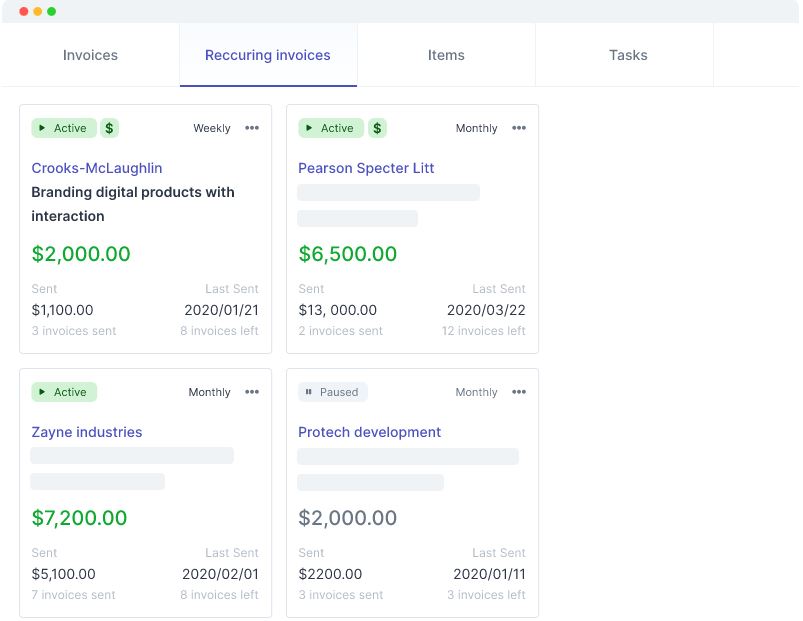

What is InvoiceQuick?
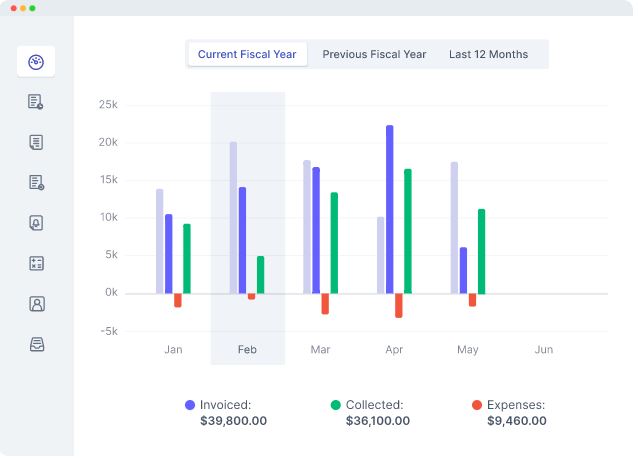
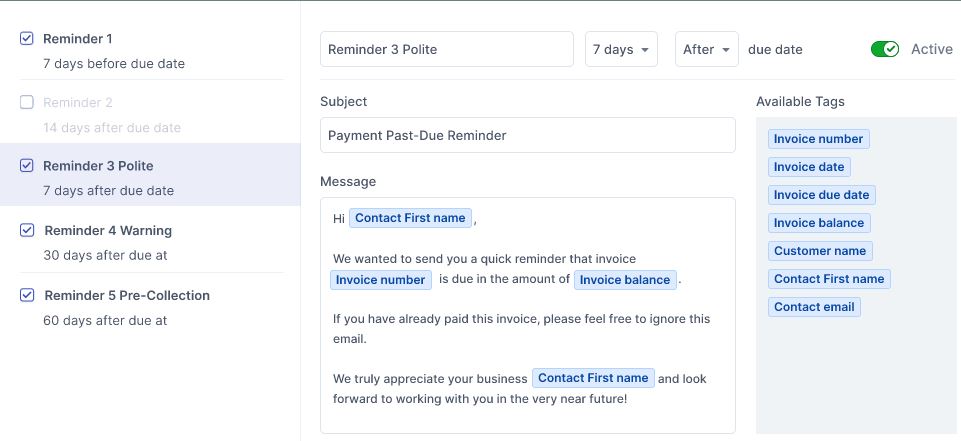
InvoiceQuick is an invoicing solution tailored for small businesses, freelancers, and startups, designed to streamline billing processes and enhance professionalism. Its key features include unlimited customer management, customizable invoice templates, recurring invoices, and automated reminders. The platform also offers expense tracking, accounting functionalities, and comprehensive reporting tools. Users can create and bill expenses, manage transactions, and access a customer dashboard for improved client interactions. Additional features encompass multi-language support, customizable fields, and priority support, ensuring a versatile and user-friendly experience.
- Easy-to-use intuitive interface for invoicing
- Professional, customizable invoice templates for clients
- Recurring invoicing and automated payment processing
- Reliable email delivery and follow-up reminders
- Responsive customer support and continuous improvements
- Free tier, affordable pricing, generous trial
Eligibility
Number of Seats/Users: InvoiceQuick offers discounts based on the number of users or seats. A higher volume typically leads to a better discount structure, especially for enterprise-level usage.
Commitment to a Long-Term Contract: Discounts are often provided to companies that commit to using the service for a longer period (e.g., 1-year or 3-year contracts). A longer commitment shows InvoiceQuick that the company is serious and willing to invest in the platform long-term.
No Active Discounts: Companies that are not already receiving other active discounts may have a better chance of qualifying for additional discounts from InvoiceQuick. InvoiceQuick reserves discounts for new customers or those not currently under promotional pricing.
Volume or Usage Commitment: InvoiceQuick offers discounts if you agree to a minimum amount of usage or transaction volume. This could be based on data storage, transactions, or other metrics tied to how much you will use the platform.
Enterprise-Level Negotiation: Companies that qualify as “enterprise” due to their size or complexity (e.g., having large teams, multiple departments, or geographical presence) may be eligible for additional discounts from InvoiceQuick. Such companies are often in a position to negotiate for better pricing.
Early Renewal or Prepayment: InvoiceQuick often offers discounts if you renew early or prepay for the entire contract period. This is a common approach to securing a lower price.

InvoiceQuick - Up to 30% off
Reviews
Here at Spendbase our internal data shows that InvoiceQuick delivers very strong value for freelancers, small businesses, and early‑stage startups, especially from a cost‑to‑benefit perspective.
Key positives our Spendbase clients highlight:
- Ease of use
- Simple, intuitive interface
- Fast to create and send invoices, even for casual or low‑volume users
- Professional look and feel
- Clean, branded invoices that “don’t look DIY”
- Minimal InvoiceQuick branding on client‑facing documents
- Revenue & cash‑flow impact
- Recurring invoicing and automated reminders
- Payment links embedded with invoices → faster payments, less chasing
- Pricing & accessibility
- Generous free tier (e.g., up to 3 clients)
- Low monthly fee compared to alternatives and no extra % fees on Stripe payments
- Reliability & support
- High delivery reliability to client inboxes
- Responsive, “brilliant” support that fixes issues and listens to feature requests
- Continuous product improvement
- Clients notice regular feature updates and interface upgrades over time
Our internal data also shows some recurring friction points and feature gaps:
- Mobility and access
- Strong demand for a dedicated mobile app for on‑the‑go invoicing
- Mild annoyance when accounts get locked after long inactivity
- Workflow and UX improvements
- Desire to mark invoices as paid directly from the invoice list/dashboard
- Easier editing and auto‑saving of company names/logos
- Faster lookup of past items/pricing for repeat use
- Clearer visibility for “fine‑print” invoice comments that can affect amounts
- Advanced/scale needs
- Custom SMTP / white‑label sending
- Localization like custom financial year settings
- Basic accounting outputs (e.g., balance sheet export for accountants)
- Deeper integrations with Excel, Google Sheets, and CRMs
From a Spendbase savings perspective, our internal benchmarks show:
- InvoiceQuick is typically a low‑cost, high‑satisfaction tool, so negotiation focus is less on price cuts and more on securing:
- The right plan tier as your client list grows
- Long‑term discounts for annual commitments
- Assurances on roadmap items that matter (mobile app, integrations, accounting exports)
Overall, our Spendbase clients see InvoiceQuick as a “set it and forget it” invoicing workhorse that punches above its price, especially for small teams that need to look professional and get paid quickly without heavy accounting overhead.
See how much you can save on your stack
Pick your team’s tools!
Click to select one or more tools.


What’s your company size?
Just click to select.
What’s your business email?
We'll send you calculations right away
The email is flying to your inbox!
Beyond discounts, you may qualify for up to $100K in AWS credits.

FAQ
1. How can I apply a discount to an invoice?
You can apply percentage or flat discounts to individual line items or the entire invoice.
2. Can I save discount presets for future use?
Yes, you can save unlimited discount presets for quick application on future invoices.
3. Are discounts applied before or after taxes?
By default, discounts are applied after taxes, but you can change this setting to apply them before taxes.
4. Is there a limit to the number of discounts I can apply?
No, you can apply multiple discounts to an invoice as needed.
5. Can I apply different discounts to different line items?
Yes, you can apply unique discounts to individual line items within the same invoice.
6. Do discounts affect the tax amount on the invoice?
By default, discounts do not reduce the tax amount, but this setting can be adjusted.
7. Can I remove a discount after applying it?
Yes, you can edit or remove discounts from an invoice before finalizing it.
8. Are there any pre-set discount templates available?
Yes, pre-written discount templates are available and can be customized to your needs.
Related discounts

SUM-IT Total
Billing and Invoicing Software
Up to 15% off

Booky
Billing and Invoicing Software
Up to 30% off

InvoiceASAP
Billing and Invoicing Software
Up to 20% off

Method Proposals
Billing and Invoicing Software
Up to 20% off
Mollie
Billing and Invoicing Software
Up to 25% off

Psyquel
Billing and Invoicing Software
Up to 15% off
Software cost optimization
InvoiceQuick savings in five steps
Let’s estimate your potential savings and see how you can scale your cloud infrastructure.
One call. No cost. No commitments


meet vendor relationship EXPERTS
Our customers save millions with us



Save on InvoiceQuick
It’s time to shrink your bill
Let our SaaS cost optimization experts check what deals you can get and how much you can save on your corporate subscriptions
See how you can:
- Learn about pricing benchmarks and discounts
- Present potential savings by vendor to your team
- Meet your SaaS and cloud cost optimization goals
Get InvoiceQuick discount
We’ll email you back within 1 business day