











Linked Helper 2 Discount - Up to 45% off
LinkedIn automation and lead generation tool for safe and smart outreach
Get discountCategory
Lead Capture Software
What is Linked Helper 2?
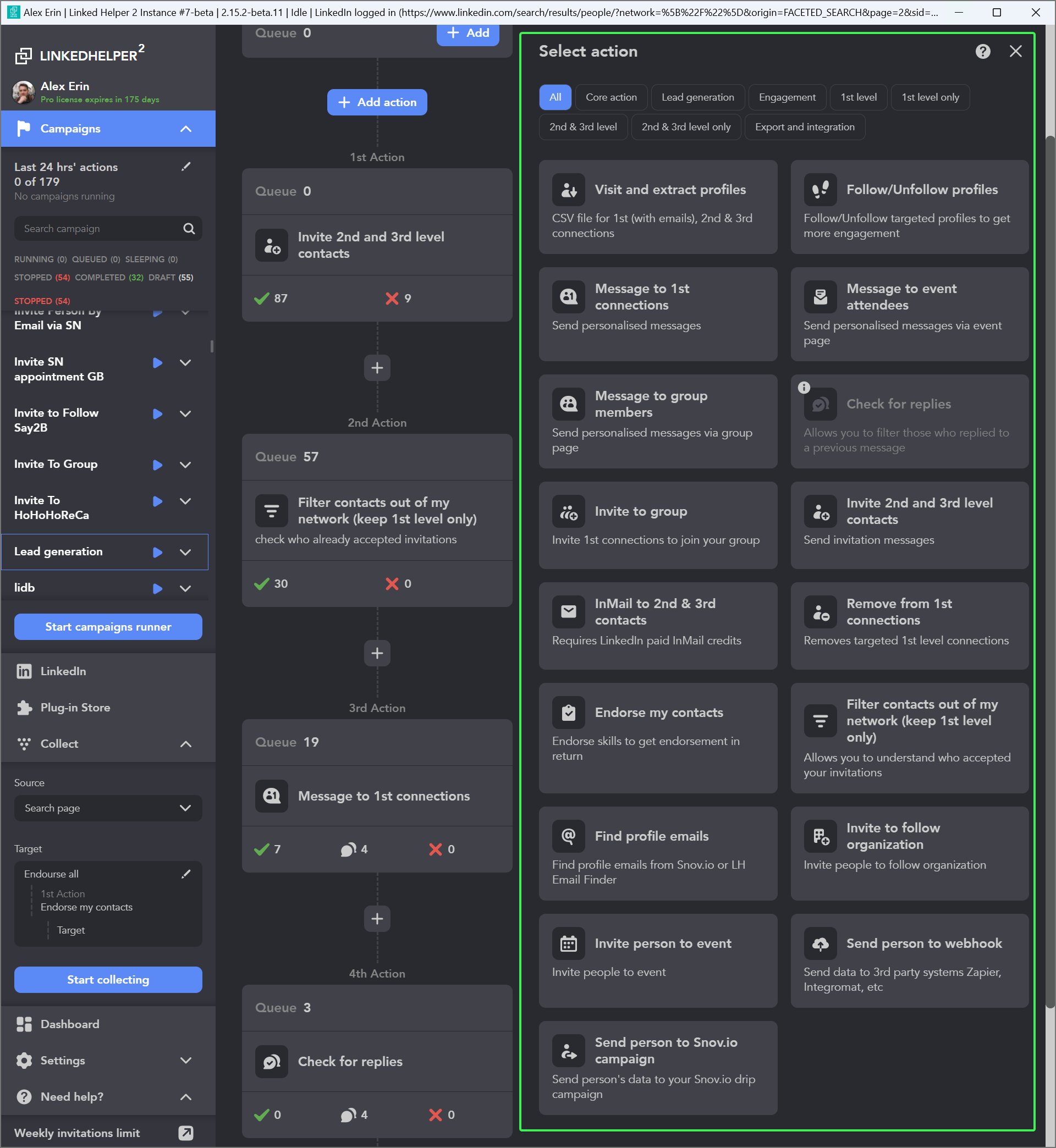
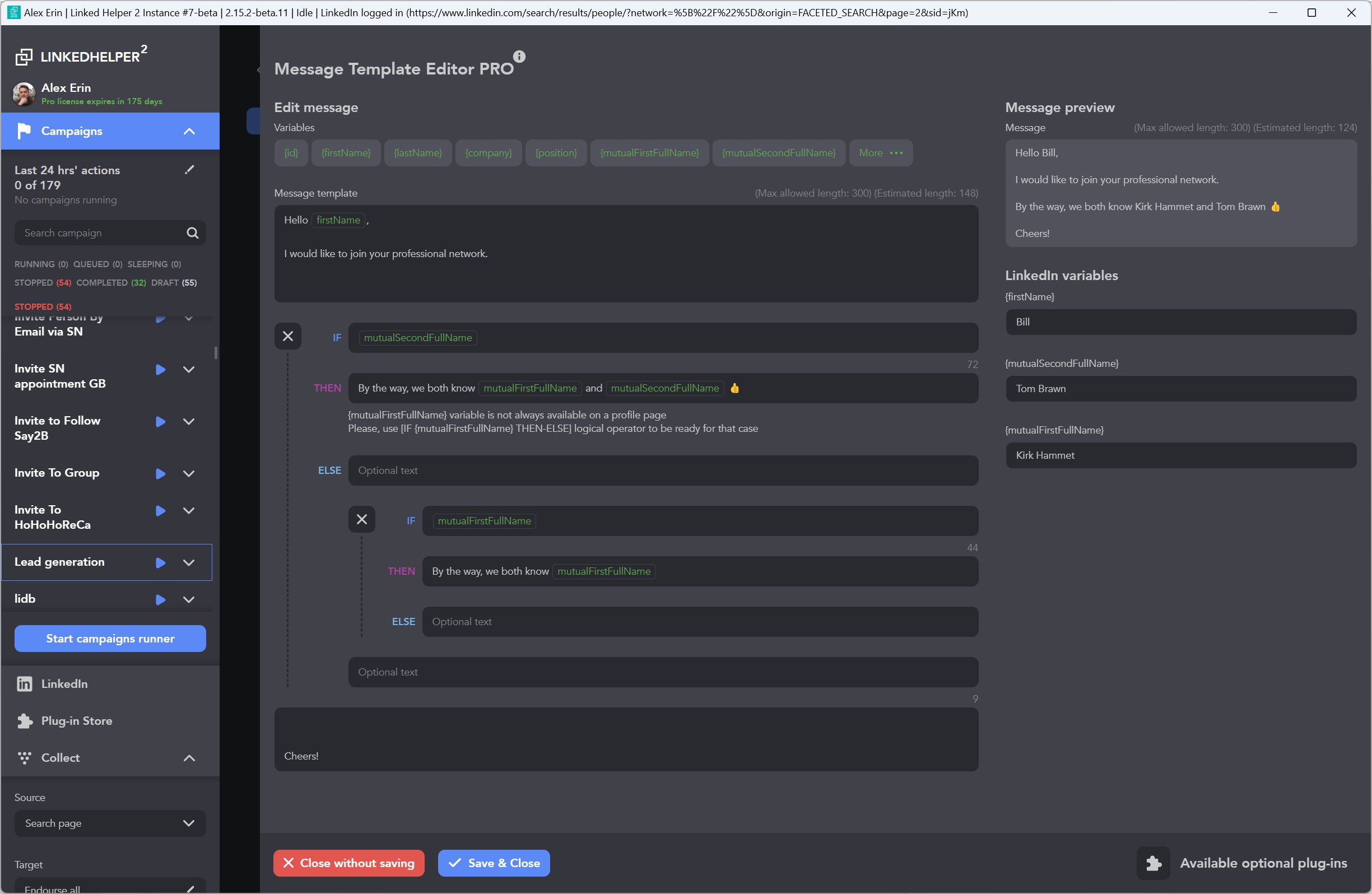
Linked Helper 2 is a LinkedIn automation tool designed to streamline outreach and lead generation efforts. It enables users to automate connection requests, follow-ups, and profile visits, while maintaining a personalized approach. Key features include campaign management, contact management, CRM integration, and customizable templates. The tool also offers activity tracking, email marketing, and lead nurturing capabilities. Users can build smart prospecting flows that visit profiles, endorse skills, and send tailored messages in sequences that build trust before making a pitch. Additionally, it allows exporting full profile data or integrating directly into a CRM, keeping pipelines organized and sales routines predictable. Linked Helper 2 has been recognized as a Best Value Social CRM Tool in 2023 and 2024.
- Automated LinkedIn outreach: connections, messages, visits
- Visual multi-step campaigns with reusable templates
- Built-in CRM for leads and follow-ups
- Integrated email finder and contact enrichment
- Human-like automation prioritizing account safety, compliance
- Flexible data export and CRM integrations
Eligibility
Number of Seats/Users: Linked Helper 2 offers discounts based on the number of users or seats. A higher volume typically leads to a better discount structure, especially for enterprise-level usage.
Commitment to a Long-Term Contract: Discounts are often provided to companies that commit to using the service for a longer period (e.g., 1-year or 3-year contracts). A longer commitment shows Linked Helper 2 that the company is serious and willing to invest in the platform long-term.
No Active Discounts: Companies that are not already receiving other active discounts may have a better chance of qualifying for additional discounts from Linked Helper 2. Linked Helper 2 reserves discounts for new customers or those not currently under promotional pricing.
Volume or Usage Commitment: Linked Helper 2 offers discounts if you agree to a minimum amount of usage or transaction volume. This could be based on data storage, transactions, or other metrics tied to how much you will use the platform.
Enterprise-Level Negotiation: Companies that qualify as “enterprise” due to their size or complexity (e.g., having large teams, multiple departments, or geographical presence) may be eligible for additional discounts from Linked Helper 2. Such companies are often in a position to negotiate for better pricing.
Early Renewal or Prepayment: Linked Helper 2 often offers discounts if you renew early or prepay for the entire contract period. This is a common approach to securing a lower price.

Linked Helper 2 - Up to 45% off
Reviews
Here at Spendbase our internal data shows that Linked Helper 2 is seen as a high‑value, “core stack” tool for LinkedIn outreach, especially for teams focused on lead generation, recruiting, and early‑stage sales.
Most Spendbase clients describe it as a clear ROI driver once it’s set up properly.
Key strengths our clients highlight
– Powerful automation:
– Multi‑step outreach flows (visit, follow/like, endorse, then connect/message)
– Auto follow‑ups, smart delays, dynamic variables
– Good for keeping a steady lead funnel and reconnecting with existing networks
– Flexibility & control:
– Highly customizable campaigns and templates
– Ability to work with multiple LinkedIn accounts and switch licenses
– Solid exports and CRM integrations (HubSpot, Make, external CRMs)
– Safety & reliability:
– Works like a human in a built‑in browser, not via risky extensions/API
– Seen as stable even at scale (dozens of accounts)
– Support & education:
– Very fast, personal support (often via WhatsApp / chat)
– Rich documentation and video tutorials that shorten the learning curve
– Pricing perception:
– Frequently called “best bang for your buck” and “very competitive” versus alternatives
Main friction points Spendbase clients face
– Learning curve & UX:
– Interface feels dated or “clunky” to some
– The huge feature set can be overwhelming at first
– Deployment model:
– Runs locally, so you must keep a machine on or rent a server
– Some would strongly prefer a pure cloud solution
– UI preferences:
– Multiple mentions of wanting a light theme instead of only dark mode
– Feature wishes:
– Built‑in AI personalization and AI assistant
– More flexible dashboards/reporting
– Extra automations (e.g., birthday messages, more native CRM integrations)
– Cost sensitivity:
– Solo users and tiny SMEs mention Pro pricing can feel heavy and ask for a lighter tier
What this means from a Spendbase discount angle
– Teams that commit to using advanced workflows usually see strong value even at full price.
– The users most in need of discounts are:
– Solo founders / one‑person agencies
– Very early‑stage startups testing product‑market fit
– Bundling longer terms or multi‑account setups with small discounts is likely to pay off, because once clients pass the initial learning curve, churn is low and usage becomes “mission‑critical.”
See how much you can save on your stack
Pick your team’s tools!
Click to select one or more tools.


What’s your company size?
Just click to select.
What’s your business email?
We'll send you calculations right away
The email is flying to your inbox!
Beyond discounts, you may qualify for up to $100K in AWS credits.

FAQ
1. What discounts are available for Linked Helper 2 licenses?
We offer discounts for longer license durations and bulk purchases. For example, a 12-month Standard license is $99, saving 45% compared to monthly renewals.
2. How do I qualify for bulk purchase discounts?
Bulk discounts apply when purchasing multiple licenses of the same type and duration in a single transaction. Discounts start at 10 licenses.
3. Are there any special offers or promotions currently available?
Yes, we have special offers through partners like LinkUnity and Topuzer. Contact them directly for exclusive deals.
4. Can I switch my license between different LinkedIn accounts?
Yes, a license can be used with any LinkedIn account, but not simultaneously. You can switch it between accounts as needed.
5. Is there a free trial available for Linked Helper 2?
Yes, we offer a 14-day free trial with access to all features to help you evaluate Linked Helper 2.
6. Do you offer discounts for non-profit organizations?
Please contact our support team to inquire about special discounts available for non-profit organizations.
7. How can I get an invoice for my Linked Helper 2 purchase?
Invoices can be downloaded from the Subscription menu under Billing > Subscription > Billing history.
8. Can I use Linked Helper 2 on multiple computers?
A license can be used on any computer, but not on multiple machines simultaneously. You can switch between computers as needed.
Related discounts

Tagvenue Pro
Lead Capture Software
Up to 50% off

Coldlytics
Lead Capture Software
Up to 35% off

Leadprio
Lead Capture Software
Up to 30% off

LeadsNavi
Lead Capture Software
Up to 30% off
Software cost optimization
Linked Helper 2 savings in five steps
Let’s estimate your potential savings and see how you can scale your cloud infrastructure.
One call. No cost. No commitments


meet vendor relationship EXPERTS
Our customers save millions with us



Save on Linked Helper 2
It’s time to shrink your bill
Let our SaaS cost optimization experts check what deals you can get and how much you can save on your corporate subscriptions
See how you can:
- Learn about pricing benchmarks and discounts
- Present potential savings by vendor to your team
- Meet your SaaS and cloud cost optimization goals
Get Linked Helper 2 discount
We’ll email you back within 1 business day