











Microsoft Planner Discount - Up to 40% off
Microsoft Planner is a new app from Microsoft that helps teams organize their work.
Get discountCategory
Task Management Software

What is Microsoft Planner?
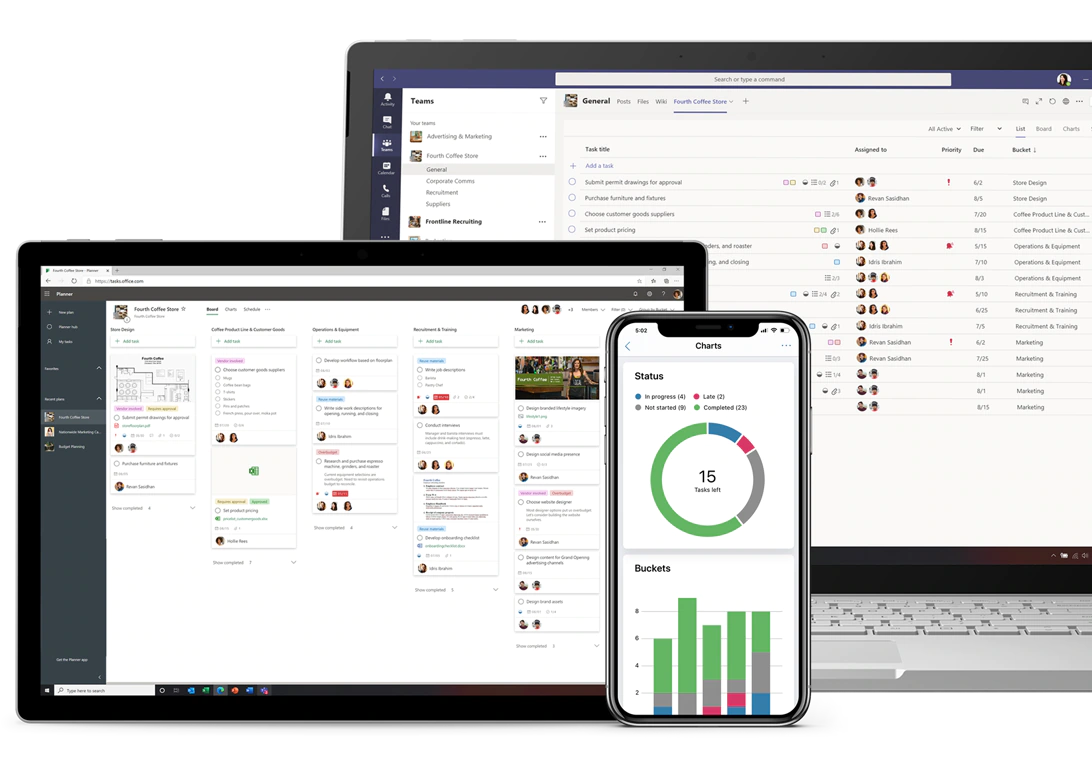
Microsoft Planner is a task management application within the Microsoft 365 suite, designed to help teams organize and collaborate on projects. It offers a visual interface where users can create plans, assign tasks, set deadlines, and track progress. Key features include Kanban-style boards for task organization, integration with Microsoft Teams for seamless collaboration, and multiple views such as Grid, Board, Schedule, and Charts to monitor project status. Planner also supports file sharing, checklists, and labels for categorization, enhancing team coordination and productivity.
- Visual task boards for organizing projects
- Seamless integration with Microsoft 365 ecosystem
- Team task assignment and workload tracking
- Real-time collaboration with comments and files
- Cross-device access: web, desktop, mobile
- Simple, intuitive interface for quick adoption
Eligibility
Number of Seats/Users: Microsoft Planner offers discounts based on the number of users or seats. A higher volume typically leads to a better discount structure, especially for enterprise-level usage.
Commitment to a Long-Term Contract: Discounts are often provided to companies that commit to using the service for a longer period (e.g., 1-year or 3-year contracts). A longer commitment shows Microsoft Planner that the company is serious and willing to invest in the platform long-term.
No Active Discounts: Companies that are not already receiving other active discounts may have a better chance of qualifying for additional discounts from Microsoft Planner. Microsoft Planner reserves discounts for new customers or those not currently under promotional pricing.
Volume or Usage Commitment: Microsoft Planner offers discounts if you agree to a minimum amount of usage or transaction volume. This could be based on data storage, transactions, or other metrics tied to how much you will use the platform.
Enterprise-Level Negotiation: Companies that qualify as “enterprise” due to their size or complexity (e.g., having large teams, multiple departments, or geographical presence) may be eligible for additional discounts from Microsoft Planner. Such companies are often in a position to negotiate for better pricing.
Early Renewal or Prepayment: Microsoft Planner often offers discounts if you renew early or prepay for the entire contract period. This is a common approach to securing a lower price.

Microsoft Planner - Up to 40% off
Reviews
Here at Spendbase our internal data shows that Microsoft Planner hits a sweet spot for teams already paying for Microsoft 365, especially when you want structure without the complexity (or cost) of heavy project tools.
Key strengths our Spendbase clients highlight:
- Easy onboarding & everyday use
- Simple, visual boards for tasks and buckets
- Very low learning curve, even for non-technical staff
-
Great fit for day‑to‑day task management and lightweight projects
-
Deep Microsoft 365 integration
- Works smoothly with Outlook, Teams, SharePoint, To Do, Exchange
- Included in many M365 licenses, so no extra tool to buy
-
Centralized user and license management simplifies admin costs
-
Team visibility & collaboration
- Clear view of who’s working on what and task progress
- Helpful for tracking remote employee productivity
- File sharing and comments directly on tasks
At the same time, our internal data shows consistent pain points:
- Limited for complex or large projects
- Too “light” for detailed project management
- No built‑in Gantt charts or advanced workflows
-
Subtask limits and no robust subtask due dates/assignees
-
Gaps in task visibility and automation
- Managers can’t easily see all tasks assigned to a specific employee across all plans
- Recurring tasks and automation are clunky or require extra tools
-
Some clients want better calendar and reporting views
-
Usability & performance issues
- Slows down when many tasks are added in large boards
- Mobile and Mac experiences are less clear and can cause missed tasks
- Requires a stable internet connection to work smoothly
From a Spendbase savings perspective, Planner is most cost‑effective when:
- You already pay for Microsoft 365 and want to avoid extra project tools
- Your projects are small to medium in complexity
- You value integration and centralized license management over advanced PM features
For organizations needing full project governance (detailed timelines, dependencies, complex reporting), our internal data suggests pairing Planner with more robust project tools and carefully right‑sizing Microsoft 365 licenses to avoid paying for overlapping functionality.
See how much you can save on your stack
Pick your team’s tools!
Click to select one or more tools.


What’s your company size?
Just click to select.
What’s your business email?
We'll send you calculations right away
The email is flying to your inbox!
Beyond discounts, you may qualify for up to $100K in AWS credits.

FAQ
1. Are there discounts available for Microsoft Planner?
Yes, we offer volume discounts on Microsoft Planner subscriptions, with higher discounts for larger quantities.
2. Do nonprofits receive special pricing for Microsoft Planner?
Yes, nonprofits can access discounted rates for Microsoft Planner, making it more affordable for eligible organizations.
3. Is Microsoft Planner included in Microsoft 365 subscriptions?
Yes, Microsoft Planner is included with most Microsoft 365 subscriptions, providing integrated task management solutions.
4. Can I get a free trial of Microsoft Planner?
Yes, we offer a free trial for Microsoft Planner, allowing you to explore its features before committing to a subscription.
5. Are there any discounts for government agencies?
Yes, government agencies can benefit from substantial discounts on Microsoft Planner through special agreements.
6. Do educational institutions receive discounts on Microsoft Planner?
Yes, educational institutions are eligible for discounted pricing on Microsoft Planner to support their academic initiatives.
7. Is there a discount for purchasing multiple Microsoft Planner licenses?
Yes, we offer volume discounts for bulk purchases of Microsoft Planner licenses, reducing costs for larger teams.
8. Are there seasonal promotions or discounts for Microsoft Planner?
Yes, we occasionally offer seasonal promotions and discounts on Microsoft Planner; please check our website for current offers.
Related discounts

Recapped
Task Management Software
Up to 50% off

Evocom
Task Management Software
Up to 15% off

Taskomat
Task Management Software
Up to 15% off

Backlog
Task Management Software
Up to 45% off

Dyzo
Task Management Software
Up to 45% off

ProProfs Project
Task Management Software
Up to 25% off
Software cost optimization
Microsoft Planner savings in five steps
Let’s estimate your potential savings and see how you can scale your cloud infrastructure.
One call. No cost. No commitments


meet vendor relationship EXPERTS
Our customers save millions with us



Save on Microsoft Planner
It’s time to shrink your bill
Let our SaaS cost optimization experts check what deals you can get and how much you can save on your corporate subscriptions
See how you can:
- Learn about pricing benchmarks and discounts
- Present potential savings by vendor to your team
- Meet your SaaS and cloud cost optimization goals
Get Microsoft Planner discount
We’ll email you back within 1 business day