











PCMover Discount - Up to 40% off
PCmover Enterprise will save you hours of IT time and resources throughout your PC hardware and OS refreshes.
Get discountCategory
IT Management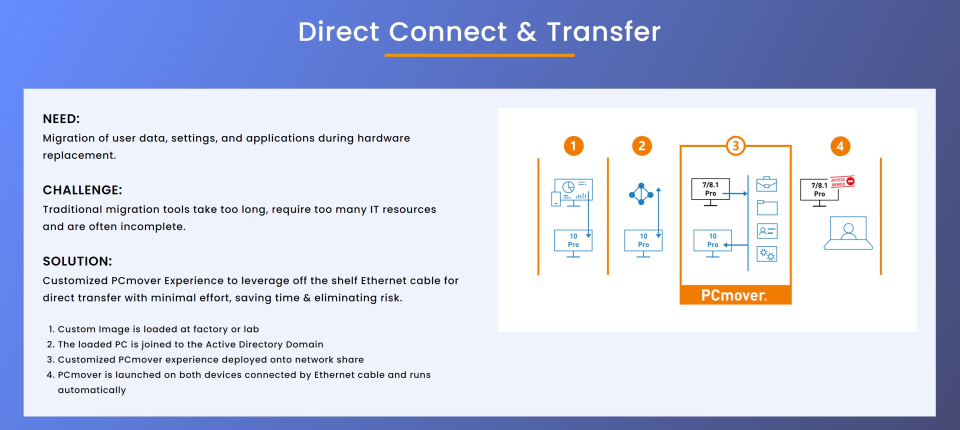

What is PCMover?
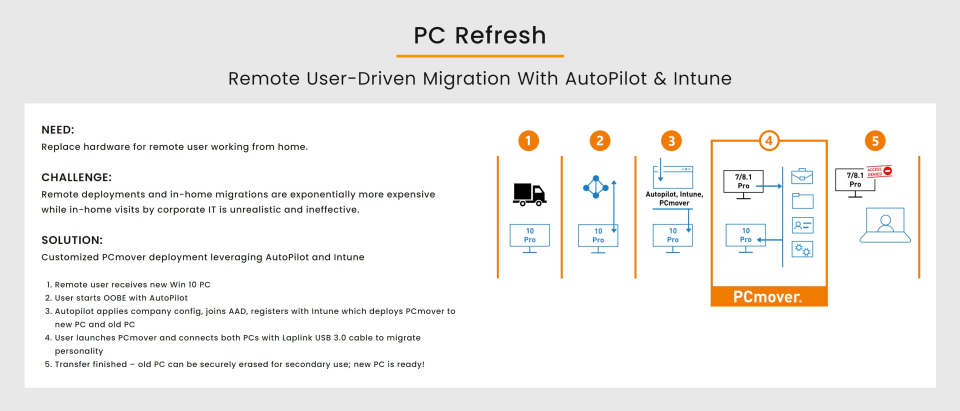
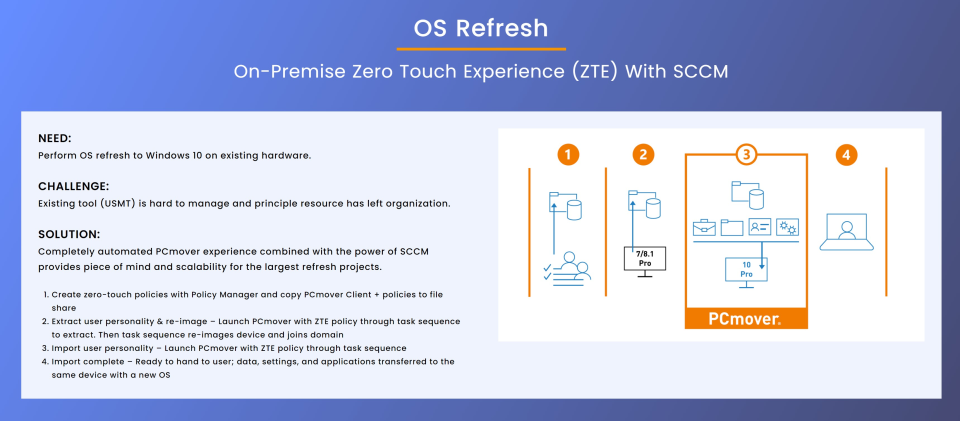
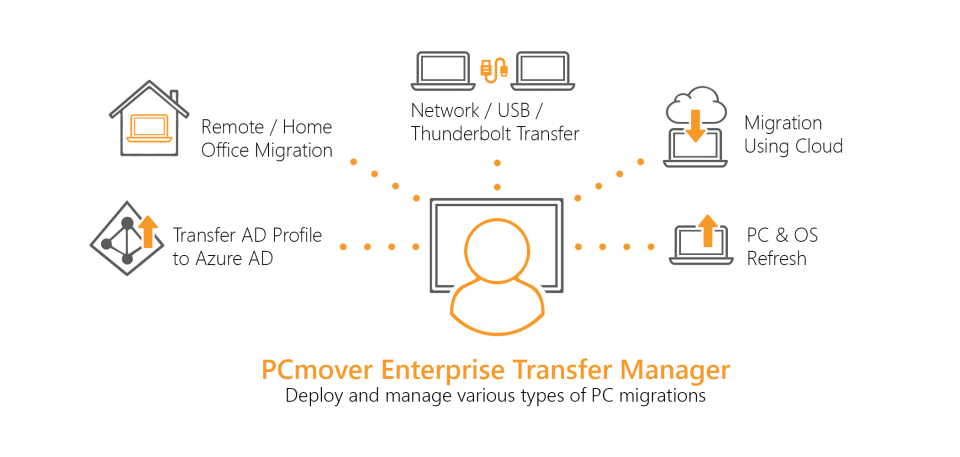
PCmover is a software solution designed to facilitate the transfer of files, settings, and applications from an old computer to a new one. It simplifies the migration process by automatically transferring user profiles, documents, and even browser settings, ensuring a seamless transition without the need for technical expertise. Key features include the preservation of personalized settings such as desktop backgrounds and fonts, as well as the ability to transfer large amounts of data efficiently. PCmover is particularly beneficial for users seeking a convenient and comprehensive tool to migrate their digital environment to a new system.
- Transfers applications, data, and user settings.
- Automates PC refresh, break/fix, OS upgrades.
- Microsoft’s only recommended Windows migration solution.
- Saves significant IT time, labor costs.
- Secure direct PC-to-PC data transfer.
- Handles large datasets and legacy software.
Eligibility
Number of Seats/Users: PCMover offers discounts based on the number of users or seats. A higher volume typically leads to a better discount structure, especially for enterprise-level usage.
Commitment to a Long-Term Contract: Discounts are often provided to companies that commit to using the service for a longer period (e.g., 1-year or 3-year contracts). A longer commitment shows PCMover that the company is serious and willing to invest in the platform long-term.
No Active Discounts: Companies that are not already receiving other active discounts may have a better chance of qualifying for additional discounts from PCMover. PCMover reserves discounts for new customers or those not currently under promotional pricing.
Volume or Usage Commitment: PCMover offers discounts if you agree to a minimum amount of usage or transaction volume. This could be based on data storage, transactions, or other metrics tied to how much you will use the platform.
Enterprise-Level Negotiation: Companies that qualify as “enterprise” due to their size or complexity (e.g., having large teams, multiple departments, or geographical presence) may be eligible for additional discounts from PCMover. Such companies are often in a position to negotiate for better pricing.
Early Renewal or Prepayment: PCMover often offers discounts if you renew early or prepay for the entire contract period. This is a common approach to securing a lower price.

PCMover - Up to 40% off
Reviews
Here at Spendbase our internal data shows that PCmover is seen as a serious time‑saver for migrations, especially in larger environments, but there are a few gotchas to be aware of before you commit to many licenses.
From what Spendbase clients tell us, the strongest positives are:
- Big time savings for IT teams
- Widely used in hardware refresh and break/fix scenarios.
-
Clients running multi‑site rollouts with thousands of endpoints say it cuts project time and total cost of ownership significantly.
-
Ease of use
- Non‑technical staff can run migrations by following the wizard.
-
One-click or guided selection of apps, profiles, and files is appreciated.
-
Depth of migration
- Moves applications, user profiles, registry settings, browser data, and even very old apps in many cases.
-
Works even from systems with damaged boot sectors, as long as the drive is readable.
-
Security and compliance
-
High marks for avoiding external drives or cloud storage, which helps with GDPR and internal security policies.
-
Human support
- Direct phone support from real engineers is a strong plus for complex projects.
Our internal data also highlights consistent pain points:
- Performance
- Large transfers (500–650 GB) often take 24–30+ hours.
-
Older or cluttered source PCs slow the process further.
-
Scope misunderstandings
- PCmover does not move Windows itself; the OS must be pre‑installed on the target.
-
Some clients only realize this mid‑project, causing delays.
-
Application gaps
- Most mainstream apps (Microsoft, Adobe) move fine.
- Bespoke/less common software may not function after migration.
-
Printer drivers and configurations often need manual re‑setup.
-
Platform and language limits
- No Mac ↔ PC migration.
-
English‑centric interface can be a barrier for some teams.
-
Cost sensitivity
- Home and very small business users find it pricey for one‑off use.
- Larger organizations call out the cost of multiple licenses, although they usually acknowledge the labor savings.
From a Spendbase discount standpoint, PCmover tends to deliver strong ROI where:
- You have recurring refresh cycles or large rollout waves.
- You can standardize the process and reuse licenses at scale.
For one‑time or very small deployments, we usually recommend negotiating carefully on volume and term, or right‑sizing license counts so you’re not overpaying for unused capacity.
See how much you can save on your stack
Pick your team’s tools!
Click to select one or more tools.


What’s your company size?
Just click to select.
What’s your business email?
We'll send you calculations right away
The email is flying to your inbox!
Beyond discounts, you may qualify for up to $100K in AWS credits.

FAQ
1. Are there any current discounts available for PCmover?
Yes, we offer various discounts, including up to 80% off on PCmover Professional. Check our special offers page for the latest deals.
2. How can I apply a PCmover discount code?
During checkout, enter the discount code in the designated field to apply the savings to your purchase.
3. Do you offer discounts for bulk or business purchases?
Yes, we provide volume licensing discounts for businesses. Contact our sales team for a customized quote.
4. Are there any seasonal promotions for PCmover?
We frequently run seasonal promotions. Sign up for our newsletter to stay informed about upcoming deals.
5. Can I combine multiple discount codes on a single purchase?
Typically, only one discount code can be applied per transaction. Please refer to the specific promotion's terms and conditions.
6. Do you offer discounts for educational institutions or non-profits?
Yes, special discounts are available for educational and non-profit organizations. Contact our support team for more details.
7. Is there a discount for upgrading from an older version of PCmover?
Yes, we offer upgrade discounts for existing customers. Please visit our upgrade page for more information.
8. How long do PCmover discount codes remain valid?
Discount code validity varies. Always check the expiration date associated with each code to ensure it's still active.
Related discounts

SuperOps
IT Management
Up to 50% off

Ericsson NetCloud Manager
IT Management
Up to 40% off

ConnectWise RMM
IT Management
Up to 30% off

Automox
IT Management
Up to 15% off

Vendr
IT Management
Up to 20% off

CoreSuite
IT Management
Up to 50% off
Software cost optimization
PCMover savings in five steps
Let’s estimate your potential savings and see how you can scale your cloud infrastructure.
One call. No cost. No commitments


meet vendor relationship EXPERTS
Our customers save millions with us



Save on PCMover
It’s time to shrink your bill
Let our SaaS cost optimization experts check what deals you can get and how much you can save on your corporate subscriptions
See how you can:
- Learn about pricing benchmarks and discounts
- Present potential savings by vendor to your team
- Meet your SaaS and cloud cost optimization goals
Get PCMover discount
We’ll email you back within 1 business day