











Remote Desktop Manager Discount - Up to 45% off
Centralize all your remote connections, passwords, and credentials into a unique platform that people love to work with.
Get discountCategory
IT Management


What is Remote Desktop Manager?
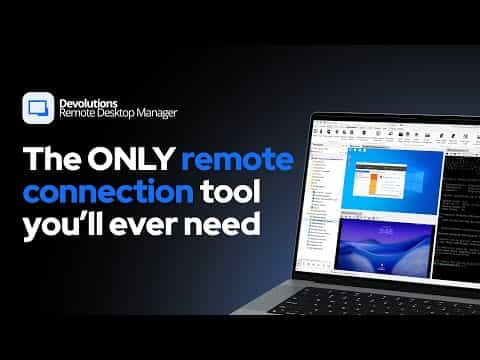
Remote Desktop Manager is an all‑in‑one remote connection and password management platform for IT teams, MSPs, and helpdesks. It centralizes all remote sessions, credentials, and privileged accounts in a secure, unified console to simplify and secure remote access.
Key features include centralized remote connection management, integrated password vault and privileged access management, granular access controls and role‑based permissions, strong authentication (including two‑factor), audit trails and activity tracking, real‑time monitoring and alerts, ticket and issue management, and collaboration tools for sharing sessions within teams. It offers extensive integrations (e.g., remote access tools, password managers, cloud services) plus reporting, dashboards, and mobile access, helping organizations improve security, compliance, and IT support efficiency.
- Centralized management of all remote connections
- Integrated password and privileged account vault
- Secure team sharing with granular permissions
- Wide protocol support and integrations
- Advanced logging, auditing, and session recording
- Cross-platform access with rich automation tools
Eligibility
Number of Seats/Users: Remote Desktop Manager offers discounts based on the number of users or seats. A higher volume typically leads to a better discount structure, especially for enterprise-level usage.
Commitment to a Long-Term Contract: Discounts are often provided to companies that commit to using the service for a longer period (e.g., 1-year or 3-year contracts). A longer commitment shows Remote Desktop Manager that the company is serious and willing to invest in the platform long-term.
No Active Discounts: Companies that are not already receiving other active discounts may have a better chance of qualifying for additional discounts from Remote Desktop Manager. Remote Desktop Manager reserves discounts for new customers or those not currently under promotional pricing.
Volume or Usage Commitment: Remote Desktop Manager offers discounts if you agree to a minimum amount of usage or transaction volume. This could be based on data storage, transactions, or other metrics tied to how much you will use the platform.
Enterprise-Level Negotiation: Companies that qualify as “enterprise” due to their size or complexity (e.g., having large teams, multiple departments, or geographical presence) may be eligible for additional discounts from Remote Desktop Manager. Such companies are often in a position to negotiate for better pricing.
Early Renewal or Prepayment: Remote Desktop Manager often offers discounts if you renew early or prepay for the entire contract period. This is a common approach to securing a lower price.

Remote Desktop Manager - Up to 45% off
Reviews
Here at Spendbase our internal data shows that Remote Desktop Manager is seen as a “must‑have” tool by most Spendbase clients who handle many remote endpoints and credentials every day.
Overall sentiment is very positive
– Ratings heavily cluster around 4–5 stars
– Clients repeatedly describe it as “indispensable”, “on steroids”, “holy grail”, and “one of the best tools” they use daily
Key strengths our clients highlight
– Centralization and productivity
– All RDP/SSH/VNC/website connections in one place
– Easy to manage a large number of customer and internal servers
– Great for MSPs, IT managers, helpdesk and devs handling many environments
- Credential and security management
- Secure storage of passwords, documents, and privileged accounts
- Ability to share credentials safely with teams
-
Strong fit for compliance tasks when combined with team features and vault integrations
-
Usability and interface
- Intuitive, tabbed, “single pane of glass” interface
- Fast to set up new sessions and VPN mappings
- Works across platforms (Windows, macOS, Linux, iOS), with Solo edition appreciated by individual users
Common pain points we see
– Performance
– Slow startup or lag with large databases or many entries
– Occasional lag in remote sessions; sometimes unclear if due to network or app
– Interface can feel heavy on high‑resolution displays
- Platform stability and UX gaps
- Crashes reported more often on Linux and some Mac/iOS quirks
- Confusing setup for non‑Windows OS connections
-
Context menus and configuration options can feel overwhelming
-
Password and recording features
- Some clients find the password/secret management view not comfortable enough for full migration
-
Session video recordings lack resolution and scaling, limiting workflow analysis
-
Pricing and packaging
- Perceived as a bit pricey for simple RDP‑only use cases
- Desire for a lighter, cheaper edition focused only on RDP for smaller teams
From a Spendbase discount standpoint, our takeaway is: Remote Desktop Manager delivers strong value for teams that truly leverage its broad feature set (vaults, VPN automation, scripts, logging). For simpler or RDP‑only scenarios, negotiating the right edition and user tiers is key to avoiding overpaying for functionality that will not be used.
See how much you can save on your stack
Pick your team’s tools!
Click to select one or more tools.


What’s your company size?
Just click to select.
What’s your business email?
We'll send you calculations right away
The email is flying to your inbox!
Beyond discounts, you may qualify for up to $100K in AWS credits.

FAQ
1. Are there any discounts available for Remote Desktop Manager?
Yes, we offer various discounts, including promotions and volume licensing deals. Contact our sales team for current offers.
2. Do you provide discounts for educational institutions?
Yes, educational institutions are eligible for special discounts. Please reach out to our sales department for more details.
3. Is there a discount for non-profit organizations?
Absolutely, we offer discounted rates for non-profits. Contact our sales team to learn more about these opportunities.
4. Can I get a discount for purchasing multiple licenses?
Yes, we provide volume discounts for bulk license purchases. Please contact our sales team for specific pricing information.
5. Are there seasonal promotions or sales for Remote Desktop Manager?
We occasionally run seasonal promotions. Stay updated by subscribing to our newsletter or following our social media channels.
6. Do you offer discounts for existing customers upgrading to a higher plan?
Yes, existing customers upgrading to a higher plan may be eligible for discounts. Contact our support team for assistance.
7. Is there a free trial available before purchasing?
Yes, we offer a free trial period for you to evaluate Remote Desktop Manager before making a purchase.
8. How can I stay informed about upcoming discounts and promotions?
To stay informed about upcoming discounts and promotions, subscribe to our newsletter or follow us on social media.
Related discounts

ServiceNow IT Operations Management
IT Management
Up to 40% off

Uniqkey
IT Management
Up to 20% off

Avast Essential Business Security
IT Management
Up to 50% off

myITprocess
IT Management
Up to 25% off

ServiceTonic
IT Management
Up to 30% off

Checkmk
IT Management
Up to 45% off
Software cost optimization
Remote Desktop Manager savings in five steps
Let’s estimate your potential savings and see how you can scale your cloud infrastructure.
One call. No cost. No commitments


meet vendor relationship EXPERTS
Our customers save millions with us



Save on Remote Desktop Manager
It’s time to shrink your bill
Let our SaaS cost optimization experts check what deals you can get and how much you can save on your corporate subscriptions
See how you can:
- Learn about pricing benchmarks and discounts
- Present potential savings by vendor to your team
- Meet your SaaS and cloud cost optimization goals
Get Remote Desktop Manager discount
We’ll email you back within 1 business day