











Sage 500 Discount - Up to 35% off
Enterprise resource planning solution that helps businesses manage accounting, finance, manufacturing, and supply chain processes.
Get discountCategory
Accounting Software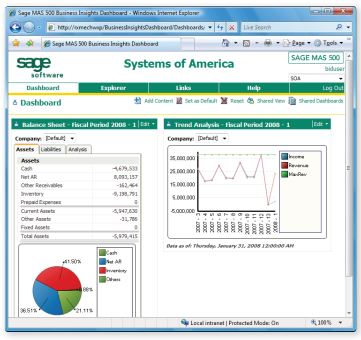
What is Sage 500?
Sage 500 is an enterprise resource planning (ERP) software designed to enhance operational efficiency for businesses, particularly in manufacturing and distribution sectors. Its core features include comprehensive financial management with modules for general ledger, accounts payable, and accounts receivable. The software offers robust inventory and warehouse management capabilities, supporting advanced features like bin tracking and three-step inventory transfers. Manufacturing management is streamlined through production scheduling, work order management, and quality control tools. Additionally, Sage 500 integrates customer relationship management (CRM) to manage customer interactions and sales pipelines, and provides business intelligence tools for real-time data analysis and reporting. As of December 31, 2024, Sage 500 has been discontinued.
- Integrated ERP for accounting and operations
- Comprehensive accounts receivable/payable management
- Real-time financial and inventory updates
- Advanced planning, forecasting, and budgeting tools
- Purchase order processing with three-way matching
- Robust system with low operating costs
Eligibility
Number of Seats/Users: Sage 500 offers discounts based on the number of users or seats. A higher volume typically leads to a better discount structure, especially for enterprise-level usage.
Commitment to a Long-Term Contract: Discounts are often provided to companies that commit to using the service for a longer period (e.g., 1-year or 3-year contracts). A longer commitment shows Sage 500 that the company is serious and willing to invest in the platform long-term.
No Active Discounts: Companies that are not already receiving other active discounts may have a better chance of qualifying for additional discounts from Sage 500. Sage 500 reserves discounts for new customers or those not currently under promotional pricing.
Volume or Usage Commitment: Sage 500 offers discounts if you agree to a minimum amount of usage or transaction volume. This could be based on data storage, transactions, or other metrics tied to how much you will use the platform.
Enterprise-Level Negotiation: Companies that qualify as “enterprise” due to their size or complexity (e.g., having large teams, multiple departments, or geographical presence) may be eligible for additional discounts from Sage 500. Such companies are often in a position to negotiate for better pricing.
Early Renewal or Prepayment: Sage 500 often offers discounts if you renew early or prepay for the entire contract period. This is a common approach to securing a lower price.

Sage 500 - Up to 35% off
Reviews
Here at Spendbase our internal data shows that Sage 500 is seen as a solid, workhorse ERP that does its job well, but often costs more than many teams feel is justified for what they actually use.
Key strengths our Spendbase clients highlight
– Reliability and stability
– “Very robust, keeps running” comes up a lot.
– Rare complaints about downtime or crashes.
- Core finance and ERP features
- Strong accounts payable workflows, especially:
- Easy three‑way match for PO‑based invoices
-
Covers accounting, finance, manufacturing, and supply chain well enough for mid‑sized and larger companies.
-
Ease of use in daily operations
- Once configured, day‑to‑day tasks (AP, POs, basic accounting) are straightforward.
- Users like the predictable workflows and low “surprise factor.”
Main pain points we see in our data
– Cost vs. actual usage
– Many clients say they use only a slice of Sage 500’s full capabilities.
– Licensing and maintenance feel high given that limited usage.
- Complexity of changes and configuration
- System changes and deeper customizations are viewed as “extremely complicated.”
-
This often means extra spend on consultants or internal IT time.
-
Limited product evolution
- “Little improvement in software” is a recurring theme.
-
Clients are sometimes confused by the number of overlapping products from the parent company and worry about roadmap and long‑term fit.
-
Traceability and manual tasks
- Manual posting is seen as hard to track back, which affects auditability and can increase finance team workload.
How this shapes our discount and optimization approach
When we negotiate Sage 500 contracts for clients, our internal benchmarks show the biggest savings usually come from:
– Right‑sizing licenses to match actual usage patterns
– Pushing for better terms when Sage 500 is used mostly for AP/GL and not the full ERP stack
– Leveraging the lack of active product innovation to argue for stronger discounts or flexible exit clauses
In short, Sage 500 fits organizations that value stability over cutting‑edge features, but it frequently has “extra” capacity you shouldn’t be overpaying for—and that’s exactly where we focus on getting you better pricing.
See how much you can save on your stack
Pick your team’s tools!
Click to select one or more tools.


What’s your company size?
Just click to select.
What’s your business email?
We'll send you calculations right away
The email is flying to your inbox!
Beyond discounts, you may qualify for up to $100K in AWS credits.

FAQ
1. What types of discounts are available in Sage 500?
Sage 500 offers early-payment, quantity, and item-specific discounts to enhance sales and customer satisfaction.
2. How do I set up quantity discounts in Sage 500?
Use the 'Maintain Quantity Discounts' feature to define discounts based on purchase quantities, applying them to specific inventory items.
3. Can I apply discounts to specific customers in Sage 500?
Yes, assign permanent discounts to individual customers by updating their records, ensuring personalized pricing.
4. Is it possible to offer early-payment discounts in Sage 500?
Absolutely, configure early-payment terms to incentivize prompt payments, benefiting both cash flow and customer relations.
5. How do I track discounts applied to sales in Sage 500?
Sage 500 records discounts in the Sales Discounts account, providing clear visibility into discount-related transactions.
6. Can I apply multiple discounts to a single transaction in Sage 500?
Yes, combine different discount types on a single transaction to offer tailored pricing strategies.
7. How do I ensure discounts are applied correctly in Sage 500?
Regularly review discount settings and transaction records to confirm accurate application and maintain pricing integrity.
Related discounts

MoneyMonk
Accounting Software
Up to 25% off

Unanet ERP AE
Accounting Software
Up to 25% off

FinanEDI
Accounting Software
Up to 30% off

OneStream
Accounting Software
Up to 20% off

Visual Lease
Accounting Software
Up to 20% off

Nube3i
Accounting Software
Up to 25% off
Software cost optimization
Sage 500 savings in five steps
Let’s estimate your potential savings and see how you can scale your cloud infrastructure.
One call. No cost. No commitments


meet vendor relationship EXPERTS
Our customers save millions with us



Save on Sage 500
It’s time to shrink your bill
Let our SaaS cost optimization experts check what deals you can get and how much you can save on your corporate subscriptions
See how you can:
- Learn about pricing benchmarks and discounts
- Present potential savings by vendor to your team
- Meet your SaaS and cloud cost optimization goals
Get Sage 500 discount
We’ll email you back within 1 business day