











SAP Build Discount - Up to 15% off
SAP Build is a low-code platform that helps businesses create applications, business sites, and automate processes with drag-and-drop.
Get discountCategory
Business Process Management Software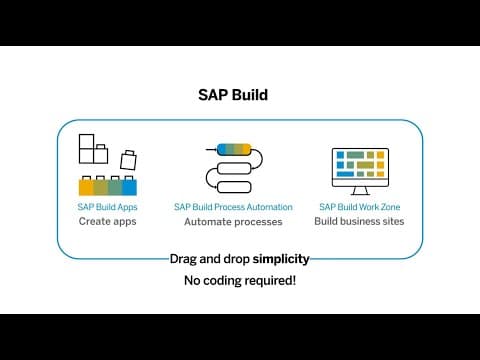


What is SAP Build?
SAP Build is a low-code solution that enables businesses to accelerate development and automation without the need for coding. It is designed to cater to both technical and non-technical users, providing drag-and-drop simplicity for creating enterprise apps, automating processes, and designing business sites.
Key features include:
-
Application Development: Build web and mobile applications using a visual interface.
-
Workflow Management: Automate business processes and manual tasks with drag-and-drop simplicity.
-
Business Process Management: Design digital workspaces connecting applications for seamless collaboration.
SAP Build is part of the SAP Business Technology Platform, offering tools like SAP Build Apps, SAP Build Process Automation, and SAP Build Work Zone to facilitate development and process management with minimal coding.
- Low-code, no-code enterprise application development
- Drag-and-drop, intuitive UI for building
- Business process automation and workflow orchestration
- Cross-platform web, desktop, and mobile support
- Prebuilt templates and reusable UI components
- Collaboration between technical and non-technical users
Eligibility
Number of Seats/Users: SAP Build offers discounts based on the number of users or seats. A higher volume typically leads to a better discount structure, especially for enterprise-level usage.
Commitment to a Long-Term Contract: Discounts are often provided to companies that commit to using the service for a longer period (e.g., 1-year or 3-year contracts). A longer commitment shows SAP Build that the company is serious and willing to invest in the platform long-term.
No Active Discounts: Companies that are not already receiving other active discounts may have a better chance of qualifying for additional discounts from SAP Build. SAP Build reserves discounts for new customers or those not currently under promotional pricing.
Volume or Usage Commitment: SAP Build offers discounts if you agree to a minimum amount of usage or transaction volume. This could be based on data storage, transactions, or other metrics tied to how much you will use the platform.
Enterprise-Level Negotiation: Companies that qualify as “enterprise” due to their size or complexity (e.g., having large teams, multiple departments, or geographical presence) may be eligible for additional discounts from SAP Build. Such companies are often in a position to negotiate for better pricing.
Early Renewal or Prepayment: SAP Build often offers discounts if you renew early or prepay for the entire contract period. This is a common approach to securing a lower price.

SAP Build - Up to 15% off
Reviews
Here at Spendbase our internal data shows that SAP Build is generally seen as a strong, cost-effective low‑code platform, especially for teams already invested in the SAP ecosystem.
From what Spendbase clients share, the main strengths are:
- Ease of use and speed
- Drag-and-drop interface and “no-code” feel make it possible to build apps and automations fast.
- Prebuilt templates and a rich control library reduce build time and dev effort.
-
Many clients mention using it daily for core work, which signals high adoption.
-
Business impact
- Helps simplify workloads and automate repetitive tasks.
- Supports cross‑platform app development (desktop and mobile).
-
Good fit for co-development across multiple teams, improving collaboration.
-
Perceived value for money
- Clients frequently associate SAP Build with “value for money” and faster deployment, which is key for ROI.
At the same time, our internal feedback surfaces several friction points that matter for budgeting and adoption:
- Pricing and program limits
- Non‑SAP customers especially find pricing and thresholds confusing.
- There is uncertainty about when usage will exceed free or included tiers, which can create surprise costs.
-
This is exactly where a structured discount and usage optimization strategy can save money.
-
Product and experience gaps
- Occasional freezes, forced sign-outs, and cloud function errors.
- Confusing password reset experience.
- Challenges exporting apps to mobile platforms.
- Documentation and community support are perceived as weaker than ideal.
- Learning curve exists, particularly for non-technical end users.
- Change management for multi-team setups can be complex without clear governance.
From a Spendbase discount and optimization standpoint, our takeaway is:
- SAP Build is a good candidate for:
- Negotiating clearer pricing tiers and volume or commitment discounts.
- Actively monitoring usage to avoid crossing free/limited thresholds unintentionally.
- Structuring licenses and environments by team (dev vs business users) to reduce waste.
In short, SAP Build delivers strong functional value, but to keep the TCO in check, you want tight control over pricing structure, usage, and support expectations—areas where we typically help our clients save.
See how much you can save on your stack
Pick your team’s tools!
Click to select one or more tools.


What’s your company size?
Just click to select.
What’s your business email?
We'll send you calculations right away
The email is flying to your inbox!
Beyond discounts, you may qualify for up to $100K in AWS credits.

FAQ
1. How can I activate additional overall discounts in SAP Business ByDesign?
Enable the 'Do you want additional discounts at document level' option in Business Configuration under General Business Data.
2. What is the maximum discount percentage I can set for sales users in SAP CPQ?
You can set a maximum discount percentage for sales users by configuring discount rules in SAP CPQ's setup.
3. How do I apply a coupon to specific products in SAP Customer Checkout?
Specify discount rules for coupons to apply them to articles, sales items, or receipts in SAP Customer Checkout.
4. Can I set up promotions for specific product categories in SAP CPQ?
Yes, SAP CPQ allows you to configure promotions for specific products, product types, or product categories.
5. How are discounts calculated when multiple discounts apply to a product in SAP Commerce Cloud?
SAP Commerce Cloud accumulates all applicable discounts for a product, applying each one to determine the final price.
6. Is there a limit to the number of promotions I can create in SAP Commerce Cloud?
Performance issues may arise after 2,000-3,000 promotions; it's recommended to keep the number below 10,000.
7. Why aren't discounts and prices refreshed in purchase orders created through the Procurement Confirmation Wizard?
Discounts and prices may not recalculate when quantity changes if volume discounts are defined; ensure settings allow for recalculations.
8. How can I prevent automatic transfer of manual pricing conditions between items in a purchase order?
To prevent this, configure the pricing procedure to avoid automatic transfer of manual pricing conditions between items.
Related discounts

Minitab Engage
Business Process Management Software
Up to 20% off

FloWave
Business Process Management Software
Up to 25% off

ServiceTracer
Business Process Management Software
Up to 35% off

Cargosnap
Business Process Management Software
Up to 25% off

TIBCO BusinessEvents
Business Process Management Software
Up to 35% off

Navvia
Business Process Management Software
Up to 15% off
Software cost optimization
SAP Build savings in five steps
Let’s estimate your potential savings and see how you can scale your cloud infrastructure.
One call. No cost. No commitments


meet vendor relationship EXPERTS
Our customers save millions with us



Save on SAP Build
It’s time to shrink your bill
Let our SaaS cost optimization experts check what deals you can get and how much you can save on your corporate subscriptions
See how you can:
- Learn about pricing benchmarks and discounts
- Present potential savings by vendor to your team
- Meet your SaaS and cloud cost optimization goals
Get SAP Build discount
We’ll email you back within 1 business day