











SmartTouch POS Discount - Up to 35% off
SmartTouch POS is the powerful automation system for restaurants, cafés, shops or street-foodsL
Get discountCategory
Point of Sale Software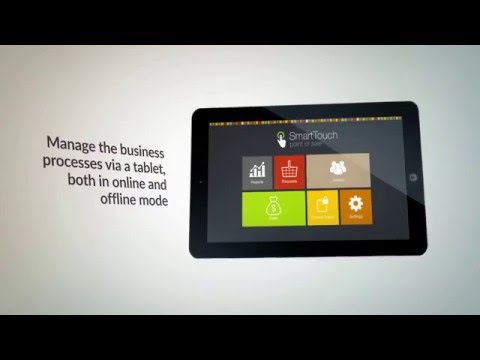
What is SmartTouch POS?
SmartTouch POS transforms tablets into efficient sales systems, ideal for restaurants, street food vendors, and retail shops. It offers comprehensive features including sales processing, waiter mode for table management, and detailed reporting. The web admin panel provides access to inventory management, user permissions, and consolidated reports, ensuring streamlined operations.
- Turns tablets into full-featured POS system
- Waiter mode with table-based order management
- Web admin panel for inventory management
- Consolidated reporting and detailed sales analytics
- User lists with customizable access permissions
- Fast, intuitive interface for quick ordering
Eligibility
Number of Seats/Users: SmartTouch POS offers discounts based on the number of users or seats. A higher volume typically leads to a better discount structure, especially for enterprise-level usage.
Commitment to a Long-Term Contract: Discounts are often provided to companies that commit to using the service for a longer period (e.g., 1-year or 3-year contracts). A longer commitment shows SmartTouch POS that the company is serious and willing to invest in the platform long-term.
No Active Discounts: Companies that are not already receiving other active discounts may have a better chance of qualifying for additional discounts from SmartTouch POS. SmartTouch POS reserves discounts for new customers or those not currently under promotional pricing.
Volume or Usage Commitment: SmartTouch POS offers discounts if you agree to a minimum amount of usage or transaction volume. This could be based on data storage, transactions, or other metrics tied to how much you will use the platform.
Enterprise-Level Negotiation: Companies that qualify as “enterprise” due to their size or complexity (e.g., having large teams, multiple departments, or geographical presence) may be eligible for additional discounts from SmartTouch POS. Such companies are often in a position to negotiate for better pricing.
Early Renewal or Prepayment: SmartTouch POS often offers discounts if you renew early or prepay for the entire contract period. This is a common approach to securing a lower price.

SmartTouch POS - Up to 35% off
Reviews
Here at Spendbase our internal data shows that SmartTouch POS is especially popular with cafes, small restaurants, and street‑food businesses that want a simple tablet-based system without heavy setup or training.
From what Spendbase clients share with us, the strongest positives cluster around:
- Ease of use
- Simple, self-explanatory interface
- Menu items logically grouped (meats, seafood, sandwiches, etc.)
- Staff can usually place orders in under a minute after a short learning period
-
Minimal training costs for new hires
-
Speed of service
- Faster order entry compared with older POS systems
- Quicker table turnover and less time “searching the screen”
-
Waiter/table mode makes managing multiple tables smoother
-
Operational control
- Web admin panel is appreciated for:
- Inventory tracking
- User and permission management
- Consolidated sales and performance reports
- Better visibility into what’s selling and where margins are
At the same time, Spendbase clients consistently point out a few friction points:
- Catalog & menu maintenance
- New or uncommon drinks often need to be typed in manually
- Keeping the database of items updated can be a bit tedious for fast-changing menus
- Configuration time
- Initial setup of categories, modifiers, and recipes can take some effort
- Smaller teams sometimes postpone fine-tuning, which limits the benefits of reporting
From a cost-optimization angle, our internal data shows that:
- Many businesses initially overestimate how many terminals or user licenses they need.
- The most efficient setups typically:
- Run SmartTouch POS on a small fleet of shared tablets
- Keep a tight, well-structured product list to speed up orders
- Actively use web reports to adjust staffing and menu pricing
Overall, Spendbase clients see SmartTouch POS as:
- A fast, lightweight way to replace traditional cash registers
- Strong on usability and daily operations
- Still evolving in how easily it handles expanding or frequently changing drink and menu lists
See how much you can save on your stack
Pick your team’s tools!
Click to select one or more tools.


What’s your company size?
Just click to select.
What’s your business email?
We'll send you calculations right away
The email is flying to your inbox!
Beyond discounts, you may qualify for up to $100K in AWS credits.

FAQ
1. How do I apply a discount to a specific item in SmartTouch POS?
Select the item, press 'Discount', choose the discount type, and enter the value to apply it.
2. Can I set up automatic discounts in SmartTouch POS?
Yes, configure automatic discounts to apply when specific conditions are met, streamlining the checkout process.
3. Is it possible to restrict discounts to certain categories or items?
Yes, you can configure categories or items to be non-discountable, ensuring discounts apply only where intended.
4. How do I create a 'Buy One Get One' (BOGO) offer in SmartTouch POS?
Set up a 'Buy X Get Y' discount, specifying the items and conditions for the promotion.
5. Can I apply a discount to the entire order in SmartTouch POS?
Yes, select the sale, press 'Discount', choose the discount type, and enter the value to apply it to the whole order.
6. How do I prevent unauthorized discount application by staff?
Enable manager authorization for discounts, requiring approval from a manager-level staff member at the time of use.
7. Does SmartTouch POS offer a free trial?
Yes, SmartTouch POS offers a free trial without requiring credit card details.
8. What support options are available for SmartTouch POS users?
Support is available via chat, with representatives available Monday-Friday: 7am-9pm PDT, and Saturday-Sunday: 8am-9pm PDT.
Related discounts

Crimson Retail Suite
Point of Sale Software
Up to 25% off

ORTY
Point of Sale Software
Up to 40% off

Primaseller
Point of Sale Software
Up to 20% off

Nex
Point of Sale Software
Up to 20% off

ARBA POS
Point of Sale Software
Up to 35% off

E- Wine Liquor POS
Point of Sale Software
Up to 45% off
Software cost optimization
SmartTouch POS savings in five steps
Let’s estimate your potential savings and see how you can scale your cloud infrastructure.
One call. No cost. No commitments


meet vendor relationship EXPERTS
Our customers save millions with us



Save on SmartTouch POS
It’s time to shrink your bill
Let our SaaS cost optimization experts check what deals you can get and how much you can save on your corporate subscriptions
See how you can:
- Learn about pricing benchmarks and discounts
- Present potential savings by vendor to your team
- Meet your SaaS and cloud cost optimization goals
Get SmartTouch POS discount
We’ll email you back within 1 business day