











SocialSchedules Discount - Up to 40% off
SocialSchedules is a free employee scheduling tool for web & mobile. Build your schedule in minutes & send it to your team in a click.
Get discountCategory
Calendar Software



What is SocialSchedules?
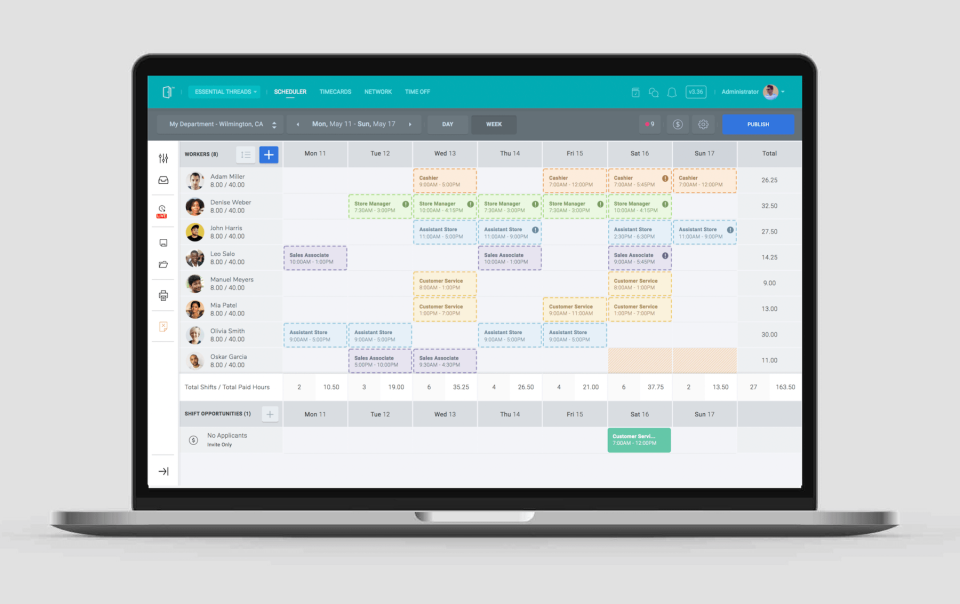
SocialSchedules, formerly known as OpenSimSim, is a workforce management platform designed for businesses with hourly employees. It offers features such as employee scheduling, time tracking, and team communication. Managers can create and distribute schedules efficiently, while employees can view their shifts, request time off, and swap shifts via mobile apps. The platform includes real-time time tracking with geofencing, in-app messaging for streamlined communication, and reporting tools to monitor labor costs and productivity. SocialSchedules aims to optimize labor costs, enhance employee engagement, and ensure compliance with labor laws.
- Easy schedule building and editing
- Free mobile apps, always up-to-date
- Employee self-service: availability, requests, swaps
- Group messaging and in-app notifications
- Time-off tracking and labor forecasting
- POS integration and multi-location support
Eligibility
Number of Seats/Users: SocialSchedules offers discounts based on the number of users or seats. A higher volume typically leads to a better discount structure, especially for enterprise-level usage.
Commitment to a Long-Term Contract: Discounts are often provided to companies that commit to using the service for a longer period (e.g., 1-year or 3-year contracts). A longer commitment shows SocialSchedules that the company is serious and willing to invest in the platform long-term.
No Active Discounts: Companies that are not already receiving other active discounts may have a better chance of qualifying for additional discounts from SocialSchedules. SocialSchedules reserves discounts for new customers or those not currently under promotional pricing.
Volume or Usage Commitment: SocialSchedules offers discounts if you agree to a minimum amount of usage or transaction volume. This could be based on data storage, transactions, or other metrics tied to how much you will use the platform.
Enterprise-Level Negotiation: Companies that qualify as “enterprise” due to their size or complexity (e.g., having large teams, multiple departments, or geographical presence) may be eligible for additional discounts from SocialSchedules. Such companies are often in a position to negotiate for better pricing.
Early Renewal or Prepayment: SocialSchedules often offers discounts if you renew early or prepay for the entire contract period. This is a common approach to securing a lower price.

SocialSchedules - Up to 40% off
Reviews
Here at Spendbase our internal data shows that SocialSchedules (formerly OpenSimSim) performs very well for small and mid-sized teams that need flexible, low-cost scheduling.
From our clients’ feedback, key strengths are:
- Cost & value
- Free tier is a big win for:
- Small businesses
- Non‑profits
- Volunteer organizations
-
Many Spendbase clients say they cut admin time significantly compared to paper or manual spreadsheets, without adding software cost.
-
Ease of use
- Simple setup; managers and even “non‑tech” staff adopt it quickly.
- Drag‑and‑drop weekly views, shift templates, and “copy/paste previous weeks” are heavily used.
-
Multi‑location and multi‑department views are appreciated in hospitality, retail, and clubs.
-
Mobile experience
- iOS/Android apps are used daily:
- Staff check schedules, see next shift countdown, and request time off.
- Managers make edits on the go and handle call‑ins remotely.
-
Landscape weekly view on phones is specifically praised.
-
Collaboration & self-service
- Group messaging replaces mass emails and speeds up last‑minute changes.
- Shift swapping, dropping, and open shifts reduce manager workload.
- Staff availability input and time‑off requests improve fairness and clarity.
Our internal data also highlights recurring pain points:
- Feature gaps
- No or limited:
- Recurring shifts / master roster editing
- Month‑view printing
- Audit trail of who changed which shift
- Quick view of employee weekly hour targets/preferences
- “Manager view” simulation of the employee app
-
Time & attendance (clock‑in) pricing can be expensive for very large, infrequent workforces; some clients would prefer a flat fee instead of per-user.
-
UX & performance issues
- Some latency in messaging and mobile app lag when posting shifts.
- Hard to see entire large teams without constant scrolling; zoom options are requested.
- Notification system for chat/messages can be too easy to miss.
-
Auto log‑out on shared work computers is seen as disruptive.
-
Scheduling patterns
- Businesses with irregular or multiple daily shifts want faster ways to create intervals.
- Volunteer groups that only operate on weekends would like to hide unused weekdays.
From a Spendbase savings perspective:
SocialSchedules delivers strong ROI on its free tier for most small teams. For larger organizations, the main optimization opportunity is negotiating or right‑sizing paid time‑tracking features so you’re not overpaying for occasional users.
See how much you can save on your stack
Pick your team’s tools!
Click to select one or more tools.


What’s your company size?
Just click to select.
What’s your business email?
We'll send you calculations right away
The email is flying to your inbox!
Beyond discounts, you may qualify for up to $100K in AWS credits.

FAQ
1. What pricing plans does SocialSchedules offer?
We offer Free, Starter, Premium, and Enterprise plans to suit various business needs.
2. Are there discounts for annual subscriptions?
Yes, switching to an annual subscription saves 20-25% compared to monthly billing.
3. Is there a free trial available?
We offer a free plan with basic features; no time-limited free trial is provided.
4. Can I upgrade or downgrade my plan anytime?
Yes, you can change your plan at any time; upgrades are billed upfront.
5. How does billing work for SocialSchedules?
All plans are billed upfront and automatically renew unless canceled.
6. Do you offer discounts for multiple locations?
Our pricing is per location; please contact us for potential multi-location discounts.
7. Are there any setup fees for new accounts?
No, there are no setup fees; you can start using SocialSchedules immediately.
8. Is customer support available for all plans?
Yes, all plans include access to our customer support team for assistance.
Related discounts

Pro Schedule
Calendar Software
Up to 40% off

TimeTap
Calendar Software
Up to 50% off

DaySmart Appointments
Calendar Software
Up to 25% off

GlossGenius
Calendar Software
Up to 20% off

Salon Booking System
Calendar Software
Up to 20% off

UpKeep
Calendar Software
Up to 30% off
Software cost optimization
SocialSchedules savings in five steps
Let’s estimate your potential savings and see how you can scale your cloud infrastructure.
One call. No cost. No commitments


meet vendor relationship EXPERTS
Our customers save millions with us



Save on SocialSchedules
It’s time to shrink your bill
Let our SaaS cost optimization experts check what deals you can get and how much you can save on your corporate subscriptions
See how you can:
- Learn about pricing benchmarks and discounts
- Present potential savings by vendor to your team
- Meet your SaaS and cloud cost optimization goals
Get SocialSchedules discount
We’ll email you back within 1 business day