











SQ CAD Discount - Up to 25% off
3D CAD tool in Japanese that helps engineers design products, check interference, and access built-in parts libraries.
Get discountCategory
3D CAD Software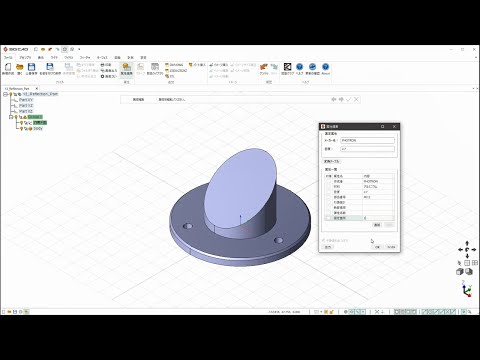
What is SQ CAD?
SQ CAD is a 3D computer-aided design tool developed for engineering professionals in Japan. It streamlines parts, jig, and equipment layout design, facilitating communication between engineers. Users can import data from major 3D CAD tools, convert with high accuracy, and share files in 3D PDF and STL formats with organizations that don’t use 3D CAD tools. The tool reads attribute data from ready-made parts, accurately determining mass even for large assemblies. It supports procurement by exporting editable parts data to Excel. The dynamic interference display tool enables users to rotate shapes and check for interference. Isometric views, cross-sections, and drawings from 3D models can be exported as 2D drawings with real-time updates. Additional features include gradient analysis, open edge highlighting, and a library of ready-made, user-registered, and frequently used parts.
Based on the provided product data, here are six key features of SQ CAD:
- Accurate conversion of major 3D CAD formats
- Export to 3D PDF and STL
- Precise mass calculation for assemblies
- Dynamic interference detection tool
- Real-time 2D drawing updates
- Comprehensive parts and tools library
Eligibility
Number of Seats/Users: SQ CAD offers discounts based on the number of users or seats. A higher volume typically leads to a better discount structure, especially for enterprise-level usage.
Commitment to a Long-Term Contract: Discounts are often provided to companies that commit to using the service for a longer period (e.g., 1-year or 3-year contracts). A longer commitment shows SQ CAD that the company is serious and willing to invest in the platform long-term.
No Active Discounts: Companies that are not already receiving other active discounts may have a better chance of qualifying for additional discounts from SQ CAD. SQ CAD reserves discounts for new customers or those not currently under promotional pricing.
Volume or Usage Commitment: SQ CAD offers discounts if you agree to a minimum amount of usage or transaction volume. This could be based on data storage, transactions, or other metrics tied to how much you will use the platform.
Enterprise-Level Negotiation: Companies that qualify as “enterprise” due to their size or complexity (e.g., having large teams, multiple departments, or geographical presence) may be eligible for additional discounts from SQ CAD. Such companies are often in a position to negotiate for better pricing.
Early Renewal or Prepayment: SQ CAD often offers discounts if you renew early or prepay for the entire contract period. This is a common approach to securing a lower price.

SQ CAD - Up to 25% off
Reviews
Hello! As a Spendbase discount specialist, I’m here to share some insights based on our internal data regarding SQ CAD, a 3D computer-aided design tool developed for engineering professionals in Japan. Here’s what we’ve gathered:
Key Features Highlighted by Spendbase Clients:
-
High-Accuracy Data Import: Clients appreciate SQ CAD’s ability to import data from major 3D CAD tools with high accuracy, ensuring seamless integration into existing workflows.
-
Versatile File Sharing: The capability to share files in 3D PDF and STL formats is particularly valued, especially when collaborating with organizations that don’t use 3D CAD tools.
-
Comprehensive Attribute Data Reading: The tool’s proficiency in reading attribute data from ready-made parts and accurately determining mass, even for large assemblies, stands out as a significant advantage.
-
Procurement Integration: Clients find the feature that allows outsourcing editable parts data to Excel beneficial for streamlining procurement processes.
-
Dynamic Interference Display: The dynamic interference display tool, which enables users to gyrate the shape and check for interference, is noted for enhancing design accuracy.
-
Real-Time 2D Drawing Export: The ability to export isometric views, cross-sections, and drawings from 3D models as 2D drawings with real-time updates is highly regarded.
-
Additional Features: Clients also highlight the gradient analysis, open edge highlighting, and the library of ready-made, user-registered, and frequently used parts as valuable additions.
Considerations:
-
Learning Curve: Some clients mention a learning curve associated with mastering all the features, especially for those new to 3D CAD tools.
-
System Requirements: A few clients note that the software requires a robust system to run smoothly, which might necessitate hardware upgrades.
Overall Sentiment:
Our internal data indicates that SQ CAD is well-received among engineering professionals for its comprehensive features and user-friendly interface. While there are considerations regarding the learning curve and system requirements, the tool’s benefits in streamlining design processes and enhancing collaboration are highly valued.
I hope this analysis provides a clear overview of SQ CAD’s strengths and areas to consider. If you have any further questions or need additional information, feel free to ask!
See how much you can save on your stack
Pick your team’s tools!
Click to select one or more tools.


What’s your company size?
Just click to select.
What’s your business email?
We'll send you calculations right away
The email is flying to your inbox!
Beyond discounts, you may qualify for up to $100K in AWS credits.

FAQ
1. How can I apply a discount to an entire sale?
In the Square app, tap 'Review sale' > 'Add discount', select the desired discount, then complete the transaction.
2. Can I apply discounts to individual items?
Yes, tap the item in the sale, select the discount, and save. Then proceed to charge and complete the transaction.
3. How do automatic discounts work?
Automatic discounts apply when set conditions are met, such as specific items added or a minimum quantity reached.
4. Can I apply multiple discounts to a single sale?
Yes, multiple discounts can be applied; they will compound in ascending order, starting with the lower percentage.
5. How do I create a 'Buy One, Get One' discount?
Set up an automatic discount with the 'Buy One, Get One' rule, specifying the items and discount percentage.
6. Can I set discounts for specific customer groups?
Yes, create customer groups in Square Customer Directory and assign discounts that apply automatically during transactions.
7. How do I manage existing discounts?
In your Square Dashboard, go to 'Items' > 'Discounts' to edit or delete existing discounts as needed.
8. Are there restrictions on applying discounts?
A specific discount can only be applied once per sale; percentage discounts can apply to items or entire sales, while amount discounts apply to entire sales.
Related discounts

Inventor
3D CAD Software
Up to 20% off

FEM Design
3D CAD Software
Up to 15% off

Metrica TOPO
3D CAD Software
Up to 20% off

pvDesign
3D CAD Software
Up to 45% off

Almacam
3D CAD Software
Up to 15% off

PaleBlue
3D CAD Software
Up to 50% off
Software cost optimization
SQ CAD savings in five steps
Let’s estimate your potential savings and see how you can scale your cloud infrastructure.
One call. No cost. No commitments


meet vendor relationship EXPERTS
Our customers save millions with us



Save on SQ CAD
It’s time to shrink your bill
Let our SaaS cost optimization experts check what deals you can get and how much you can save on your corporate subscriptions
See how you can:
- Learn about pricing benchmarks and discounts
- Present potential savings by vendor to your team
- Meet your SaaS and cloud cost optimization goals
Get SQ CAD discount
We’ll email you back within 1 business day