











SumUp Point of Sale Discount - Up to 15% off
The SumUp Point of Sale: Grow your business and build your customer base with every transaction.
Get discountCategory
Retail Management Software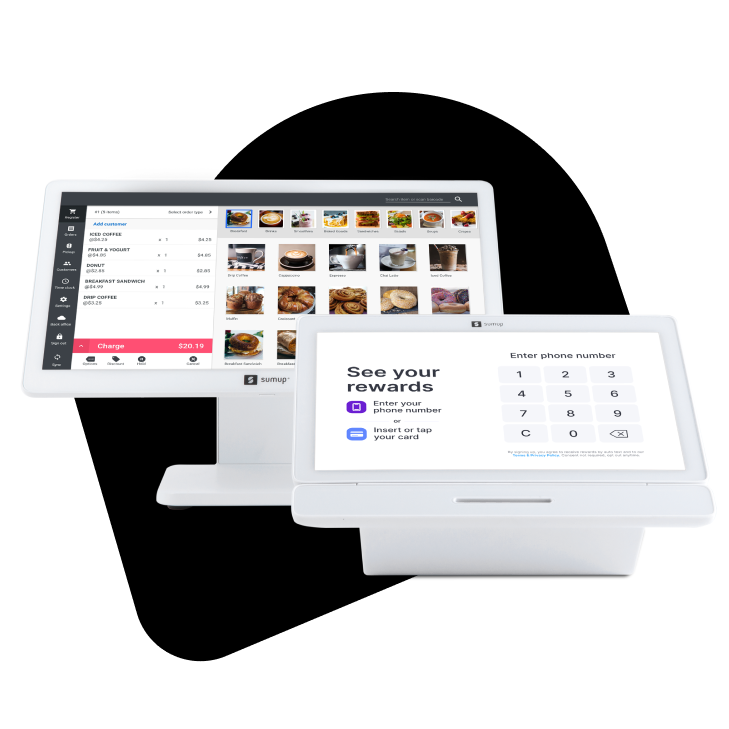
What is SumUp Point of Sale?
SumUp Point of Sale is a cloud-based system designed to streamline business operations and enhance customer engagement. It offers seamless payment processing, real-time inventory management, and detailed sales reporting. The platform includes customer loyalty programs, automated marketing campaigns, and staff management tools. Its intuitive interface supports both online and in-person transactions, making it suitable for various industries such as retail, hospitality, and service-based businesses.
Looking for a great deal on SumUp Point of Sale?
Good news! SumUp Point of Sale is currently offering discounts of up to 15% off regular subscription rates. This is your chance to leverage premium photo editing tools to enhance team coordination and productivity at a significantly reduced cost.
- Easy to use, intuitive interface
- Supports in-person and online payments
- Integrated automated marketing campaigns
- Customizable sales and stock reporting
- Quick setup with multiple payment devices
- Customer loyalty registration before payment
Eligibility
Number of Seats/Users: SumUp Point of Sale offers discounts based on the number of users or seats. A higher volume typically leads to a better discount structure, especially for enterprise-level usage.
Commitment to a Long-Term Contract: Discounts are often provided to companies that commit to using the service for a longer period (e.g., 1-year or 3-year contracts). A longer commitment shows SumUp Point of Sale that the company is serious and willing to invest in the platform long-term.
No Active Discounts: Companies that are not already receiving other active discounts may have a better chance of qualifying for additional discounts from SumUp Point of Sale. SumUp Point of Sale reserves discounts for new customers or those not currently under promotional pricing.
Volume or Usage Commitment: SumUp Point of Sale offers discounts if you agree to a minimum amount of usage or transaction volume. This could be based on data storage, transactions, or other metrics tied to how much you will use the platform.
Enterprise-Level Negotiation: Companies that qualify as “enterprise” due to their size or complexity (e.g., having large teams, multiple departments, or geographical presence) may be eligible for additional discounts from SumUp Point of Sale. Such companies are often in a position to negotiate for better pricing.
Early Renewal or Prepayment: SumUp Point of Sale often offers discounts if you renew early or prepay for the entire contract period. This is a common approach to securing a lower price.

SumUp Point of Sale - Up to 15% off
Reviews
Here at Spendbase, our internal data shows that SumUp Point of Sale (POS) stands out for its user-friendly design, versatility, and quick setup. Most Spendbase clients highlight the ease of integrating SumUp POS into their existing workflows, saving both time and stress for busy business owners.
Key strengths observed:
– Super simple to set up and use—often ready within half an hour.
– Modern design with a style that many compare to Apple products.
– Works both online and offline, supporting payments at physical locations and online stores.
– International support—especially valued by traveling businesses or those selling in different countries.
– Supports contactless/NFC payments (though some clients want more compatibility with all financial institutions).
– Fast and intuitive reporting, highlighting which products or services generate the most revenue.
– Good support team, with prompt responses for delivery or technical issues.
– Flexible for many business types, like retail, restaurants, events, and creative businesses.
Areas for improvement identified by Spendbase clients:
– Sales reports are basic and lack deep customization. Users want more detailed analytics and better export options.
– Customization is limited—especially for invoices, user interfaces, and brand-specific payment pages.
– Some functionalities are only available in the “Pro Plan,” so clients feel pushed toward paid upgrades.
– Coverage and connectivity problems can occur, especially in rural areas or places with weak internet.
– Setting up bank accounts across countries can be a headache for businesses operating internationally.
– Some incompatibility with certain Android devices (like Huawei), which can usually be fixed by switching devices.
– Pricing for hardware and subscriptions feels high to some, especially compared to competitors.
– Occasional system outages, although described as less frequent than with previous POS solutions.
Most-loved features:
– Mobile access: Suitable for teams on the go—major plus for bands, event sellers, and pop-up retailers.
– All-in-one integration: Accepts multiple forms of payment, makes tracking sales easy, and even supports inventory and table management for cafes/restaurants.
– Seamless customer experience: Clients appreciate loyalty features and a smooth checkout process.
Improvement wishes from Spendbase clients:
– More advanced reporting and analytics.
– Ability to customize branding and invoices.
– Better reliability in areas with poor internet access.
In summary, Spendbase clients find SumUp POS to be a handy, stylish, and reliable choice—especially for growing or mobile businesses. Most are happy with their experience, but there is clear demand for more customization, richer analytics, and better support for rural or international operations.
See how much you can save on your stack
Pick your team’s tools!
Click to select one or more tools.


What’s your company size?
Just click to select.
What’s your business email?
We'll send you calculations right away
The email is flying to your inbox!
Beyond discounts, you may qualify for up to $100K in AWS credits.

FAQ
1. How do I create a custom discount in SumUp POS?
Navigate to Settings > Back Office > Configuration > Your Discounts, then click 'New Discount' to set up your custom discount.
2. Can I apply a discount to a specific item in an order?
Yes, slide the item left on the payment screen, select 'Discount,' choose percentage or amount, and apply.
3. Is it possible to offer a product for free in an order?
Yes, slide the product left on the payment screen and select 'Invite' to mark it as paid.
4. How do I activate personalized discounts in SumUp POS?
Go to Back Office > Configuration > Modules > Payment Settings, activate 'Custom discounts,' then refresh to access 'Your Discounts.'
5. Can I apply a cash discount to an invoice?
Yes, specify the discount terms in the invoice's payment terms, e.g., '5/10, net 30' for a 5% discount if paid within 10 days.
6. How do I apply a discount to an entire order?
On the payment screen, tap the discount icon, choose percentage or amount, and apply to the whole order.
7. Are there different types of discounts I can offer?
Yes, you can offer trade discounts (e.g., quantity, seasonal) and cash discounts for early payments.
8. How do I manage my menu in SumUp POS?
You can add taxes, categories, and products, and edit or delete items through the Back Office settings.
Related discounts

PHP Point of Sale
Retail Management Software
Up to 25% off

Work&Track Mobile
Retail Management Software
Up to 25% off

True Client Pro
Retail Management Software
Up to 15% off

AIM
Retail Management Software
Up to 15% off

RunIt RealTime Cloud
Retail Management Software
Up to 15% off

Shopify POS
Retail Management Software
Up to 25% off
Software cost optimization
SumUp Point of Sale savings in five steps
Let’s estimate your potential savings and see how you can scale your cloud infrastructure.
One call. No cost. No commitments


meet vendor relationship EXPERTS
Our customers save millions with us



Save on SumUp Point of Sale
It’s time to shrink your bill
Let our SaaS cost optimization experts check what deals you can get and how much you can save on your corporate subscriptions
See how you can:
- Learn about pricing benchmarks and discounts
- Present potential savings by vendor to your team
- Meet your SaaS and cloud cost optimization goals
Get SumUp Point of Sale discount
We’ll email you back within 1 business day