











SWING Seascape for Notes Discount - Up to 25% off
Seascape for Notes extracts IBM Lotus Notes historical data into stand-alone PDF/XML/JSON archives, or SharePoint libraries.
Get discountCategory
Data Management Software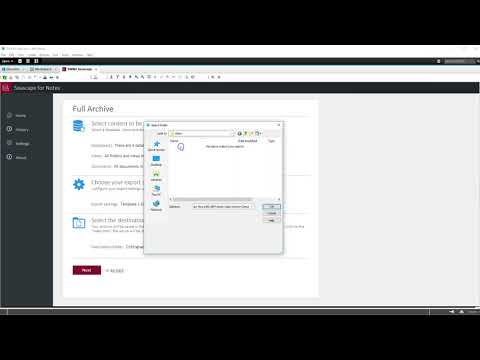
What is SWING Seascape for Notes?
SWING Seascape for Notes is a data management tool designed to extract and archive IBM Lotus Notes databases. It exports data into stand-alone PDF, XML, or JSON formats, preserving documents, views, links, and metadata. Key features include the ability to upload archived documents to Microsoft SharePoint or Office 365, facilitating seamless data migration. The software offers an intuitive user interface, supports real-time collaboration, and integrates with various business applications and cloud storage services. Additionally, it ensures data security through encryption and access controls, making it suitable for organizations transitioning from Lotus Notes while maintaining access to historical data.
Looking for a great deal on SWING Seascape for Notes?
Good news! SWING Seascape for Notes is currently offering discounts of up to 25% off regular subscription rates. This is your chance to leverage premium photo editing tools to enhance team coordination and productivity at a significantly reduced cost.
- Exports Lotus Notes databases efficiently
- Creates stand-alone PDF, XML, JSON archives
- Retains documents, views, links, metadata
- Supports historical data preservation outside Notes
- Enables easy upload to SharePoint
- Compatible with Office 365 platforms
Eligibility
Number of Seats/Users: SWING Seascape for Notes offers discounts based on the number of users or seats. A higher volume typically leads to a better discount structure, especially for enterprise-level usage.
Commitment to a Long-Term Contract: Discounts are often provided to companies that commit to using the service for a longer period (e.g., 1-year or 3-year contracts). A longer commitment shows SWING Seascape for Notes that the company is serious and willing to invest in the platform long-term.
No Active Discounts: Companies that are not already receiving other active discounts may have a better chance of qualifying for additional discounts from SWING Seascape for Notes. SWING Seascape for Notes reserves discounts for new customers or those not currently under promotional pricing.
Volume or Usage Commitment: SWING Seascape for Notes offers discounts if you agree to a minimum amount of usage or transaction volume. This could be based on data storage, transactions, or other metrics tied to how much you will use the platform.
Enterprise-Level Negotiation: Companies that qualify as “enterprise” due to their size or complexity (e.g., having large teams, multiple departments, or geographical presence) may be eligible for additional discounts from SWING Seascape for Notes. Such companies are often in a position to negotiate for better pricing.
Early Renewal or Prepayment: SWING Seascape for Notes often offers discounts if you renew early or prepay for the entire contract period. This is a common approach to securing a lower price.

SWING Seascape for Notes - Up to 25% off
Reviews
Here at Spendbase, our internal data shows that SWING Seascape for Notes is a niche but effective tool for organizations looking to preserve and migrate historical IBM Lotus Notes and Domino data. Based on feedback from Spendbase clients, we’ve gathered some key insights on how customers interact with and benefit from this solution.
Main highlights from Spendbase client feedback:
– Data Preservation: Clients mention that Seascape for Notes stands out in helping companies safeguard legacy Lotus Notes information. It exports databases into accessible formats such as PDF, XML, and JSON, ensuring that crucial documents, views, and metadata remain intact.
– Archive Portability: A consistent point is the smooth transition of archived content. Many clients appreciate how archived files can be easily uploaded to platforms like Microsoft SharePoint or Office 365, making it simpler for teams to keep working with older data in modern ecosystems.
– Compliance and Auditing: Several Spendbase clients highlight Seascape’s ability to retain links and metadata. This ensures compliance and makes auditing easier when dealing with historical records.
– Simplicity: Users find the tool straightforward to use, especially when managing multiple notes databases or planning a migration away from outdated systems.
Common usage scenarios among Spendbase clients:
– Migrating large volumes of Lotus Notes documents to SharePoint
– Creating searchable, stand-alone PDF archives for auditing or legal requirements
– Handling organization-wide Notes decommissioning projects
Frequently mentioned benefits:
– No more dependence on Lotus Notes licenses for accessing historical data
– Ability to provide stakeholders with permanent, easily accessible records
– Reduced risk of data loss during IT transformation
– Enhanced document discoverability with indexed archives
Areas for further improvement:
– Spendbase clients occasionally point out a desire for more flexible export formats or integrations with additional third-party platforms.
– Some wish for a more modern interface to make managing export tasks faster.
In summary:
SWING Seascape for Notes gets positive feedback from Spendbase clients for its reliability in archiving and migrating Lotus Notes data. The tool is praised for its powerful export capabilities, ease of use, and effectiveness in preserving legacy information for compliance and continuity. If your organization is thinking about retiring Lotus Notes, Seascape for Notes is a solution that should be seriously considered, especially if auditability and data retention are priorities.
See how much you can save on your stack
Pick your team’s tools!
Click to select one or more tools.


What’s your company size?
Just click to select.
What’s your business email?
We'll send you calculations right away
The email is flying to your inbox!
Beyond discounts, you may qualify for up to $100K in AWS credits.

FAQ
1. What is SWING Seascape for Notes?
SWING Seascape for Notes is a tool that extracts IBM Lotus Notes data into stand-alone PDF/XML/JSON archives or SharePoint libraries.
2. Does SWING Seascape for Notes offer a free trial?
Yes, SWING Seascape for Notes offers a free trial for users to evaluate its features.
3. Is SWING Seascape for Notes easy to use?
Users find SWING Seascape for Notes easy to install, configure, and use, with a user-friendly interface.
4. How does SWING Seascape for Notes handle large databases?
While effective, exporting large databases may be time-consuming, e.g., near 1 hour for 5,000 elements on a modest PC.
5. What are the system requirements for SWING Seascape for Notes?
Specific system requirements are not detailed in the provided sources; please refer to the official documentation for precise information.
6. Does SWING Seascape for Notes support exporting to SharePoint?
Yes, it can export Notes databases to SharePoint, including all metadata, facilitating seamless integration.
7. Is customer support available for SWING Seascape for Notes?
Users have praised the product's responsive and fantastic customer support.
Related discounts

SPDocKit
Data Management Software
Up to 25% off

Smart DIH
Data Management Software
Up to 20% off

DataLark
Data Management Software
Up to 15% off

Syncari
Data Management Software
Up to 25% off
R-Studio Data Recovery
Data Management Software
Up to 15% off

Datafi
Data Management Software
Up to 20% off
Software cost optimization
SWING Seascape for Notes savings in five steps
Let’s estimate your potential savings and see how you can scale your cloud infrastructure.
One call. No cost. No commitments


meet vendor relationship EXPERTS
Our customers save millions with us



Save on SWING Seascape for Notes
It’s time to shrink your bill
Let our SaaS cost optimization experts check what deals you can get and how much you can save on your corporate subscriptions
See how you can:
- Learn about pricing benchmarks and discounts
- Present potential savings by vendor to your team
- Meet your SaaS and cloud cost optimization goals
Get SWING Seascape for Notes discount
We’ll email you back within 1 business day