











Virto Calendar Overlay Discount - Up to 50% off
Virto Calendar Overlay for M365 (Teams & SharePoint) helps to combine and color-code multiple calendars in one centralized view.
Get discountCategory
Calendar Software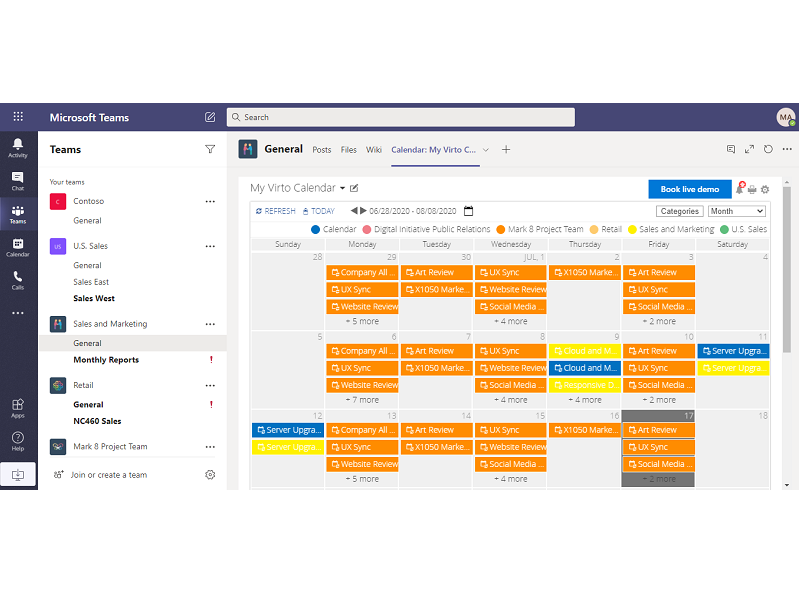
What is Virto Calendar Overlay?
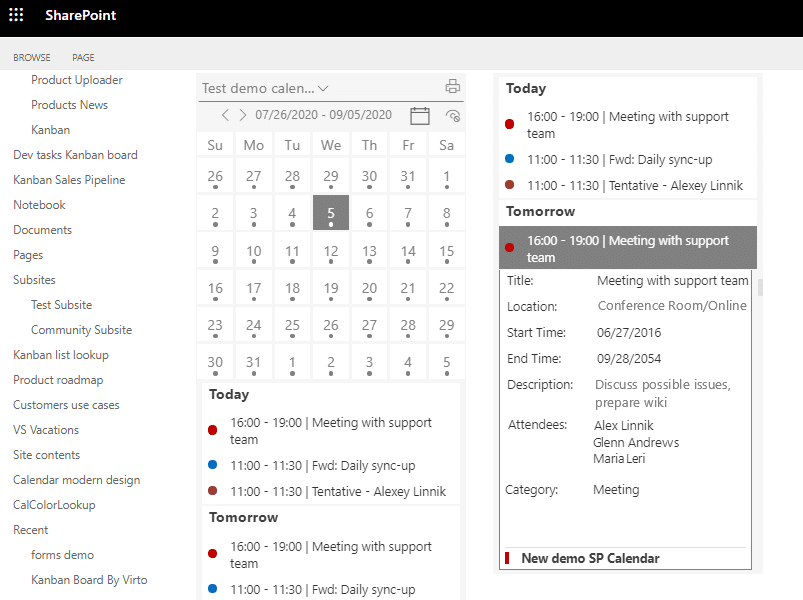
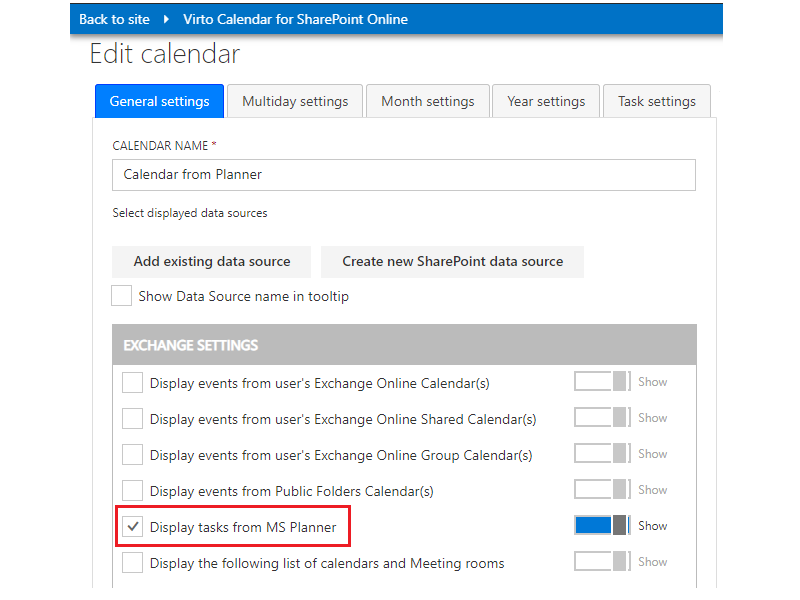
Virto Calendar Overlay is a tool that consolidates events from various sources into a unified, user-friendly calendar within SharePoint or Microsoft Teams. It offers multiple display options, including daily, weekly, monthly, yearly, and task-based views. The app supports integration with external iCal data sources, allowing users to incorporate events from platforms like Google Calendar. Users can categorize and color-code each calendar and event for better organization. Additional features include a compact mini calendar for quick overviews, seamless integration with Microsoft Teams for setting up meetings, and the ability to manage recurring events. Virto Calendar Overlay is designed to enhance scheduling efficiency and collaboration within the Microsoft ecosystem.
- Unified calendar across SharePoint and Teams
- Multiple views: day, week, month, year
- Task-based view for event management
- Supports external iCal calendar data sources
- Color-coded calendars and events categorization
- Syncs with Outlook and mail resources
Eligibility
Number of Seats/Users: Virto Calendar Overlay offers discounts based on the number of users or seats. A higher volume typically leads to a better discount structure, especially for enterprise-level usage.
Commitment to a Long-Term Contract: Discounts are often provided to companies that commit to using the service for a longer period (e.g., 1-year or 3-year contracts). A longer commitment shows Virto Calendar Overlay that the company is serious and willing to invest in the platform long-term.
No Active Discounts: Companies that are not already receiving other active discounts may have a better chance of qualifying for additional discounts from Virto Calendar Overlay. Virto Calendar Overlay reserves discounts for new customers or those not currently under promotional pricing.
Volume or Usage Commitment: Virto Calendar Overlay offers discounts if you agree to a minimum amount of usage or transaction volume. This could be based on data storage, transactions, or other metrics tied to how much you will use the platform.
Enterprise-Level Negotiation: Companies that qualify as “enterprise” due to their size or complexity (e.g., having large teams, multiple departments, or geographical presence) may be eligible for additional discounts from Virto Calendar Overlay. Such companies are often in a position to negotiate for better pricing.
Early Renewal or Prepayment: Virto Calendar Overlay often offers discounts if you renew early or prepay for the entire contract period. This is a common approach to securing a lower price.

Virto Calendar Overlay - Up to 50% off
Reviews
Here at Spendbase our internal data shows that Virto Calendar Overlay is generally well‑received by Spendbase clients who want a simple, visual way to centralize calendars in SharePoint and Microsoft Teams.
From the most upvoted feedback, these themes stand out:
1) Strengths our clients highlight
– Easy adoption
– Our internal data shows that most teams get it up and running quickly, with minimal training.
– The interface and views (daily/weekly/monthly/task) are described as intuitive.
– Strong integration
– Spendbase clients value that it syncs well with Outlook and other mail/calendar sources.
– External iCal support is seen as a core benefit for consolidating different systems.
– Helpful visual features
– The mini calendar widget on front pages is a clear favorite for surfacing upcoming events.
– Color‑coding and categorization are praised for making busy calendars easier to read.
2) Pain points that come up repeatedly
– Time and locale settings
– Some Spendbase clients struggle to switch to 24‑hour time or find where to adjust time formats.
– There is frustration around not being able to easily hide US holidays or add local holidays (for example, Hong Kong public holidays).
– Limited visual customization in some areas
– Clients would like more control over mini calendar styling, such as coloring Sundays or adjusting highlight rules.
– Documentation and discoverability
– Features are there, but users sometimes cannot quickly find the right setting, which leads to support requests and extra admin time.
3) Business impact we see across our client base
– Efficiency gains
– Teams save time by not jumping between multiple calendars, especially when coordinating company‑wide events.
– Better adoption of SharePoint/Teams
– A clear, consolidated calendar makes the intranet or Teams channels more “sticky,” driving higher internal usage.
– Optimization opportunities
– When these minor configuration issues (time format, holidays, visual tweaks) cause friction, admins spend more time than needed on setup.
– From a Spendbase discount perspective, smoothing these rough edges increases ROI because fewer support hours and less training are needed.
Overall, our internal data shows that Virto Calendar Overlay delivers strong value as a centralized calendar tool, with the main improvement opportunities around localization, time formats, and more flexible visual configuration.
See how much you can save on your stack
Pick your team’s tools!
Click to select one or more tools.


What’s your company size?
Just click to select.
What’s your business email?
We'll send you calculations right away
The email is flying to your inbox!
Beyond discounts, you may qualify for up to $100K in AWS credits.

FAQ
1. What calendar sources does Virto Calendar Overlay support?
It integrates SharePoint, Outlook, Exchange Meeting rooms, iCal calendars, and Planner tasks into a unified view.
2. How does Virto Calendar Overlay integrate with SharePoint and Teams?
It seamlessly overlays calendars within SharePoint sites and Microsoft Teams channels for centralized event management.
3. Can I customize the appearance of the calendar?
Yes, you can color-code events and adjust views to suit your preferences.
4. Is it possible to share calendars with external users?
Yes, the app supports sharing calendars with external users for collaborative scheduling.
5. What security measures are in place to protect my calendar data?
The app adheres to security standards, including annual penetration testing and documented disaster recovery plans.
6. Does Virto Calendar Overlay support task management?
Yes, it integrates with Planner tasks, allowing you to manage tasks alongside calendar events.
7. How easy is it to set up and configure?
The app offers a user-friendly interface with various display options, making setup and configuration straightforward.
8. Are there any discounts available for Virto Calendar Overlay?
Yes, we offer special discounts for new customers and bulk licenses. Contact our sales team for more details.
Related discounts

vWorkApp
Calendar Software
Up to 50% off

Boomerang for Gmail
Calendar Software
Up to 20% off

Skedulo
Calendar Software
Up to 20% off

Papershift
Calendar Software
Up to 45% off

Kronologic
Calendar Software
Up to 50% off

Yalendar
Calendar Software
Up to 50% off
Software cost optimization
Virto Calendar Overlay savings in five steps
Let’s estimate your potential savings and see how you can scale your cloud infrastructure.
One call. No cost. No commitments


meet vendor relationship EXPERTS
Our customers save millions with us



Save on Virto Calendar Overlay
It’s time to shrink your bill
Let our SaaS cost optimization experts check what deals you can get and how much you can save on your corporate subscriptions
See how you can:
- Learn about pricing benchmarks and discounts
- Present potential savings by vendor to your team
- Meet your SaaS and cloud cost optimization goals
Get Virto Calendar Overlay discount
We’ll email you back within 1 business day