











WorkingPoint Discount - Up to 15% off
Business management solution that enables professionals to manage invoices, bills, stocks, expenses, and more.
Get discountCategory
Business Management Software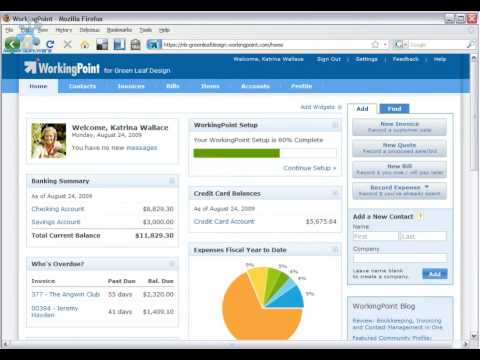
What is WorkingPoint?
WorkingPoint is a web-based application designed to streamline small business management by integrating essential tools into a single platform. Its main features include accounting, invoicing, financial reporting, tax reporting, and a business dashboard. The software also offers contact management, inventory management, cash management, and time tracking capabilities. WorkingPoint emphasizes ease of use, high-quality performance, and robust security, utilizing bank-level internet security technologies to ensure data protection. As an online system, it eliminates the need for software installations or upgrades, allowing business owners to manage their operations from any location.
- Online platform managing core small operations
- Invoicing tools with email receipt delivery
- Tracks income, expenses with customizable accounts
- Basic financial reporting for business performance
- Inventory and contact management in system
- Bank and card transaction data syncing
Eligibility
Number of Seats/Users: WorkingPoint offers discounts based on the number of users or seats. A higher volume typically leads to a better discount structure, especially for enterprise-level usage.
Commitment to a Long-Term Contract: Discounts are often provided to companies that commit to using the service for a longer period (e.g., 1-year or 3-year contracts). A longer commitment shows WorkingPoint that the company is serious and willing to invest in the platform long-term.
No Active Discounts: Companies that are not already receiving other active discounts may have a better chance of qualifying for additional discounts from WorkingPoint. WorkingPoint reserves discounts for new customers or those not currently under promotional pricing.
Volume or Usage Commitment: WorkingPoint offers discounts if you agree to a minimum amount of usage or transaction volume. This could be based on data storage, transactions, or other metrics tied to how much you will use the platform.
Enterprise-Level Negotiation: Companies that qualify as “enterprise” due to their size or complexity (e.g., having large teams, multiple departments, or geographical presence) may be eligible for additional discounts from WorkingPoint. Such companies are often in a position to negotiate for better pricing.
Early Renewal or Prepayment: WorkingPoint often offers discounts if you renew early or prepay for the entire contract period. This is a common approach to securing a lower price.

WorkingPoint - Up to 15% off
Reviews
Here at Spendbase our internal data shows that WorkingPoint is seen as a solid starter solution for small businesses, but with some clear breaking points that push teams to switch tools later on.
Key positive insights from Spendbase clients:
- Simple onboarding and day‑to‑day use
- Good fit for very small teams and early-stage businesses
- Strong basics:
- Creating and managing income/expense accounts
- Sending invoices and receipts
- Tracking income and expenses at a high level
- Lower cost than larger players like QuickBooks, especially in the early phase
- Emailing invoices/receipts directly to customers is appreciated
Where things start to break down:
- Bank and card syncing
- Initially works well and is a core value driver
- Over time, sync issues with major banks and some credit cards
- Long-standing sync failures with no timely fix are a main reason clients churn
- Accountant collaboration
- Data is not easily usable by external accountants
- This becomes a blocker as businesses grow and need formal accounting workflows
- Customer support and trust
- Early experience: responsive, helpful, reliable
- Later experience: slow or no response on critical syncing issues
- Mixed experience with refunds: promised, delayed, then eventually paid
- This delay damages confidence even though eventual payment suggests good intent in leadership
Patterns we see by business stage:
- Early-stage / micro-businesses:
- Happy with price and simplicity
- Use it mostly for invoicing, receipts, and simple tracking
- Growing businesses:
- Need reliable bank feeds and accountant-friendly exports
- More likely to move to QuickBooks or similar once sync issues appear
From a Spendbase cost-optimization angle, our internal data shows that:
- WorkingPoint delivers good value in the first years if bank sync is stable
- The hidden cost appears when teams must:
- Manually reconcile bank data
- Maintain parallel tools during migration
- Spend time chasing support and refunds
In short, Spendbase clients view WorkingPoint as a budget-friendly, easy starter, but not always reliable enough for scaling operations or strict financial workflows.
See how much you can save on your stack
Pick your team’s tools!
Click to select one or more tools.


What’s your company size?
Just click to select.
What’s your business email?
We'll send you calculations right away
The email is flying to your inbox!
Beyond discounts, you may qualify for up to $100K in AWS credits.

FAQ
1. How do I apply a discount to an invoice?
You can apply discounts by dollar amount or percentage directly on the invoice; the system automatically adjusts the total accordingly.
2. Can I set up recurring invoices with discounts?
Yes, you can create recurring invoices and include discounts, ensuring consistent billing for repeat customers.
3. Are there any limitations on the types of discounts I can offer?
You can offer both flat-rate and percentage-based discounts, applied at either the invoice or line-item level.
4. How does the system handle sales tax with discounted items?
Sales tax is calculated based on the discounted price, ensuring accurate tax reporting.
5. Can I track which discounts are most effective?
Yes, the system provides reports to analyze the performance and usage of different discounts.
6. Is it possible to apply multiple discounts to a single invoice?
Yes, multiple discounts can be applied; flat-rate discounts are deducted before percentage-based ones.
7. Can I restrict discounts to specific products or services?
Currently, discounts can be applied at the invoice or line-item level, but not restricted to specific products or services.
8. How do I ensure customers see the value of discounts on their invoices?
Discounts are clearly displayed on invoices, showing the original price, discount applied, and final total.
Related discounts

DATAHUB
Business Management Software
Up to 15% off

Culmas
Business Management Software
Up to 20% off

Businest
Business Management Software
Up to 40% off

Divalto
Business Management Software
Up to 35% off

ProDBX
Business Management Software
Up to 45% off

Intact iQ
Business Management Software
Up to 15% off
Software cost optimization
WorkingPoint savings in five steps
Let’s estimate your potential savings and see how you can scale your cloud infrastructure.
One call. No cost. No commitments


meet vendor relationship EXPERTS
Our customers save millions with us



Save on WorkingPoint
It’s time to shrink your bill
Let our SaaS cost optimization experts check what deals you can get and how much you can save on your corporate subscriptions
See how you can:
- Learn about pricing benchmarks and discounts
- Present potential savings by vendor to your team
- Meet your SaaS and cloud cost optimization goals
Get WorkingPoint discount
We’ll email you back within 1 business day