App builder Pricing Score & Analysis
App Design Software
Pricing score
Indigo Studio is a UX design and prototyping tool for creating and testing interactive user interfaces without coding. App Builder is its web-based WYSIWYG tool for visually designing responsive web apps and generating production-ready code.
Main features:
- Interactive prototyping
- App Builder visual UI design
- Responsive layouts
- UI component library
- Code generation
- User flow design

App builder up to 50% off
Unlock special pricing on App builder with Spendbase
Product Overview
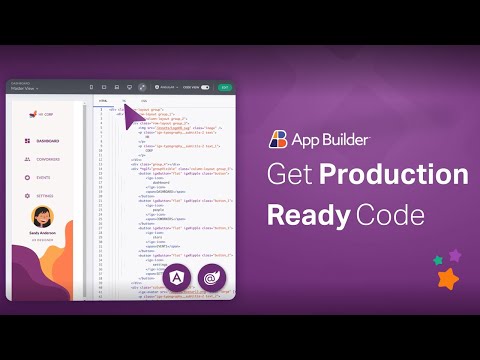
App Builder is a cloud-based, low-code, WYSIWYG drag-and-drop platform for designing and building web applications. It lets teams visually create UIs using 60+ reusable components, screen layouts, and templates, then generates production-ready code for major web frameworks such as Angular, Blazor, and Web Components.
App Builder is used to streamline app creation, prototype UI/UX, bind data, manage routing and navigation, and deploy responsive web and mobile-ready apps significantly faster.
Teams likely to be interested include software development and engineering teams, UI/UX and product design teams, product management, digital transformation or innovation groups, and IT departments that need to deliver internal tools or customer-facing applications quickly with consistent design and code.
App builder up to 50% off
Unlock special pricing on App builder with Spendbase
INSIGHTS
Plan highlights
 Starter Builder
Our internal data shows that lightweight app builders typically start here: core drag-and-drop editor, basic templates, limited automations, and email-only support. Best for small teams or early-stage startups testing no-code workflows with under 5–10 internal users.
 Team Builder
Our internal data shows that mid-tier plans add advanced workflows, role-based access, API connectors, and higher usage limits. Ideal for product, ops, and IT teams needing governed internal tools, with 10–50 active users and moderate integration complexity.
 Business Builder
Our internal data shows that business tiers include SSO, advanced security, custom environments, higher automation volumes, and priority support. Designed for mid-market companies standardizing on a no-code platform across multiple departments and regions.
 Enterprise Builder
Our internal data shows that enterprise plans bundle unlimited or high user counts, dedicated infrastructure, advanced compliance, on-prem or VPC options, and premium support/SLAs. Targeted at large organizations with strict security, governance, and global rollout requirements.

INSIGHTS
How much does App builder typically cost?
These are the publicly listed prices — our deals are even better
 |
Starter
For individuals and very small teams testing app ideas |
Team
For small teams building and launching internal or customer apps |
Business+
For growing companies needing advanced features, governance, and support |
Enterprise
Custom solutions for large organizations with complex security and compliance needs |
|---|---|---|---|---|
|
Monthly cost
Per User |
$0
|
$20
|
$40
|
Custom pricing
|
|
Monthly cost
Total (50 users) |
$0
|
$1,000
|
$2,000
|
Custom pricing
|
|
Annual cost
Per User |
$0
|
$200
|
$400
|
Custom pricing
|
|
Annual cost
Total (50 users) |
$0
|
$10,000
|
$20,000
|
Custom pricing
|

Spendbase price
|
$0
|
$5,000
50% off |
$10,000
50% off |
Custom pricing
|
Calculated based on data for a company of 50 people - for individual calculations
contact us.ANALYZE SAAS SPEND
How do we save you on Slack?

Hoop on a call with us
See cost saving options

Get detailed calculations

Share it with your team

SaaS SAVINGS AND WINS
Our customers save up to 39% on software - you can too

We saved over $500k and got SaaS visibility
Global IT Manager

Spendbase has been a game-changer for us. Their platform helps tech companies like ours to slash SaaS and cloud bills by up to 35%
Chief of Stuff, BRIDGE IN

I had no idea you can get huge discounts for most SaaS subscriptions
CEO and Co-founder, Sellestial

They worked exactly like we do—efficiently and professionally. They completely offloaded the hard work from our shoulders
Operations Director, WithU

With Spendbase.co, we locked in 10–15% savings on several of our main SaaS tools. If SaaS spend is a major cost for you, they’re a strong partner.
VP of Operations at Seven Peaks
We saved over $500k and got SaaS visibility
Global IT Manager
Spendbase has been a game-changer for us. Their platform helps tech companies like ours to slash SaaS and cloud bills by up to 35%
Chief of Stuff, BRIDGE IN
I had no idea you can get huge discounts for most SaaS subscriptions
CEO and Co-founder, Sellestial
They worked exactly like we do—efficiently and professionally. They completely offloaded the hard work from our shoulders
Operations Director, WithU
With Spendbase.co, we locked in 10–15% savings on several of our main SaaS tools. If SaaS spend is a major cost for you, they’re a strong partner.
VP of Operations at Seven Peaks





Features & Benefits with Discount Lens
See what you get — for less
Detailed feature comparison table with tier benefits Text here for the second row
Drag‑and‑drop WYSIWYG app creation
App Builder provides a fully visual, drag‑and‑drop environment to design application screens and flows without hand‑coding layouts. Teams can rapidly assemble complex interfaces using ready‑made components, which shortens the learning curve for non‑developers and keeps product, design, and engineering aligned on the same visual reality.

Discount impact
Reduces dependence on scarce engineering resources, accelerates delivery of new features, and lowers training overhead. Business teams can experiment quickly, validate ideas earlier, and move from concept to working UI in days instead of weeks.
Production‑ready code for major frameworks
The platform generates clean, production‑ready code for popular web frameworks directly from the visual designs. Instead of recreating screens manually, developers start from a high‑quality baseline that already reflects the approved UX, interaction patterns, and responsive behavior defined by designers and stakeholders.
Discount impact
Cuts rework and handoff friction between UX and engineering, shortens development cycles, and improves consistency across projects. This directly lowers delivery cost while freeing engineers to focus on business logic and performance, not repetitive UI coding.
Rich UI toolbox with 60+ components
App Builder includes an extensive library of 60+ UI controls, prebuilt layouts, and customizable templates optimized for enterprise scenarios. Teams can rapidly compose dashboards, data‑heavy views, and complex forms that already follow best‑practice UX and accessibility standards, reducing custom widget development.
Discount impact
Speeds up delivery of sophisticated interfaces while maintaining a professional, consistent look and feel. Organizations gain higher UI quality with less design debt, enabling faster onboarding of new users and reducing support issues caused by inconsistent experiences.
End‑to‑end prototyping and usability testing
Originating from Indigo Studio, the solution supports interactive prototyping, advanced animations, and integrated usability testing. Teams can simulate real user journeys, capture feedback from stakeholders and test users, and iterate designs before committing budget to full implementation, all within one environment.
Discount impact
Improves decision quality and reduces risk of building the wrong solution. By catching UX issues early, organizations avoid costly rework after development, delivering experiences that better match user expectations and business goals from the first release.
Collaborative design‑to‑development workflow
App Builder centralizes design assets, project states, and generated code so designers, developers, and business owners collaborate on a single source of truth. Routing, data binding, and navigation can be configured visually, making it easy for cross‑functional teams to align on behavior and data flows.
Discount impact
Reduces miscommunication and handoff delays across teams, increasing predictability of release timelines. Stakeholders gain better visibility into progress, while product leads can manage more initiatives in parallel without sacrificing quality or control.