Microsoft 365 backup Pricing Score & Analysis
Backup Software
Pricing score
CloudAlly (Microsoft 365 Backup) is a cloud‑to‑cloud backup solution for Microsoft 365, Google Workspace, Salesforce, Box, and Dropbox, enabling secure, point‑in‑time data recovery.
Microsoft 365 backup is automated protection and restoration of Microsoft 365 data (mail, OneDrive, SharePoint, Teams) to prevent loss from deletion, corruption, or attacks.
Main features:
- Automated scheduled backup
- Point‑in‑time recovery
- Email, file, folder, calendar restore
- Cross‑user recovery
- Encryption and advanced security
- Unlimited storage
- Admin‑friendly interface

Microsoft 365 backup up to 15% off
Unlock special pricing on Microsoft 365 backup with Spendbase
Product Overview


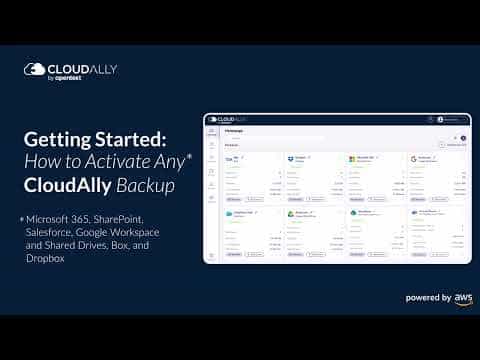

CloudAlly (branded here as Microsoft 365 Backup) is a cloud‑to‑cloud backup and recovery solution for Microsoft 365, Google Workspace, Salesforce, Box, and Dropbox. It provides automated daily backups, unlimited storage, and point‑in‑time recovery for mail, calendars, contacts, OneDrive, SharePoint, Groups, and Teams.
Microsoft 365 backup means creating independent copies of your Microsoft 365 data in a separate cloud so you can quickly restore emails, files, or entire accounts after accidental deletion, ransomware, or other data loss.
Teams and departments likely to be interested include IT and security teams, compliance and risk management, business continuity and disaster recovery owners, and managed service providers administering multiple tenants.
Microsoft 365 backup up to 15% off
Unlock special pricing on Microsoft 365 backup with Spendbase
INSIGHTS
Plan highlights
 Essential Backup
Entry-level Microsoft 365 backup modeled on our internal data from low-cost vendors. Targets small teams under 25 users needing Exchange, OneDrive and SharePoint protection with daily backups, 30–90 days retention and basic restore for accidental deletions.
 Standard Backup
Our internal data shows this is the most common price band for growing teams of 25–250 users. Includes automated backups every 4–6 hours, extended retention up to 1 year, Teams data protection, point-in-time restore and basic admin controls.
 Advanced Backup & Compliance
Benchmarked for mid-market organizations with 250–2,000 users and stricter compliance. Features higher backup frequency, long-term retention (3–7 years), granular restore, legal hold support, role-based access and regional storage options aligned with data residency needs.
 Enterprise Backup & Archiving
Our internal data shows large enterprises pay in this range for unlimited or 10+ year retention, advanced eDiscovery, SOC2-ready controls, SSO, API access, priority support and custom SLAs across global business units with complex compliance requirements.

INSIGHTS
How much does Microsoft 365 backup typically cost?
These are the publicly listed prices — our deals are even better
 |
Basic
For small teams starting with essential Microsoft 365 backup coverage |
Standard
For growing businesses needing broader retention and recovery options |
Business+
For mid-sized organizations requiring advanced security, compliance, and longer retention |
Enterprise
Custom solutions for large enterprises with complex compliance and data sovereignty needs |
|---|---|---|---|---|
|
Monthly cost
Per User |
$2.50
|
$3.50
|
$5.50
|
Custom pricing
|
|
Monthly cost
Total (50 users) |
$125.00
|
$175.00
|
$275.00
|
Custom pricing
|
|
Annual cost
Per User |
$30.00
|
$42.00
|
$66.00
|
Custom pricing
|
|
Annual cost
Total (50 users) |
$1,500.00
|
$2,100.00
|
$3,300.00
|
Custom pricing
|

Spendbase price
|
$1,275
15% off |
$1,785
15% off |
$2,805
15% off |
Custom pricing
|
Calculated based on data for a company of 50 people - for individual calculations
contact us.ANALYZE SAAS SPEND
How do we save you on Slack?

Hoop on a call with us
See cost saving options

Get detailed calculations

Share it with your team

SaaS SAVINGS AND WINS
Our customers save up to 39% on software - you can too

We saved over $500k and got SaaS visibility
Global IT Manager

Spendbase has been a game-changer for us. Their platform helps tech companies like ours to slash SaaS and cloud bills by up to 35%
Chief of Stuff, BRIDGE IN

I had no idea you can get huge discounts for most SaaS subscriptions
CEO and Co-founder, Sellestial

They worked exactly like we do—efficiently and professionally. They completely offloaded the hard work from our shoulders
Operations Director, WithU

With Spendbase.co, we locked in 10–15% savings on several of our main SaaS tools. If SaaS spend is a major cost for you, they’re a strong partner.
VP of Operations at Seven Peaks
We saved over $500k and got SaaS visibility
Global IT Manager
Spendbase has been a game-changer for us. Their platform helps tech companies like ours to slash SaaS and cloud bills by up to 35%
Chief of Stuff, BRIDGE IN
I had no idea you can get huge discounts for most SaaS subscriptions
CEO and Co-founder, Sellestial
They worked exactly like we do—efficiently and professionally. They completely offloaded the hard work from our shoulders
Operations Director, WithU
With Spendbase.co, we locked in 10–15% savings on several of our main SaaS tools. If SaaS spend is a major cost for you, they’re a strong partner.
VP of Operations at Seven Peaks





Features & Benefits with Discount Lens
See what you get — for less
Detailed feature comparison table with tier benefits Text here for the second row
Automated, Scheduled Microsoft 365 Backups
CloudAlly automates backup scheduling for Exchange Online, SharePoint, OneDrive, Teams, and other Microsoft 365 workloads. Admins define frequency and retention, then backups run reliably in the background, removing manual effort and reducing the risk of human error or missed backup windows.

Discount impact
Ensures consistent protection of critical SaaS data with minimal admin overhead, lowering operational risk and freeing IT teams to focus on higher‑value work rather than routine backup tasks.
Point‑in‑Time Restore And Granular Recovery
The platform offers true backup and recovery with point‑in‑time snapshots, allowing restoration of entire mailboxes, sites, or individual items such as emails, files, and folders. This is crucial for recovering from accidental deletion, corruption, or ransomware without disrupting current production data.
Discount impact
Reduces downtime and data loss impact, enabling precise, fast recoveries that keep users productive and help organizations meet stringent RTO/RPO and compliance expectations.
Secure, Encrypted Cloud‑to‑Cloud Protection
CloudAlly stores Microsoft 365 backups in secure, encrypted cloud storage with enterprise‑grade encryption in transit and at rest. This minimizes exposure of sensitive business data, supporting internal security policies and external regulatory requirements across industries and geographies.
Discount impact
Strengthens overall security posture while still enabling flexible access to backups, helping security and compliance teams reduce breach risk and demonstrate robust data‑protection controls to auditors and customers.
Incremental Backups With Detailed Backup Logs
After the initial full backup, CloudAlly uses incremental backups to capture only new or changed data, complemented by comprehensive backup logs. This optimizes storage and performance, while giving admins full visibility into backup status, success, failures, and potential anomalies.
Discount impact
Lowers storage and bandwidth costs, improves backup reliability, and gives IT clear, auditable insight into backup operations so issues are identified and resolved before they affect the business.
Centralized Multi‑SaaS Backup For IT Teams
Beyond Microsoft 365, CloudAlly unifies backup for Google Workspace, Salesforce, Box, and Dropbox in a single admin interface. This is especially valuable for MSPs and IT teams managing diverse SaaS estates who need one consistent policy, monitoring, and reporting layer.
Discount impact
Simplifies operations and vendor management, reduces training and tool sprawl, and delivers better cost control and governance over backup spend across the entire SaaS application portfolio.