Subcap Pricing Score & Analysis
Artificial Intelligence Software
Pricing score
Subcap is an AI-powered tool that automatically generates accurate subtitles and captions for videos, optimized for social media and content creators.
Main features:
- Automatic speech recognition and transcription
- Auto-generated subtitles and captions
- Multiple language support
- Customizable caption styles
- Speaker recognition and timing adjustment
- Export for major social platforms

Subcap up to 15% off
Unlock special pricing on Subcap with Spendbase
Product Overview
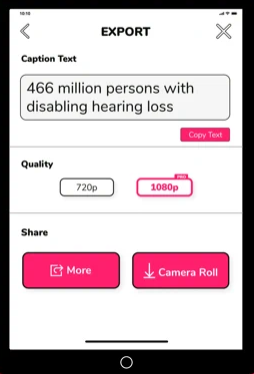
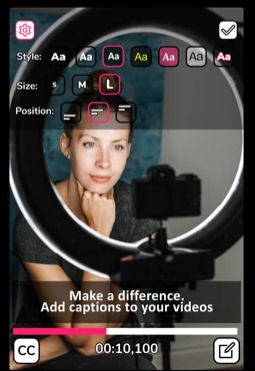
Subcap is an AI-powered tool that automatically generates accurate, editable subtitles and captions for videos. It supports multiple languages, speaker detection, styling, and export options to fit different platforms and workflows. Subcap is designed to speed up caption creation, improve accessibility, and help content perform better on social media where many viewers watch without sound.
Teams and departments that might be interested include: social media and marketing teams, video production and post-production teams, e-learning and training departments, internal communications, HR and employer branding teams, agencies producing client video content, and any organization focused on accessibility or compliance with captioning requirements.
Subcap up to 15% off
Unlock special pricing on Subcap with Spendbase
INSIGHTS
Plan highlights
 Starter (Free / Manual Captions)
Our internal data shows Subcap’s base tier is free to download, aimed at solo creators testing captioned video workflows. Auto‑captions are limited or unavailable; users rely on manual subtitle entry, basic styling, and standard exports, with no commitment and low-risk experimentation for very small teams.
 Creator Monthly Plan
Our internal data shows that Subcap’s monthly tier targets individual creators and small marketing teams needing unlimited auto‑captions, multi‑language support, dual-language subtitles, basic SRT export, and HD (720p/1080p) video output, optimized for TikTok, Instagram and YouTube without long-term commitment.
 Growth Multi‑Month Plan
Our internal data shows longer Subcap subscriptions discount pricing versus monthly, ideal for agencies and fast-growing content teams. Features mirror monthly plans: AI captions with high accuracy, branding customization, logo overlays, font controls, multi-platform aspect ratios, and priority use for recurring campaigns.
 Annual Pro Accessibility Suite
Our internal data shows that annual Subcap-style plans, aligned with competitors averaging $5–$15/user/month, suit larger marketing departments and enterprises scaling captioned content. Teams get full auto‑caption features, multi-language reach, dual-language workflows, 4K export options, and predictable spend through annual budgeting.

INSIGHTS
How much does Subcap typically cost?
These are the publicly listed prices — our deals are even better
 |
Starter
For individual creators and small teams beginning with AI subtitles |
Pro
For growing teams needing higher volumes and advanced customization |
Business+
For larger organizations with frequent video production and multi-language needs |
Enterprise
Custom solutions for large enterprises with compliance, integrations, and dedicated support |
|---|---|---|---|---|
|
Monthly cost
Per User |
$5
|
$10
|
$15
|
Custom pricing
|
|
Monthly cost
Total (50 users) |
$250
|
$500
|
$750
|
Custom pricing
|
|
Annual cost
Per User |
$60
|
$120
|
$180
|
Custom pricing
|
|
Annual cost
Total (50 users) |
$3,000
|
$6,000
|
$9,000
|
Custom pricing
|

Spendbase price
|
$2,550
15% off |
$5,100
15% off |
$7,650
15% off |
Custom pricing
|
Calculated based on data for a company of 50 people - for individual calculations
contact us.ANALYZE SAAS SPEND
How do we save you on Slack?

Hoop on a call with us

See cost saving options

Get detailed calculations

Share it with your team

SaaS SAVINGS AND WINS
Our customers save up to 39% on software - you can too

We saved over $500k and got SaaS visibility
Global IT Manager

Spendbase has been a game-changer for us. Their platform helps tech companies like ours to slash SaaS and cloud bills by up to 35%
Chief of Stuff, BRIDGE IN

I had no idea you can get huge discounts for most SaaS subscriptions
CEO and Co-founder, Sellestial

They worked exactly like we do—efficiently and professionally. They completely offloaded the hard work from our shoulders
Operations Director, WithU

With Spendbase.co, we locked in 10–15% savings on several of our main SaaS tools. If SaaS spend is a major cost for you, they’re a strong partner.
VP of Operations at Seven Peaks
We saved over $500k and got SaaS visibility
Global IT Manager
Spendbase has been a game-changer for us. Their platform helps tech companies like ours to slash SaaS and cloud bills by up to 35%
Chief of Stuff, BRIDGE IN
I had no idea you can get huge discounts for most SaaS subscriptions
CEO and Co-founder, Sellestial
They worked exactly like we do—efficiently and professionally. They completely offloaded the hard work from our shoulders
Operations Director, WithU
With Spendbase.co, we locked in 10–15% savings on several of our main SaaS tools. If SaaS spend is a major cost for you, they’re a strong partner.
VP of Operations at Seven Peaks





Features & Benefits with Discount Lens
See what you get — for less
Detailed feature comparison table with tier benefits Text here for the second row
Automated context-aware subtitle generation
Subcap automatically generates subtitles that adapt to different video formats and platforms. This reduces manual editing time, improves accuracy over generic caption tools, and ensures creators consistently meet accessibility standards across channels without needing deep technical skills.

Discount impact
Teams ship more videos faster while staying compliant with accessibility requirements. This directly lowers production costs and improves reach and engagement, especially on social platforms where sound-off viewing is common.
Mobile-first editing and publishing workflow
The product is optimized for mobile use, allowing users to shoot, subtitle, and publish content directly from their phones. This removes the dependency on desktop editing suites and enables on-the-go content production for marketing, social media, and creator teams.
Discount impact
Marketing and content teams operate with greater agility, capturing and publishing timely content without waiting for post-production. This increases content volume and responsiveness, driving more impressions and conversions from real-time campaigns.
Customizable subtitles and brand styling
Subcap enables users to customize subtitle fonts, colors, positioning, and styles to match brand guidelines. This allows companies to maintain a consistent, professional look across all video assets while still leveraging automated captioning.
Discount impact
Branded subtitles enhance visual identity and perceived quality, improving viewer trust and brand recall. Businesses get automation without sacrificing design standards, supporting higher-performing paid and organic campaigns.
Support for multiple languages and platforms
The solution supports subtitles across various languages and formats suitable for different social and video platforms. This lets organizations localize content efficiently and reuse assets across channels while keeping captions technically aligned with platform requirements.
Discount impact
Companies expand into new markets and audiences with minimal additional production effort. Multi-language support increases global reach and ROI from existing video content, driving incremental revenue and engagement from international viewers.
Fast processing and user-friendly interface
Subcap offers quick subtitle generation with an intuitive interface that non-technical users can learn rapidly. Reviews highlight ease of use and speed, enabling teams to integrate subtitle workflows into their daily operations without heavy training or complex setup.
Discount impact
Reduced learning curve and rapid processing translate into immediate productivity gains. Teams save hours per week on manual captioning, freeing budget and time for higher-value creative and strategic work.