










AWS billing creates cloud waste and finance risk fast because pricing is usage-based, region-based, and layered. One workload can trigger charges for compute, storage, requests, support, and data transfer at the same time. The Flexera 2026 State of the Cloud Report, based on 753 cloud decision-makers, says 29% of IaaS and PaaS spend is wasted. Gartner widely estimates about 30% of cloud spend creates no business value, and global waste is above $100 billion.
If you lead finance, run operations, or wear the founder finance hat, you don’t need deep cloud skills to read an AWS bill well. You need plain-English terms, a few warning signs, and a habit of checking what ends, what scales, and what keeps charging.
Start with the billing language that moves most AWS costs.
Start with the billing terms that shape most AWS costs
As of March 2026, AWS hasn’t changed the core billing model. Recent service-term updates mostly touched invoicing entities, electronic invoices, and currency handling, not the basics of how usage gets charged.
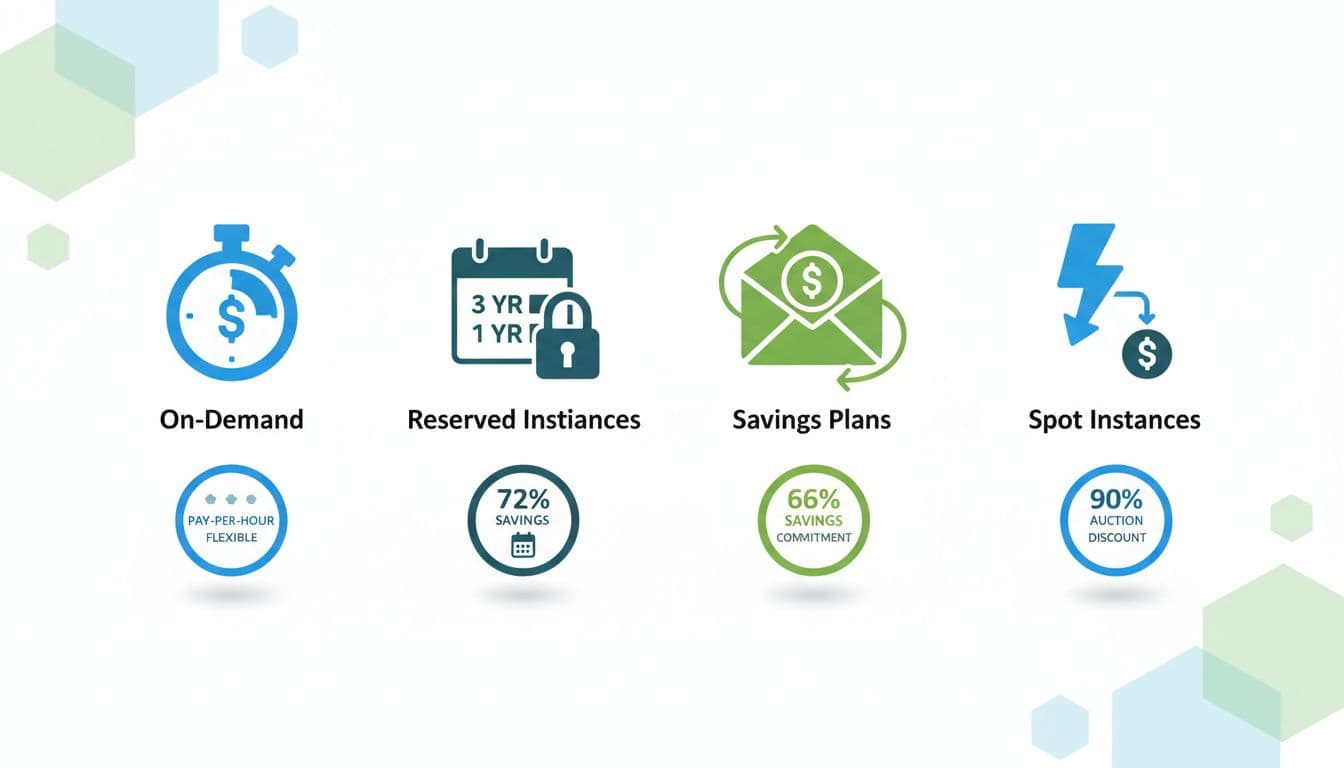
On-Demand, Reserved Instances, Savings Plans, and Spot Instances
These four pricing models shape a large share of compute spend.
On-Demand means pay as you go, with no long-term promise. It’s flexible, so teams like it for testing, short projects, or uncertain workloads. However, it usually carries the highest unit price.
Reserved Instances and Savings Plans trade flexibility for lower rates. Both usually involve a 1 or 3 year commitment. In return, compute savings can reach about 72%, depending on the service and term. Finance teams should care because the discount is real, but so is the risk of paying for capacity you no longer need.
Savings Plans are often easier to live with than Reserved Instances. They apply to committed hourly spend instead of one exact instance setup. That makes them more forgiving when engineers change instance families or shift workloads.
Spot Instances use spare AWS capacity. Discounts can reach about 90%, but AWS can interrupt the workload with short notice. That works for batch jobs, testing, and fault-tolerant tasks. It doesn’t fit steady customer-facing systems that must stay up.
Think of it like airfare. Full-flex tickets cost more, advance commitments cost less, and standby is cheapest if you can handle disruption.
Free Tier, AWS credits, and promotional balance
These terms sound similar, but they aren’t the same.
The AWS Free Tier gives limited usage for free, often with caps and time windows. Some benefits last 12 months, while a few are always free at small limits. Once you cross the cap or the time limit ends, regular billing starts.
AWS credits work more like prepaid balance for eligible AWS usage while they stay active. Startup credits, proof-of-concept credits, and promotional credits can reduce the bill to zero for a while, but they expire. Some startup credits may last 12 to 24 months. WAFR credits often last 6 months.
Eligibility can be stricter than many founders expect. AWS may look at startup stage, accelerator participation, company age, funding or revenue caps, workload relevance, and usage thresholds before approving credits. Teams exploring these options often review AWS credits for startups and new projects before making budget assumptions.
The finance takeaway is simple: free usage and credits lower spend for a period, not forever. If you don’t track the expiry date, next month’s savings can turn into surprise burn.
See how much you can save on your stack
Pick your team’s tools!
Click to select one or more tools.


What’s your company size?
Just click to select.
What’s your business email?
We'll send you calculations right away
The email is flying to your inbox!
Beyond discounts, you may qualify for up to $100K in AWS credits.

The AWS bill is not just compute, here is where charges really come from
An AWS bill is more like a grocery receipt than a lease. The server is only one item in the cart.
Compute, storage, and database charges
AWS is popular because it combines scalable compute, secure storage, managed databases, and global delivery in one platform. That breadth helps teams move fast. It also means each service follows its own billing logic.
EC2, the core virtual server service, charges by instance type, size, operating system, region, and runtime. Lambda bills by request count and execution time. Databases such as RDS, Aurora, and DynamoDB mix compute, storage, backup, and sometimes input or read capacity into one service family.
Storage is where finance teams often get misled. S3 Standard is built for frequent access. S3 Standard-IA lowers the storage rate for less-used files, but adds retrieval fees and minimum storage duration rules. Glacier tiers push storage costs lower still, yet access is slower and restores can add extra charges. AWS breaks this down on its pricing overview page.
Request fees also matter. A bucket with cheap per-GB storage can still become expensive if an app keeps reading, writing, listing, and scanning objects at high volume.
Data transfer, regions, and why location affects your invoice
Data transfer sounds harmless until it isn’t.
In plain terms, moving data into AWS is often free or low-cost in many cases. Moving data out of AWS, across regions, or between services can cost much more. That is why egress charges surprise finance teams so often.
A region is a geographic area, like US East or US West. An Availability Zone is a separate facility inside a region. Zones help reliability, but they are not the same as regions. Traffic across zones or across regions can create charges that don’t show up in early architecture diagrams.
The nearest region also isn’t always the cheapest. Labor, power, tax, and service availability all affect pricing. A team can pick a region for speed or compliance, then discover later that the bill grew because traffic leaves that region constantly.
Data transfer often starts as a side charge and ends as a major line item.
That problem gets worse when a workload spreads across regions, content delivery layers, backups, and third-party tools.
Small rates can still create large losses. Cloud waste often comes from quiet usage, not dramatic outages.
Requests, retrieval fees, idle resources, and overprovisioning
Some of the most expensive AWS terms look harmless on paper.
API requests can add up across S3, Lambda, databases, and monitoring. Retrieval fees show up when teams move archived data back into active use. Snapshots cost money to keep. Unattached volumes still bill. Idle instances burn cash while doing little or nothing. NAT and transfer-related usage can quietly rise with traffic.
A low unit price doesn’t cap total spend. One million small events can cost more than one large server.
Gartner has long estimated that 30% to 40% of cloud waste comes from overprovisioning alone. That means companies often buy more memory, CPU, storage, or uptime headroom than the business needs. Engineers do this for safety. Finance feels it in the invoice.
The pattern is common in storage too. Archive tiers look cheap until teams restore data often, delete too early, or ignore request charges.
Support plans, consolidated billing, and multi-account complexity
Support costs deserve a place in finance reviews.
AWS includes basic support, but paid plans can become material as spend grows. Higher tiers offer faster response times, architecture help, and account support. Those benefits can be worth it, yet the cost should be reviewed like any other recurring item.
Consolidated billing lets a company roll multiple AWS accounts under one payer account. That can help with volume discounts and cleaner payment handling. For growing firms, it’s often the right setup.
Still, multi-account structures have a downside. They improve control, but they can make tracking ownership harder. Without strong tags, budgets, and cost owners, finance sees service codes and account IDs instead of teams and business units.
That is how budget leaks survive. Nobody feels fully responsible for a shared line item, so it keeps renewing itself every month.

We can unlock discounts on 10,000+ tools you already use.
How to read an AWS bill without missing the story behind the numbers
A good AWS review process is simple. The hard part is doing it every month.
Match each line item to a business owner, usage driver, and time limit
Start by grouping spend by service, team, environment, and commitment type.
Then check each major cost line for three facts. First, what created it. Second, who owns it. Third, when it ends. If one of those answers is missing, the charge needs attention.
This works well because AWS costs are time-bound in many places. A Free Tier window might end after 12 months. A WAFR credit may expire after 6 months. A Savings Plan can run for 1 to 3 years. A proof-of-concept project may stop, while its storage and snapshots keep billing.
Flexera’s 2026 report says only 6% of companies report zero avoidable cloud waste. That tells finance teams something useful: regular review isn’t overkill. It’s standard hygiene.
Use AWS cost tools before month-end surprises hit
AWS already provides the core tools many teams need. The AWS Cost Management and Billing guide ties together Cost Explorer, AWS Budgets, reports, and forecasting features in one place.
Cost Explorer helps you spot usage trends and changes over time. AWS Budgets sends threshold alerts before overspend gets too far. Pricing pages and calculators help model new workloads before engineering launches them.
The strongest habit is a monthly review with finance and engineering in the same room. Look at top movers, expired discounts, rising data transfer, and any commitment that no longer matches demand. As of March 2026, that discipline matters more than chasing any new billing trick.
AWS billing terms are not technical trivia. They are cost levers.
Choose the wrong pricing model, the wrong storage class, or the wrong region pattern, and the bill drifts upward. Ignore credit expiration dates or line items without owners, and finance risk grows quietly.
Build a monthly billing review habit, then audit your current commitments and credits. The teams that do this regularly usually don’t eliminate waste in one move, but they stop letting it hide in plain sight.


Get discounts on your team’s favorite apps
Find deals for 10%, 30%, or even 70% off in our discount marketplace.
Check Discounts



