











Cost optimization
AWS Account Structure for Enterprises: Control at Scale

A 10-person startup can live inside one Amazon Web Services account for a while. An enterprise can’t.
In a large AWS account structure for enterprises, we care about blast radius, compliance, quota headroom, team autonomy, and central control at the same time.
That is why a foundation on AWS starts with the multi-account model and AWS Organizations.
What makes AWS account structure for enterprises so different?
In 2026, cloud teams are under pressure from AI workloads, and FinOps reviews.
That mix changes the job.
A small team can start with a single account. A large company usually can’t stay there for long.
AWS re:Post still shows why teams asking about a first AWS account quickly run into limits when they organize your AWS estate around one shared boundary.
This quick view shows the shift in thinking:
| Model | What we optimize for | What breaks first |
|---|---|---|
| Single-account thinking | Simplicity and speed | Permission sprawl, quotas, noisy neighbors |
| Multi-account thinking | Isolation and clean ownership | More setup, more automation work |
Why a single AWS account stops working at scale
One bad deployment in a single AWS account can hit logs, shared networks, and production apps at once. Billing also gets muddy, IAM grows tangled, and one quota issue can throttle an unrelated workload.
How enterprise needs shape the account model
Different accounts let us set different rules for finance, healthcare, R&D, and customer-facing apps.
That matters when one business unit needs stricter security and compliance, while another needs faster release cycles.
- Pros include smaller blast radius and cleaner billing.
- Pros also include better quota separation across teams.
- Cons include more moving parts and more cross-account permission design.
- Cons also include extra work when we are expanding their footprint on AWS.
See how much you can save on your stack
Pick your team’s tools!
Click to select one or more tools.


What’s your company size?
Just click to select.
What’s your business email?
We'll send you calculations right away
The email is flying to your inbox!
Beyond discounts, you may qualify for up to $100K in AWS credits.

How AWS Organizations and OUs help us govern many accounts
An AWS organization gives us one place to centrally manage accounts, policy, and consolidated billing, while member accounts stay isolated.
That is the heart of a multi-account AWS environment. AWS recommends foundational accounts for security, logging, and infrastructure in its AWS Organizations best practices.
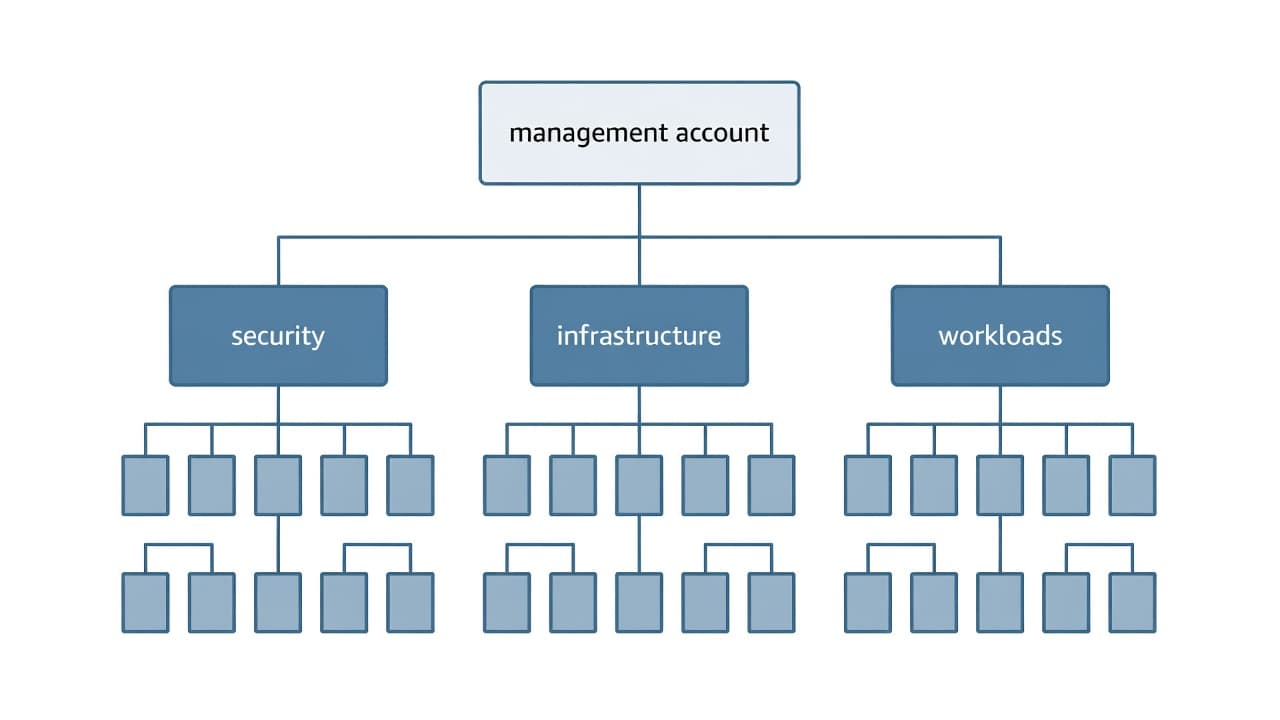
The role of AWS Organizations in a multi-account strategy
AWS Organizations becomes the control plane for managing multiple accounts.
We use one management account for organization-level tasks, then keep workloads inside member accounts. That gives us central visibility without pooling all AWS resources into one risky place.
Why organizational units are better than a flat account list
A flat list of 80 accounts gets old fast. An organizational unit, or OU, lets us group accounts by purpose and apply AWS Organizations service control policies at the right level.
OUs work best when they follow control needs, not the company org chart.
- Pros include one AWS organization with consistent rules across accounts in an organization.
- Pros also include simpler ways to group accounts and review many accounts.
- Cons include the temptation to create too many OUs.
- Cons also include harder design choices if our organizational model copies reporting lines.
A practical enterprise AWS account structure we can actually run
A deep tree looks clever on paper, then falls apart in operations.
AWS Control Tower account structure guidance points in the same direction, especially when we are organizing your AWS environment using opinionated landing-zone guardrails.
This blueprint is a good starting point:
| Area | Typical accounts | Why it exists |
|---|---|---|
| Security OU | Log archive, audit, forensics, break-glass | Clean AWS security visibility across accounts |
| Infrastructure OU | Networking, shared services, identity support | Reusable platform pieces |
| Workloads OU | App or product accounts, split by prod and non-prod | Isolated delivery speed |
| Sandbox OU | Experiment and training accounts | Safe testing |
| Suspended OU | Closed or inactive accounts | Retention without active risk |
Security, logging, and audit accounts that stay out of the way
Dedicated accounts for logs, detection, audit, and AWS Config keep our security team above the noise.
When an incident lands, we want clean evidence across accounts, not a forensics hunt inside the same account that may be compromised.
Infrastructure and workload accounts that keep teams moving
Networking, shared CI tooling, and identity support often live in dedicated accounts. Application accounts should track products or workloads, not only team names.
Production and non-production should split early, because change speed, access management, and risk are different.
- Pros include dedicated accounts for risky functions and faster app teams.
- Pros also include better use of AWS Control Tower for new accounts.
- Cons include more overhead for shared services and IAM.
- Cons also include more discipline when we organize our accounts by product, not habit.
Core design principles that keep the structure from falling apart
The best practice is plain: keep the management account boring, separate SDLC stages, automate provisioning, and use federation instead of long-lived IAM user credentials.
This is the operating checklist we keep close:
| Rule | Why it matters |
|---|---|
| Keep the management account empty | Limits blast radius at the top |
| Split prod and non-prod | Cuts risk and access overlap |
| Automate account vending | Keeps naming, tags, and guardrails consistent |
| Use AWS IAM Identity Center | Stronger access management and less credential drift |
Keep the management account clean and boring
The management account should never host apps, databases, or experiments.
One misplaced permission in that account can ripple through accounts in the organization.
If the management account feels busy, we have already lost some control.
Automate account creation and access from day one
Manual setup does not scale in a multi-account environment on AWS.
We want federation through AWS IAM Identity Center, formerly AWS Single Sign-On, with least privilege by default and service control policies at the OU level.
That is how we avoid every new team asking for an IAM user and carrying one old credential forever.
- Pros include repeatable provisioning and safer permission patterns.
- Pros also include cleaner guardrails for different accounts.
- Cons include upfront platform work and stronger platform ownership.
- Cons also include some friction when teams want exceptions to best practices for AWS.
Free virtual cards for non-EU residents
Open in 1 working day, issue 100 virtual cards, and get up to 1.25% cashback.
Get a free account
Advanced enterprise strategies for security, networking, and compliance
Once the basics work, mature teams tighten traffic control and data boundaries.
In 2026, identity-first security and hybrid patterns are pushing more companies to centralize network inspection while keeping regulated workloads apart.
A compact design helps:
| Pattern | Best fit | Main benefit |
|---|---|---|
| Central networking account | Shared ingress, egress, firewalls, Direct Connect | Consistent traffic control |
| Shared VPC subnets through RAM | Platform-managed networks | Less network sprawl |
| Regulated-data OU | PCI-DSS, HIPAA, or strict internal data classes | Stronger rules where needed |
Use a centralized networking account to control traffic
A networking account often owns Transit Gateway, internet ingress, egress filtering, and private connectivity. That reduces drift. It also keeps one AWS service team from solving the same network problem ten different ways.
Separate regulated data into its own OU
Sensitive data does not need to drag the whole AWS platform into the strictest rule set.
A separate OU lets us apply tighter controls only where they belong. For current security ideas around IAM, encryption, and monitoring, this summary of AWS cloud security practices is a useful cross-check.
- Pros include stronger control over cloud resources and regulated workload paths.
- Pros also include fewer broad restrictions on the rest of the AWS environment.
- Cons include more review work for cross-OU traffic.
- Cons also include extra design effort for data classification.
What enterprise pricing and savings look like in 2026
FinOps is mainstream now, and that changes how we read account boundaries. Better separation gives finance cleaner billing, better showback, and fewer fights over shared costs.
It also helps when we enhance an established AWS environment instead of rebuilding it.
This quick map shows where structure helps cost:
| Account boundary | Finance benefit |
|---|---|
| Product account | Clear owner and forecast |
| Prod vs non-prod split | Cleaner waste analysis |
| Shared services account | Better allocation of common costs |
| Sandbox account | Easier spend caps and cleanup |
How better account boundaries improve billing and forecasting
When costs sit in the right account, CFOs can see who owns them. We stop guessing whether storage spikes came from analytics, backups, or a forgotten test stack.
Where savings can come from without changing the architecture
Savings often come from commitments, storage class choices, and CDN tuning, not from ripping up the whole design.
CloudFront CDN, compute commitments, and storage lifecycle policies matter, but clean boundaries make those choices visible.
Teams looking at saving on AWS infrastructure costs sometimes pair governance with credit or partner programs instead of forcing a big redesign.
- Pros include cleaner forecasting and fewer shared-cost disputes.
- Pros also include better spend reviews across business units.
- Cons include more chargeback conversations.
- Cons also include extra tagging and reporting discipline.
Three real-world enterprise patterns we can learn from
We keep seeing the same patterns win because they protect a clear business goal.
One manufacturer splits accounts by business unit, so each BU gets autonomy, budget ownership, and separate change windows. A large SaaS company keeps shared platform services in one place but isolates high-value customer workloads in different accounts.
Another common model is simple and effective: shared services, then separate prod and non-prod workload accounts for each major product.
That structure is easier to run than a giant pool of individual accounts with no hierarchy.
- Pros include fast local decisions and stronger ownership.
- Pros also include a clearer number of accounts by risk and revenue line.
- Cons include more platform overhead for cross-account tooling.
- Cons also include real complexity when customer-isolation patterns spread too far.
How to get free AWS credits in 2026 and lower the pressure on new accounts
Credits will not fix weak architecture, but they can buy time while our landing zone matures. Startups usually look at AWS Activate.
Enterprises usually work through AWS sales, migration programs, or partner deals.
Spendbase promotes offers of up to $100,000 in AWS credits, which can ease the first wave of landing-zone, testing, and migration costs.
If we are weighing paths, this short 2026 guide to obtaining AWS credits lays out what fits founders, portfolio companies, and larger enterprise deals.
| Credit path | Best fit | What to expect |
|---|---|---|
| AWS Activate | Startups and portfolio-backed teams | Program-based credits and startup support |
| Sales-led incentives | Enterprises moving workloads | Credits tied to migration or spend |
| Partner offers | Teams using outside procurement help | Added discounts or credit support |
- Pros include lower pressure on new accounts and faster proof-of-concept work.
- Pros also include room to test governance before full production scale.
- Cons include expiry dates and eligibility limits.
- Cons also include the risk of chasing credits instead of fixing the AWS environment.

We can unlock discounts on 10,000+ tools you already use.
Conclusion
A strong AWS account structure for enterprises gives us isolation, governance, and speed without adding theater. The core pattern is stable: one AWS organization, clean OUs, dedicated security and shared-services accounts, and automation for every repeatable step.
When we keep the design simple, the AWS environment stays readable. When we keep it strict, the business stays safer. The best structure does both.


Get discounts on your team’s favorite apps
Find deals for 10%, 30%, or even 70% off in our discount marketplace.
Check Discounts



