











AWS Athena: Guides, Pricing, Cost Optimization

If your data volumes continue to grow, you know that the challenge is far greater than merely storage. Infrastructure complexity, scaling limitations, and operational overhead – all of these add up to significant constraints. Addressing these pressures requires efficient and scalable solutions – and AWS Athena is one of them.
In this guide, we’ll review AWS Athena in depth through an operational and financial lens – breaking down how it works, where it creates the most value, whether its pricing is good value for money, and which optimization strategies are essential for long-term efficiency.
Key Takeaways
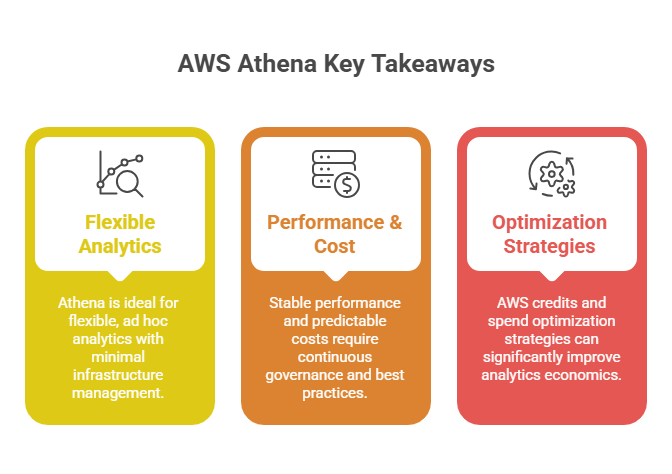
> AWS Athena fits perfectly for cases when scenarios where flexible, ad hoc analytics and minimal infrastructure management are critical requirements.
> Stable performance and predictable cost behavior require continuous governance and adherence to best practices: query optimization, dataset compaction, metadata management, workload monitoring, etc.
> AWS credits and spend optimization strategies can significantly improve early-stage analytics economics, especially during experimentation and scaling phases.
See how much you can save on your stack
Pick your team’s tools!
Click to select one or more tools.


What’s your company size?
Just click to select.
What’s your business email?
We'll send you calculations right away
The email is flying to your inbox!
Beyond discounts, you may qualify for up to $100K in AWS credits.

What Is AWS Athena
AWS Athena is Amazon Web Services’ serverless interactive query service that allows users to analyze data directly in Amazon S3 using standard SQL.
Unlike traditional analytics engines, AWS Athena removes operational complexity in three key ways. Specifically, it stands out by requiring: 1) NO infrastructure provisioning, 2) NO cluster management, 3) NO capacity planning. Athena separates compute from storage entirely. Queries run on-demand, and you pay only for the data scanned. This way, teams can effortlessly scale analytics as they like.
Importantly, Athena leverages Presto/Trino under the hood, which guarantees distributed query execution across large datasets, all without requiring users to manage compute resources. Due to this, Athena is particularly well-suited for ad hoc analytics, log analysis, data lake exploration, BI integrations, rapid experimentation, etc.
| Traditional Analytics Systems | Athena Model |
| Cluster provisioning required | Fully serverless |
| Capacity planning complexity | On-demand query execution |
| Idle infrastructure costs | Pay-per-query |
| ETL-heavy workflows | Query-in-place |
| Scaling events required | Automatic scaling |
| Operational overhead | Minimal administration |
How AWS Athena Works: Key Capabilities
Serverless Query Execution
One of Athena’s core capabilities is that it eliminates infrastructure management entirely. Queries execute across distributed compute resources automatically allocated by AWS. This results in elastic scaling behavior, rapid query startup, simplified operation, and, most importantly, no idle compute costs.
Query-in-Place Analytics
Athena directly queries data stored in Amazon S3 without requiring ingestion into a proprietary storage engine.
This query-in-place logic fundamentally reshapes analytics workflows. This way, data remains in S3, and there’s no need to replicate it into analytics-specific storage systems. Datasets become queryable immediately, and new files added to S3 can be analyzed without transformation or loading delays. Plus, Athena naturally aligns with modern lake-based storage strategies.
For more information on how to run SQL queries in Amazon Athena, check this AWS guide from its official documentation – in particular, how to query any data source with Amazon Athena’s new federated query.
Broad Format Support
Athena supports multiple data formats, both row-based (CSV / JSON) and columnar ones (Parquet, ORC, Avro). With this level of flexibility, it becomes easy to analyze diverse datasets without having to enforce rigid data transformation pipelines.
Meantime, format selection directly influences query performance and cost efficiency. View more details in the table below.
| Dimension | CSV | JSON | Parquet | ORC | Avro |
| Scan Efficiency | Low | Low | Very High | Very High | Medium |
| Compression Efficiency | Low | Low | High | High | Medium |
| Parsing Overhead | Low | High | Minimal | Minimal | Minimal |
| Query Performance | Slower on large datasets | Slower on large datasets | Fast | Fast | Moderate |
| Cost Behavior | Higher scan costs | Higher scan costs | Significantly reduced scan costs | Significantly reduced scan costs | Moderate scan costs |
| Schema Flexibility | Low | High | Medium | Medium | High |
| Best Fit Scenarios | Small datasets, simple exploration | Semi-structured data, event/log analysis | Large-scale analytics,BI workloads | Large-scale analytics, high-performance queries | Streaming pipelines, schema evolution |
Integrated Analytics Within Amazon SageMaker
For streamlined SQL processing alongside Apache Spark workloads, AWS Athena is integrated into the next generation of Amazon SageMaker and its Unified Studio. Thanks to this, Athena makes it easy to query and analyze data directly from connected sources (including Amazon S3 data lakes).
Automatic Scaling
Athena dynamically allocates compute resources per query. Thanks to it, you can forget managing clusters, instance sizes, or node distribution – execution resources are provisioned transparently by AWS based on query demands. In particular, these capabilities stand out:
> AWS Athena automatically parallelizes query execution across distributed compute resources (which is particularly beneficial for large scans, joins, and aggregations).
> Unpredictable query volumes, bursty analytical workloads, and intermittent usage patterns are handled efficiently. No need to scale events or adjust resources.
> Athena supports multiple simultaneous queries without preconfigured resource ceilings.
> Operational Simplicity at Scale. Scaling complexity (including node balancing, failover handling, hardware limits, and resource contention, etc.) is abstracted entirely from engineering teams.
> Capacity Auto-Scaling for Reservations. For workloads using Capacity Reservations, AWS Athena’s recent release for auto-scaling Capacity Reservations allows for adjusting reserved Data Processing Units up or down based on utilization thresholds you configure.
> Adaptive Execution Behavior. Query execution resources are allocated based on workload characteristics (data scanned, query structure, join complexity, intermediate result sizes, etc).
For more details, check the user guide in AWS documentation on how to automatically adjust capacity with AWS Athena
Top Use Cases for AWS Athena
Not all analytics use cases are a perfect fit for AWS Athena. We reviewed some of the most common scenarios and summarized the findings – see them below.
✅ Case #1: Data Lake Exploration
Assessment Highlights | |
| Primary Value | Flexible SQL analytics directly on raw S3 datasets |
| Performance Drivers | Scan volume, partition pruning, file layout efficiency |
| Cost Drivers | Data scanned per query, format efficiency |
| Operational Impact | Eliminates ETL pipelines and infrastructure management |
| Critical Design Dependencies | Columnar formats and disciplined partitioning |
Based on our assessment of Athena deployments in data lake environments, AWS Athena proved effective as a discovery and exploration engine, particularly during early analytical phases where flexibility and immediacy outweigh latency optimization. It proved itself well in these cases:
- Investigating behavioral logs. AWS Athena worked well for analyzing user activity, application events, and operational telemetry to uncover patterns, anomalies, and performance bottlenecks.
- Exploring semi-structured data. It can effectively query JSON and event-based datasets without rigid transformation pipelines.
- Running exploratory analytics. Athena was able to efficiently validate hypotheses, inspect raw datasets, perform ad hoc analytical queries, etc.
- Validating data quality and structure. Athena helped identify inconsistencies, missing fields, schema drift, and ingestion issues across evolving datasets.
- Supporting rapid analytical experiments. With AWS Athena, we were able to generate insights without requiring analytics infrastructure provisioning.
However, our evaluation also revealed several characteristic inefficiency patterns. Consider this when working with AWS Athena:
- Exploratory queries frequently trigger wide scans (particularly in cases of incomplete/omitted filtering predicates). Selecting only required columns or using columnar formats such as Parquet or ORC can prevent that.
- Partition pruning gaps may occur, too. To reduce this risk, apply partition-aware schema design and consistent partition key filtering.
- Fragmented object structures and suboptimal file sizes introduce latency variability, and, thus, inconsistent query performance. Consolidate small files, optimize object sizes, or apply compression to mitigate that.
- Iterative exploration workflows often generate unexpectedly high scan costs. With proper scan observability and optimization of repeated queries, this issue can be effectively controlled.
See more details and examples of using AWS Athena for big data analytics options in the AWS documentation.
✅ Case #2: Log & Event Analysis
Assessment Highlights | |
| Primary Value | Schema-on-read analytics for large-scale, append-heavy event datasets |
| Performance Drivers | Scan volume, parsing overhead, partition pruning efficiency |
| Cost Drivers | Data scanned per query, format efficiency, query frequency |
| Operational Impact | Enables immediate analytics without ingestion pipelines |
| Critical Design Dependencies | Columnar storage, partitioning strategy, log structure optimization |
Athena is widely used for application logs, CloudTrail logs, security events, Clickstream data – and for good reason. These workloads demand elastic scalability, flexible schema handling, and low-friction queryability, which are precisely the characteristics that Athena’s serverless execution model is built to support.
When testing AWS Athena for log & event analysis, key observed advantages we identified were: 1) No ingestion delays, 2) Massive scale tolerance, 3) SQL-based analytical flexibility.
Meantime, during our testing, we also identified several bottlenecks:
- JSON-heavy workloads introduced substantial CPU and I/O overhead;
- Wide log schemas drastically amplify scanned data volumes;
- Query filters strongly influenced both latency and scan costs;
- Frequent scans of large log datasets significantly increased overall query expenses.
Fortunately, these risks can be mitigated. To do so, transform datasets into columnar formats such as Parquet or ORC – this way, AWS Athena will scan only what it needs.
✅ Case #3: BI & Reporting Integration
Assessment Highlights | |
| Primary Value | Serverless analytics backend for reporting and dashboard workloads |
| Performance Drivers | Query structure, scan efficiency, concurrency patterns |
| Cost Drivers | Repeated scans, query frequency, dataset layout |
| Operational Impact | Eliminates analytics cluster provisioning and maintenance |
| Critical Design Dependencies | Columnar formats, partitioning discipline, query governance |
Based on our testing, AWS Athena also demonstrated strong viability for BI integrations. Particularly, it performed well in architectures featuring elasticity, operational simplicity, and infrastructure minimization.
The primary advantages observed in this case include:
- Natural handling of bursty and concurrency-heavy workloads;
- Elimination of analytics cluster provisioning and scaling concerns;
- Direct integration with common BI and visualization platforms;
- Simplified analytical stack for reporting-centric use cases.
Furthermore, Athena proved to integrate effectively with modern reporting ecosystems, and there are detailed guides on how to use it with QuickSight, Tableau, Power BI, etc.
Athena behaved predictably in BI scenarios when the following design conditions were satisfied:
➝ Queries are structured for scan efficiency;
➝ Datasets are stored in columnar formats (Parquet / ORC);
➝ Partitioning strategy is consistently applied.
This leads to one conclusion: in short, Athena’s performance in BI environments is strongly determined by data layout and query design discipline. Follow best practices – and you’ll gain stable performance and predictable costs. But once ignored, BI workloads may quickly evolve into high-frequency scan engines.
Free virtual cards for non-EU residents
Open in 1 working day, issue 100 virtual cards, and get up to 1.25% cashback.
Get a free account
Limitations & Scenarios When Athena May Not Be Optimal
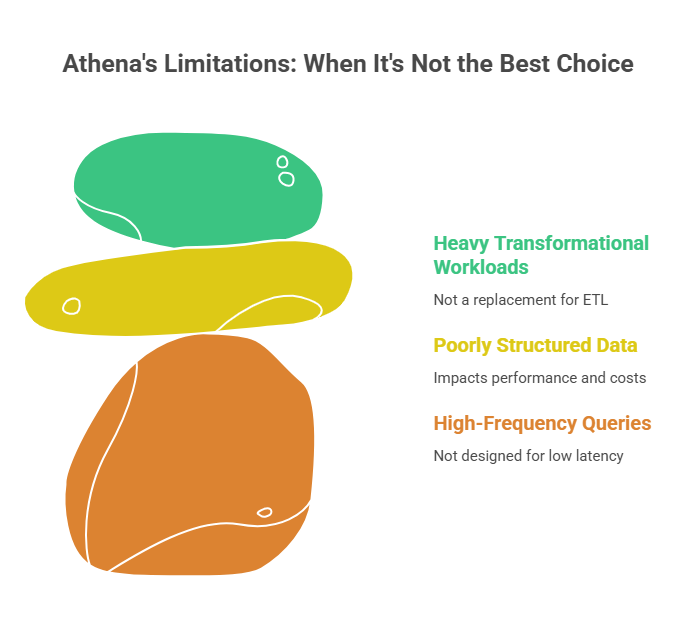
❌ High-Frequency Low-Latency Queries
AWS Athena is not designed for high-frequency, millisecond-response query patterns. First and foremost, it’s optimized for analytical workloads, not latency-sensitive transactional operations. To meet the needs of low-latency responses, Amazon Redshift, Amazon DynamoDB, or operational databases can be a better fit.
❌ Poorly Structured Data Lakes
AWS Athena performance is highly sensitive to data lake structure – file size, format choice, and partitioning strategy all matter here. Unoptimized datasets frequently lead to high scan costs, slow queries, performance variability, and other issues.
❌ Heavy Transformational Workloads
Athena is not a replacement for full ETL or large-scale transformation engines. Substantial data transformations are much better handled by services such as AWS Glue, EMR, or Spark-based pipelines, which are designed for processing-intensive workloads.
AWS Athena Pricing Overview
AWS Athena pricing is consumption-based – with costs primarily driven by data scanned per query. Storage, metadata management, and data transfer are billed separately under standard AWS pricing structures. See more details below.
| AWS Athena: Key Pricing Components | ||
| Pricing Area | Behavior | Pricing Mechanics |
Data Scan Volume | Primary cost driver | $5.00 per TB scanned, rounded to nearest MB, 10 MB minimum per query |
Storage (S3) | Billed separately | Standard S3 rates (e.g., ~$0.023 per GB / month for S3 Standard, region-dependent) |
Metadata (Glue Catalog) | Minimal but relevant | First 1M objects free; beyond that ~$1 per 100K objects (region-dependent) |
Data Transfer | Standard AWS network rules | Charged per standard AWS data transfer pricing: • Outbound to internet: ~$0.05–$0.09 per GB • Cross-AZ transfer: ~$0.01 per GB • Cross-region transfer: ~$0.02–$0.05 per GB |
Query Scan Costs
Queries are billed based on the amount of data scanned, rounded up to the nearest megabyte, with a 10 MB minimum per query.
For example: scanning 500 GB of data in a single query would cost roughly $2.50.
Also, note that Athena does not charge for DDL statements (e.g., CREATE TABLE) or failed/canceled queries (only the data scanned counts toward this fee).
Storage (S3)
Athena itself does not charge for storing data, you pay the standard S3 storage rates for your data, query results, and any intermediate output.
For example, S3 Standard storage in many regions is around $0.023 per GB / month for the first 50 TB of data stored. See more details on Amazon S3 pricing here.
Metadata (AWS Glue Data Catalog)
If you use the AWS Glue Data Catalog with Athena, metadata storage and access are billed separately under AWS Glue pricing. The first 1 million metadata objects and accesses per month are free; beyond that, costs start at $1 per 100 000 objects.
Data Transfer
Data transferred out of AWS (across regions or to the internet) is charged separately from Athena query costs, based on the standard AWS network pricing.
| AWS Athena Pricing Breakdown: Realistic Monthly Cost Scenario | |||
| Pricing Dimension | Scenario Usage | Pricing Basis | Estimated Monthly Cost |
| Data Scan Volume | ~120 GB × 25 queries/day × 30 days ≈ 90 TB scanned / month | $5.00 per TB scanned | $450 |
| Storage (S3) | ~8 TB stored | ~$0.023 per GB / month | $184 |
| Metadata (Glue Catalog) | Moderate footprint (~1.8M objects) | First 1M free, remainder billed | $8–12 |
| Data Transfer | Limited internet egress (~350 GB) | ~$0.05–$0.09 per GB | $18–32 |
| Total | $660 – $680 / month | ||
Getting Started With AWS Athena: Step-by-Step Guide
Athena is one of the fastest analytics services to get running, provided you focus on the right things. Follow our guide to get started the right way.
Architectural Preparation
Step 1. Define query patterns
Before implementation, clarify expected workload characteristics, including these three core apsects: 1) ad hoc vs repetitive queries, 2) scan-heavy vs filter-intensive workloads, 3) BI / reporting vs exploratory analytics.
Note that different query patterns produce fundamentally different cost and performance dynamics. For example, exploratory analytics typically tolerates higher latency and scan variability. BI workloads, in turn, demand predictable query response and controlled scan behavior. Because of this, early workload classification will significantly reduce downstream optimization effort.
Step 2. Optimize data formats
Athena performs most efficiently with columnar storage: Parquet or ORC.
Avoid long-term reliance on row-based formats for large datasets (CSV or JSON), since these formats force Athena to scan entire records rather than only the columns required by a query. This will mean unnecessary migration overhead and avoidable costs.
Step 3. Implement the partitioning strategy
Partitioning is one of AWS Athena’s primary performance mechanisms preventing full-dataset scans and stabilizing query latency. To implement it efficiently, follow these actions:
✅Organize datasets in Amazon S3 using logical partition keys reflected in the object path (e.g., year=2026/month=02/)
✅Select partition keys aligned with dominant query access patterns
✅Ensure queries consistently apply filtering predicates on partition keys
✅Avoid overly granular partitioning that may introduce metadata overhead
✅Maintain partitioning discipline as datasets evolve
| Typical AWS Athena Partition Keys | ||
| Partition Key | Best Suited For | Considerations |
Date / Time | – Logs- Events- Time-series data- BI reporting | Overly granular partitions (hour/minute) may increase metadata overhead |
| Region | – Multi-region systems- Geo-analytics- Compliance workloads | Inconsistent region naming leads to pruning failures |
| Tenant / Customer | – Multi-tenant SaaS – Client-isolated analytics | High-cardinality partitions may degrade performance |
| Event Type | – Application logs- Telemetry- Monitoring datasets | Skewed distribution can create uneven partitions |
| Environment (Prod / Dev / Test) | – Operational analytics – Platform monitoring | Poor governance may mix datasets unintentionally |
| Data Source / System | – Aggregated data lakes- Multi-pipeline ingestion | Excessive partition dimensions increase complexity |
To learn more details, follow the instructions on how to choose partition keys from the AWS user guide.
Implementation & Setup
Step 1. Prepare S3 datasets
Next on, datasets should be organized. Consistent S3 prefixes, optimized data, columnar formats – all these aspects need to be considered. Use the checklist below to validate that your S3 datasets are structured properly.
| Athena Dataset Preparation Checklist |
| ✅Design S3 prefixes to reflect logical partition keys (e.g., year=, month=, region=) |
| ✅Maintain a consistent and predictable S3 path structure |
| ✅Store datasets in columnar formats (Parquet or ORC) |
| ✅Apply lightweight compression (e.g., Snappy) |
| ✅Consolidate small files through periodic compaction |
| ✅Target optimized file sizes (typically 128 MB – 1 GB per object) |
| ✅Avoid excessive dataset fragmentation |
| ✅Enforce deterministic, machine-friendly naming conventions |
| ✅Align dataset layout with dominant query access patterns |
| ✅Treat dataset optimization as ongoing maintenance |
Example: Optimized S3 Dataset Layout
A well-structured Athena dataset typically follows a partition-aware and query-efficient S3 prefix design:
s3://analytics-bucket/events/
year=2026/
month=02/
day=20/
events_01.parquet
events_02.parquet
This structure provides several advantages:
> Partition keys (year, month, day) are explicitly encoded in the path;
> Queries filtering by time automatically trigger partition pruning;
> Columnar Parquet files minimize scanned data volumes;
> Consolidated file sizes reduce metadata overhead and latency variability.
Step 2. Configure AWS Glue Data Catalog
Athena relies on the AWS Glue Data Catalog for metadata management and schema resolution. Its right configuration is particularly important in larger environments, since schema drift, inconsistent crawlers, and unmanaged table definitions directly impact performance and query results.
Here’s a pro tip for a logical database structure: a well-governed catalog typically separates datasets by analytical function: 1) analytics (curated analytical datasets), 2) logs (application / telemetry data), 3) sandbox (experimental / ad hoc datasets).
Check out a step-by-step configuration guide below.
| Glue Catalog Configuration Checklist |
| ✅Create databases aligned with logical data domains (e.g., analytics, logs, finance) |
| ✅Define tables using explicit schemas where structure is predictable |
| ✅Use Glue Crawlers selectively, primarily for evolving or semi-structured datasets |
| ✅Validate crawler output to prevent incorrect data type inference |
| ✅Ensure partition keys are correctly defined in table metadata |
| ✅Regularly audit schemas for drift or structural inconsistencies |
| ✅Avoid duplicate or overlapping table definitions |
| ✅Apply naming conventions for databases and tables |
| ✅Monitor metadata object growth in large-scale environments |
| ✅Establish governance rules for schema updates |
Step 3. Define schemas
Schemas in Athena can be created using DDL statements (CREATE EXTERNAL TABLE) or AWS Glue Crawlers. The two of them serve different operational purposes (explicit schemas focus on control and stability, crawlers – speed and automation).
| Comparing AWS Athena Schema Definition Approaches | ||
| DDL statements | AWS Glue Crawlers | |
| Setup speed | Manual, slower setup | Automated, faster setup |
| Schema control | Full control | Inference-based |
| Predictability | High stability | Variable outcomes |
| Data Type Accuracy | Precisely defined | Occasionally misinferred |
| Partition Handling | Explicit, reliable | Detection-dependent |
| Schema Drift Risk | Low when governed | Higher in evolving datasets |
| Operational Overhead | Higher upfront effort | Higher validation needs |
| Governance Fit | Strong alignment | Requires monitoring |
Also, consider a hybrid approach – many teams apply it for a balanced agility and control. Teams often rely on Glue Crawlers for rapid schema discovery and onboarding in dynamic environments, then introduce explicit schemas once datasets stabilize.
Step 4. Run validation queries
AWS Athena Validation Checklist |
| 1. Column Resolution & Data Types |
| ✅Verify columns are resolved correctly ✅Confirm data types match dataset structure ✅Detect excessive implicit casting ✅Validate numeric and timestamp behavior |
| 2. Partition Pruning Behavior |
✅Test queries filtering on partition keys ✅Confirm partition pruning is applied ✅Compare scan volumes with and without partition filters ✅Detect unexpected full-partition scans |
| 3. Scan Volume & Efficiency |
✅Inspect data scanned per query ✅Validate scan size aligns with query scope ✅Identify hidden full-dataset scans ✅Detect inefficient filtering patterns |
| 4. Query Latency Stability |
✅Evaluate query execution time consistency ✅Identify latency spikes or variability ✅Detect dataset fragmentation indicators ✅Validate pruning impact on latency |
| 5. Casting & Parsing Overhead |
✅Detect excessive runtime casting ✅Identify parsing overhead (e.g., JSON) ✅Validate conversion efficiency ✅Detect resource amplification patterns |
Common Cost Pitfalls in AWS Athena
From our experience, AWS Athena cost inefficiencies typically stem from one of these factors: 1) query behavior, 2) data layout decisions.
Specifically, watch out for these cost bottlenecks:
- Full-table scans. Queries with weak filtering or excessive column selection often trigger large scans, directly inflating costs.
- Missing partition filters. Failure to apply partition-aware predicates results in unnecessary full-dataset scans.
- Excessive small files. Fragmented datasets increase metadata overhead and reduce scan efficiency.
- CSV / JSON-heavy workloads. Row-based formats amplify scan volumes and introduce parsing overhead compared to columnar storage.
- BI tools triggering repeated scans. Repetitive dashboard queries can evolve into persistent high-frequency scan engines.
Cost Optimization Strategies for AWS Athena
Quick Wins for AWS Athena Cost Optimization | |||
| Strategy | Effort | Savings | Impact Speed |
| Convert to Parquet / ORC | Low | Very High | Immediate |
| Implement partitioning | Medium | Very High | Immediate |
| Enforce partition filters | Very low | High | Immediate |
| Optimize file sizes | Low | Medium | Short-term |
| Query governance policies | Medium | High | Short-term |
To ensure quick cost efficiency wins, we recommend following these best practices:
> Converting datasets to Parquet or ORC. Migrate row-based formats such as CSV or JSON into columnar storage. Also, apply lightweight compression to improve scan efficiency and latency stability.
> Partitioning significantly limits dataset scan scope. Organize S3 objects using logical partition keys aligned with query access patterns. Ensure partitions reflect dominant filtering dimensions such as date, region, or tenant.
> Enforce partition filters to prevent unnecessary full-dataset scans, pllus monitor scan metrics to detect pruning failures and inefficient query patterns.
> File sizes optimization. Reduces metadata overhead by consolidating excessive small files through periodic compaction. Target object sizes appropriate for analytical workloads.
> Establishing query governance reduces persistent scan inefficiencies and cost volatility. To do this, monitor query behavior, identify high-scan patterns, and enforce scan-efficient query practices across BI and analytical workloads.
AWS Athena Cost Optimization: Advanced Strategies (Long-Term Optimization) | |||
| Strategy | Effort | Savings | Impact Speed |
| Redesign data lake layout | Medium | High | Short-term |
| Query workload refinement | Medium | High | Short-term |
| Automated cost monitoring | Medium | High | Ongoing |
| Governance & access controls | Medium | Medium | Gradual |
Beyond foundational optimizations, these quick-win strategies might not be efficient once
workloads scale. To secure stable cost behavior, ensure you also cover these aspects:
> Data lake layout restructuring. Align S3 organization with partitioning strategy and dominant query patterns. Also, ensure you eliminate fragmented structures.
> Query workload optimization. Evaluate query behavior, detect inefficient scan patterns, limit unnecessary column reads, and ensure filtering logic is consistently applied.
> Automated cost monitoring tracking and alerts for abnormal cost deviations: query metrics, scanned data volumes, workload trends, etc.
> Governance and access controls. Establish usage policies, regulate query execution patterns, align permissions with workload requirements.
Explore more with the AWS expert article about Top 10 Performance Tuning Tips for Amazon Athena.
Why Spendbase Is a Smart Companion for AWS Athena
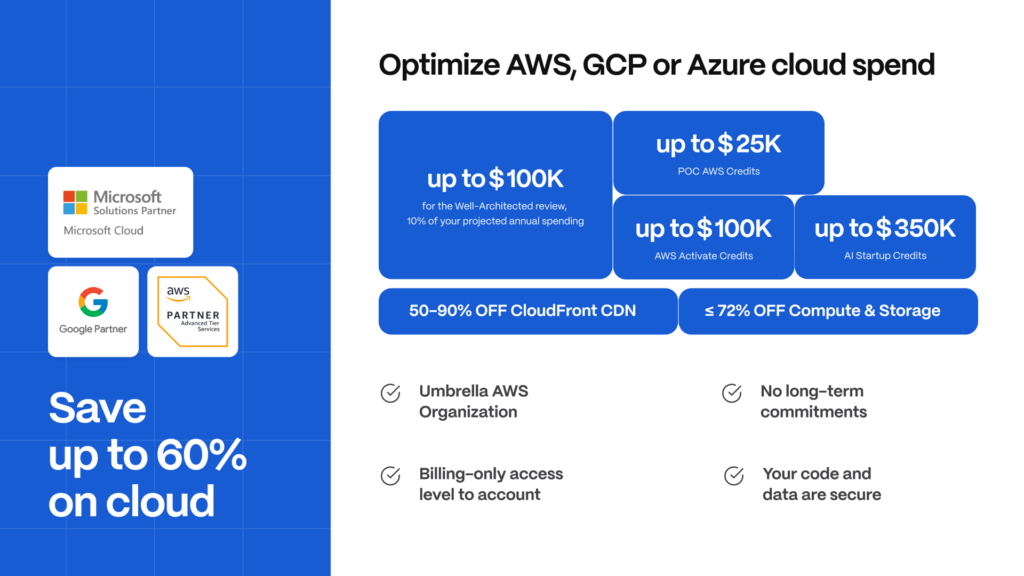
Spendbase naturally complements AWS Athena in several ways. Most notably, Spendbase helps businesses secure up to $100,000 in AWS credits and thus offset a range of costs associated with AWS Athena: query scans, Amazon S3 storage, and supporting data processing services. For many clients, the secured credits cover as much as two years of AWS expenses.
Beyond credits, Spendbase unlocks cost reductions across core cloud services, with discounts of up to 90% on CloudFront CDN usage and up to 60% on compute and storage resources. Additionally, Spendbase provides practical DevOps and cost optimization support, helping teams refine workloads, eliminate inefficiencies, and maintain predictable cloud spending.

We can unlock discounts on 10,000+ tools you already use.
Final Thoughts
AWS Athena serves as a highly efficient analytical engine when workloads are structured for scan efficiency. It’s also a powerful reminder that modern analytics economics are governed by data access patterns and not compute capacity. Therefore, ensure that analytical efficiency is designed into the system from the start.
AWS Athena cost efficiency is inseparable from data design efficiency. Well-structured datasets and disciplined query practices unlock Athena’s full economic advantage, while poor design decisions can rapidly inflate analytics spend.
For organizations leveraging AWS Athena, a smart approach is leverage free AWS credits with the help of Spendbase. This can help mitigate scan-driven query costs and storage expenses, and thus improve overall analytics cost efficiency.


Get discounts on your team’s favorite apps
Find deals for 10%, 30%, or even 70% off in our discount marketplace.
Check Discounts



