











As cloud architectures scale, storage becomes one of the most underestimated cost and performance drivers. In AWS environments, Amazon Elastic Block Store (EBS) plays a foundational role in this layer.
To better understand what influences throughput, latency, and pricing, we’ll explore in detail how EBS operates under the hood – and how to optimize its costs.
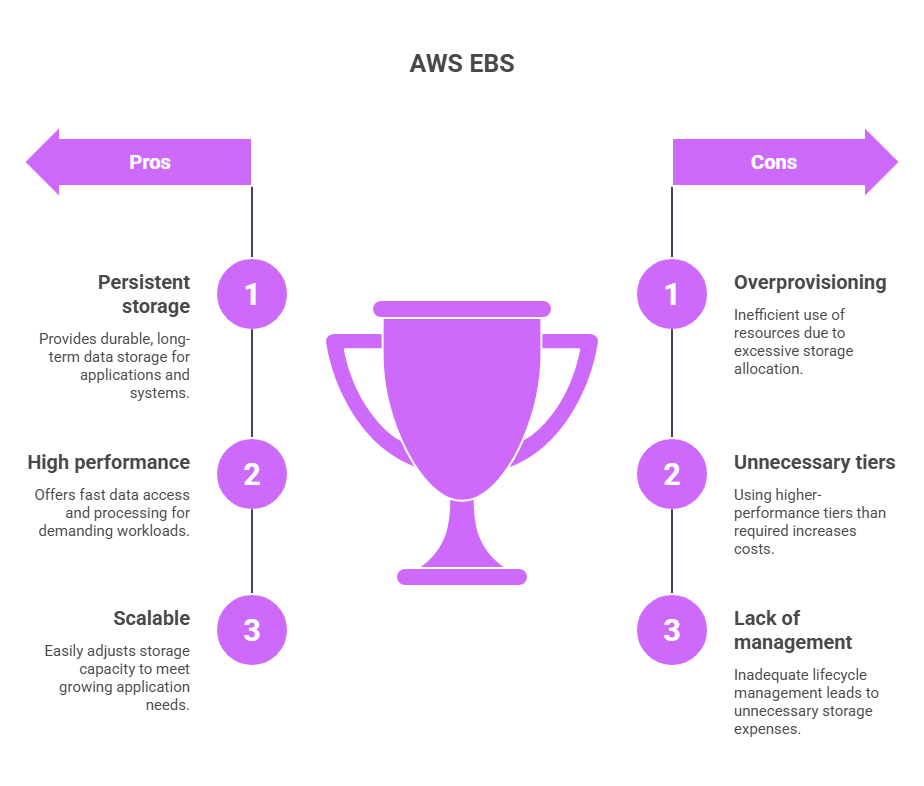
Key Takeaways
> AWS EBS provides persistent high-performance block storage – however, its effectiveness largely depends on correct volume selection and configuration;
> Most inefficiencies stem from 3 core areas: 1 – overprovisioned volumes, 2 – unnecessary high-performance tiers, 3- lack of lifecycle management;
> By securing AWS credits, organizations can offset infrastructure costs while optimizing storage usage, and thus reallocate budget toward innovation and scaling.
See how much you can save on your stack
Pick your team’s tools!
Click to select one or more tools.


What’s your company size?
Just click to select.
What’s your business email?
We'll send you calculations right away
The email is flying to your inbox!
Beyond discounts, you may qualify for up to $100K in AWS credits.

What Is AWS EBS
AWS EBS is a persistent block storage service designed for use with Amazon EC2 instances. It provides reliable, high-performance storage that behaves like a traditional disk – while being fully managed and cloud-native.
In doing so, it offers several game-changing benefits for storage management:
- Low-latency access for transactional and performance-sensitive workloads;
- High availability within an Availability Zone, with built-in redundancy to protect against hardware failure;
- Flexible performance configurations, allowing you to choose between general-purpose and provisioned IOPS volumes based on workload needs.
| Traditional Storage vs AWS EBS Model | |
| Traditional Storage | AWS EBS Model |
| Local disk storage | Network-attached block storage |
| Tied to physical hardware | Decoupled from compute lifecycle |
| Manual scaling | Elastic volume resizing |
| Limited redundancy | Built-in replication within AZ |
| Hardware-dependent | Fully managed by AWS |
Key AWS EBS Architectural Elements
Behind its simplicity as “just a disk” lies a set of architectural elements that directly influence performance, availability, and cost. Therefore, to use Amazon Elastic Block Store (EBS) effectively, it helps to understand its core components:
- Volumes (storage units). These are persistent block storage attached to EC2 instances, forming the primary data layer.
- Snapshots (backups). Incremental backups stored in S3 – enabling recovery, cloning, cross-region replication, etc.
- IOPS and throughput configuration. These settings define performance characteristics and can be tuned to support latency-sensitive applications or high-throughput workloads.
- Volume types (performance tiers) – options like gp3 (balanced) or io1/io2 (high-performance), allowing alignment with workload needs.
- Attachment model. Typically single-instance attachment, with Multi-Attach available for specific clustered workloads
- Elastic modification capability. Volume size and performance can be adjusted dynamically, often without downtime, eliminating the need to recreate or migrate storage.
Core Capabilities of AWS EBS
From our observations, AWS EBS enables several standout capabilities that directly impact performance, operational and cost efficiency. Let’s explore.
AWS EBS Volume Types
AWS EBS offers multiple volume types, each designed for specific workload patterns.
At the same time, its core capabilities (persistence, performance tuning, snapshots, and scaling) apply across all types, but behave differently depending on how volumes are configured. Thus, the greatest impact comes from alignment – specifically, matching the right volume type and configuration to actual workload patterns. See the table below with key considerations on how to achieve that.
AWS EBS Volume Types Overview | |||
| Volume Type | Best For | Performance Characteristics | Key Consideration |
General Purpose SSD (gp3 / gp2) | Most workloads (web apps, databases) | Balanced IOPS, throughput, & latency | Default choice, but often overprovisioned |
Provisioned IOPS SSD (io1 / io2) | Latency-sensitive apps (databases, critical systems, etc.) | High, consistent IOPS, low latency | Higher cost, requires precise tuning |
Throughput Optimized HDD (st1) | Large sequential workloads (logs, analytics, etc.) | High throughput, lower IOPS | Not suitable for random access |
Cold HDD (sc1) | Infrequent access, archival data | Low cost, low performance | Designed for minimal access patterns |
Persistent Storage
First, persistent storage is one of the most valuable aspects of AWS EBS. Because volumes exist independently of EC2 instances, your data remains intact even if an instance is stopped or terminated.
This gives you a lot more flexibility and control to operate and scale your workloads efficiently, in particular:
- You’re not tying storage to the lifecycle of compute (which simplifies scaling and architecture decisions);
- Replacing or migrating instances becomes low-risk, since data stays preserved at the volume level;
- Restarts, failures, or updates don’t disrupt data availability.
From our experience, it’s particularly beneficial when uptime, recoverability, and operational continuity matter.
Performance Customization
Another great benefit, AWS EBS offers a high degree of control. With EBS’s fine-grained control over performance, you can fine-tune:
- IOPS (input/output operations per second);
- Throughput (data transfer rate);
- Volume size (which directly defines performance ceilings).
This flexibility allows you to align storage precisely with workload behavior, whether you’re optimizing for low-latency transactional systems or high-throughput data processing.
However, consider this:
- Overconfiguring IOPS or throughput is common, especially in early-stage setups (since teams are often paying for unused capacity);
- Underprovisioning typically surfaces later, when workloads scale and performance issues appear as latency spikes, queue buildup, or degraded user experience
Snapshot & Backup Integration
EBS integrates natively with Amazon S3 via snapshots, which provides durable incremental backups.
Functionally, this enables the following advantages:
- Point-in-time recovery for robust data protection and rollback scenarios;
- Fast volume cloning for testing, staging, or scaling environments;
- Cross-region snapshot replication for disaster recovery and business continuity.
Most importantly, snapshots are incremental and, thus, only changes are stored. When you create the first snapshot, EBS copies all data blocks from the volume to S3 (a full baseline). For every subsequent snapshot, only the blocks that have changed since the last snapshot are saved. This, in the long run, optimizes both storage consumption and cost over time.
Elastic Scaling
AWS EBS volumes can be resized or have their performance adjusted without downtime in most cases. It allows teams to react quickly to spikes in demand, onboard new workloads, and efficiently stabilize performance issues.
However, to maintain efficiency, continuous monitoring is essential (e.g., IOPS utilization, queue depth, throughput usage). Keep the following in mind:
- Scaling is typically one-directional – volumes are increased during growth or incidents, but rarely scaled back;
- Performance parameters (IOPS, throughput) are often adjusted reactively (without later re-evaluation);
- Over time, volumes can drift away from actual workload needs and become overprovisioned.
Free virtual cards for non-EU residents
Open in 1 working day, issue 100 virtual cards, and get up to 1.25% cashback.
Get a free account
Integration with AWS Ecosystem
Another key strength is how seamlessly it integrates with the broader AWS ecosystem. See a list of integrations below, as well as the impact they deliver altogether.
| AWS EBS Integrations Overview | ||
| Service | Role | What It Enables |
| Amazon EC2 | Compute layer | Attaching persistent block storage to instances |
| AWS CloudWatch | Monitoring | Tracking IOPS, throughput, latency; set alerts |
| AWS Backup | Backup management | Centralized backup policies and automation |
| Amazon S3 | Snapshot storage | Durable storage for snapshots and recovery |
| AWS IAM | Access control | Fine-grained permissions for volumes and snapshots |
| AWS KMS | Encryption | Encryption at rest for volumes and snapshots |
| AWS CloudTrail | Audit & logging | Tracking API activity and access to EBS resources |
| Amazon Data Lifecycle Manager (DLM) | Lifecycle automation | Automating snapshot creation and retention |
| AWS Systems Manager | Operations | Automating patching, manage instances using EBS volumes |
| Amazon FSx / EFS | Storage ecosystem | Complementary storage for shared file workloads |
| AWS Lambda | Automation | Triggering workflows based on EBS events |
Top Use Cases for AWS EBS
Amazon Elastic Block Store (EBS) is widely used across AWS workloads, but its effectiveness depends on how well it matches the use case. Below are the scenarios where it delivers the most value.
AWS EBS Autopilot: Suitability Overview | ||
| Suitability | Use Case | Why It Works (or Doesn’t) |
Highly suitable | Transactional databases (OLTP) | – Low-latency SSD options (gp3, io2) – Consistent performance with provisioned IOPS – Strong durability within an AZ |
Highly suitable | Stateful applications (e.g., backend services) | – Persistent storage independent of compute – Easy attachment to EC2 instances – Supports scaling and failover scenarios |
Highly suitable | Lift-and-shift workloads | – Familiar block storage model (like traditional disks) – Minimal changes required during migration – Seamless integration with Amazon EC2 |
Highly suitable | Development & testing environments | – Fast provisioning and cloning via snapshots – Flexible resizing and configuration – Supports rapid iteration |
Moderate suitability | Data processing (sequential workloads) | – Works with throughput-optimized volumes (st1) – Cost-efficient for sequential access patterns – Performance drops for random access |
| Moderate suitability | Backup and archival (via snapshots) | – Incremental snapshots stored in AWS S3 – Good for recovery and DR – Requires lifecycle management to control costs |
| Limited suitability | Highly distributed systems | – Single-AZ scope limits cross-region resilience – Not designed for distributed storage patterns |
Limited suitability | Highly variable / spiky workloads | – Requires pre-provisioned performance – Can lead to overprovisioning and cost inefficiency – Less flexible than serverless storage options |
✅ Case #1: Application & Database Storage
This is one of the most common and critical use cases for Amazon Elastic Block Store (EBS). Application backends and databases (e.g., OLTP systems) require consistent, low-latency access to data, where even small delays can impact user experience and system performance.
In these setups, EBS acts as the primary data layer, supporting everything from transactional databases (PostgreSQL, MySQL) to stateful backend services. Unlike object storage, it provides block-level access – which is essential for database engines that rely on fast, predictable I/O.
AWS EBS for Application & Database Storage: Assessment Highlights | |
Primary value | Low-latency block storage |
Performance drivers | IOPS, throughput |
Operational impact | Supports transactional workloads |
Critical dependencies | Volume sizing, performance tuning |
From what we’ve seen in production environments, EBS performs consistently for database workloads – however, only in cases when performance is aligned with actual usage.
Some of our highlights from testing:
> gp3 volumes handled most OLTP workloads efficiently when properly tuned;
> Overprovisioned IOPS rarely improved performance unless workloads were truly latency-bound;
> Query optimization had a greater impact than increasing storage performance;
> To avoid unnecessary scaling, monitoring latency and queue depth proceed efficient.
✅ Case #2: Boot Volumes for EC2
Every Amazon EC2 instance relies on a boot volume to store the operating system, system files, and essential configurations. In AWS, Amazon EBS handles exactly that.
Unlike ephemeral instance storage, EBS-backed boot volumes are persistent – meaning, the OS and data remain intact even if the instance is stopped or restarted. This is critical for maintaining system state, applying updates, and ensuring consistent environments across restarts.
AWS EBS & Boot Volumed for EC2: Assessment Highlights | |
Primary value | Persistent OS storage |
Performance drivers | Volume type selection |
Operational impact | Ensures instance reliability |
Critical dependencies | Snapshot strategy |
From what we’ve observed, boot volumes are typically stable and predictable – however, they are often overlooked from a cost and lifecycle perspective. In practice, inefficiencies tend to accumulate through oversized volumes and unmanaged snapshots.
Our highlights from testing showed the following:
- gp3 provides sufficient performance for most boot volumes without requiring tuning;
- Oversized root volumes are common and rarely fully utilized;
- Snapshot accumulation becomes a hidden cost driver without retention policies;
- Standardizing AMIs and volume sizes reduces operational complexity and cost.
✅ Case #3: Data Processing Workloads
In this case, we’ve reviewed how EBS supports data processing workloads. In this context, Amazon Elastic Block Store (EBS) is used as a high-throughput storage layer for intermediate data, staging areas, and processing outputs (ETL pipelines, log processing, batch analytics jobs, etc.). The goal, in this case, is consistent data transfer performance during heavy read/write operations.
In this scenario, we’ve observed the following:
> st1 delivers strong performance for sequential workloads at a lower cost than SSD;
> Using gp3 for throughput-heavy workloads often results in unnecessary spend;
> Performance drops significantly when workloads shift from sequential to random access;
> Throughput limits (not IOPS) are usually the key bottleneck in data pipelines.
AWS EBS for Data Processing Workloads: Assessment Highlights | |
Primary value | High-throughput storage |
Performance drivers | Sequential read/write performance |
Operational impact | Supports batch processing |
Critical dependencies | Volume type alignment |
Limitations & When EBS May Not Be Optimal
EBS volumes are primarily designed to be attached to a single EC2 instance, which makes them unsuitable for scenarios requiring concurrent access from multiple instances. While limited Multi-Attach options exist, they introduce additional complexity and do not provide true shared filesystem behavior. This can lead to data consistency challenges and increased operational overhead.
For such use cases, managed network file systems like Amazon EFS or high-performance file systems such as Amazon FSx are more appropriate, as they are built to support multi-instance access natively.
❌ Object storage workloads
EBS is designed for block storage and is not optimized for storing or accessing unstructured data such as files, media, or large datasets via APIs. Using EBS for these workloads can result in higher costs and limited scalability compared to object storage solutions.
In contrast, Amazon S3 provides a more suitable model, offering virtually unlimited scalability, high durability, and efficient access patterns for object-based workloads, with additional archival options like S3 Glacier for long-term storage.
❌ Infrequent access or archival data
EBS charges for provisioned storage regardless of how often the data is accessed, making it inefficient for workloads with low access frequency. Since there is no built-in tiering for cold data, costs can accumulate over time without delivering proportional value.
For these scenarios, storage classes such as Amazon S3 Infrequent Access or S3 Glacier are better suited, as they are specifically designed to reduce costs for infrequently accessed or archival data.
❌ Highly distributed systems
EBS volumes are scoped to a single Availability Zone, which limits their suitability for distributed architectures that require data to be accessed across regions or multiple zones. Implementing such systems with EBS often requires additional replication mechanisms, increasing complexity and cost.
Because of this, for distributed workloads, services like Amazon S3 or distributed databases such as DynamoDB provide a more appropriate foundation, as they are designed for high availability and global accessibility.
How AWS EBS Works: Key Considerations
In practice, AWS EBS functions like a traditional disk, but with added cloud flexibility and performance controls. Let’s explore how it works step by step.
Step 1: Defining storage requirements
Before creating a volume, teams define size, performance needs (IOPS/throughput), and workload characteristics (e.g., transactional vs throughput-heavy).
Note: choosing the right volume type (e.g., gp3 vs io2) is critical at this stage (consider peak vs average load, growth projections, and latency sensitivity).
Step 2: Creating and configuring volumes
Volumes are provisioned with specific parameters (size, type, IOPS, throughput, etc.), which directly determine both performance and cost.
Most importantly, consider that every additional unit of provisioned performance has a direct cost impact (overprovisioning for “safety” is common, but aligning with actual usage patterns is what drives efficiency).
Step 3: Attaching volumes to EC2 instances
The volume is attached to an EC2 instance and exposed as a block device. At this point, it can be formatted and mounted like a traditional disk.
At this stage, consider that volumes are AZ-bound – so mismatches affect availability. Also, account for attachment limits and whether your architecture requires Multi-Attach or shared storage patterns.
Step 4: Reading and writing data
Applications interact with the volume as if it were local storage, performing standard read/write operations. Performance depends on both volume configuration and application behavior.
Step 5: Ensuring data durability
Data is automatically replicated within the same Availability Zone, protecting against hardware failures and ensuring high availability at the storage layer (however, consider that this does not protect against AZ-level failure – production-grade setups typically require cross-AZ or cross-region replication strategies).
Step 6: Creating snapshots for backup and recovery
Snapshots are taken incrementally and stored in Amazon S3, enabling point-in-time recovery, cloning of environments, and disaster recovery strategies.
At this point, it’s important to understand how often data changes (f.e., high-change workloads generate more snapshot data – therefore, without lifecycle policies, costs can grow unnoticed over time).
Step 7: Scaling storage and performance
As workloads evolve, volumes can be resized or have IOPS and throughput adjusted (often without downtime).
To scale efficiently, ensure you regularly review all configurations and align them with actual usage patterns.
Step 8: Monitoring and optimizing usage
Teams monitor IOPS, throughput, latency, and utilization metrics to identify bottlenecks or overprovisioning, and adjust configurations accordingly.
AWS EBS: Key Metrics To Monitor | ||
| Metric | What it shows | What to watch for |
| IOPS (read/write) | Number of I/O operations per second | Constantly near limits → underprovisioned; consistently low → overprovisioned |
| Throughput (MB/s) | Data transfer rate | Saturation → bottlenecks; low usage → wasted capacity |
| Latency | Time per I/O operation | Spikes or sustained high latency → performance issues |
| Queue depth | Number of pending I/O requests | High queue depth → insufficient IOPS or inefficient I/O patterns |
| Burst balance (for gp2/gp3) | Available burst credits | Depletion → sudden performance drops |
| Volume utilization (%) | Actual vs provisioned usage | Low utilization → overprovisioning; high → scaling needed |
| Read vs write ratio | Workload pattern | Imbalance may require tuning or different volume type |
| Snapshot size growth | Data change rate over time | Rapid growth → increasing storage costs |
The Hidden Complexity of Block Storage
At first glance, AWS EBS seems simple – attach a volume and use it. However, in reality, it introduces ongoing complexity – around performance tuning, cost visibility, and lifecycle management, to name a few.
Based on our experience, here are the aspects that are often overlooked:
- Storage is not passive: it directly impacts application performance and cost;
- Inefficiencies often stem from misaligned performance settings and unused volumes or snapshots;
- Configurations are rarely revisited as workloads evolve (leading to drift and overspending);
- Costs are based on provisioned capacity, not actual usage (which makes misconfigurations expensive).
Our key takeaway from this: EBS simplifies infrastructure, but not optimization. To use it efficiently, it’s important to understand its cost drivers. See below.
AWS EBS Pricing Overview
Unlike consumption-based models, AWS EBS pricing is tied to allocated capacity and performance settings. In particular, EBS pricing is driven by:
- Volume type (different types (e.g., gp3, io2) have distinct pricing models and performance characteristics;
- Provisioned storage (GB/month) – you pay for the allocated capacity (regardless of actual usage);
- Provisioned IOPS (io1/io2) – high-performance volumes charge separately for configured IOPS;
- Throughput (gp3) – additional throughput beyond the baseline is billed separately
- Snapshot storage – Incremental backups stored in Amazon S3 are charged based on stored data over time.
AWS EBS Pricing Breakdown | |||
| Pricing Component | Behavior | Primary Cost Impact | Typical Pricing |
| Storage capacity (GB) | Billed per provisioned GB/month | Overallocated storage size | $0.08–$0.10 per GB/month (gp3) |
| Volume type | Determines pricing tier (gp3, io2, etc.) | Using higher-tier storage than needed | gp3 (baseline) vs io2 (premium, significantly higher) |
| Provisioned IOPS | Billed per IOPS configured (io1/io2) | Excess performance allocation | $0.005–$0.065 per IOPS/month |
| Throughput (gp3) | Billed per MB/s provisioned | Accumulation of unused snapshots | $0.04–$0.06 per MB/s/month |
| Volume lifecycle | Charges apply while volumes exist (even if unused) | Detached or idle volumes | $0.05 per GB/month |
Let’s review a practical example. The scenario below reflects a typical mid-size production workload running on Amazon Elastic Block Store (EBS) – for example, a backend service with a database, moderate traffic, ongoing backups, etc.
Estimated AWS EBS Monthly Costs for a Mid-Size Deployment | ||
| Component | Usage | Monthly Cost |
| Storage (gp3) | 1 TB provisioned storage | $80–100 |
| Provisioned IOPS | 6,000 IOPS (above baseline if applicable) | $30–60 |
| Throughput (gp3) | 250 MB/s configured | $10–20 |
| Snapshot storage | 500 GB incremental backups in Amazon S3 | $20–30 |
| Idle / detached volumes | 200–500 GB unused volumes | $15–50 |
| Monitoring & data transfer | Basic metrics + minor internal traffic | $5–15 |
| Total (optimized setup) | $160–275/month | |
To better understand potential costs, let’s review the real-life scenario. The example below reflects a typical mid-size autoscaled workload where costs are primarily driven by CPU and memory usage, with smaller contributions from storage, networking, and observability. Overall, it shows a predictable cost range, where efficient scaling helps keep spending aligned with actual demand – see more details in the table.
Estimated AWS EBS Monthly Costs for a Mid-Size Deployment | ||
| Component | Usage | Monthly Cost |
| CPU requests | 2 vCPU average (autoscaled, 730 hrs) | $60–70 |
| Memory requests | 8 GB average (autoscaled, 730 hrs) | $25–35 |
| Ephemeral storage | 50 GB temporary usage | $2–3 |
| Pod runtime overhead | Included within resource pricing | |
| Network egress | 100 GB outbound traffic | $10–12 |
| Monitoring & logging | Standard logs and metrics volume | $10–20 |
| Total (with HA) | $110–140/month | |
What Drives AWS EBS Costs
From what we’ve observed, inefficiencies in AWS EBS typically result from how storage and performance are provisioned and maintained. Below are the key cost drivers we’ve identified in our work with EBS.
Factor #1. Oversized storage allocation
When volumes are provisioned for peak capacity but remain underutilized, they generate continuous cost regardless of actual usage.
Factor #2. Unused or detached volumes
Volumes that are no longer attached to instances but not deleted continue to incur charges, often going unnoticed in larger environments.
Factor #3. Overconfigured performance (IOPS & throughput)
Provisioning higher IOPS or throughput than required increases cost without delivering measurable performance improvements.
Factor #4. Snapshot sprawl
Accumulating outdated or unnecessary snapshots leads to gradual cost increases (especially without defined retention policies).
Factor #5. Misaligned volume type selection
Using high-performance SSD volumes for workloads that do not require them results in avoidable overspending.
AWS EBS: Capabilities vs Cost Risks | ||
| Capability | Cost Risk & Impact | Optimization |
| Volume sizing (storage capacity) | Overprovisioned volumes lead to continuous cost regardless of actual usage | → Right-size volumes → Review unused capacity → Reduce size |
| Performance configuration (IOPS / throughput) | Excess IOPS or throughput increases cost without real performance benefit | → Align with workload → Monitor usage → Avoid overprovisioning |
| Volume lifecycle management | Detached or unused volumes still incur full charges | → Delete unused volumes → Automate cleanup |
| Snapshot storage | Accumulating snapshots increase storage costs over time | → Apply lifecycle policies → Remove old snapshots → Optimize frequency |
| Volume type selection | Using high-performance types (io1/io2) unnecessarily increases cost | → Match type to workload → Use gp3 where possible |
| Elastic scaling | Scaling up without scaling down leads to long-term overprovisioning | → Scale down after peaks |
| Monitoring & visibility | Lack of monitoring leads to hidden inefficiencies and cost drift | → Track key metrics → Set alerts → Use FinOps practices |
| Data change rate (snapshots) | High write activity increases incremental snapshot storage costs | → Adjust backup frequency → Optimize data usage |
Optimizing AWS EBS Costs: Best Practices
From an optimization standpoint, Amazon Elastic Block Store requires continuous tuning. Fortunately, this can be achieved through both quick wins and longer-term, higher-effort optimization practices.
Immediate, High-Impact Areas for Improvement for Google Cloud SQL | |||
| Strategy | Effort | Savings | Impact Speed |
| Reduce excess storage | Low | High | Immediate |
| Delete unused volumes | Low | High | Immediate |
| Right-size IOPS/throughput | Low | Medium | Short-term |
| Clean up snapshots | Low | Medium | Short-term |
| Optimize volume type selection | Low | High | Immediate |
To achieve quick wins in AWS EBS cost optimization, follow these recommendations:
- Adjust storage capacity to actual usage – regularly review and reduce excess allocated space;
- Align performance settings with real demand – configure IOPS and throughput based on observed workload behavior;
- Remove unused volumes – identify and delete inactive or detached storage;
- Control snapshot lifecycle – enforce retention policies and clean up outdated backups;
- Select appropriate volume tiers – match storage type to workload requirements rather than defaulting to premium options;
Long-Term Cost Optimization Strategies for AWS EBS | |||
| Strategy | Effort | Savings | Impact Speed |
| Implement continuous storage right-sizing | Medium | High | Ongoing |
| Establish snapshot lifecycle policies | Low | Medium | Ongoing |
| Automate detection of unused volumes | Medium | High | Short-term |
| Standardize volume type selection | Medium | High | Medium-term |
| Optimize IOPS and throughput baselines | Medium | Medium | Medium-term |
| Introduce cost monitoring & alerting | Low | High | Immediate |
| Align storage with workload lifecycle | Medium | High | Medium-term |
| Regularly audit storage configurations | Low | High | Ongoing |
Meantime, to maintain long-term efficiency, we recommend these best practices::
– Continuously right-size storage – regularly review usage trends and adjust volume sizes to prevent long-term over-allocation;
– Manage snapshot lifecycle proactively – define retention policies, automate cleanup, avoid uncontrolled snapshot growth;
– Standardize storage decisions – define clear guidelines for when to use gp3 vs io2 to avoid unnecessary upgrades;
– Introduce cost visibility and alerts – monitor storage spending trends, set alerts for anomalies or unexpected growth;
– Perform regular audits – review configurations across environments to identify inefficiencies and optimization opportunities.

We can unlock discounts on 10,000+ tools you already use.
How AWS Credits Can Streamline EBS Costs
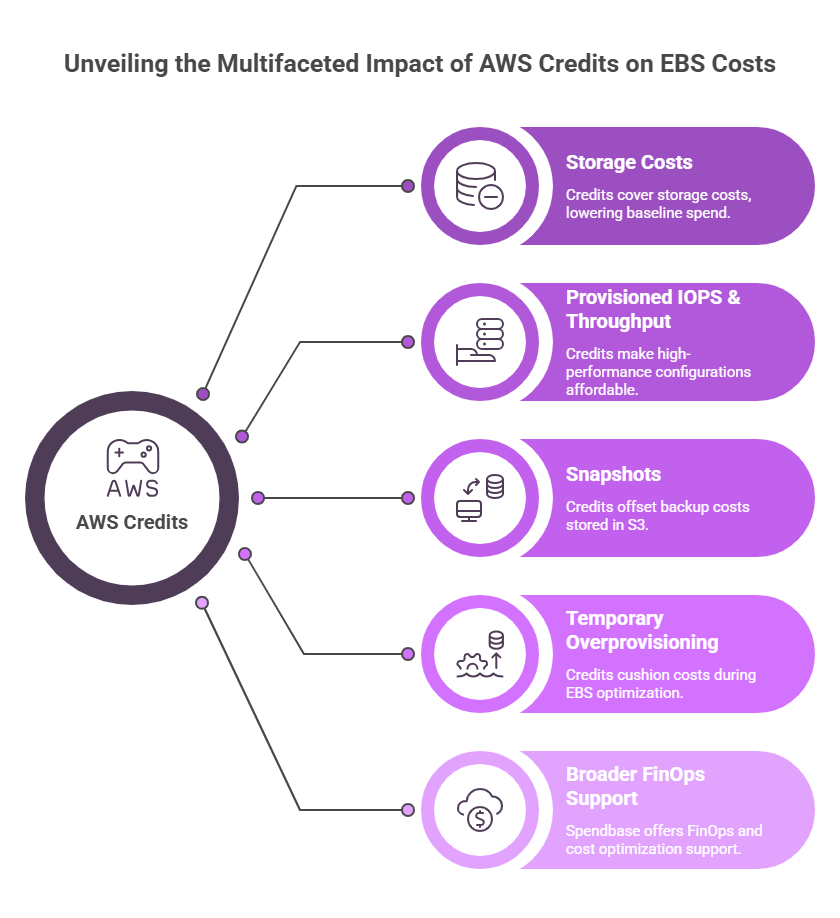
While optimizing configuration is essential, another effective lever for reducing costs in Amazon EBS is the use of AWS credits – especially when accessed through partners like Spendbase.
As an official AWS partner, Spendbase helps businesses secure free AWS credits and manages the process end-to-end – from identifying the right programs to applying, activating, and maximizing their impact on EBS and overall cloud spend.
In particular, it can impact EBS i the following areas:
- Storage costs (GB/month) – covered by credits, reducing baseline spend;
- Provisioned IOPS & throughput – high-performance configurations become more affordable during scaling phases;
- Snapshots (stored in Amazon S3) – backup-related costs can be partially or fully offset;
- Temporary overprovisioning – credits cushion the cost while you optimize and right-size.
Besides, in addition to AWS credits (up to $100,000 for startups), Spendbase provides broader FinOps and cost optimization support – including cloud cost audits, SaaS cost optimization (by 39% on average), vendor negotiation, corporate cards to control spend, and more.


Get discounts on your team’s favorite apps
Find deals for 10%, 30%, or even 70% off in our discount marketplace.
Check Discounts



