











Cost optimization
AWS EMR (Elastic MapReduce): Guides, Pricing, Cost Optimization

Nowadays, turning raw data into actionable insights at scale is a competitive necessity. And that’s precisely where Amazon EMR (Elastic MapReduce) provides substantial value. In this, we’ll explain how exactly it achieves that – as well as explore all the AWS EMR essentials: how it works, its pricing model, key cost drivers, and the most effective strategies to optimize both performance and spend.
Key Highlights & Takeaways
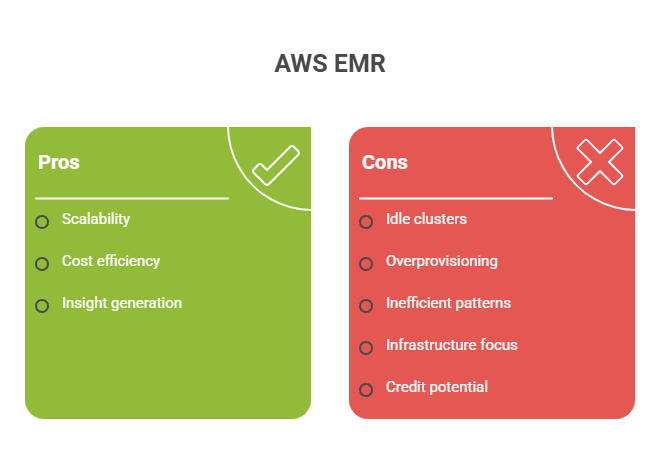
> AWS EMR delivers massive scalability for data processing. Meantime, its cost efficiency depends heavily on cluster design and workload behavior.
> The biggest cost risks come from several areas: idle clusters, overprovisioned instances, inefficient data processing patterns, you name it.
> EMR cost optimization is not just about infrastructure. First and foremost, it requires aligning compute usage with actual data processing needs.
> Additional savings opportunities exist beyond infrastructure. Spendbase can help unlock up to $100,000 AWS credits and reduce overall cloud spend without increasing operational overhead.
See how much you can save on your stack
Pick your team’s tools!
Click to select one or more tools.


What’s your company size?
Just click to select.
What’s your business email?
We'll send you calculations right away
The email is flying to your inbox!
Beyond discounts, you may qualify for up to $100K in AWS credits.

What Is AWS EMR
AWS EMR (Elastic MapReduce) is a managed big data platform that allows organizations to process vast amounts of data using frameworks (Apache Spark, Hadoop, Hive, Presto, Flink, etc.). This, in turn, allows teams to run large-scale data processing, analytics, and machine learning workloads efficiently without managing complex infrastructure.
At its core, AWS EMR significantly simplifies distributed data processing – by handling cluster provisioning, scaling, and integration with other AWS services.
Unlike traditional setups (that require manual cluster setup and ongoing maintenance), AWS EMR is easily managed and scalable. See its core differentiation points in the table below.
| Traditional Approach | AWS EMR |
| Manual cluster setup | Fully managed clusters |
| Fixed infrastructure | Elastic scaling |
| High upfront cost | Pay-as-you-go |
| Complex maintenance | Managed by AWS |
| Limited flexibility | Multi-framework support |
Beyond that, AWS EMR brings several game-changers. From our perspective, its core value lies in the following:
> Scalability. EMR distributes workloads across multiple nodes, thus enabling efficient processing of massive datasets without re-architecting systems.
> Flexibility. Since it supports multiple frameworks, teams can choose the best tool for each workload.
> Cost control. AWS EMR offers pay-as-you-go compute. This helps avoid idle costs and optimizes spend.
Key Capabilities of AWS EMR
Distributed Data Processing
Distributed data processing is at the core of how AWS EMR works – by breaking large workloads into smaller tasks and executing them across multiple nodes simultaneously.
In cases where performance at scale is critical (like ETL pipelines or analytics workloads), AWS EMR’s distributed data processing proves to be of great value. Since it executes workloads in parallel across multiple nodes, it significantly reduces processing time for large-scale datasets.
Here’s another benefit: when built on Apache Spark and Hadoop frameworks, EMR not only accelerates computation but also ensures fault tolerance. This means, workloads continue even if individual nodes fail.
Particularly, these capabilities show how EMR enables this model to be fast and efficient in practice:
- Parallel execution – AWS EMR splits workloads across multiple nodes, and thus tasks run simultaneously;
- Fault tolerance – if a node fails or a task errors out, AWS EMR automatically retries and redistributes the work, thus keeping pipelines stable;
- Horizontal scaling – AWS EMR can add or remove nodes dynamically based on workload demand (to avoid overprovisioning infrastructure);
- Data locality – for minimized data movement and reducedd latency, EMR processes data close to where it’s stored (e.g., S3 or HDFS);
- Resource allocation – EMR is able to efficiently distributes CPU and memory across tasks.
For a quick overview of the capabilities, their impact, and best practices, see the table below.
| Area | How EMR Handles It | Impact | Best Practices |
| Parallel execution | Splits workloads across nodes | Faster processing | • Optimize data partitioning • Minimize data shuffling • Use efficient joins • Cache intermediate results |
| Fault tolerance | Automatic task retry & node recovery | Reliable pipelines | • Monitor job failures and logs • Tune retry configurations • Avoid excessive recomputation |
| Horizontal scaling | Add/remove nodes dynamically | Handles large datasets | • Configure auto-scaling policies • Use Spot instances • Prefer transient clusters • Set scaling limits |
| Data locality | Processes data close to storage (S3/HDFS) | Reduced latency | • Use Parquet/ORC • Optimize data partitioning • Cut unnecessary data moves |
| Resource allocation | YARN/Spark resource management | Efficient utilization | • Tune executor memory & cores • Right-size instance types • Avoid resource fragmentation |
Multi-Framework Support
One of EMR’s strongest advantages is its ability to support multiple frameworks within the same environment. Imagine you can run Spark for fast analytics, Hive for SQL-based queries, Presto for interactive analysis, or Flink for real-time streaming – all without re-architecting infrastructure. Below is a detailed breakdown of the supported frameworks.
| Framework | Use Case | Strength | Performance Behavior |
| Apache Spark | ETL, batch processing, , large-scale transformations | In-memory speed | High performance |
| Hive | SQL analytics, legacy SQL workloads | Simplicity | Slower performance (disk-based) |
| Presto / Trino | Interactive queries, ad hoc analytics | Low latency | Fast for queries |
| Flink | Stream processing, streaming pipelines | Real-time processing | Continuous execution |
| Hadoop MapReduce | Batch processing, legacy workloads | Stability | Slower than Spark |
| Apache HBase | NoSQL, real-time read/write access | Low-latency access | Fast for random reads/writes |
| Apache Tez | Optimized batch processing (Hive backend) | Faster execution engine | Improved over MapReduce |
| Apache Pig | Data transformation, ETL scripting | Simplicity | Moderate performance |
| Apache Zeppelin | Interactive analysis, notebooks | Visualization & collaboration | Depends on backend engine |
Integration with AWS Ecosystem
EMR integrates seamlessly with the AWS ecosystem – this way, data moves efficiently across services without complex pipelines. This, in turn, creates a unified architecture where storage, processing, and analytics work together. Explore a list of supported integrations below.
| Service | Role in Architecture | Integration Type | Performance Impact |
| Amazon S3 | Data lake storage | Native | High throughput |
| Amazon Athena | Query layer | Direct query on S3 | Serverless queries |
| Amazon Redshift | Data warehouse | Data loading from EMR | High-performance BI |
| AWS Glue | Metadata/catalog | Schema management | Faster queries via catalog |
| AWS Lambda | Event triggers | Workflow automation | Real-time response |
Auto Scaling
Auto scaling enables AWS EMR clusters to dynamically adjust based on workload demand, scaling up during heavy processing and scaling down when demand drops. In practice, here’s how it works:
- Scale-up – EMR adds nodes during peak load, so your jobs run faster. On the downside, however, it can increase short-term costs and risk over-scaling if not controlled;
- Scale-down – removes idle nodes to cut costs, though you might see slight delays (plus, there’s a risk of under-scaling);
- Instance groups/fleets – lets you mix instance types (including Spot) to balance performance and cost, but adds some configuration complexity;
- Metric-based scaling – adjusts resources based on CPU, memory, or YARN metrics, which altogether helps you scale more precisely (if configured the right way);
- Scheduled scaling – scales resources at set times for predictable workloads, helping avoid waste. However, it’s less flexible in cases of unexpected changes.
Meantime, note: while this capability can be game-changing for cost efficiency, its effectiveness depends heavily on configuration. Therefore, ensure you have the right scaling policies in place.
AWS EMR Serverless & EMR on EKS
With EMR Serverless, there’s no need to manage clusters entirely – which means, teams can pay strictly for execution time.
From our experience, choosing the right deployment model in EMR has a direct impact on performance, cost efficiency, and operational complexity – and getting it right early can save significant time and resources down the line. Below are some guidelines to help you choose the right option.
| AWS EMR Deployment Models Comparison | |||
| Deployment Model | Performance Behavior | Cost Model | Best Fit |
| EMR on EC2 | Stable, predictable | Pay for uptime | Long-running workloads |
| EMR Serverless | Auto-scaled per job | Pay per execution | Intermittent workloads |
| EMR on EKS | Shared cluster resources | Resource-based billing | Containerized ecosystems |
| Persistent clusters | Immediate availability | High idle cost risk | Continuous pipelines |
| Transient clusters | Slight startup delay | Highly cost-efficient | Batch workloads |
Key Use Cases of AWS EMR
AWS EMR is known for its versatility. In particular, the official AWS documentation highlights several use cases of successfully leveraging AWS EMR, including:
- Building scalable transactional data lakes;
- Reducing costs for shuffle-heavy Apache Spark workloads;
- Optimizing HBase reads with bucket caching on Amazon EMR;
- Optimizing Flink’s join operations.
Apart from those, based on our observations and testing, AWS EMR is best suited for data-intensive workloads – especially in scenarios where scale and flexibility. See our key testing highlights below.
✅ Case #1: ETL Pipelines at Scale
The first scenario we exploreD is large-scale ETL pipelines – in our view, one of the most common and impactful use cases for AWS Elastic MapReduce.
During our testing, we’ve observed the following:
> EMR performed exceptionally well when transforming raw unstructured data into analytics-ready formats;
> Joins, aggregations, schema normalization, and enrichment processes were executed effectively at scale;
> Another high-impact aspect proved to be parallelized processing (see its best practices here), which eliminated sequential bottlenecks and significantly reduced execution time;
> AWS EMR worked natively with S3-based data lakes for smooth data access and processing;
> Decoupled storage and compute allowed independent scaling of resources and, hence, greater flexibility and cost control.
Assessment Highlights: AWS EMR for ETL Pipelines at Scale | |
| Primary Value | Scalable data transformation |
| Workload Type | Batch ETL pipelines |
| Performance Driver | Parallel Spark execution |
| Scalability Model | Distributed cluster processing |
| Architectural Benefit | Decoupled storage (S3) and compute |
| Key Consideration | Job optimization directly impacts cost |
✅ Case #2: Big Data Analytics & Aggregation
The second case we explored is about large-scale analytics: specifically, a scenario where a company processes clickstream data from a high-traffic digital platform.
In this setup, millions of user events (page views, clicks, sessions, etc.) are continuously stored in an S3-based data lake. The goal is to generate insights such as user behavior patterns, conversion funnels, and feature usage trends. So, let’s see how AWS EMR handled it.
During our testing, here’s what we’ve seen:
> Overall, EMR enabled efficient analysis of this data by distributing workloads across multiple nodes, making it possible to process billions of records without overwhelming the system;
> Aggregations (user behavior patterns, conversion funnels, engagement metrics) were computed significantly faster compared to traditional single-node setups;
> Spark and Presto frameworks helped us improve query performance. This allowed for both scheduled batch analytics and fast exploration of large datasets;
> As data volume grew, EMR scaled horizontally;
> However, we’ve also noticed that the initial poor partitioning and inefficient queries led to excessive data scans (and thus, inflated costs).
Our verdict is the following: AWS EMR provided a scalable foundation for large-scale analytics, but its effectiveness depended on how well data and queries were designed.
Assessment Highlights: AWS EMR for Big Data Analytics & Aggregation | |
| Primary Value | Large-scale data analysis |
| Workload Type | Log analytics, clickstreams, IoT |
| Performance Driver | Distributed query execution |
| Scalability Model | Horizontal scaling via clusters |
| Architectural Benefit | Handles massive datasets efficiently |
| Key Consideration | Data layout impacts performance and cost |
✅ Case #3: Machine Learning Data Processing
From our observations, AWS EMR proved to be highly effective as a preprocessing layer for machine learning workflows – particularly in feature engineering and dataset preparation. Here’s why:
> During our testing, EMR handled feature engineering tasks (joins, aggregations, encoding) across massive datasets without performance bottlenecks;
> Working directly with S3 allowed teams to prepare training data without duplicating storage;
> Parallel feature generation significantly reduced preprocessing time for ML pipelines for us;
> With flexible data preparation workflows, we could leverage both batch processing and iterative experimentation efficiently during model development;
> We were also able to optimize costs, since decoupled compute and storage allowed us to spin up clusters for preprocessing and terminate them after;
> Besides, EMR easily handled growing datasets as models evolved and required more data.
As observed in this case, AWS EMR is able to shift the focus from infrastructure constraints to data readiness. Meantime, consider that performance and cost efficiency still heavily depend on a number of other factors: data structure, job design, overall pipeline optimization, to name a few.
Assessment Highlights: AWS EMR for Machine Learning Data Processing | |
| Primary Value | Scalable data preprocessing |
| Workload Type | Feature engineering pipelines |
| Performance Driver | Parallel data transformation |
| Scalability Model | Distributed compute |
| Architectural Benefit | Efficient handling of large datasets |
| Key Consideration | Separate tools needed for inference |
✅ Case #4: Log & Event Processing
Another strong use case for EMR, from what we’ve observed, is large-scale log and event processing (especially for applications generating high volumes of operational or security data). These workloads often require parsing, filtering, and aggregating logs to extract meaningful insights – areas where AWS EMR excels.
Here’s what we noticed during testing: when working with structured logs and Spark, EMR enabled efficient distributed processing of high-volume data. This allowed us to extract insights quickly while scaling seamlessly with growing workloads – and maintaining cost efficiency (thanks to on-demand cluster usage).
However, what we’ve also discovered, EMR may not be the best fit for real-time log processing – since it is not optimized for low-latency streaming (unless combined with frameworks like Flink).
Assessment Highlights: AWS EMR for Log & Event Processing | |
| Primary Value | Large-scale log analysis |
| Workload Type | Application logs, security events |
| Performance Driver | Parallel processing |
| Scalability Model | Batch processing clusters |
| Architectural Benefit | Handles high log volumes |
| Key Consideration | Not ideal for real-time use cases |
✅ Case #5: Data Lake Processing (S3-Based Architectures)
EMR integrates naturally with S3-based data lakes, which makes it a strong choice for processing and transforming large datasets stored in object storage.
Here’s how EMR performs in this type of scenario: first and foremost, it enables efficient processing of large volumes of data directly from data lakes. Among its other benefits, 2 aspects stand out in this case: 1 – the ability to scale resources as demand grows, 2 – handling transformations in parallel.
These capabilities, in turn, translate into:
- Faster processing of raw unstructured data into analytics-ready formats;
- The ability to efficiently run complex queries and aggregations without bottlenecks;
- Better cost control from using transient on-demand clusters;
- Greater flexibility through decoupled storage and compute (e.g., S3 + EMR).
Assessment Highlights: AWS EMR for Data Lake Processing | |
| Workload Type | S3-based datasets |
| Performance Driver | Data locality & partitioning |
| Scalability Model | On-demand compute over storage |
| Architectural Benefit | No data duplication required |
| Key Consideration | Data structure determines efficiency |
Free virtual cards for non-EU residents
Open in 1 working day, issue 100 virtual cards, and get up to 1.25% cashback.
Get a free account
When AWS EMR Is NOT the Best Fit
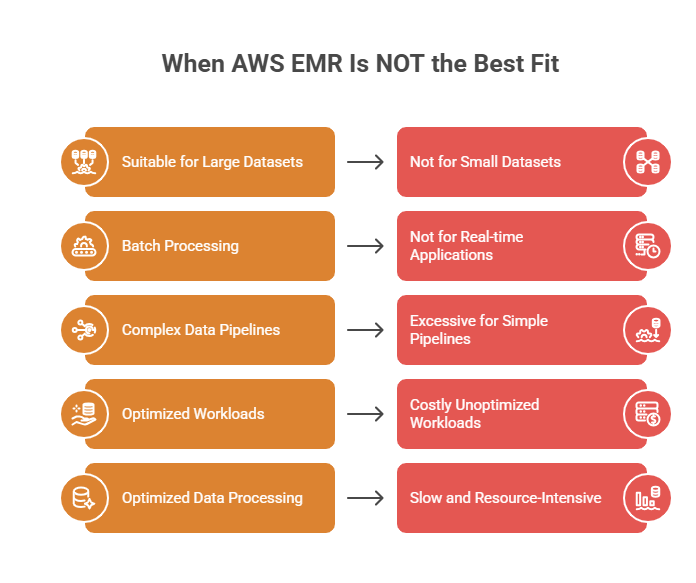
Despite its strengths, EMR is not a one-size-fits-all solution. Choosing it for the wrong use case can introduce unnecessary complexity and higher costs – thus bringing more challenges than benefits. Below, we’ve highlighted some scenarios to consider.
❌ Small datasets or lightweight analytics workloads
When data volumes are relatively small, using EMR can introduce unnecessary complexity and cost due to cluster provisioning and management overhead.
In such cases, serverless solutions like Amazon Athena are often more efficient (since they allow direct querying without maintaining infrastructure).
❌ Real-time, low-latency applications
EMR is designed for batch and large-scale distributed processing, but not for millisecond-level response times. Therefore, workloads that require real-time decision-making or ultra-low latency (for example, transactional systems or real-time APIs) are not quite suitable for it. In this case, a better match would be Amazon DynamoDB or dedicated streaming platforms.
❌ Simple or low-complexity data pipelines
For straightforward ETL workflows, AWS EMR can be excessive in both setup and cost. In contrast, AWS Glue (or other similar services) can provide a more streamlined serverless approach – the one that can both reduce operational overhead and efficiently handle common data transformation needs.
❌ Always-on or continuously running workloads without optimization
If clusters are kept running continuously without careful workload scheduling or scaling, AWS EMR can quickly become cost-inefficient. In such scenarios, serverless or event-driven architectures may provide better cost alignment.
❌ Poorly structured or unoptimized data processing workloads
When data is not properly partitioned or jobs are not optimized (e.g., inefficient Spark logic), EMR workloads can become slow and resource-intensive. This not only impacts performance but also significantly increases compute costs. In this case, alternative solutions are more practical – for example:
- Use Amazon Athena for ad hoc querying of structured data in S3 without managing clusters;
- AWS Glue – for serverless ETL with lower operational overhead;
- Amazon Redshift for optimized analytics on structured data;
- Amazon EMR Serverless when you require Spark workloads without infrastructure management;
- Databricks for managed Spark with built-in optimizations.
How AWS EMR Works
At a high level, AWS EMR runs distributed processing with on-demand resources and parallel execution.
In practice, though, it’s not just a sequence of steps – but rather a coordinated system where three core elements (compute, storage, and orchestration) work together continuously. Let’s review it in more detail.
Stage 1. Cluster Provisioning
The process begins with EMR provisioning a cluster of EC2 instances (typically organized into three node types: master, core, and task), each with a specific role:
- Master (primary) node – acts as the control center of the cluster that manages resource allocation, coordinates tasks, monitors overall cluster health, etc.;
- Core nodes – handle the main data processing tasks and store data (via HDFS), and thus forming the backbone of the cluster’s compute and storage;
- Task nodes – execute additional processing tasks without storing data to help scale compute capacity during heavy workloads.
| AWS EMR Node Types Comparison | |||||
| Storage | Scalability | Cost Impact | Failure Impact | When Used | |
| Master node | No (control only) | Fixed (typically 1 node) | Low relative cost | High | Always required (1 per cluster) |
| Core nodes | Yes | Scales with workload | Higher cost | Medium | For baseline workload processing |
| Task nodes | No | Highly scalable | Cost-efficient | Low | During peak workloads |
From our experience, this stage is highly critical: in practice, cluster configuration directly impacts both performance and cost.
To avoid common mistakes, follow these best practices:
- Right-size your cluster from the start. Choose appropriate instance types based on workload. For example, CPU-intensive workloads need more compute power (vCPUs) for fast data processing and transformations, while memory-intensive workloads – more RAM (for in-memory processing).
- Leverage Spot instances for task nodes. It will significantly reduce costs without risking data loss.
- Avoid overprovisioning core nodes (typically, they incur both compute and storage costs)
- Use auto-scaling for flexibility. Adjust capacity dynamically instead of relying on static clusters.
- Separate compute and storage where possible. For better cost efficiency, rely on S3 instead of HDFS.
- Test configurations with smaller workloads first. Don’t forget to validate performance before scaling to production.
To look at an efficient setup in practice, see the architecture diagram below – here, the EMR cluster is deployed within a VPC (or hybrid setup such as AWS Outposts), where it operates inside private subnets and connects securely to data sources via endpoints and internal networking. This setup ensures both controlled access and efficient data processing across environments.
Stage 2. Data Ingestion
Once the cluster is ready, EMR connects to data sources (most commonly, Amazon S3). Unlike traditional Hadoop setups, Elastic MapReduce decouples storage from compute, which means data does not need to reside within the cluster itself.
From our experience, this separation is one of EMR’s biggest architectural advantages: it allows clusters to be spun up and terminated without affecting stored data. In practice, teams can process the same dataset multiple times with different clusters without duplicating storage. This, in turn, enables more flexible and cost-efficient workflows.
To learn more about how to get data into AWS EMR, check out the official documentation.
Stage 3. Distributed Processing
At this stage, frameworks like Apache Spark execute jobs across the cluster. Data is split into smaller chunks and processed in parallel across multiple nodes, which significantly accelerates computation.
This stage typically includes the following steps:
- Data partitioning, when datasets are divided into smaller chunks for parallel processing;
- Task distribution: jobs are assigned across cluster nodes for execution;
- Parallel execution – nodes process data simultaneously to accelerate computation;
- Data shuffling (if needed), when data is redistributed across nodes for joins or aggregations;
- Intermediate processing – transformations and computations are applied to each partition;
- Result aggregation – processed data is combined into final outputs.
At this stage, since it’s where actual computation happens, this is where most performance and cost differences emerge. Therefore, the real optimization opportunity lies not in the infrastructure itself, but in how workloads are designed and executed.
Stage 4. Job Submission & Processing Flow
At this stage, workloads are actually triggered and executed within the cluster, defining how data processing jobs are initiated and managed.
Workloads can be submitted in multiple ways depending on the use case:
- Predefined steps – jobs are defined upfront during cluster creation (common for batch pipelines);
- Dynamic submission – jobs are triggered (via API, CLI, or console), enabling flexible and on-demand processing;
- Direct interaction – users connect to the cluster and run queries or jobs directly through Spark, Hive, or other frameworks.
Once submitted, jobs follow a structured step-based execution flow, where each step represents a unit of work. For clear visibility into progress and status, these steps typically move through the following states: PENDING → RUNNING → COMPLETED.
Thanks to this, this structured workflow enables predictable and controlled data processing pipelines.
Stage 5. Scaling
As workloads run, AWS EMR can automatically scale cluster resources up or down based on demand. Additional task nodes can be added during heavy processing and removed once workloads decrease.
Stage 6. Output & Data Persistence
Once processing is complete, results are written back to storage systems (the most common ones are Amazon S3 and Redshift).
Additionally, persisted outputs can be seamlessly integrated with downstream systems:
- Analytics platforms for querying and dashboards (Amazon Athena, Amazon QuickSight, Tableau, etc.);
- Data warehouses for structured reporting (Amazon Redshift, Snowflake, Google BigQuery, and others) ;
- Machine learning pipelines for model training and inference (Amazon SageMaker, Databricks, TensorFlow pipelines).
Here’s a key advantage of AWS Elastic MapReduce at this stage: most importantly, it does not retain state within the cluster itself. This means, clusters can be terminated immediately after processing without losing data.
Cluster Lifecycle (Across All Stages)
The cluster lifecycle defines how the infrastructure is created, used, and terminated throughout the entire data processing flow.
Unlike the previous stages, this is not a step in the pipeline – consider it rather as a layer that runs across all stages.
An EMR cluster typically moves through the following states (and each state reflects how the cluster is being used):
- STARTING / BOOTSTRAPPING – infrastructure is provisioned and configured;
- RUNNING – workloads are actively executed;
- WAITING – cluster is idle but still incurring costs;
- TERMINATING / TERMINATED – resources are shut down to stop charges.
Cluster lifecycle directly impacts a range of aspects. In particular:
- Performance. The timing of cluster startup, scaling, and availability determines how quickly workloads can begin and complete. From our experience, poor lifecycle management (e.g., delayed startup or insufficient scaling) can lead to slower job execution and bottlenecks.
- Cost. Clusters incur charges while running, especially in the WAITING (idle) state.
- Reliability. Proper lifecycle management keeps workflows stable. Plus, features like retries and termination protection reduce the risk of failures and data loss.
AWS EMR Pricing Overview
AWS EMR pricing is layered and often misunderstood at first glance. Here’s why:
> EMR is primarily an orchestration layer. EMR itself is not the main cost driver, it orchestrates multiple AWS services behind the scenes.
> Compute costs (EC2) is where most of the cost comes from. Since EMR runs on EC2, compute usage becomes the dominant factor in the overall pricing structure.
> EMR service fee is often overlooked because it’s relatively small – meantime, it still adds up to the total AWS expenses. It is charged per instance-hour for managing clusters and frameworks.
> Storage costs (EBS & S3) add another layer to pricing. Costs depend on how much data is stored temporarily (EBS) and long-term (S3)
> Data transfer costs are also frequently underestimated. Charges vary based on how data moves between services, zones, or regions
See the cost breakdown in detail below.
| AWS EMR: Core Pricing Components | |||
| Component | What You Pay For | Pricing Behavior | Impact |
| EC2 Instances | Compute resources | Largest cost driver | Scales with cluster size & runtime |
| EMR Service Fee | Per instance/hour | Small additional charge | Minimal vs compute cost |
| EBS Storage | Attached volumes | Per GB/month | Depends on cluster config |
| S3 Storage | Data storage | Separate pricing | Long-term storage cost |
| Data Transfer | Network usage | Depends on traffic | Often overlooked cost driver |
To better illustrate how AWS EMR pricing works in practice, let’s consider a typical mid-size ETL pipeline setup – in particular:
- Runs once per day to process newly ingested data;
- Uses a 10-node cluster (e.g., m5.xlarge instances), consisting of 1 master and 9 core/task nodes;
- Processes data for approx. 4 hours per run (including ingestion, transformation, and aggregation steps).
| AWS EMR: Real-Life Example of Monthly Cost | ||
| Usage | Monthly Cost | |
| EC2 compute | 10 nodes × 4h/day | $480 |
| EMR surcharge | $0.015 per instance/hour | $18 |
| EBS storage | 500 GB | $40 |
| S3 storage | 1 TB | $23 |
| Data transfer | Moderate | $20 |
| Total | $580/month | |
From a practical standpoint, this example highlights a few critical realities:
#1 – Compute dominates the cost (~80%+)
This means that even small inefficiencies in runtime (e.g., jobs running longer than needed) can significantly increase costs. Hence, to ensure effective cost optimization, start by reducing runtime.
#2 – You pay for time, not just work
Even though the job runs only 4 hours per day, you are paying for all 10 nodes and the entire duration of the job, regardless of whether resources are fully utilized. It means, even if the cluster is idle during that time, you’re still paying the full price.
#3 – Storage costs are predictable, but secondary
EBS and S3 combined are relatively small compared to compute. However, it’s important to consider that poor data lifecycle management can increase storage costs over time, especially in cases of large datasets.
What Drives AWS EMR Costs
From our experience, EMR costs are primarily driven by how efficiently compute resources are used over time. Here are some of our observations:
- Cluster uptime is typically the biggest hidden cost. EMR charges for the entire duration a cluster is running, even if it’s idle – and therefore, keeping clusters active longer than necessary quickly leads to unnecessary spend.
- Instance types directly impact cost. Overprovisioned instances multiply expenses across the cluster, especially when resources are underutilized.
- Data processing plays an impact on costs, too: poorly optimized Spark jobs increase runtime, which directly increases compute costs. Hence, faster jobs are not just better, they’re cheaper.
- Storage & data transfer become more significant as data scales, since large datasets and unnecessary data movement can gradually add to overall costs.
| AWS EMR: Capabilities vs Cost Risks | |||
| Capability | Cost Risk | Impact | Optimization |
| Auto Scaling | Poor configuration | Overprovisioning | Tune scaling policies |
| Persistent clusters | Idle time | Wasted compute | Use transient clusters |
| Large instance types | Overcapacity | High cost | Right-size instances |
| Complex jobs | Long runtimes | Increased compute cost | Optimize Spark jobs |
Cost Optimization Strategies
To optimize EMR spending, we recommend following these action steps:
- Use transient clusters wherever possible – instead of keeping clusters running continuously, spin them up only when needed for processing and terminate them immediately after completion (this will eliminates idle compute costs and ensure you only pay for active workloads);
- Optimize data processing jobs – improve Spark job efficiency by reducing shuffle operations, optimizing joins, and using columnar data formats like Parquet or ORC;
- Right-size clusters based on workload – align instance types and cluster size with actual processing requirements, continuously monitor utilization and adjust accordingly;
- Adopt EMR Serverless where applicable – for intermittent or unpredictable workloads, use EMR Serverless to eliminate cluster management and pay strictly for execution time, reducing both operational overhead and idle cost risks;
- Store and structure data efficiently – use columnar formats, apply partitioning strategies, minimize processing time and data scanned through organized datasets.
| Quick Wins for AWS EMR Cost Optimization | |||
| Strategy | Effort | Savings Impact | Speed |
| Use transient clusters | Low | Very high | Immediate |
| Use Spot Instances | Medium | Very high | Fast |
| Optimize Spark jobs | Medium | High | Fast |
| Right-size clusters | Medium | High | Fast |
| Use EMR Serverless | Low | High | Immediate |
Beyond the above-mentioned foundational steps, more advanced approaches can significantly improve long-term cost efficiency:
- Implement automated cluster lifecycle management – schedule cluster start/stop times, enforce auto-termination policies, integrate EMR with orchestration tools (e.g., Airflow) – preventing clusters from running longer than necessary;
- Establish workload-aware scaling policies – configure auto scaling based on real workload metrics (CPU, memory, YARN usage), avoid overly aggressive scaling rules that can lead to unnecessary resource allocation;
- Continuously monitor and optimize job performance – track execution times, identify bottlenecks, refine processing logic to reduce runtime and resource consumption over time;
- Optimize data layout and partitioning – ensure datasets are partitioned correctly to minimize data scanned and processed (especially for large-scale analytics workloads);
- Control data transfer and pipeline design – minimize unnecessary data movement between services or regions, design pipelines that process data as close to storage as possible;
- Track EMR spend proactively – use AWS Cost Explorer and tagging strategies to identify high-cost clusters, inefficient jobs, underutilized resources, etc.
| AWS EMR Cost Optimization: Advanced Strategis | |||
| Strategy | Effort | Savings Impact | Speed |
| Lifecycle automation | Medium | Very high | Fast |
| Workload-aware scaling | Medium | High | Medium-term |
| Job performance tuning | High | Very high | Medium-term |
| Data partitioning optimization | Medium | High | Fast |
| Data transfer optimization | Medium | Medium | Medium-term |
| Cost monitoring & tagging | Low | High | Immediate |
For more insights on using Amazon EMR Serverless effectively, check out the AWS article highlighting the Top 10 best practices for Amazon EMR Serverless.

We can unlock discounts on 10,000+ tools you already use.
Step-by-Step AWS EMR Setup & Governance Checklist
From what we’ve seen in real-world setups, getting AWS EMR right isn’t about spinning up clusters – it’s about making the right architectural and governance decisions upfront.
The checklist below reflects the key steps that separate scalable and cost-efficient data platforms from those that become difficult to manage from early on.
Step-by-Step AWS EMR Setup & Governance Checklist |
| 1. Define data processing strategy |
| ✅ Identify key workloads (ETL, analytics, ML preprocessing, streaming) ✅ Define data sources and destinations (S3, Redshift, external systems) ✅ Select appropriate processing frameworks (Spark, Hive, Flink, etc.) ✅ Estimate data volume and processing frequency ✅ Define SLA/SLO requirements for job completion |
| 2. Design cluster architecture |
| ✅ Choose cluster type (persistent vs transient vs serverless) ✅ Define node roles (master, core, task nodes) ✅ Select instance types based on workload (compute vs memory optimized) ✅ Configure instance fleets (On-Demand + Spot mix) ✅ Plan VPC, subnets, and networking configuration |
| 3. Configure storage & data layout |
| ✅ Define S3 as primary data lake storage ✅ Use efficient formats (Parquet, ORC) ✅ Implement partitioning strategy for large datasets ✅ Configure EBS volumes for intermediate processing ✅ Define data lifecycle policies (S3 transitions, retention) |
| 4. Set up cluster provisioning |
| ✅ Launch EMR clusters with required applications (Spark, Hive, etc.) ✅ Configure bootstrap actions (custom scripts, dependencies) ✅ Enable auto-termination for transient clusters ✅ Set up EMR release version and compatibility ✅ Validate cluster startup and configuration |
| 5. Configure scaling & resource management |
| ✅ Enable auto scaling policies (CPU, memory, YARN metrics) ✅ Define min/max cluster size ✅ Configure task nodes for flexible scaling ✅ Optimize Spark executor settings (memory, cores) ✅ Validate scaling behavior under load |
| 6. Implement monitoring & logging |
| ✅ Enable CloudWatch metrics for EMR clusters ✅ Configure CloudWatch Logs for job and system logs ✅ Monitor key metrics (CPU, memory, job duration, failures) ✅ Track cluster utilization and idle time ✅ Set up logging for debugging and audit purposes |
| 7. Configure job execution workflows |
| ✅ Define job orchestration (Step Functions, Airflow, cron jobs) ✅ Automate job submission and scheduling ✅ Handle job dependencies and retries ✅ Validate job execution and output accuracy ✅ Ensure idempotency for repeatable jobs |
| 8. Optimize performance & cost |
| ✅ Use Spot Instances for non-critical workloads ✅ Right-size cluster based on actual usage ✅ Optimize Spark jobs (reduce shuffle, optimize joins) ✅ Minimize cluster idle time (use transient clusters) ✅ Monitor cost using AWS Cost Explorer and tagging |
| 9. Implement security & governance |
| ✅ Configure IAM roles for EMR access control ✅ Enable encryption at rest (S3, EBS) and in transit ✅ Restrict network access via security groups ✅ Enable audit logging (CloudTrail) ✅ Apply tagging strategy for cost allocation |
| 10. Test & continuously improve |
| ✅ Run test workloads to validate performance ✅ Simulate failures and recovery scenarios ✅ Review job execution times and optimize ✅ Audit cluster usage and cost regularly ✅ Continuously refine architecture based on workload patterns |
How To Maximize AWS Savings With Spendbase
From our experience, maximizing AWS savings goes far beyond simply right-sizing infrastructure or eliminating idle resources. Technical optimization plays a critical role, that’s a fact – however, the biggest cost efficiencies often come from adding smarter financial and vendor management strategies to it. That’s precisely the area where Spendbase excels.

Spendbase helps companies unlock additional savings across their entire tech stack. Together, our team of cost optimization experts can help you:
- Secure up to 2 years of free AWS runway;
- Leverage up to $300,000 in cloud cost savings (across AWS, GCP, and Azure);
- Reduce SaaS expenses by up to 39%;
- Get cashback every time your employees spend.
As a result, you get lower costs, better control, and more predictable scaling without slowing down your team.


Get discounts on your team’s favorite apps
Find deals for 10%, 30%, or even 70% off in our discount marketplace.
Check Discounts



