










Cost optimization
AWS Relational Database Service (RDS): Guides, Pricing, Cost Optimization

As applications grow, databases quietly become one of the most critical (and most expensive) components of the architecture. To address this, organizations increasingly rely on managed database services – and AWS Relational Database Service (RDS) is one of the most widely adopted solutions in this space.
In this guide, we’ll dive into all key AWS RDS essentials: assessing its impact, limitations, core optimization strategies, and more.
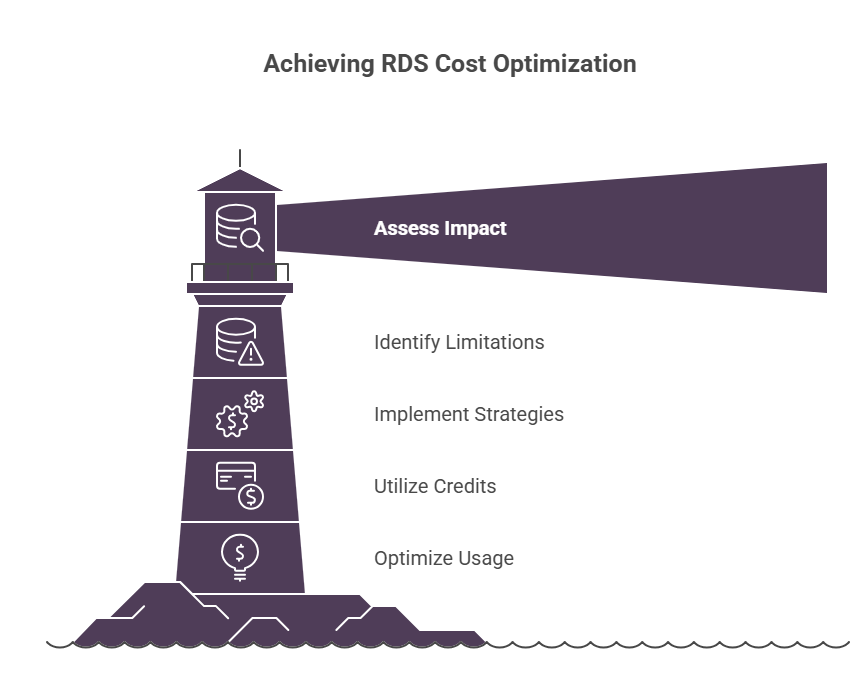
Key Takeaways
> AWS RDS removes infrastructure management. Doing so, teams are able to shift responsibility to configuration, performance tuning, cost control, and other optimization practices.
> RDS is ideal for predictable, steady workloads. Particularly, it performs best for applications with consistent traffic (internal business systems, transactional systems with regular read/write patterns, SaaS platforms with steady user bases, etc.).
> AWS credits help reduce baseline costs – ensuring efficient, consistent AWS RDS usage without waste.
What Is AWS RDS
AWS RDS is a fully managed relational database service that supports multiple engines: MySQL, PostgreSQL, MariaDB, SQL Server, Amazon Aurora, you name it. Core operational tasks are handled by AWS, allowing teams to focus more on application logic and data usage.
Unlike traditional systems, Amazon RDS removes the need to manage underlying infrastructure. See how these differences affect operational overhead below.
Traditional Database Setup vs Amazon RDS | |
| Manual provisioning | Managed instances |
| Custom backup scripts | Automated backups |
| Manual failover | Multi-AZ deployments |
| Infrastructure ownership | AWS-managed infrastructure |
| High operational overhead | Reduced operational burden |
From our perspective, here are several aspects that make RDS stand out:
> Fully managed operations
AWS Relational Database Service automates backups, patching, updates, and routine maintenance – and thus, significantly reducing operational overhead.
> Multi-engine flexibility
AWS RDS supports multiple database engines, allowing teams to choose based on existing expertise or workload needs.
> High availability & durability
It offers Multi-AZ deployments and automated failover for production-grade resilience.
> Scalable infrastructure
Thanks to instance resizing, storage autoscaling, and read replicas, it’s easy to scale compute and storage as workloads grow, with minimal manual intervention.
> Integrated monitoring & insights
Built-in tools (like Amazon CloudWatch and Performance Insights) provide easy visibility into performance and usage.
> Read scalability
AWS RDS supports read replicas to efficiently offload read-heavy workloads and improve performance.
See how much you can save on your stack
Pick your team’s tools!
Click to select one or more tools.


What’s your company size?
Just click to select.
What’s your business email?
We'll send you calculations right away
The email is flying to your inbox!
Beyond discounts, you may qualify for up to $100K in AWS credits.

How AWS RDS Works
At its core, AWS RDS runs database engines on managed compute instances within AWS infrastructure.
Step 1: Connection Initialization
An application connects via an RDS endpoint, which resolves to the active instance inside a VPC. Access is validated through networking rules and security controls, and latency at this stage depends on network design and placement.
Step 2: Query Processing
Once connected, queries are executed by the database engine using the CPU and memory of the selected instance class. This layer defines how efficiently queries are parsed, cached, and processed, making instance sizing critical for both performance and cost.
Step 3: Data Read/Write Operations
All data is stored on Amazon EBS volumes, where read and write requests translate into I/O operations. Storage type and provisioned IOPS determine throughput, often becoming a bottleneck before compute limits are reached.
Step 4: Transaction Handling
For durability, writes are first recorded in transaction logs before being committed to storage. This ensures consistency but also makes disk latency a key factor in write-heavy workloads.
Step 5: Replication & Availability.
If enabled, data is replicated to standby instances or read replicas. Multi-AZ setups provide synchronous replication for failover, while replicas support read scaling, each impacting both resilience and cost.
Step 6: Backup Management.
AWS RDS continuously performs automated backups and snapshots, enabling point-in-time recovery while adding to storage consumption over time.
Step 7: Monitoring & Maintenance.
Metrics are collected continuously, and updates are applied during maintenance windows, ensuring operational stability but requiring careful planning to avoid disruptions.
Core AWS RDS Components
Database Engine Selection
The database engine defines how your system behaves under load, scales, and evolves over time. In particular, we’ve observed the following:
- MySQL / PostgreSQL are solid general-purpose options, but scaling often requires manual optimization (indexes, tuning, replicas, etc.).
- MariaDB provides MySQL compatibility with incremental improvements, though ecosystem support may vary.
- Oracle / SQL Server offer advanced enterprise capabilities, but licensing and operational costs can grow significantly.
- Amazon Aurora is cloud-optimized, allowing to separate compute and storage for better performance and faster failover.
Database Engine Comparison | ||||
| Factor | MySQL / PostgreSQL | MariaDB | Oracle / SQL Server | Aurora |
| Failover speed | Moderate | Moderate | Moderate | Fast (seconds) |
| Read scaling | Manual replicas | Manual replicas | Built-in options | Built-in, easier scaling |
| Write scaling | Limited | Limited | Advanced (complex) | Better (storage layer optimized) |
| Maintenance effort | Medium | Medium | High | Low |
| Vendor lock-in | None | None | High | High (AWS) |
| Best maturity stage | Startup / Mid-scale | Startup / Mid-scale | Enterprise | Mid-scale / Large-scale |
Instance Classes (Compute Layer)
Amazon RDS uses predefined instance types (CPU + RAM). This means several important aspects:
- Performance is tied to instance size. CPU drives query execution, while RAM improves caching. Smaller instances hit limits faster; larger ones help only if resources are actually used.
- Scaling requires resizing (vertical scaling). You scale in fixed steps (bigger instances), often requiring restarts or failover.
- Overprovisioning is common. Typically, teams size for peak load, leaving resources underutilized most of the time and increasing costs.
| AWS RDS: Main Instance Families | ||
| Family | Best For | Key Characteristic |
| T (Burstable) | Low/variable workloads | Uses CPU credits for short bursts |
| M (General purpose) | Balanced workloads | Mix of CPU and memory |
| R (Memory optimized) | Read-heavy, caching workloads | High RAM for large datasets |
| C (Compute optimized) | CPU-intensive queries | High CPU-to-memory ratio |
| X / Z (High Memory) | Large databases, in-memory workloads | Extremely high RAM |
Working with instance families, we suggest the following: start with the M instance family (since it provides a balanced mix of CPU and memory and fits most workloads). If you notice performance issues, adjust based on the bottleneck: move to R (if reads and caching become the limiting factor), or to C if CPU usage is consistently high.
Storage Layer (EBS)
AWS RDS supports multiple storage types, with gp3 and io1/io2 being the primary ones used today.
This layer directly influences a range of other aspects: latency (how fast each read/write operation completes), throughput (how much data can be processed per second), IOPS (how many operations can run in parallel), cost (based on provisioned capacity and performance), and others.
From what we’ve seen in practice, gp3 covers the majority of use cases effectively, but the moment performance becomes inconsistent or I/O starts to throttle under pressure, moving to io1/io2 is often the only way to regain stability. See more in-depth functionality comparison in the table below.
EBS Storage Options Comparison (AWS RDS) | ||
| Feature | gp3 (General Purpose) | io1 / io2 (Provisioned IOPS) |
| Best for | Most workloads | Performance-critical workloads |
| Performance model | Baseline + configurable IOPS/throughput | Fully provisioned, predictable IOPS |
| Latency | Moderate, varies with load | Consistently low |
| IOPS control | Adjustable (within limits) | Precisely provisioned |
| Throughput | Configurable | High and consistent |
| Cost | Lower, cost-efficient | Higher, performance-driven |
| Workload fit | General apps, mixed workloads | Write-heavy, high-concurrency systems |
| Scalability | Flexible, easy to adjust | Requires planning and provisioning |
| Consistency under load | Can vary under heavy pressure | Stable even under sustained load |
Multi-AZ Deployments
Multi-AZ provides high availability by maintaining a synchronously replicated standby instance in a different Availability Zone.
Thus, when something goes wrong (be it infrastructure failure, a patching event, an AZ outage, or anything else), AWS RDS automatically triggers a failover and switches your database endpoint to the standby. This happens without manual intervention, and in most cases, applications reconnect within seconds.
Meantime, in this case, there are certain trade-offs we consistently see teams underestimate:
- Write latency increases, because every commit must be confirmed in two locations;
- The standby is passive, meaning it doesn’t help with read scaling;
- Costs nearly double, since you’re running a full secondary environment at all times.
To handle it efficiently, we recommend enabling Multi-AZ only for systems where downtime has a clear business impact.
Read Replicas
Amazon RDS read replicas enable horizontal scaling by creating asynchronous copies of the primary database. This allows read operations to be distributed across multiple instances without increasing load on the primary.
From our experience, read replicas are suitable for use cases where eventual consistency is acceptable and workloads are read-heavy (since they effectively distribute load and improve scalability). However, they might be less suitable for systems requiring real-time accuracy. See more insights on suitability below.
Amazon RDS Read Replicas: Use Cases | ||
| Use Case | Suitability | Why |
| Analytics / reporting | High | Can tolerate lag |
| Read-heavy APIs | High | Offloads primary instance |
| Transactional systems | Limited | Requires strong consistency |
| Real-time systems | Low | Lag impacts correctness |
| Dashboards / BI tools | High | Slight delay is acceptable |
| Batch processing | High | Non-time-sensitive workloads |
| Search / catalog services | High | Mostly read operations |
| Logging / audit queries | High | Append-heavy, read later |
| Global apps (multi-region reads) | Medium | Improves latency, but adds consistency challenges |
| Caching layer fallback | Medium | Backup for cache misses, but slower than cache |
| Event-driven systems | Low | Outdated data can break flows |
| Financial systems | Low | Strong consistency required |
Key Capabilities of AWS RDS
#1. Fully Managed Operations
RDS automates core database operations. In real-world operations, here’s the impact it makes:
> Backups
With automated backups and point-in-time recovery in Amazon RDS, you’re no longer responsible for designing and maintaining backup pipelines.
That said, this doesn’t remove ownership – instead, it shifts it. You still need to define retention periods, align them with compliance requirements, ensure your recovery objectives (RPO/RTO) are realistic, and so on.
> Patching
Patching is handled automatically during defined maintenance windows, which removes the operational burden of manually applying updates.
However, consider this: at the same time, this introduces a dependency on AWS scheduling. If maintenance windows are poorly aligned with your traffic patterns, you can still experience disruption. So, choose maintenance windows carefully and understand how patching events interact with your availability setup (e.g., Multi-AZ).
| AWS RDS Maintenance Window & Patching Checklist. | |
| Area | What to Check |
| Core Checks | ✅ Lowest traffic periods based on historical metrics ✅ Alignment with primary user time zones (incl. DST) |
| Availability Setup | ✅ Multi-AZ enabled and standby health verified ✅ Failover tested and duration measured |
| Application Readiness | ✅ Retry logic (exponential backoff) implemente ✅ Connection pooling and reconnection behavior validated ✅ ORM/driver timeout settings reviewed |
| Change Coordination | ✅ No overlap with deployments or migrations ✅ Maintenance aligned with release calendar |
| Notifications & Alerts | ✅ RDS event subscriptions enabled ✅ Alerts integrated with Slack/PagerDuty ✅ On-call team informed |
| Patch Awareness | ✅ Type of patch identified (OS vs engine) ✅ Reboot requirement confirmed ✅ Pending maintenance reviewed |
| Testing | ✅ Failover simulated in staging ✅ Restart scenarios tested under load |
| SLA Alignment | ✅ Expected failover/restart duration documented ✅ Impact aligned with internal SLAs |
| Rollback Readiness | ✅ Recent snapshots available ✅ Clear mitigation plan (scale, restore, promote replica) |
| Dependencies | ✅ Downstream services mapped (APIs, jobs, pipelines) ✅ Behavior during DB downtime validated |
| Replication | ✅ Read replica lag monitored ✅ Read routing logic verified |
| Configuration | ✅ Parameter group changes reviewed ✅ Pending-reboot settings checked |
| Performance | ✅ Baseline IOPS/latency captured ✅ Post-maintenance performance monitored |
> Failover
Built-in AWS RDS failover (via Multi-AZ) significantly improves resilience. However, many teams overlook that it’s not that seamless from an application perspective. Here’s why:
- It can take seconds to minutes, during which the primary instance becomes unavailable
- During this time, active sessions may drop, and new connections can temporarily fail
- Treating failover as “instant and invisible” often leads to application-level downtime
To mitigate this, ensure applications are designed for recovery: including retry logic, reconnection handling, proper timeout configuration, etc.
Application-Level Resilience Best Practices for AWS RDS Failover | |
| Area | Best Practices |
| Retry Logic | Implement exponential backoff (e.g., 100ms → 200ms → 400ms) Set a max retry limit to avoid overloadRetry only on transient errors (connection loss, timeouts) |
| Connection Handling | Use connection pooling with auto-reconnectAvoid long-lived/stale connections Validate connections before reuse |
| Timeouts | Configure reasonable DB connection timeouts (not too short/long) Separate connect timeout vs query timeoutAlign timeouts with expected failover duration |
| Error Handling | Classify errors (transient vs fatal) Gracefully handle DB unavailability (fallback responses, queues) |
| Idempotency | Ensure operations can be safely retried (no duplicate side effects) Use idempotency keys where applicable |
| Transaction Management | Keep transactions short-lived Avoid holding locks during failover-sensitive operations |
| DNS & Endpoint Handling | Use RDS endpoint (not IP) to allow automatic failover routing Ensure app respects DNS refresh (low TTL awareness) |
| Circuit Breakers | Implement circuit breaker pattern to prevent cascading failures Allow system to recover before retrying aggressively |
| Observability | Track retry rates, error spikes, and reconnect attempts Alert on abnormal failover behavior |
| Load Management | Throttle retries during failover to avoid overwhelming the new primary Use queues/buffers for write-heavy workloads |
| Testing | Simulate failover scenarios regularly Validate real behavior under load and partial outages |
> Monitoring
RDS integrates with native AWS monitoring and logging tools, giving you immediate access to all the crucial metrics. For example:
- CPU utilization (monitors overall CPU %, per-core usage, burst balance (T-class), spikes over time);
- Memory (Freeable memory) – monitors available RAM, buffer/cache usage, swap activity;
- Storage (Allocated vs Used) – monitoring total allocated storage, used storage, autoscaling growth, free space, etc.;
- Database connections (monitors active connections, max connection limit, connection spikes, idle connections);
- Read/Write IOPS – read IOPS, write IOPS, throughput (MB/s), burst capacity;
- Latency (Read/Write) – monitors average read latency, write latency, latency spikes, percentile latency (p95/p99)
- Disk queue depth – monitors pending I/O requests, queue spikes, sustained backlog, and others.
In relation to AWS RDS observability, here’s an important aspect to consider: while this provides a solid baseline, it’s often not sufficient for deep operational insight. To truly understand performance and cost behavior, you need to enable and configure additional layers: query-level monitoring, slow query logs, cost tracking, you name it.
#2. Vertical Scaling
In Amazon RDS, vertical scaling is achieved by upgrading the DB instance class (CPU, RAM, network throughput).
From our perspective, this approach has a number of benefits:
> No architectural changes required – since scaling is straightforward and fast;
> More CPU and memory directly improve query execution and caching;
> It works transparently without modifying code or data access patterns;
> Consistent behavior, with avoided complexities of distributed systems (no sharding, no data partitioning, etc.);
> Predictable scaling path with clear upgrade tiers.
Meantime, consider that vertical scaling is simple but reactive. From our experience, we’ve seen many teams scale up when performance degrades without addressing root causes (like inefficient queries, poor indexing, etc.). This, in turn, often leads to higher costs without proportional performance gains.
Security & Compliance
RDS includes built-in security controls aligned with AWS best practices
Its core security-related capabilities can be broken down into 3 key clusters:
#1. AWS IAM integration (enables centralized, fine-grained access control): featuring user/service access, role-based permissions, IAM database authentication, etc.
#2. Encryption at rest and in transit (protects data using AWS KMS and SSL/TLS) – covers data storage, backups, snapshots, data in motion.
#3. Network isolation via VPC (allowing databases to run in private subnets with controlled access) – ensures reduced attack surface and controlled connectivity.
Check out the official AWS documentation to learn how to secure your data with Amazon RDS for SQL Server.
Ecosystem Integration
Amazon RDS is deeply integrated into the AWS ecosystem – which means, your database becomes part of a connected and event-driven system (where actions and insights flow across services).
Explore the list of integrations, along with their capabilities, in the table below.
AWS RDS: Key Integrations | ||
| Service | What It Enables | Example Use Case |
| AWS Lambda | Trigger automation based on DB events | Notifications on failover, automated remediation workflows |
| Amazon S3 | Data export and long-term storage | Export snapshots/logs for analytics or compliance |
| Amazon CloudWatch | Monitoring, alerting, dashboards | Alert on CPU spikes, latency, connection thresholds |
| AWS CloudTrail | Audit and activity tracking | Track configuration changes and user actions |
| AWS IAM | Access control and security | Enforce least-privilege access to DB resources |
| AWS Secrets Manager | Secure credential storage and rotation | Automatically rotate DB credentials |
| AWS Config | Configuration monitoring and compliance | Detect misconfigurations or policy violations |
| Amazon EventBridge | Event routing and orchestration | Trigger workflows on failover, maintenance events |
Free virtual cards for non-EU residents
Open in 1 working day, issue 100 virtual cards, and get up to 1.25% cashback.
Get a free account
Top Use Cases for AWS RDS
AWS RDS is powerful, but only when used in the right context. In our experience, that comes down to how well your workload fits its managed instance-based model. In particular, we recommend considering these aspects:
> Relational data alignment
RDS is best suited for structured data with clear schemas, relationships, and transactional requirements.
> Vertical scaling model
Performance scaling is primarily achieved by increasing instance size or adding read replicas, rather than distributing workloads across multiple nodes.
> Consistent workload patterns
Stable traffic enables predictable performance and more effective cost optimization (e.g., Reserved Instances).
> Optimizable query behavior
Workloads with repeatable, well-structured queries benefit the most from indexing and tuning.
> Controlled concurrency
RDS handles moderate levels of parallel usage well, especially when supported by connection pooling strategies.
> Cost efficiency through steady usage
Since RDS is always-on, it delivers the most value when utilization is consistent rather than highly variable.
AWS RDS: Suitability Overview | ||
| Suitability | Use Case | Why It Works (or Doesn’t) |
| Highly suitable | Web & mobile backends (OLTP) | – Reliable transactions – Predictable queries – Built-in high availability |
| Highly suitable | SaaS platforms (steady load) | – Structured schemas – Consistent usage – Manageable scaling |
| Highly suitable | Internal systems (ERP, CRM) | – Stable demand – Low operational overhead – Automated maintenance |
| Highly suitable | Lift-and-shift migrations | – Familiar engines – Minimal changes – Fast deployment |
| Moderate suitability | APIs & microservices | – Works at moderate scale – Needs connection/query tuning |
| Moderate suitability | Read-heavy workloads | – Read replicas add cost/complexity |
| Moderate suitability | Mid-sized systems | – Vertical scaling works up to limits |
| Moderate suitability | Mixed workloads | – Analytics can impact transactional performance |
| Not suitable | Distributed architectures | – Limited horizontal scaling, no multi-node writes |
| Not suitable | Highly variable workloads | – Overprovisioning drives cost inefficiency |
| Not suitable | Analytical workloads | – Not optimized for large-scale processing |
| Not suitable | High-concurrency systems | – Connection limits and contention issues |
| Not suitable | Poor schema/query design | – Inefficiencies increase cost and latency |
✅ Case #1: Web & Application Backends
In this scenario, we evaluated RDS as the primary database for a typical SaaS/web application with steady traffic and transactional workloads. During testing, RDS handled standard CRUD operations reliably, with predictable performance as long as queries were properly optimized.
The biggest advantage was the reduction in operational overhead (no need to manage backups, patching, or failover manually). However, performance was highly dependent on query efficiency and connection handling, especially under concurrent load.
AWS RDS for Web & Application Backends: Assessment Highlights | |
Primary value | Reliable transactional data storage |
Performance drivers | Query efficiency, indexing, caching |
Operational impact | Eliminates infrastructure management overhead |
Critical dependencies | Schema design, connection management |
✅ Case #2: Enterprise Systems
As another AWS RDS use case, we tested RDS in a business-critical environment with stricter requirements around uptime, consistency, and compliance.
In this case, we observed the following:
- Multi-AZ deployments provided stable failover behavior;
- Overall, the managed nature of the service simplified maintenance operations;
- Costs increased significantly due to high availability setups and larger instance sizes;
- Performance remained stable, but required careful planning around instance sizing and failover configuration.
AWS RDS for Enterprise Systems: Assessment Highlights | |
Primary value | Managed database for business-critical workloads |
Performance drivers | Instance sizing, high availability configuration |
Operational impact | Ensures reliability, compliance, and stability |
Critical dependencies | Licensing model, failover planning |
✅ Case #3: Read-Heavy Applications
In this case, we focused on applications with a high volume of read operations (e.g., dashboards, content platforms). By introducing read replicas, we were able to offload traffic from the primary instance and improve overall system stability. Performance gains were noticeable, but only after properly routing queries to replicas. We also observed that replication lag became a factor under heavy write loads, requiring careful handling at the application level.
AWS RDS for Read-Heavy Applications: Assessment Highlights | |
Primary value | Horizontal scaling via read replicas |
Performance drivers | Replication strategy, query distribution |
Operational impact | Reduces load on primary instance |
Critical dependencies | Query routing, replication lag handling |
When AWS RDS May Not Be the Best Fit
Based on our experience and testing, AWS RDS delivers strong results when it’s matched with the right workload – otherwise, the limitations surface quickly. Explore some of the most common scenarios where it may not be the best fit (in our view) – listed below.
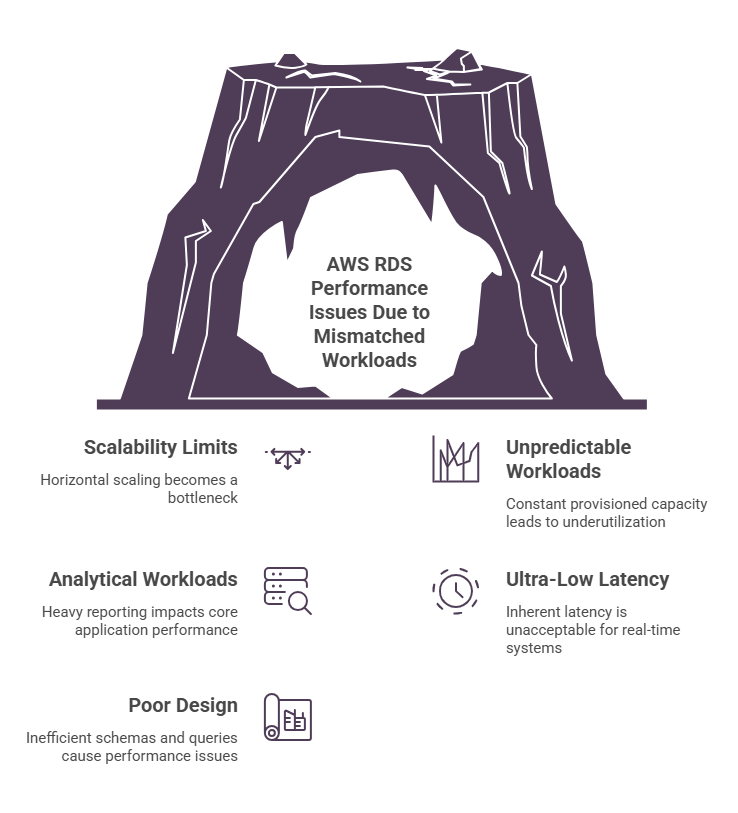
❌ Highly scalable distributed systems
In cases where applications require horizontal scaling across multiple nodes (especially for write-heavy workloads), RDS can become a bottleneck.
Since scaling is primarily vertical and read replicas don’t solve write scaling, distributed databases or NoSQL solutions are often a better fit (take Amazon Aurora, Amazon DynamoDB, Amazon Keyspaces, Amazon DocumentDB, etc.).
❌ Highly variable or unpredictable workloads
AWS RDS instances are always-on, meaning you pay for provisioned capacity regardless of usage. For workloads with spiky or unpredictable traffic, this commonly leads to underutilization during low-demand periods.
In scenarios like these, we recommend using serverless or auto-scaling database solutions ( Amazon Aurora Serverless v2, Amazon DynamoDB, Amazon Keyspaces, , etc).
❌ Analytical and heavy reporting workloads
RDS is optimized for transactional (OLTP) workloads with frequent, small queries. Running large aggregations, joins, or full-table scans directly on RDS can consume significant CPU and I/O. This, in turn, impacts the performance of core application queries. As data volume grows, these workloads increasingly compete for resources.
In our experience, here’s what works better: separating analytics into dedicated systems like data warehouses (e.g., Amazon Redshift) can help you avoid contention and improve efficiency.
❌ Ultra-low latency or real-time systems
RDS introduces inherent latency from network communication and disk-based storage operations. For systems requiring near-instant responses (e.g., real-time bidding, high-frequency trading, or live state synchronization), even small delays can be unacceptable.
A better fit in this case, in our view, is in-memory or specialized low-latency databases designed for sub-millisecond performance (f.e., Redis, Memcached, Amazon DynamoDB, etc.).
❌ Poor schema design and inefficient queries
No managed service can compensate for bad database design – therefore, inefficient schemas and queries will inevitably result in poor performance and higher costs.
Meantime, here’s what we’ve also observed: in practice, query design is just one part of a broader picture. AWS RDS performance is influenced by multiple interconnected factors, which often amplify these inefficiencies. See more details below.
Hidden Factors Impacting AWS RDS Performance | ||
| Factor | Why It Matters & Impact | Optimization Options |
| Query behavior | Inefficient queries increase CPU, I/O, and latency as data grows | → Optimize indexes → Refactor queries → Add caching (Redis) → Use read replicas |
| Scaling limits | Poor scalability leads to costly redesigns and sharding | → Add read replicas → Partition/shard data → Migrate to Aurora → Load-balance reads |
| Ecosystem & tooling | Weak tooling slows debugging and operations | → Use CloudWatch & Performance Insights → Standardize monitoring → Automate alerts |
| Licensing model | Costs grow faster than actual usage | → Right-size instances → Use Reserved Instances → Migrate to open-source |
| Cloud optimization | Missed features reduce performance and efficiency | → Use Aurora features → Enable auto/serverless scaling → Optimize failover |
| Connection management | Too many connections cause resource exhaustion | → Use connection pooling → Limit idle connections → Monitor spikes |
| Workload patterns | Mixed workloads create contention and slowdowns | → Separate read/write (CQRS) → Offload to replicas → Schedule batch jobs |
| Storage bottlenecks | I/O limits cause latency spikes and slow queries | → Tune IOPS/throughput → Upgrade to io2 → Monitor queue depth |
| Maintenance strategy | Poor planning leads to downtime risks | → Define maintenance windows → Test in staging → Plan rollbacks |
AWS RDS Pricing Structure
At a high level, AWS RDS pricing is driven by a combination of compute, storage, and operational features. Unlike purely usage-based services, RDS costs are largely tied to provisioned infrastructure, meaning decisions like instance size, availability setup, and scaling strategy have a direct and ongoing impact on spend.
Check out the main cost drivers of AWS RDS pricing in the table below.
AWS RDS Pricing Breakdown | ||
| Pricing Component | Behavior | Typical Cost |
Compute (instances) | Primary cost driver (per hour) | $0.017/hr (t4g.micro) $0.20–0.40/hr (m6g.large) $1+/hr (r6g.2xlarge) |
Storage (EBS – gp3) | Charged per GB/month | $0.08 per GB/month |
Storage (EBS – io1/io2) | Provisioned IOPS storage | $0.125 per GB/month + $0.065 per provisioned IOPS |
I/O operations | Charged per million requests (gp2/io1) | $0.20 per 1M requests (varies by engine/storage type) |
| Multi-AZ deployment | Standby instance provisioned | 2× compute + additional storage costs |
| Read replicas | Additional instances | Same pricing as primary (linear scaling) |
| Backup storage | Snapshots & retention | Free up to 100% of DB size, then ~$0.095 per GB/month |
| Data transfer (outbound) | Internet / cross-AZ | $0.09 per GB (internet), $0.01–0.02 per GB (cross-AZ) |
Let’s review a practical case where AWS RDS costs are influenced not just by database size, but by how infrastructure is configured. As you can see, factors like instance sizing, Multi-AZ deployment, and read replicas can significantly increase total cost beyond base storage.
Specifically, we’ve had several key observations:
- Compute dominates the cost structure. Even relatively small databases can become expensive if instance sizes are overprovisioned or not regularly adjusted.
- High availability comes at a premium. Multi-AZ often doubles compute cost without improving performance, making it essential to justify based on uptime needs.
- Scaling decisions add up quickly. Each read replica introduces a full instance cost, which can scale linearly if not controlled.
- Costs persist even during low usage. Unlike serverless models, RDS continues to incur charges regardless of traffic levels.
Estimated AWS RDS Monthly Cost Scenario (Mid-Size Production Deployment) | ||
| Pricing Category | Usage Scenario | Est. Monthly Cost |
| Compute (primary) | db.m6g.large | $180 |
| Multi-AZ standby | Enabled | $180 |
| Read replicas | 1 replica | $120 |
| Storage | 500 GB (gp3) | $50 |
| I/O operations | Moderate workload | $70 |
| Backup storage | Extended retention | $30 |
| Data transfer | Moderate traffic | $60 |
| Total Estimated Cost | $690 | |
What Drives AWS RDS Costs in Practice
From our experience, instances are often sized for peak load but remain underutilized most of the time. This, in turn, leads to consistently high compute costs without matching demand. Below, we’ve highlighted some of the most common cost inefficiencies we’ve seen teams make.
Factor #1: Overprovisioned Instances
When allocated for peak load but underutilized most of the time, they lead to consistently high compute costs without proportional usage.
Factor #2: Idle Databases
Non-production environments (dev/test) running continuously (instead of being scheduled or paused) create unnecessary baseline spend.
Factor #3: Inefficient Queries
From our observations, poorly optimized queries significantly increase CPU and I/O usage – which not only impacts performance but also drives higher infrastructure requirements.
Factor #4: Storage Misconfiguration
When high-performance storage (e.g., provisioned IOPS) is often used without a clear need expect higher costs without meaningful performance gains.
Factor #5: Multi-AZ Overuse
In many cases, Multi-AZ is enabled by default – not by necessity. This way, it typically doubles compute costs without delivering proportional value when uptime requirements are limited.
Optimizing Amazon RDS Costs: Best Practices
RDS optimization comes down to matching compute, storage, and scaling strategies with real usage. To ensure “quick wins” in AWS RDS cost optimization, we recommend the following best practices:
- Right-size instances – regularly review CPU and memory utilization, downsize overprovisioned instances, and align capacity with actual workload demands rather than peak assumptions;
- Optimize queries and indexing – identify slow queries, refine execution plans, apply proper indexing, and minimize full table scans to reduce CPU and I/O load;
- Align storage with workload – choose appropriate storage types (e.g., GP3, IO1), monitor IOPS and throughput, and avoid overprovisioning;
- Use high availability selectively – enable Multi-AZ deployments only for critical workloads, ensuring the added cost is justified by uptime requirements;
- Leverage read replicas effectively – use read replicas to offload read-heavy workloads, but avoid unnecessary replicas that increase cost without clear benefit;
- Schedule non-production environments – stop or automate shutdown of dev/test instances when not in use to eliminate idle costs;
- Continuously monitor performance – track CPU utilization, query latency, I/O throughput, and connection patterns using tools like Amazon CloudWatch and Performance Insights.
| Immediate & High-Impact Optimization Areas for AWS RDS | |||
| Strategy | Effort | Savings | Impact Speed |
| Adjust instance size to workload | Low | High | Immediate |
| Optimize storage configuration | Low | Medium | Short-term |
| Disable idle dev/test instances | Low | High | Immediate |
| Use Multi-AZ selectively | Low | High | Short-term |
| Monitor CPU, I/O, and queries | Low | High | Immediate |
However, sustainable efficiency requires more than quick adjustments. To ensure cost-efficiency long-term, follow the strategies below:
- Refine query design – standardize query patterns, remove redundant operations, and optimize execution plans to reduce compute and I/O load.
- Improve connection management – monitor connection spikes, implement pooling (e.g., PgBouncer), and avoid excessive concurrent connections.
- Optimize I/O performance – analyze read/write behavior, minimize unnecessary disk operations, and align storage configuration with workload needs.
- Establish continuous observability – leverage Amazon CloudWatch and Performance Insights to track performance trends, set alerts, and correlate usage with cost.
- Distribute workloads efficiently – offload read-heavy traffic to replicas and move analytical workloads to services like Amazon Redshift (where appropriate).
- Leverage pricing optimizations – use Reserved Instances or Savings Plans to reduce long-term compute costs for predictable workloads.
| Long-Term Efficiency Improvements for AWS RDS | |||
| Strategy | Effort | Savings | Impact Speed |
| Improve query structure and indexing | Medium | High | Short-term |
| Optimize connection management | Medium | Medium | Ongoing |
| Enhance storage and I/O efficiency | Medium | High | Short-term |
| Implement continuous monitoring | Medium | High | Ongoing |
| Optimize workload distribution (replicas, Redshift) | Medium | High | Medium-term |
| Apply Reserved Instances / Savings Plans | Low | High | Immediate |
Besides, here’s one of the most important insights we often see overlooked is that RDS does not solve database design. It removes the burden of infrastructure management, but core principles still apply. Therefore, schema design, query efficiency, and workload patterns all continue to matter.
Setting Up AWS RDS: Step-by-Step Checklist
Getting AWS RDS set up correctly from day one makes a significant difference: it helps avoid oversized instances, performance bottlenecks, and unnecessary costs down the line.
To do so, check out the checklist below – it reflects what we’ve seen work in practice to build a stable, efficient deployment.
Setup & Governance Checklist for AWS RDS |
| 1. Define workload requirements |
| ☐ Determine the workload type (primarily transactional or mixed) ☐ Estimate expected traffic and peak usage periods ☐ Set clear performance and latency expectations ☐ Project data growth and storage demand ☐ Decide on availability needs (single-AZ vs Multi-AZ) |
| 2. Design the database architecture |
☐ Choose the right engine (MySQL, PostgreSQL, MariaDB, SQL Server, Oracle) ☐ Structure schemas for consistency and performance ☐ Plan indexes in advance to support key queries ☐ Separate production and non-production environments ☐ Define how read scaling will be handled (e.g., replicas) |
| 3. Set up compute and scaling strategy |
☐ Select an instance type based on real workload characteristics ☐ Avoid provisioning purely for worst-case scenarios ☐ Be aware of vertical scaling limits ☐ Decide when to scale up vs when to add replicas ☐ Test performance under realistic conditions |
| 4. Configure storage and backups |
☐ Choose appropriate storage (gp3 for general use, io1/io2 for high IOPS needs) ☐ Enable automated backups with a suitable retention window ☐ Monitor storage consumption over time ☐ Manage snapshot lifecycle to avoid unnecessary costs ☐ Allocate storage based on actual needs, not assumptions |
| 5. Address performance from the start |
☐ Optimize queries and eliminate inefficiencies early ☐ Reduce full scans and expensive joins where possible ☐ Apply indexes based on access patterns ☐ Use Performance Insights to identify bottlenecks ☐ Adjust database parameters through parameter groups if needed |
| 6. Ensure monitoring and visibility |
☐ Enable Amazon CloudWatch for metrics and logs ☐ Track key indicators such as CPU, memory, I/O, latency, and connections ☐ Configure alerts for abnormal behavior ☐ Review trends regularly to identify optimization opportunities ☐ Use Performance Insights for deeper query analysis |
| 7. Implement security controls |
☐ Apply IAM-based access with least-privilege principles ☐ Enable encryption using KMS (at rest) and SSL/TLS (in transit) ☐ Deploy databases within private subnets in a VPC ☐ Restrict access using security groups ☐ Regularly audit access and rotate credentials |
| 8. Keep costs under control |
☐ Continuously adjust instance sizing based on actual usage ☐ Apply Reserved Instances or Savings Plans where applicable ☐ Reevaluate the need for Multi-AZ and replicas ☐ Remove unused snapshots and inactive resources ☐ Monitor spending and optimize on an ongoing basis |
| 9. Validate and iterate |
☐ Perform load and stress testing ☐ Validate failover behavior and recovery processes ☐ Analyze real usage patterns after deployment ☐ Identify inefficiencies and refine configuration ☐ Continuously adapt setup as requirements evolve |

We can unlock discounts on 10,000+ tools you already use.
Secure Free AWS Credits With Spendbase To Optimize AWS RDS Costs from Day One
On a final note, one of the most overlooked factors in early infrastructure decisions is how cost constraints shape architecture. In many cases, these decisions are driven more by budget limitations than actual requirements – which, in turn, often leads to underprovisioned systems or short-term trade-offs that create long-term inefficiencies.
AWS credits help avoid this – they give teams the room to make better architectural decisions upfront. This, in turn, help further improve performance and set a stronger foundation for long-term efficiency.
As an official AWS partner, Spendbase helps startups and growing teams secure AWS credits and maximize their value (up to $100,000 for eligible startups). From identifying the right programs to guiding the end-to-end application process, Spendbase ensures you not only receive credits but also use them strategically.


Get discounts on your team’s favorite apps
Find deals for 10%, 30%, or even 70% off in our discount marketplace.
Check Discounts



