











Cost optimization
AWS S3 (Simple Storage Service): Guides, Pricing, Cost Optimization

Most teams start using Amazon S3 with a simple goal: store data reliably and cheaply. However, there’s much more to S3 than that.
Behind the scenes, the S3 efficiency depends on many aspects: storage class selection, data access patterns, data transfer volumes, lifecycle policies, you name it. In this guide, we’ll break down how S3 works, what drives costs, how to keep it efficient as you scale, and more.

Key Highlights
> The core value of Amazon S3 lies in its scalability and durability. It provides virtually unlimited storage with high availability and strong data durability guarantees.
> Most cost inefficiencies stem from data lifecycle mismanagement. Unoptimized storage classes, excessive data retention, and uncontrolled data growth are the primary cost drivers.
> Financial visibility and spend strategy amplify technical optimization. For example, securing up to $1,000 in AWS credits helps businesses reduce cloud costs while gaining better control over infrastructure spending.
See how much you can save on your stack
Pick your team’s tools!
Click to select one or more tools.


What’s your company size?
Just click to select.
What’s your business email?
We'll send you calculations right away
The email is flying to your inbox!
Beyond discounts, you may qualify for up to $100K in AWS credits.

What Is AWS S3
Amazon S3 (Simple Storage Service) is a cloud-based object storage service that allows you to store and retrieve any amount of data from anywhere on the internet.
In its essence, one of the greatest advantages is that it serves as a distributed data layer that integrates deeply with the entire AWS ecosystem – AWS Lambda (for serverless compute), Amazon EC2 (virtual servers), Amazon Athena (for SQL queries on S3), Amazon Redshift (data warehousing), AWS Glue (ETL service), Amazon EMR (for big data processing), etc.
Unlike traditional storage (where you manage disks or file systems), S3 abstracts the infrastructure layer and lets you interact directly with data through APIs. This makes it easier to scale, integrate, and manage large volumes of data without worrying about underlying hardware.
Traditional Storage vs AWS S3: Side-by-Side Comparison | ||
| Aspect | Traditional Storage | AWS S3 |
| Capacity | Fixed capacity | Virtually unlimited |
| Scaling | Manual scaling | Automatic scaling |
| Management | Infrastructure management required | Fully managed |
| Pricing model | Pay for provisioned storage | Pay for actual usage |
| Durability | Limited durability | High durability (11 9’s) |
| Availability | Depends on setup | Built-in high availability |
| Data access | Typically local or network-bound | Accessible globally via APIs |
| Performance scaling | Requires hardware upgrades | Scales automatically with demand |
| Integration | Limited integrations | Deep integration across AWS services |
| Data lifecycle | Manual management | Automated lifecycle policies |
| Event handling | Not native | Built-in event notifications |
| Security | Custom implementation | Native IAM, encryption, policies |
| Analytics readiness | Requires ETL setup | Directly queryable (e.g., via Athena) |
| Cost visibility | Often unclear | Granular, usage-based billing |
Additionally, based on our observations of day-to-day AWS operations, these S3 features make the biggest difference:
- It automatically scales without provisioning capacity – which means you don’t need to predict storage needs, manually add resources, or handle capacity limits as your data grows;
- Data is redundantly stored across multiple facilities (designed for 99.999999999% durability);
- It supports event-driven architectures – hence, systems can react instantly to events like file uploads or updates;
- S3 consolidates data lakes, analytics processing, backup storage, and static hosting into a single service;
- It separates storage from compute, which means multiple services can access the same data without duplication;
- It supports lifecycle automation, thus helping move data between tiers based on usage patterns.
Core Capabilities (And Their Real Impact)
Unlimited Scalability
Amazon S3 scales automatically – which means, you don’t have to worry about capacity planning or infrastructure management. This way, it’s particularly efficient for unpredictable or rapidly growing workloads.
Here’s how it looks in practice:
- You can ingest terabytes to petabytes of data without redesigning your architecture;
- There is no performance degradation as data volume grows;
- Workloads with spiky or unpredictable traffic can be handled seamlessly – including logs, media uploads, analytics pipelines, etc.
To see more details about the difference between traditional storage and S3 scalability, explore the table below.
Traditional Storage vs S3 Scalability: Side-by-Side Comparison | ||
| Traditional Storage | Amazon S3 | |
| Capacity | Required in advance | Not required |
| Scaling approach | Manual (add disks/servers) | Automatic |
| Performance at scale | Can degrade under load | Remains consistent |
| Handling traffic spikes | Requires overprovisioning | Handled natively |
| Concurrency | Limited by infrastructure | Massive parallel access |
| Operational overhead | High (maintenance, upgrades) | Minimal |
| Cost efficiency | Pay for provisioned capacity | Pay for actual usage |
| Architecture impact | Tightly coupled systems | Decoupled, flexible systems |
Multiple Storage Classes
Among the core benefits, S3 offers multiple storage tiers – tailored to access frequency, performance, and cost requirements. This brings a number of benefits: cost optimization by design, efficient handling of data lifecycle, better alignment between cost and usage, you name it. But there’s a catch – let’s review it in more detail.
A frequent mistake many teams make is considering the class selection as a one-time decision. In reality, it should continuously evolve based on actual usage patterns. To support this, S3 provides several key capabilities:
- Dynamic data tiering, which enables data to move between storage classes over time (hot → warm → cold).
- Usage-based optimization. Thanks to this, storage decisions can be aligned with actual access patterns.
- Automated lifecycle management. It supports policy-driven transitions and retention without manual intervention
- Access pattern visibility provides insights into how data is used and helps with informed storage class selection
See a breakdown of S3 storage classes and their considerations below.
| AWS S3 Storage Classes: Breakdown | |||
| Storage Class | Use Cases | Cost Details | Risks |
| Standard | – Frequently accessed data – Real-time apps, APIs – Content delivery – Active data lakes (hot layer) – Web and mobile app storage | Highest storage cost, lowest access cost | Overuse of cold data (unnecessary costs) |
| Standard-IA | – Disaster recovery copies – Older application data – Infrequently accessed logs – Secondary analytics data – Long-tail user content | Lower storage cost, higher retrieval cost | Sudden access spikes can significantly increase costs |
| One Zone-IA | – Re-creatable data – Temporary backups – Staging environments | Lower cost than Standard-IA | Reduced durability (single AZ), risk of data loss |
| Glacier | – Long-term backups – Compliance & audit logs – Historical datasets – Archival of infrequently accessed data archives | Very low storage cost, retrieval fees apply | Retrieval delays (minutes to hours), additional access costs |
| Glacier Deep Archive | – Regulatory and legal archives – Medical or financial records – Long-term compliance storage (years+) – Historical data retention | Lowest storage cost | Long retrieval times (hours), higher retrieval fees |
Lifecycle Management
S3 lifecycle policies automate how data is transitioned, retained, and removed over time. This way, you can be confident that storage usage continuously aligns with both access patterns and business requirements.
From an architectural perspective, lifecycle management acts as a policy-driven governance layer. First and foremost, it eliminates manual decisions – and, instead, enforces consistent rules across large datasets to help organizations optimize cost and performance.
Key functions of AWS S3 include:
- Tiering – implies moving data across storage classes based on access patterns. It reduces costs over time, but requires proper timing to avoid inefficiencies
- Expiration – removes outdated data to prevent storage bloat (note: it must be carefully defined to avoid data loss).
- Version cleanup – deletes old object versions to control hidden storage growth; requires consistent monitoring to prevent cost increases.
To see the examples of S3 Lifecycle configurations, check out the official AWS S3 documentation.
High Durability & Availability
AWS S3 is engineered for extreme durability and high availability across multiple Availability Zones. In particular, some of the highlights in this domain are:
→ 99.999999999% (11 9’s) durability that efficiently supports long-term storage of high-value data;
→ Multi-AZ availability by default to ensure data remains accessible even during infrastructure failures (and without the need to design custom failover mechanisms);
→ Versioning – provides object-level recovery, maintains historical versions, protects against accidental deletion or unintended overwrites;
→ Replication, which extends resilience beyond a single Availability Zone or region – through cross-region (CRR) or same-region (SRR) data duplication.
Integration Across AWS
From our observations, AWS S3 often becomes the hub of data movement (ingestion, processing, delivery, etc.) – all thanks to its deep integration into the ecosystem of other AWS services. Explore the list of them below.
Major AWS S3 Integrations | |||
| Service | Role | Integration Details | Common Use Cases |
AWS Lambda | Event-driven compute | Triggered by S3 events (PUT/DELETE) | – Real-time file processing (e.g., image resize) – Log processing pipelines – Event-driven ETL workflows |
Amazon Athena | Query engine | Queries data directly in S3 via SQL | – Ad hoc data analysis – Data lake querying – Reporting on large datasets without ETL |
Amazon EMR | Big data processing | Uses S3 as input/output layer | – Spark/Hadoop batch processing – Large-scale ETL jobs – Data transformation pipelines |
Amazon CloudFront | Content delivery | Uses S3 as origin for cached distribution | – Static website hosting – Global media delivery – Low-latency asset distribution |
AWS Glue | ETL & catalog | Crawls and transforms S3 data | – Data catalog creation – ETL pipeline orchestration – Schema discovery and management |
Amazon Redshift | Data warehouse | Loads/queries S3 data (COPY, Spectrum) | – BI and reporting – Hybrid data lake + warehouse queries – Structured analytics |
Amazon SageMaker | Machine learning | Uses S3 for datasets and outputs | – Model training on large datasets – Storing model artifacts – ML pipelines and experiments |
AWS Backup | Backup & recovery | Stores backups in S3-backed storage | – Centralized backup storage – Compliance and retention – Disaster recovery |
Amazon Kinesis | Streaming ingestion | Streams data into S3 (via Firehose) | – Real-time log ingestion – Streaming analytics pipelines – IoT data collection |
How AWS S3 Works
In this section, we’ll break down how S3 works step by step – from how data is stored and accessed to how it scales and integrates across AWS environments.
Step 1: Creating a bucket
The process begins with creating a bucket, which serves as the top-level container for your data. At this stage, you define the following:
- Region (data location and latency) – choosing where your data is physically stored;
- Access control – defining public/private access and IAM policies regulating who can access data and what actions they can perform;
- Lifecycle rules – automating data transition flows between storage classes, as well as when it is archived or deleted.
Step 2: Uploading data as objects
At this stage, data is uploaded into the bucket as objects. Every object is assigned a unique key (which acts like a logical path) and consists of:
- File (actual data) – can be anything from small JSON logs to large media files or datasets;
- System metadata (size, timestamps, storage class), which are automatically managed by S3 and used for tracking and lifecycle operations;
- Custom metadata (tags, attributes). This is user-defined values that help categorize and manage objects at scale;
- Key (unique identifier / path) – determines how data is organized and accessed, often structured to reflect time, service, data type, etc.
From our experience and observations, key structure directly (and significantly) impacts query performance and scalability – therefore, it should be designed intentionally. For example, we recommend following these best practices:
- Time-based partitioning (to enable efficient filtering and reduce data scanned);
- Service or data-type grouping (to isolate workloads and improve query targeting);
- Avoiding flat namespaces (preventing inefficient LIST operations);
- Balanced prefix distribution (to avoid request hotspots and ensure consistent performance under high concurrency);
- Alignment with query engines (structuring keys to match how tools like Amazon Athena partition).
Step 3: S3 distributes and stores the data
Once uploaded, S3 automatically replicates the data across multiple Availability Zones. This ensures high durability and fault tolerance without requiring any manual configuration or infrastructure management.
Here’s what happens behind the scenes:
1 – Data replication across AZs. Multiple copies of data are stored in separate facilities to prevent loss from hardware or location failures;
2- Automatic failure handling. S3 detects and recovers from failures without user intervention;
3 – Data integrity checks. Continuous validation ensures that stored data remains uncorrupted over time.
With this in mind, remember that not all data requires the same durability guarantees. If you apply the same principles to critical and non-critical data, the following will happen: 1 – you’ll add unnecessary complexity (e.g., replication, versioning), 2 – you’ll overpay for protecting data that doesn’t need it, 3 – you’ll have to manage more data than needed.
AWS S3 Best Practices: Durability Strategy by Data Importance | ||
| Data Type | Criticality | Durability Strategy |
| Financial records | High | Versioning + cross-region replication |
| Production databases | High | Multi-AZ + backups + replication |
| Compliance data | High | Versioning + strict retention policies |
| Customer transactions | High | Replication + backup + versioning |
| Audit logs (regulated) | High | Long-term retention + Glacier + replication |
| Temporary files | Low | Minimal durability, no versioning |
| Application logs | Low | Standard storage + short retention |
| Reproducible datasets | Low | Lower-cost tiers, recreate if needed |
| Cached data | Low | No replication, easy regeneration |
| Test or staging data | Low | Minimal setup, cost-optimized storage |
Step 4: Accessing and retrieving data
Moving on, data can be retrieved at any time using API calls, direct links, or services like Amazon Athena. Depending on the use case, data may be downloaded, queried, or processed. Access patterns at this stage significantly influence cost and performance.
Common access methods include:
- API requests (GET, LIST) – they serve as a standard way for applications to retrieve or list data programmatically
- Pre-signed URLs to provide temporary, secure access to specific objects without exposing credentials
- Query engines (e.g., Amazon Athena). They enable direct querying of data in S3 without moving it.
- Applications and services (backend systems, analytics tools, user-facing apps accessing data in real time, etc.).
Step 5: Control access and security
AWS S3 enables fine-grained control over who can access specific data and how it can be used – access to data is managed through IAM policies, bucket policies, and object-level permissions. Let’s review each of them in more detail.
IAM roles and policies
IAM roles and policies are the primary mechanism for controlling access to Amazon S3. They define permissions at the identity level – meaning, they should be the single source of truth for access control logic wherever possible.
When setting up IAM roles, consider that overly broad policies (e.g., s3:*) are a common anti-pattern and often lead to security risks. Therefore, scope your permissions as narrowly as possible, and grant only the specific actions and resources required.
| Aspect | Description |
| Scope | Identity level (users, roles, services) |
| What it does | Defines who can access S3 and what actions they can perform |
| Key capabilities | – Fine-grained permissions- Role-based access- Service integration |
| Risks / considerations | Misconfigured permissions can lead to overexposure or blocked access |
| Best use | Primary mechanism for access control within AWS |
Bucket policies
Bucket policies provide centralized control at the bucket level. With them, you can define access rules that apply to all objects within the bucket (cross-account access, conditional restrictions, etc).
From our observations, bucket policies are best used for enforcing global rules and guardrails (for example, restricting access to specific networks or requiring encryption). However, note that layering too many conditions can make policies hard to debug. Therefore, aim at combining bucket policies (for broad enforcement) with IAM (for detailed permission logic).
Plus, always validate policies carefully – even a single misconfiguration can expose an entire bucket.
| Aspect | Description |
| Scope | Bucket level |
| What it does | Applies rules directly to the bucket, including cross-account access |
| Key capabilities | – Centralized control- Conditional access (IP, VPC, encryption) |
| Risks / considerations | Complex policies can be difficult to manage and troubleshoot |
| Best use | Centralized enforcement and external access control |
Object ACLs
Object ACLs enable fine-grained, object-level permissions. They are typically used for specific sharing scenarios, for example: sharing a single file publicly, granting access to a specific object for another AWS account, allowing temporary access to individual objects in controlled workflows, etc.
Commonly, ACLs are considered a legacy-style access control mechanism because they add complexity, lack flexibility, and are harder to manage at scale compared to IAM and bucket policies. Therefore, we recommend disabling or avoiding ACL usage for most cases.
| Aspect | Description |
| Scope | Object level |
| What it does | Defines permissions for individual objects |
| Key capabilities | Granular object-level sharing |
| Risks / considerations | Can introduce inconsistency and complexity in access control |
| Best use | Specific sharing scenarios; generally avoided in favor of policies |
Step 6: Using data across AWS services
Once stored, data in S3 can be consumed by other services. For example, AWS Lambda can process new uploads, while analytics services can query data directly. This makes S3 a central layer in many architectures.
Some common integration workflows for AWS S3 include:
> AWS S3 + AWS Lambda
This integration is used for event-driven processing. When data is uploaded to S3, it can trigger AWS Lambda to automatically transform, validate, or enrich the data.
> AWS S3 + Amazon Athena
This combination allows direct querying of data stored in S3 using Amazon Athena, eliminating the need to move or preprocess data.
> AWS S3 + AWS Glue
Together, S3 and AWS Glue support data transformation and cataloging, enabling structured and discoverable datasets for analytics.
> AWS S3 + Amazon EMR
With Amazon EMR, S3 serves as the primary storage layer for running large-scale Spark or Hadoop processing jobs.
> AWS S3 + Amazon Redshift
This integration enables loading and querying data from S3 within Amazon Redshift for reporting and business intelligence.
> AWS S3 + Amazon SageMaker
S3 works with Amazon SageMaker to store training datasets, model artifacts, and outputs throughout the ML lifecycle.
> AWS S3 + Amazon CloudFront
In this setup, Amazon CloudFront uses S3 as an origin to deliver content globally with low latency.
> AWS S3 + Amazon Kinesis
S3 integrates with Amazon Kinesis to capture and store real-time data streams for further processing and analysis.
Free virtual cards for non-EU residents
Open in 1 working day, issue 100 virtual cards, and get up to 1.25% cashback.
Get a free account
Best-Fit Use Cases for Amazon S3
Considering the above-mentioned benefits and capabilities, AWS S3 can serve as a strong fit for a wide range of business-critical use cases. Let’s review some of them below, as we’ve put them to the test.
✅ Case #1: Data Lakes
In this scenario, Amazon S3 was used as the foundational layer for building scalable data lakes, storing both raw and processed datasets for analytics workflows.
The key requirement here was to handle growing datasets while maintaining query performance and cost control. To support large-scale analytics, the architecture relied on S3 as a central data repository, integrated with downstream processing services.
| AWS S3 for Data Lakes: Assessment Highlights | |
| Primary value | Scalable storage for structured and unstructured data |
| Ingestion model | Batch uploads, streaming ingestion |
| Processing behavior | Data accessed via Athena, EMR, or Redshift |
| Scaling mechanism | Virtually unlimited storage capacity |
| Operational benefit | No infrastructure management required |
| Reliability benefit | High durability (11 9’s) |
| Key consideration | Query efficiency directly impacts cost |
During the testing, S3 proved itself highly effective as a data lake foundation.
In particular:
> S3 handled large-scale data ingestion without performance bottlenecks;
> Data availability remained consistent across analytics workloads.
However, we’ve also noticed that without proper query optimization and data structuring, performance can degrade and query costs can increase significantly. Our key observations in this area are the following:
> Lack of partitioning led to unnecessary data scans (directly impacting query efficiency);
> Using non-optimized file formats (e.g., CSV/JSON instead of columnar formats) resulted in higher storage and processing costs;
> Poor data lifecycle management increased storage expenses, especially when infrequently accessed data remained in higher-cost storage tiers;
> Small file fragmentation introduced overhead in query execution, which reduced overall performance.
To avoid this, consider implementing proper data structuring and query optimization practices. Apply partitioning data. Use columnar formats (for example, Parquet). Also, optimize queries to avoid full scans, and apply lifecycle policies to manage storage costs efficiently.
✅ Case #2: Backup & Archiving
This scenario focused on long-term data retention and disaster recovery, where S3 was used as a durable and cost-efficient backup layer. As we’ve observed, the architecture prioritized both durability and cost efficiency. Most importantly for this case, lifecycle policies automatically transition data to colder storage tiers over time.
| AWS S3 for Backup & Archiving: Assessment Highlights | |
| Primary value | Long-term, low-cost data retention |
| Ingestion model | Tiered storage (Standard → Glacier) |
| Processing behavior | Infrequent retrieval |
| Scaling mechanism | Automatic storage scaling |
| Operational benefit | No maintenance overhead |
| Reliability benefit | Cross-region replication options |
| Key consideration | Retrieval latency and fees |
During our testing, we’ve observed the following:
> Glacier storage classes provided a highly cost-efficient solution for infrequently accessed backup data;
> The tiered storage model aligned well with infrequent retrieval patterns typical for backup and archiving scenarios;
> Automatic scaling ensured proved efficient in handling growing data volumes, too;
> However, there’s potential cost spike risk when designing recovery strategies – therefore, consider retrieval latency and associated fees.
✅ Case #3: Static Content Hosting
In this use case, we tested how AWS S3 performs when used to host static assets (websites, images, media files, etc). The setup leveraged S3 as the storage layer, often combined with CDN services for performance optimization.
| AWS S3 for Static Content Hosting: Assessment Highlights | |
| Primary value | Simple and scalable content delivery |
| Ingestion model | HTTP-based access (via CloudFront/API) |
| Processing behavior | High availability, low latency with CDN |
| Scaling mechanism | Automatic scaling with traffic |
| Operational benefit | No backend infrastructure required |
| Reliability benefit | Highly available object storage |
| Key consideration | Data transfer costs |
Here are several highlights based on our observations from testing:
> Overall, static assets were delivered reliably under varying traffic loads;
> Integration with CDN significantly reduced latency;
> Caching mechanisms minimized direct origin requests;
> Automatic scaling performed well in supporting traffic spikes.
When AWS S3 Is NOT the Best Fit
Meantime, consider that AWS S’ object-based architecture might not be the best fit for some cases – since it can introduce limitations in performance, access patterns, or application design. Let’s review some of such examples.
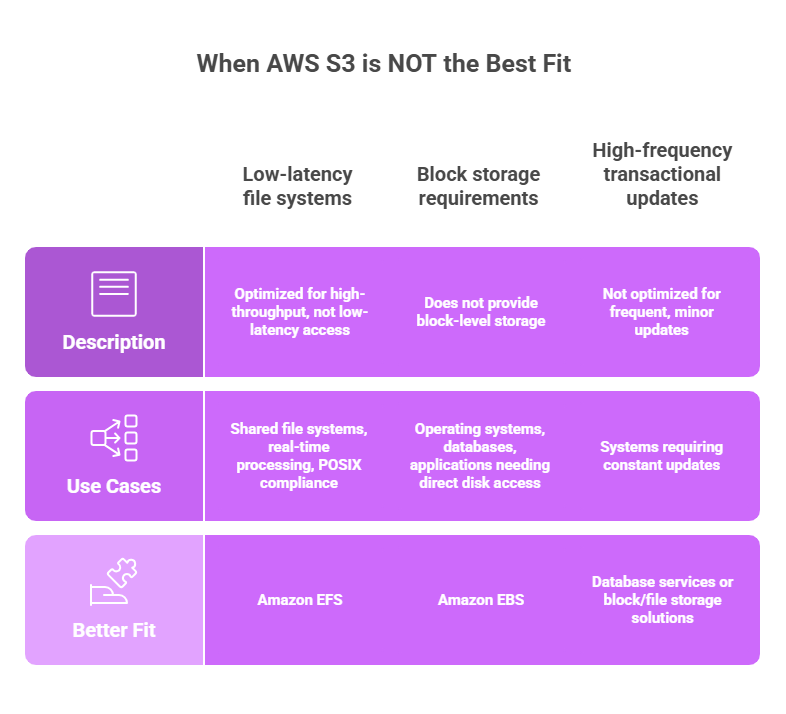
❌ Low-latency file systems
First and foremost, remember that S3 is optimized for high-throughput object storage – and not for low-latency file access. Because of this, workloads that require fast and frequent file operations may experience performance limitations.
From our experience, some of these frequent cases include:
- Shared file systems;
- Real-time processing;
- Applications expecting POSIX compliance.
In such cases, Amazon EFS is a better fit (especially for low-latency, file-based access).
❌ Block storage requirements
S3 does not provide block-level storage, which is required for use cases like operating systems or databases/applications that need direct disk access.
For these scenarios, Amazon EBS is more appropriate (since it delivers persistent block storage with predictable performance).
❌ High-frequency transactional updates
AWS S3 is not optimized for workloads that involve frequent (and minor) updates or transactional operations. Since objects must be rewritten entirely when modified, this can lead to inefficiencies in systems requiring constant updates.
In such cases, we recommend using database services or block/file storage solutions.
AWS S3 Pricing Overview
Amazon S3 pricing is usage-based and spans multiple cost layers, including storage, request operations, data transfer, and more.
In short, S3 doesn’t charge solely for capacity – first and foremost, its pricing reflects how data flows through the system.
At a high level, you are paying for four main components:
1. Storage (GB/month). Cost depends on storage class (e.g., Standard, Glacier) and total data volume. Typically, it’s the most predictable part of the bill.
2. Requests (PUT, GET, LIST). Costs increase with the number and type of operations. For example, high-frequency workloads (analytics, APIs, etc.) can significantly raise costs.
3. Data transfer (egress). Charges for it apply when data leaves S3 (especially to the internet or across regions). Note: in many cases, it’s one of the largest cost drivers.
4. Retrieval (cold storage). Accessing data from Glacier tiers also incurs additional fees and latency.
See more details on the AWS S3 cost breakdown in the table below.
| AWS S3 Pricing Breakdown | ||
| Pricing Component | Behavior | Typical Cost Pattern |
| Storage | Data stored per GB/month | Low and predictable |
| Requests | API operations (PUT, GET, LIST) | Scales with usage frequency |
| Data transfer | Data leaving S3 | Often a major cost driver |
| Retrieval | Access from Glacier tiers | Adds cost for archived data |
To see how S3 pricing behaves in real workloads, let’s look at some use cases. Below, we’ve estimated the following scenario (view a table below with a detailed breakdown):
- 10 TB stored in S3 Standard;
- Daily ingestion of new data;
- Frequent queries via Amazon Athena;
- Monthly archival to Glacier storage classes;
- Regular access by analytics tools and pipelines.
| AWS S3: Monthly Cost Scenario | ||
| Pricing Area | Details | Estimated Cost |
| Storage | 10 TB in S3 Standard | $230 |
| Requests | High query + ingestion activity | $80 |
| Data scanning (Athena) | Frequent large queries (~30 TB scanned) | $150 |
| Data transfer | Moderate outbound traffic | $120 |
| Glacier storage | Archived data (~5 TB) | $20 |
| Retrieval (Glacier) | Occasional access | $25 |
| Total | $625 / month | |
What Drives AWS S3 Costs
From our observations, these are the major AWS S3 cost drivers:
- Access patterns are the primary driver. Frequent reads, queries, or scans (especially via Athena) can significantly increase costs.
- Data transfer has a major impact. Moving data out of S3 or across regions often leads to higher-than-expected charges.
- Query behavior affects cost variability. Large and unoptimized queries that scan entire datasets increase both Athena and S3 costs.
- Storage class strategy influences efficiency. Keeping infrequently accessed data in S3 Standard instead of cheaper tiers leads to overspending.
- Object size and structure matter. Many small objects increase request costs, while poorly partitioned data increases query costs.
- Lifecycle management affects long-term cost. Without automated transitions, unused data accumulates in expensive storage tiers.
| AWS S3: Capabilities vs Cost Risks | |||
| Capability | Cost Risk | Impact | Optimization |
| Unlimited storage | Data sprawl | Rising storage cost | → Lifecycle policies → Data retention rules |
| Multiple storage classes | Misclassification | Overpaying for storage | → Align class with access patterns |
| High request throughput | Excessive requests | Increased API cost | → Batch operations → Cache results |
| Data transfer | Cross-region traffic | High network cost | → Keep data local→ Use CDN |
| Data lake usage | Full scans | High query cost | → Partition data |
AWS S3: Core Pricing Components
Understanding Amazon S3 pricing requires looking beyond simple storage costs. While S3 is often perceived as a low-cost storage solution, its actual cost structure is multi-dimensional and closely tied to how data is used over time.
In practice, costs are not only driven by how much data you store, but also by these 3 major components: 1 – how frequently you access it, 2 – how it is structured, 3 – how it moves across your architecture.
Specifically, at a high level, S3 pricing is driven by several key factors:
- Storage (how much data you store over time – baseline, predictable cost);
- Requests & retrieval (how often data is read, written, or listed);
- Data transfer (how much data is moved across regions, services, or outside AWS).
Additional factors such as storage class selection, lifecycle transitions, replication, and retrieval fees further shape the total cost.
| Component | What You Pay For | Pricing Behavior | Impact |
| Storage | Stored data (GB/month) | Per GB/month | Primary cost driver |
| Requests | PUT, GET, LIST operations | Per request | Scales with usage frequency |
| Data Retrieval | Accessing IA / Glacier data | Per GB retrieved | Can spike if misaligned |
| Data Transfer | Outbound data movement | Depends on traffic | Often underestimated |
| Replication & Lifecycle | Data copies & transitions | Per GB / operation | Long-term cost impact |
AWS S3 Cost Optimization Strategies
Here’s an often-overlooked aspect: when it comes to optimizing Amazon S3 costs, some impactful improvements come from simple and low-effort actions. From our experience, these “quick wins” can help reduce unnecessary storage and access costs without requiring major architectural changes – explore and compare them in the table below.
| Quick Wins for AWS S3 Cost Optimization | |||
| Strategy | Effort | Savings Impact | Speed |
| Apply lifecycle policies | Low | Very high | Immediate |
| Optimize storage classes | Low | High | Immediate |
| Reduce data transfer | Medium | High | Fast |
| Optimize data formats | Medium | High | Fast |
| Minimize requests | Low | Medium | Immediate |
Beyond foundational steps, more advanced strategies can significantly improve long-term efficiency, too:
- Automate data lifecycle management – enforce retention policies, automatic tiering, deletion rules, etc.;
- Design efficient data architectures – structure datasets to minimize scanning and redundant access;
- Optimize data lake queries – use partitioning, indexing, query optimization;
- Control replication and redundancy – in particular, avoid unnecessary duplication of data across regions;
- Implement cost visibility and tagging – identify high-cost buckets, unused data, inefficient usage patterns, etc.
Advanced Strategies for for Long-Term Data Cost Optimization | |||
| Strategy | Effort | Savings Impact | Speed |
| Automate data lifecycle management | Medium | Very high | Medium |
| Design efficient data architectures | High | Very high | Gradual |
| Optimize data lake queries | Medium | High | Fast |
| Control replication and redundancy | Medium | High | Medium |
| Implement cost visibility & monitoring | Low | High | Immediate |
How To Set Up AWS S3: Step-by-Step Guide
From what we’ve seen in real-world setups, getting S3 right isn’t just about storing data. Most importantly, you need to know how to structure and govern it effectively from the start. To help you achieve that, we’ve prepared a checklist below, breaking down all the core steps.
The checklist below reflects the key steps that separate scalable, cost-efficient storage systems from those that become difficult to manage over time.
Step-by-Step AWS S3 Setup & Governance Checklist |
| 1. Define storage strategy |
| ✅ Identify data types (logs, media, analytics, backups) ✅ Define access patterns (frequent vs infrequent) ✅ Estimate data growth and retention ✅ Define compliance and durability requirements |
| 2. Design bucket structure |
| ✅ Organize buckets by environment/use case ✅ Define naming conventions ✅ Separate production and non-production data ✅ Avoid excessive bucket fragmentation |
| 3. Configure storage classes |
| ✅ Assign appropriate storage tiers ✅ Define lifecycle transitions ✅ Use Glacier for archival data ✅ Validate access requirements before transitions |
| 4. Implement data lifecycle policies |
| ✅ Automate data transitions ✅ Define retention and deletion rules ✅ Avoid storing unused data ✅ Regularly review lifecycle configurations |
| 5. Optimize data layout |
| ✅ Use efficient formats (Parquet, ORC) ✅ Apply partitioning strategies ✅ Compress large datasets ✅ Structure data for efficient querying |
| 6. Configure access & security |
| ✅ Define IAM policies ✅ Restrict public access ✅ Enable encryption (at rest & in transit) ✅ Use bucket policies and ACLs |
| 7. Monitor usage & cost |
| ✅ Track storage growth ✅ Monitor request patterns ✅ Analyze data transfer costs ✅ Use AWS Cost Explorer and tagging |
| 8. Optimize performance & cost |
| ✅ Reduce unnecessary requests ✅ Minimize cross-region traffic ✅ Optimize query patterns ✅ Review storage class usage regularly |
| 9. Implement governance & compliance |
| ✅ Enable audit logging (CloudTrail) ✅ Apply tagging strategy ✅ Enforce access controls ✅ Ensure compliance requirements |
| 10. Test and continuously improve |
| ✅ Validate data access patterns ✅ Review cost trends regularly ✅ Optimize based on real usage ✅ Continuously refine architecture |

We can unlock discounts on 10,000+ tools you already use.
How Spendbase Helps You Get More Out of AWS
Spendbase helps companies unlock up to $100,000 AWS credits to offset infrastructure costs. Thanks to this, companies can significantly reduce initial cloud expenses – in many cases, getting up to 2 full years of free AWS runway. This way, you can scale faster, experiment more, and build without being constrained by infrastructure costs.
As an official AWS partner, Spendbase handles end-to-end communication with AWS – so no active involvement or effort is required on your side.
In addition, seasoned Spendbase experts provide dedicated DevOps support – to help you ensure AWS environments are properly configured and optimized. This way, you can avoid costly mistakes and maintain long-term efficiency.


Get discounts on your team’s favorite apps
Find deals for 10%, 30%, or even 70% off in our discount marketplace.
Check Discounts



