










AWS Trusted Advisor: Guides, Pricing, Cost Optimization

As your cloud usage expands, controlling costs becomes no longer a mere financial task but a strategic and operational priority. For many teams, AWS Trusted Advisor plays a crucial role in this task as a continuous diagnostic layer that, if managed properly, efficiently surfaces inefficiencies, risk exposures, optimization opportunities, and more.
In this guide, we’ll walk through AWS Trusted Advisor from an operational and financial lens. You’ll find out what exactly it does, how it generates value across governance and cost optimization, whether its pricing justifies the ROI, which optimization strategies truly maximize outcomes, and more.
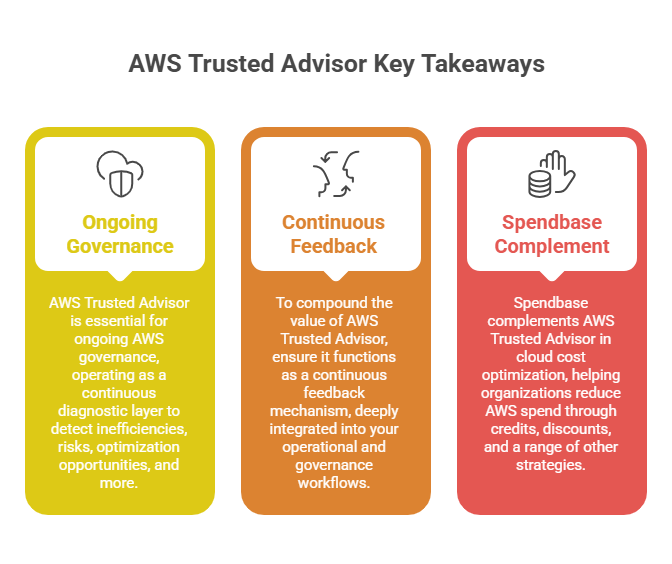
Key Takeaways
> AWS Trusted Advisor is essential for ongoing AWS governance – operating as a continuous diagnostic layer to detect inefficiencies, risks, optimization opportunities, and more. Doing so, it covers such aspects as cost, security, performance, resilience, quotas, etc.
> To compound the value of AWS Trusted Advisor, ensure it functions as a continuous feedback mechanism, deeply integrated into your operational and governance workflows.
> Spendbase complements AWS Trusted Advisor in cloud cost optimization – helping organizations reduce AWS spend through credits, discounts, and a range of other strategies.
See how much you can save on your stack
Pick your team’s tools!
Click to select one or more tools.


What’s your company size?
Just click to select.
What’s your business email?
We'll send you calculations right away
The email is flying to your inbox!
Beyond discounts, you may qualify for up to $100K in AWS credits.

What Is AWS Trusted Advisor
AWS Trusted Advisor is a fully managed best-practice advisory service that continuously analyzes your AWS environment based on AWS architecture guidelines. At its core, Trusted Advisor evaluates your resources and usage patterns across multiple domains and generates actionable recommendations.
Unlike manual audits (that rely on fragmented data sources), Trusted Advisor provides a centralized and automated checks framework used for:
- Identifying idle or underutilized resources;
- Detecting security misconfigurations early;
- Highlighting performance inefficiencies;
- Tracking approaching AWS service limits;
- Promoting architectural best practices.
Most importantly, this fundamentally reshapes how organizations approach optimization. Instead of review cycles or reactive cost audits, teams gain continuous awareness of their AWS environment. This, in turn, helps them identify inefficiencies or emerging risks early. Explore the specific areas covered by AWS Trusted Advisor below.
The Functional Scope of AWS Trusted Advisor | ||
| Category | What Trusted Advisor Analyzes | Typical Checks / Signals |
| Cost Optimization | Resource utilization Idle capacity Pricing inefficiencies | – Idle EC2 instances – Underutilized EBS volumes – Unattached Elastic IPs – Low-utilization RDS instances – Savings Plan opportunities |
| Security | Configuration risks Access exposures Compliance gaps | – Open security groups – MFA on root account – S3 bucket permissions – IAM usage patterns – Exposed ports |
| Performance | Service configurations affecting efficiency Throughput constraints | – EC2 instance sizing – EBS throughput optimization – CloudFront distribution settings – DynamoDB capacity configuration |
| Fault Tolerance | Resilience gaps Redundancy weaknesses Availability risks | – Single-AZ deployments – Insufficient backups – Lack of Multi-AZ RDS – ELB configuration gaps |
| Service Limits | Usage against AWS account quotas | – Approaching EC2 limits – VPC limits – IAM roles – EBS volumes – Elastic IP thresholds |
| Operational Excellence | Governance controls Monitoring coverage Lifecycle discipline | – CloudWatch alarms – Logging configuration – Deprecated instance usage – Resource tagging coverage |
How AWS Trusted Advisor Works
In practice, AWS Trusted Advisor runs a collection of checks. Each check analyzes specific aspects of your infrastructure (f.e., underutilized EC2 instances, idle load balancers, exposed security groups, etc.). These checks rely on metadata, configuration states, and usage patterns drawn directly from your AWS resources.
The results are presented as clear and prioritized recommendations. You receive categorized findings with practical guidance: what was detected, why it matters, how to remediate it, and so on.
A few aspects that stand out in how AWS Trusted Advisor operates:
> It operates continuously. This means no more waiting for manual assessments, reliance on scheduled audits, or delays in identified risks.
> From an architectural perspective, it does not modify resources. It observes, evaluates, and advises. In turn, control always remains with your teams.
> AWS Trusted Advisor provides account-level visibility. You see not only a resource-by-resource evaluation, but a holistic view across your entire AWS environment.
Based on all the above-mentioned factors, it’s important to note that AWS Trusted Advisor excels in rapidly growing AWS environments. Since optimization challenges scale with complexity, the risks of inefficiencies continuously increase – and periodic checks become no longer sufficient to handle that. Continuous analysis powered by AWS Trusted Advisor solves that. Explore the features that make this efficiency possible.
Top Use Cases of AWS Trusted Advisor
From our observations, Trusted Advisor works best in scenarios where inefficiencies and risks emerge gradually as infrastructure evolves.
Specifically, the danger of scaling is that many conditions simply don’t appear as failures. As a result, inefficiencies build silently once cloud usage grows. This is precisely what Trusted Advisor is designed to address – detecting structural waste, configuration drift, and emerging risks that traditional monitoring systems are not intended to surface. See the most common scenarios of that below.
| AWS Trusted Advisor Suitability Overview | ||
Highly suitable | Conditionally suitable | Not recommended |
| Cost optimization & waste reduction | Architecture reviews | Deep workload debugging |
| Security posture assessmentsService quota monitoring | Performance tuning decisions | Low-latency telemetry analysis |
| Fault tolerance validation | Incident investigations | Log analytics |
| Governance & best-practice compliance | Capacity planning | |
In the meantime, remember that AWS Trusted Advisor doesn’t provide full architectural prescriptions. For deep optimization initiatives, it should complement other tools, such as:
- Architecture reviews. Able to complement Trusted Advisor by validating broader design decisions, dependencies, and resilience strategies beyond individual findings.
- Workload profiling. It refines AWS Trusted Advisor recommendations with workload-specific utilization / performance behavior.
- Observability tooling. Adds real-time metrics and diagnostics that AWS Trusted Advisor is not designed to provide.
- FinOps analytics frameworks. This translates AWS Trusted Advisor optimization signals into financial planning and cost governance decisions.
Key AWS Trusted Advisor Capabilities
Organizational View & Recommendations
AWS Trusted Advisor supports an organizational view to help teams analyze findings across multiple AWS accounts. This, in turn, provides centralized visibility into risks and optimization opportunities at scale.
You get it all in a single window: a breakdown by domain clarifies where findings originate, a snapshot of the environment’s health and risk posture, identification of excluded or undefined checks, and more. See the example below.
Check out the official user guide on how to enable organizational view in AWS Trusted Advisor to learn more.
Dynamic Check Behavior
AWS Trusted Advisor’s checks evolve as AWS services and account characteristics change. As AWS introduces new instance families, pricing models, or security features, relevant checks adapt automatically.
Noise Reduction / Signal Prioritization
Instead of generating undifferentiated alerts, AWS Trusted Advisor ranks findings based on severity and potential impact.
For example, a publicly exposed resource or a critical service quota limit receives higher visibility than minor utilization inefficiencies. Therefore, this prioritization helps teams allocate attention where operational or security risks are most critical.
Access Control via IAM Policies
Access to AWS Trusted Advisor data can be precisely governed using IAM policies. In particular, organizations can:
- Define which users can view checks and recommendations;
- Control which roles may retrieve Trusted Advisor findings;
- Restrict access at the team or responsibility level;
- Govern programmatic access via CLI / API;
- Regulate integration with automation workflows;
- Enforce least-privilege access models.
Learn more details in the dedicated AWS Trusted Advisor user guide.
Checks Powered by AWS Config
Certain AWS Trusted Advisor checks leverage AWS Config data, which can significantly enhance configuration analysis and drift detection. Here’s how.
In practice, AWS Trusted Advisor’s real-time evaluations capture only the current snapshot of a resource. AWS Config, in turn, introduces historical and state-aware context. This way, Trusted Advisor can detect a range of issues beyond only active misconfigurations, including:
- Gradual configuration drift (where resources slowly deviate from their originally compliant or optimized state due to incremental changes, updates, manual modifications, etc.);
- Unintended changes introduced accidentally through deployments, automation errors, human actions, or other reasons;
- Persistent deviations from AWS best practices – for example, missing redundancy, inefficient sizing, governance gaps, etc.
Security Hub CSPM Controls
AWS Trusted Advisor incorporates visibility into Security Hub CSPM-related controls. Thus, it links configuration risks with broader cloud security posture management, allowing for:
- Detecting misconfigurations with security implications;
- Identifying publicly exposed or weakly protected resources;
- Highlighting gaps in controls like MFA, encryption, or logging;
- Correlating architectural patterns with security risks;
- Aligning operational diagnostics with compliance frameworks.
Review more details on key control areas and potential findings in the table below, or browse the user guide for more details.
Security Hub CSPM Control Coverage in AWS Trusted Advisor | |
| Control Area | Example Findings / Signals |
Identity Protection | → IAM users without MFA → Excessive permissions → Unused credentials |
Resource Exposure | → Publicly accessible S3 buckets → Permissive security groups (0.0.0.0/0) → Exposed endpoints |
Encryption Posture | → Unencrypted EBS volumes → S3 buckets without default encryption → RDS encryption gaps |
Logging Coverage | → Disabled CloudTrail logging → Insufficient logging scope → Missing activity tracking |
Configuration Hardening | → Weak security group rules → Missing backups → Suboptimal security settings |
As commonly observed, these capabilities from integrated Security Hub CSPM-related controls ensure that recommendations are no longer purely technical observations – they turn into actionable signals directly aligned with security governance and risk management.
Compute Optimization via AWS Compute Optimizer
Another useful feature is that organizations can opt in to AWS Compute Optimizer to extend Trusted Advisor’s analytical capabilities with machine-learning-driven utilization modeling.
This will help them unlock more advanced rightsizing and performance-related recommendations within AWS Trusted Advisor (overprovisioned or underprovisioned EC2 instances, inefficient instance family selections, capacity utilization pattern analysis, infrastructure modernization signals, etc.)
Integration With AWS Tools
Trusted Advisor is integrated with several AWS systems:
Tech Stack of AWS Services Integrated with AWS Trusted Advisor | |||
| Priority / Use Case | Integration | Area | Impact |
| Must-have | AWS Management Console | Operations | Rapid visibility into environment health |
| Must-have | AWS CLI / API | Automation, governance | Enables automation, custom governance tooling |
| For scaling cloud environments | AWS Organizations | Multi-account governance | Detects systemic risks & inefficiencies at scale |
| For scaling cloud environments | EventBridge / SNS | Monitoring, automation | Triggers notifications & remediation workflows |
| For scaling cloud environments | Ticketing / ITSM Systems | Operations | Embeds recs into workflows (Findings → Jira / ServiceNow) |
| For scaling cloud environments | Cost Monitoring Dashboards | FinOps, cost Governance | Continuous cost hygiene monitoring (Insights → FinOps / BI tools) |
| Mature, advanced environments | Automated Remediation Workflows | Automation, reliability engineering | Transfers findings to Lambda / SSM (for self-healing infrastructure actions) |
| Mature, advanced environments | Compliance Validation Pipelines | Security | Detects policy & control drift |
| Mature, advanced environments | CI/CD Governance Checks | DevOps governance | Findings → deployment gates (preventing risky patterns from reaching production) |
| Mature, advanced environments | AWS Well-Architected Tool | Architecture, design governance | Connects signals with formal assessments |
| Mature, advanced environments | Security Monitoring (SIEM / SOC) | Security ops | Adds visibility between configuration & risk |
| Mature, advanced environments | FinOps / Cost Platforms | Financial governance | Correlates waste with financial governance |
Trusted Advisor Priority
AWS Trusted Advisor Priority extends the standard advisory model by introducing a more structured and decision-oriented layer of operational intelligence. Its key characteristics include:
> Prioritized insights that highlight findings with material risk or cost implications;
> Curated recommendations, which filter advisory signals into decision-relevant actions;
> Contextual guidance with practical, relevant inputs;
> Risk-informed focus in alignment wiith governance and reliability concerns;
Overall, this leads to accelerated decision support and minimized analysis overhead.
Free virtual cards for non-EU residents
Open in 1 working day, issue 100 virtual cards, and get up to 1.25% cashback.
Get a free account
AWS Trusted Advisor Pricing Overview
AWS Trusted Advisor pricing is not structured as a standalone service fee. Typically, it goes together with AWS support and is thus governed by your AWS Support plan of choice. See details on support pricing below, or explore the official AWS Support Plan Pricing page.
| Pricing Access Levels of AWS Trusted Advisor | ||
| Support Plan | Scope of Capabilities | Average Cost |
| Basic | Limited checks (mostly service limits) | Free |
| Business Support+ | Limited checks + API access | Whichever is greater: $29/month or 3-9% of monthly AWS spend (tiered) |
| Enterprise Support | Full access across all cost, performance, security checks | Whichever is greater: $5K/month or 3-10% of monthly AWS spend (tiered) |
| Unified Operations | Full access + advanced guidance and account management | Whichever is greater: Minimum $50K/month or 5-10% of monthly AWS spend (tiered) |
Trusted Advisor Cost Considerations: Is the ROI Worth It?
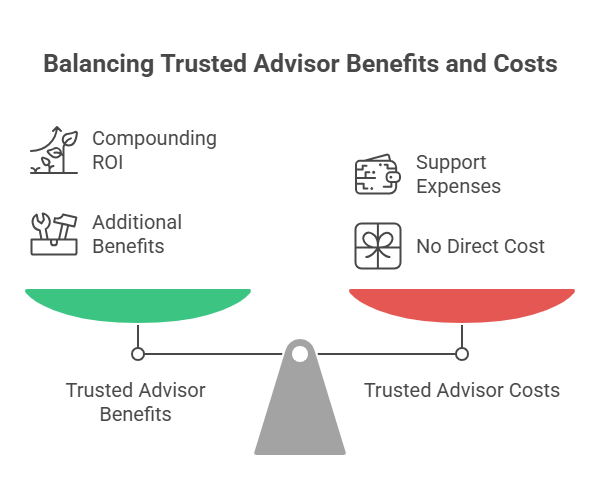
When evaluating the pricing and ROI of AWS Trusted Advisor, there are several often-overlooked aspects. Particularly, consider the following:
> Its ROI materializes through compounding effects. AWS Trusted Advisor’s ROI rarely manifests as a single dramatic cost-saving event. Instead, its value compounds through a range of long-term outcomes: prevented inefficiencies, avoided scaling constraints, reduced risk exposure, earlier detection of structural drift, you name it.
> Optimization savings often exceed support expenses. In many environments, even modest optimization outcomes offset Business Support fees.
As part of the AWS support package, it includes additional benefits (depending on its tier): faster response SLAs, architectural guidance, tech support, infrastructure risk mitigation, governance stabilization, etc.
Working With AWS Trusted Advisor: Step-by-Step Guide
In this section, we’ll navigate you through the process of setting up, managing, and optimizing your work with AWS Trusted Advisor. For extra details and configurations, visit the AWS user guide for AWS Trusted Advisor.
Step 1. Verify Access & Permissions
AWS Trusted Advisor capabilities (the depth, frequency, automation, etc.) are directly tied to your AWS Support plan. To make sure you land with the right one, double-check this:
✅Your active AWS Support tier;
✅IAM permissions for Trusted Advisor access (ensure everyone on your team who needs access can view findings);
✅Support for API access (if automation is planned) – Basic support plan doesn’t cover it, so you’d need to upgrade if you need it.
Step 2. Validate Organizational Visibility
This step is essential to ensure AWS Trusted Advisor is ready to be set in a multi-account AWS environment.
Therefore, to ensure there are no risks of fragmented data or missed systemic issues, remember to set up a cross-account aggregation strategy, including these steps:
- Retrieve findings via AWS Trusted Advisor API;
- Store results in a centralized S3 bucket;
- Query using AWS Athena or feed dashboards / BI tools;
- Normalize by severity, category, account, and owner;
- Optionally route critical signals into alerting / ticketing systems.
Step 3. Establish Defined Review Boundaries
From our experience, this step is essential to prevent duplicated analysis or conflicting decisions / ownership gaps whilst working with the Trusted Advisor findings. Specifically, we recommend:
✅ Map all your AWS accounts to clearly defined workloads or environments (production, staging, shared services)
✅ Distinguish locally resolved vs centrally governed findings
✅ Define severity tiers (f.e., critical, high, informational, etc.)
✅ Agree on an escalation logic (who acts, how fast, under what decision authority, etc.)
Step 4. Establish Ownership & Responsibility
Without this step being handled efficiently, AWS Trusted Advisor becomes another passive dashboard. It might seamlessly generate signals, but signals alone don’t fix anything. Someone must interpret, decide, and act on them – and there should be a system in place to do it properly.
See the example below with the essential aspects you should include (dedicated findings reviewer, decision owner, automation levels, etc.)
| An Example for Ownership & Decision Model | |||
|---|---|---|---|
| Finding Type / Scenario | Primary Reviewer | Decision Owner | Automated or Manual? |
| Cost optimization signals (idle resources, RI coverage gaps) | FinOps | FinOps + Workload Owner | Mostly automated / scheduled |
| Security exposures (public access, MFA gaps) | Security | Security Team | High-priority → manual / governed |
| Service limit risks | Platform / Cloud Ops | Platform Team | Frequently automated alerts |
| Fault tolerance / resilience risks | Platform / DevOps | Platform + Workload Owner | Typically manual evaluation |
| Performance inefficiencies | DevOps / Platform | Workload Owner | Case-dependent |
| Low-impact informational findings | Domain-specific teams | Local Owners | Backlog / optional automation |
Step 4. Integrate With Operational Workflows
For maximized efficiency, consider these recommended integrations:
> EventBridge / SNS for alerting workflows
By connecting to Amazon EventBridge, AWS Trusted Advisor’s checks and status changes can trigger automated rules, plus Amazon Simple Notification Service empowers real-time notifications across channels (email, Slack, incident tools, etc).
> ITSM / ticketing systems
With ITSM integration, high-priority risks or optimization opportunities will automatically generate tickets.
> Cost governance dashboards
By aggregating AWS Trusted Advisor into financial oversight layers, your FinOps and leadership teams can get a centralized view of all essential data: cost risks, savings opportunities, optimization trends, etc.
> Security monitoring pipelines
When security-related checks are integrated into continuous monitoring stacks, you can get more efficient risk detection, correlation, response workflows, and other security-related ops.
How to Interpret AWS Trusted Advisor Recommendations: Top Things to Consider
All things considered, having AWS Trusted Advisor enabled is only the starting point. Most importantly, its findings should be efficiently analyzed in the broad context: covering business impact, workloads, architecture, and other priorities.
To see the recs interpretation in practice (and how to do it efficiently), let’s examine a realistic scenario frequently encountered in AWS operations: a “low utilization RDS instance” recommendation.
Specifically, let’s go step by step through the list of the best practices:
- Differentiate material risks from low-impact optimizations.
For example, in our case, it might be obvious that downsizing a low-utilization database might reduce cost. However, if we look closely, for latency-sensitive workloads, it can introduce performance volatility. Hence, this apparent waste is actually a protective design.
Therefore, remember: not every efficiency signal translates into a safe optimization.
- Validate findings against architectural intent.
It’s important because AWS Trusted Advisor highlights deviations based ongeneralized best practices and NOT from your workload strategy. In our case, the instance wasn’t oversized by accident. It was provisioned deliberately to absorb bursts and stabilize response times.
- Identify systemic patterns.
Note this: a single underutilized resource rarely triggered concern for us. But when similar findings surface across multiple environments, that points toward a worth-considering factor.
- Evaluate remediation side effects.
In our illustrated case, downsizing affects latency behavior, replication dynamics, backup windows, and dependency chains. These are all important aspects we consider not worth risking.
- Prioritize actions by business impact
For this case, although savings were possible, the workload was latency-sensitive production. The modest cost reduction didn’t justify the performance risk, so prioritization shifted to findings with clearer impact.
To follow a more detailed and structured interpretation approach, follow our checklist below.
AWS Trusted Advisor Interpretation & Analysis Checklist |
| 1. Signal Relevance |
| ✅ Separate high-impact risks from minor optimizations ✅ Estimate real financial and operational impact ✅ Avoid overreacting to low-severity findings |
| 2. Architectural & Context Validation |
| ✅ Check if findings conflict with the system decisions ✅ Confirm workload-specific constraints or trade-offs ✅ Distinguish whether findings are design decisions vs unintended misconfigurations ✅ Assess whether deviation is justified or risky |
| 3. Cross-Domain Correlation |
| ✅ Relate cost findings to actual usage patterns ✅ Identify whether they are systemic vs isolated inefficiencies |
| 4. Drift & Pattern Detection |
| ✅ Spot waste signals that are recurrent ✅ Monitor governance decay indicators ✅ Identify emerging quota pressures |
| 5. Refresh & Temporal Interpretation |
| ✅ Avoid decisions based on single snapshots ✅ Compare findings across refresh cycles ✅ Separate persistent issues from temporary anomalies |
| 6. Remediation Risk & Side-Effect Analysis |
| ✅ Assess potential performance impact ✅ Evaluate dependency and stability risks ✅ Avoid optimizations that reduce resilience ✅ Confirm rollback or recovery options |
| 7. Prioritization & Decision Framing |
| ✅ Rank actions by business impact ✅ Balance savings vs operational disruption ✅ Sequence remediation logically (quick wins vs structural fixes) ✅ Align with change management / release cycles |
Common Pitfalls With Trusted Advisor
From operational experience, most AWS Trusted Advisor inefficiencies often come from governance and interpretation gaps. Specifically, watch out for these “anti-patterns”:
- Treating findings as isolated alerts. Recommendations interpreted without architectural or workload context can drive low-value optimizations that are not systemic improvements.
- Lack of remediation ownership. Findings without clearly defined consumers or decision authority accumulate and lead to more issues: alert fatigue, unresolved risk exposure, etc.
- Using Trusted Advisor as a replacement for observability. Trusted Advisor surfaces structural signals, but it’s not a performance telemetry or root-cause diagnostics solution. Hence, it can only complement monitoring systems.

We can unlock discounts on 10,000+ tools you already use.
How Spendbase Complements AWS Trusted Advisor
For teams seeking the next level of cloud cost efficiency, Spendbase is a go-to solution. It acts as a practical financial optimization layer alongside AWS Trusted Advisor. Here’s how:
> Free AWS credits (up to $100,000). Spendbase helps organizations secure substantial AWS credits, which can directly offset cloud expenses (often providing anywhere from 2 months up to 2 years of AWS runway), without requiring infrastructure changes.
> Cloud cost reductions (up to 60-90% OFF). Beyond credits, Spendbase unlocks meaningful discounts across core AWS services: compute, storage, network resources, you name it. These reductions generate immediate financial impact while preserving workload stability.
> Practical DevOps & FinOps support. Spendbase complements AWS Trusted Advisor capabilities by helping teams evaluate their AWS setup efficiency and maintain predictable cloud cost behavior.
> Optimization without disruption. Spendbase handles the end-to-end process of coordinating directly with AWS, removing negotiation, administrative overhead, and procurement friction from your teams.
Altogether, this creates a resilient foundation for your cloud cost optimization, with minimal to no effort required from your side. Reach out to us to explore how we can help you reduce your cl oud expenses.


Get discounts on your team’s favorite apps
Find deals for 10%, 30%, or even 70% off in our discount marketplace.
Check Discounts



