










Cost optimization
AWS Virtual Private Cloud (VPC): Guides, Pricing, Cost Optimization

For many teams, AWS Virtual Private Cloud (AWS VPC) serves as the foundation of a secure, robust, scalable AWS environment – however, only when designed correctly. In practice, many things can go wrong without clear architectural principles: misconfigured routing, overly permissive security groups, poor subnet design, a lack of proper network segmentation, you name it – all these aspects can quickly lead to elevated risks, unnecessary costs, or other inefficiencies.
In this guide, we’ll break down how AWS VPC works from a real-world perspective: in particular, how its pricing behaves, where the main cost drivers lie, how to design VPC architectures that scale efficiently without overspending, and more.
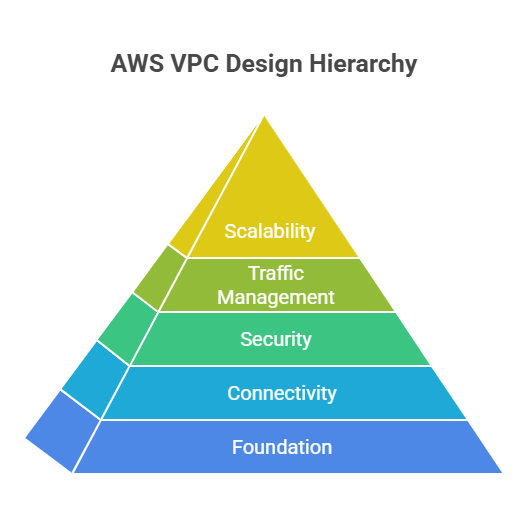
Key Highlights
> AWS VPC is not just a networking layer. It underpins connectivity, security, and traffic management across the entire AWS environment.
> VPC design directly impacts scalability. Well-structured CIDR planning and subnet segmentation enable smoother growth and avoid future rework.
> VPC costs are often indirect. While the VPC itself is free, components like NAT Gateways, data transfer, and endpoints become primary cost drivers.
> AWS credits further reduce infrastructure costs. Unlocking up to $100,000 AWS credits significantly helps companies offset cloud expenses, especially in early growth stages.
See how much you can save on your stack
Pick your team’s tools!
Click to select one or more tools.


What’s your company size?
Just click to select.
What’s your business email?
We'll send you calculations right away
The email is flying to your inbox!
Beyond discounts, you may qualify for up to $100K in AWS credits.

What Is AWS Virtual Private Cloud
AWS VPC provides full control over network configuration, enabling you to design environments that mirror (and often exceed) traditional on-premise networking capabilities.
From an architectural standpoint, VPC acts as the foundation layer for performance, security, and cost efficiency in AWS. This way, it determines a few crucial aspects:
- How efficiently services communicate (latency, data transfer paths);
- How secure your environment is (network isolation, access control);
- How much you pay for traffic (cross-AZ, NAT, internet egress).
In doing so, it serves as a logically isolated virtual network within AWS where to help you define how your resources communicate.
AWS VPC is the next level compared to traditional networking, and here’s why. Looking at traditional, hardware-based setups, they commonly require manual setup and fixed capacity. VPC, in turn, is fully software-defined and API-driven – meaning, you can provision, modify, and scale your network on demand.
| Traditional Networking vs AWS VPC | |
| Traditional Networking | AWS VPC |
| Hardware-based | Software-defined |
| Manual configuration | API-driven |
| Fixed capacity | Elastic scaling |
| Static routing | Dynamic routing |
| Limited isolation | Fine-grained isolation |
What is more, AWS VPS integrates natively with core AWS services, including AWS EC2 (for compute workloads), Amazon RDS (for managed databases), AWS Lambda (for serverless networking via VPC integration), Load balancers (traffic distribution), Private endpoints (for secure service access without internet exposure), and others.
Apart from that, here are several additional aspects that define the impact of AWS VPC:
> Programmable network control
VPC provides fine-grained control over how resources communicate. This allows you to design custom IP ranges, subnets, and routing logic that align with your application architecture.
> Deep ecosystem integration
Amazon VPC integrates seamlessly with core AWS services. Thanks to this, you get consistent networking across compute, databases, serverless, and managed services without additional tooling.
> Isolated and secure environments
Each VPC operates as a logically isolated network – which means full control over security boundaries, access rules, traffic exposure, etc.
> Flexible connectivity models
AWS VPC supports multiple connectivity options (internet access, private endpoints, hybrid connections, etc.). This way, networking easily adapts to different workload needs.
> Traffic-driven cost model
Rather than charging for the network itself, VPC costs are driven by how traffic flows through components (for example, NAT Gateways, load balancers, cross-AZ communication, etc.).
How AWS VPC Works: Step-by-Step Overview
Step 1. Defining the network boundary (CIDR)
Everything begins with defining a CIDR block (e.g., 10.0.0.0/16), which determines the IP address space for your environment. This sets the foundation for how many resources you can support and how your network will scale over time.
Step 2. Breaking the network into subnets
The VPC is then divided into subnets, each serving a different purpose. This segmentation allows you to separate workloads based on exposure and security requirements, forming the backbone of your architecture.
You divide the VPC into smaller subnet ranges:
- Public subnets (accessible from the internet). They are connected to an Internet Gateway, allow inbound and outbound internet traffic, and are commonly used for user-facing resources like web servers.
- Private subnets (no direct internet access). Not reachable from the internet, but can access it outbound via NAT. Suitable for internal application layers.
- Isolated subnets (no external access at all). No internet connectivity in any direction, mainly used for highly secure resources like databases.
To learn more about each, check out the side-by-side comparison.
AWS VPC Subnet Types Comparison | |||
| Public Subnet | Private Subnet | Isolated Subnet | |
| Internet Access | Direct via IGW | Outbound via NAT/endpoints | None |
| Key Components | IGW, public IPs | NAT Gateway, endpoints | Internal routing only |
| Security Level | Lower | Medium | High |
| Cost Impact | Low–Medium | Medium–High | Low |
| Traffic Flow | Internet ↔ subnet ↔ internal | Internal ↔ NAT/endpoints | Internal only |
| Best Practice | Entry points only | Prefer endpoints over NAT | For critical data |
Step 3. Resource deployment
Services are placed into subnets based on their role. Public-facing components like load balancers are deployed in public subnets, while application layers run in private subnets, and databases are kept isolated. This ensures a balance between accessibility and security.
Step 4. Traffic routing
Route tables control how traffic moves within the VPC and beyond it. They determine whether requests stay internal, go through a gateway, or reach external services. See details in the table below.
| Route Tables: Traffic Flow Overview | ||
| Traffic Type | Route Target | What Happens |
| Internal (within VPC) | Local route (VPC CIDR) | Traffic stays inside the VPC between subnets |
| Public internet access | Internet Gateway (IGW) | Allows inbound and outbound internet traffic |
| Outbound-only internet | NAT Gateway | Allows outbound internet access, blocks inbound connections |
| VPC-to-VPC traffic | VPC Peering / Transit Gateway | Enables communication between different VPCs |
| Hybrid connectivity | VPN / Direct Connect | Connects AWS VPC with on-prem infrastructure |
Step 5. External connectivity
To allow communication with the outside world, gateways are introduced. In particular:
- Internet Gateway (IGW) enables direct internet access for public resources;
- NAT Gateway allows private resources to initiate outbound connections securely (Note: NAT is often a major cost driver in AWS).
Step 6. Layered security
Security is enforced through 2 core components that together ensure that only authorized traffic can flow through your network:
#1. Security Groups, which operate at the resource level and control access to individual resources (e.g., EC2, databases). With them, only allow rules are defined, and return traffic is automatically permitted – making them ideal for fine-grained control (for example, app → DB access).
#2. Network ACLs. They apply rules across entire subnets, supporting both allow and deny rules. Traffic is evaluated in order, and return traffic must be explicitly allowed. This way, they are useful for broader network restrictions.
Step 7. Service-to-service communication
Within the VPC, services communicate using private IP addresses. This avoids unnecessary exposure to the internet, improves performance, and reduces costs.
Core AWS VPC Capabilities
Network Isolation
In mature architectures, isolation is not just a best practice, but a requirement. From what we’ve observed, well-designed AWS VPC boundaries efficiently served in preventing cascading failures and limiting the blast radius of incidents – and, from our experience, that’s exactly what AWS VPC is designed to enforce.
At its core, VPC enables full separation of environments – development, staging, and production – either within a single account or across multiple accounts. Each environment operates within clearly defined boundaries, with controlled communication between them.
In practice, this ensures the following benefits:
- Reduced risk of cross-environment interference;
- Strengthened security boundaries;
- Simplified compliance (HIPAA, GDPR, SOC 2, etc.);
- Safer testing and deployments.
Fine-Grained Traffic Control
VPC-level traffic control is one of the most powerful levers for enforcing secure architecture through Security Groups (instance-level) and Network ACLs (subnet-level). These mechanisms allow you to define exactly which traffic is allowed, based on ports, protocols, and source/destination rules.
Thanks to this, you can tightly control access to every component, thus minimizing exposure and ensuring that only necessary communication paths exist.
AWS VPC Traffic Control: Detailed Comparison | |||
| Security Groups | Network ACLs | Route Tables | |
| Level | Resource | Subnet | Network |
| Behavior | Stateful | Stateless | Deterministic |
| What It Controls | Inbound & outbound rules | Broad traffic filtering | Traffic direction |
| Strength | Fine-grained control | Additional protection layer | Controls flow paths |
| Limitation | Can become complex at scale | Harder to manage | Misrouting risks |
| Best Practice | Use service-based rules | Use for coarse control | Keep simple and predictable |
Hybrid Connectivity
From our experience, AWS VPC turns hybrid connectivity into a controlled transition. By leveraging VPN and AWS Direct Connect, organizations can extend on-prem systems into AWS – all while maintaining consistency in policies, connectivity, and operational workflows.
Explore how these two options differ in the table below, and why using them together can be particularly effective.
Hybrid Connectivity: VPN vs Direct Connect | ||
| Feature | VPN | Direct Connect |
| Setup speed | Fast | Slower (requires provisioning) |
| Performance | Variable (internet-based) | Stable and predictable |
| Latency | Higher | Lower |
| Cost | Lower upfront | Higher, but efficient at scale |
| Best use case | Quick setup, dev/test | Production, high-throughput systems |
Private Networking
Within an Amazon VPC, resources can communicate using private IP addresses, completely isolated from the public internet. This forms the foundation for secure internal communication between application tiers (web, application, database layers, etc.) without exposing traffic externally.
From a functionality standpoint, this enables a highly deterministic traffic flow: you control exactly how data moves inside the network using route tables, subnet segmentation (public vs. private), and security controls like security groups and network ACLs.
A key extension of this model is VPC Endpoints. These allow resources within your VPC to privately access AWS services (like S3 or DynamoDB) without traversing the internet, NAT gateways, or public IPs. Instead, traffic stays within the AWS backbone – reducing latency, improving security posture, lowering data transfer costs, you name it.
In practice, this unlocks several important capabilities:
- Service-to-service isolation. Backend services (e.g., databases) remain in private subnets with no inbound internet access.
- Controlled egress. Outbound traffic can be tightly managed via NAT gateways or restricted entirely.
- Reduced attack surface. No public exposure means fewer entry points for threats.
- Predictable networking behavior. Internal communication is not affected by internet routing variability.
Scalable Architecture Design
Amazon VPC is inherently built to support growth for numerous use cases: from single-tier deployments to highly distributed production-grade systems.
In doing so, it provides 2 important differentiators: 1 – ensures the structural foundation for designing multi-tier architectures (web → app → database), 2 – enables clear segmentation of microservices (across subnets, accounts, or even regions).
From a functionality perspective, VPC gives you several building blocks to scale both horizontally and architecturally:
- Subnet-based segmentation – distribute workloads across multiple subnets and Availability Zones to isolate tiers and prevent resource contention;
- Multi-AZ support – architect for high availability by spreading resources across Availability Zones, ensuring resilience against infrastructure failures;
- Elastic IP and routing control – dynamically manage traffic flow and failover using route tables, internet gateways, and NAT gateways;
- Load balancing integration – seamlessly integrate with services like Elastic Load Balancing to distribute traffic across instances and scale application layers automatically;
- Auto scaling alignment – pair with Auto Scaling groups to dynamically adjust compute capacity based on demand, without reconfiguring the network layer.
Beyond basic scaling, VPC also enables modular architecture design. You can isolate services into dedicated subnets or even separate VPCs, then connect them using VPC peering or centralized networking patterns (e.g., hub-and-spoke). This becomes critical as systems evolve into microservices or multi-account environments.
Another key capability is traffic control at scale. With fine-grained routing, security groups, and network ACLs, you can define how services interact as your architecture grows, and thus ensure that scaling doesn’t introduce unnecessary exposure or complexity.
From what we’ve observed, the real value of VPC in scalable design lies in enabling structured growth. Architectures that start with clear network boundaries and segmentation tend to scale cleaner, with fewer bottlenecks and less operational overhead as complexity increases.
Free virtual cards for non-EU residents
Open in 1 working day, issue 100 virtual cards, and get up to 1.25% cashback.
Get a free account
Top AWS VPC Use Cases & Real-World Assessment
✅ Case #1: Multi-Tier Architectures
In this scenario, AWS VPC was used to implement a structured, multi-layer architecture, where web, application, and database components were separated into dedicated subnets. The primary objective was to enforce clear boundaries between layers while maintaining controlled communication and scalability.
This setup typically leverages public subnets for external entry points and private or isolated subnets for internal services and data storage.
| AWS VPC for Multi-Tier Architectures: Assessment Highlights | |
| Primary value | Layered architecture with controlled exposure |
| Network model | A combination of public, private, and isolated subnets |
| Traffic behavior | Regulated communication between tiers |
| Scaling mechanism | Distribution across multiple AZs |
| Operational benefit | Clear separation of responsibilities |
| Reliability benefit | Improved fault tolerance |
| Key consideration | Efficient routing and data transfer management |
During testing, VPC demonstrated strong support for multi-tier setups.
In particular:
- Subnet segmentation enhanced both security and manageability;
- Traffic between tiers remained structured and predictable;
- Multi-AZ deployment improved resilience and availability;
- However, we’ve noticed that inefficient placement of services across availability zones can lead to increased latency and higher data transfer costs.
To optimize this setup, we’ve done several steps. First, we grouped tightly coupled services within the same AZ and reduced cross-AZ data transfer and latency – this helped us minimize unnecessary inter-tier communication and overall eliminate redundant traffic and lower costs.
✅ Case #2: Hybrid Cloud
In this use case, AWS VPC was connected to on-premise infrastructure using VPN or Direct Connect, enabling a hybrid deployment model. The goal was to extend existing systems into the cloud without disrupting ongoing operations.
| AWS VPC for Hybrid Cloud: Assessment Highlights | |
| Primary value | Integration between cloud and on-prem systems |
| Connectivity model | VPN and Direct Connect |
| Traffic behavior | Two-way communication across environments |
| Scaling mechanism | Flexible cloud extension |
| Operational benefit | Smooth transition to cloud |
| Reliability benefit | Redundant connectivity options |
| Key consideration | Latency and network cost control |
During our testing, VPC proved effective in hybrid scenarios in the following areas:
- VPN offered a fast and flexible way to establish initial connectivity;
- Direct Connect provided more stable and predictable performance;
- Communication between environments remained secure and consistent;
Meanwhile, we also noticed that poorly optimized hybrid setups can introduce latency issues and unnecessary data transfer costs.
To optimize this setup, we followed these strategies:
- Positioning critical workloads closer to users or data sources (to reduce latency and data transfer);
- Using AWS Direct Connect for performance-sensitive applications (this ensured stable & predictable performance);
- Continuously monitoring traffic patterns between environments to see whenever costs or performance need to be optimized.
✅ Case #3: Microservices Architectures
In this scenario, VPC was used to support a distributed microservices architecture, where services were deployed across multiple subnets with controlled communication channels. The focus was on isolating services while maintaining efficient internal connectivity.
Here are some of our insights from testing:
> Service isolation improved resilience and limited the impact of failures, ensuring that issues in one service did not cascade across the system;
> Private communication reduced exposure to external networks (which means strengthened security and keeping traffic within the VPC);
> Flexible routing supported complex service interactions, and thus enabling scalable and modular architecture design;
> High inter-service traffic increased internal data transfer costs (especially in communication-heavy microservices setups);
> Inefficient service placement led to unnecessary cross-AZ communication – to minimize it, we co-located frequently interacting services within the same availability zone and optimized traffic flows.
| AWS VPC for Microservices: Assessment Highlights | |
| Primary value | Service-level isolation and flexibility |
| Network model | Segmented subnets across services |
| Traffic behavior | High volume of internal communication |
| Scaling mechanism | Independent scaling per service |
| Operational benefit | Modular deployment approach |
| Reliability benefit | Isolation of service failures |
| Key consideration | Internal traffic optimization |
When AWS VPC Design Is NOT An Optimal Choice
While AWS Virtual Private Cloud provides powerful networking capabilities, inefficient design choices can quickly lead to increased costs, reduced performance, and operational complexity. Below are common scenarios where VPC setups might not be the most optimal choice.
❌ Overuse of NAT Gateways
NAT Gateways are convenient for enabling outbound internet access from private subnets. However, they come with both hourly and data processing charges. Because of this, over-reliance on NAT for high-volume traffic can significantly increase costs.
In such cases, we recommend using VPC endpoints or optimizing routing (they can help reduce NAT dependency and provide better cost efficiency).
❌ Excessive cross-AZ traffic
From our experience, distributing resources across multiple Availability Zones does improve availability. And yet, frequent communication between AZs introduces additional data transfer costs.
This way, when services exchange large volumes of data across AZs unnecessarily, it leads to both higher latency and increased cost. Optimizing service placement can mitigate this.
❌ Poor subnet design
Based on our observations, improper subnet segmentation can create several inefficiencies – routing complexity, security gaps, inefficient traffic flows, you name it. For example, mixing public and private workloads or over-segmenting subnets can complicate architecture without clear benefits.
To avoid this, implement a well-structured subnet design aligned with your application tiers.
❌ Lack of traffic visibility
Without proper monitoring and logging, it becomes difficult to understand how data moves across the network. This often results in unnoticed inefficiencies, unexpected costs, delayed troubleshooting, and other issues.
AWS VPC Pricing Overview
At first glance, AWS VPC appears free — and technically, it is. However, in real-world deployments, costs are driven not by the network itself, but by how traffic flows through it and which networking components are used.
At a high level, VPC-related costs come from several key areas:
- NAT Gateway – charges include hourly usage and data processing, often becoming one of the largest cost drivers;
- Data transfer – costs vary depending on traffic direction (intra-AZ, cross-AZ, inter-region, or internet-bound);
- VPC endpoints (PrivateLink) – introduce hourly and data processing costs for private connectivity;
- Load balancers – pricing scales with traffic volume and request handling;
- Elastic IPs – incur charges when allocated but unused.
To learn more, explore the table below – or check out the AWS VPC pricing page.
| AWS VPC: Core Pricing Components | |||
| Component | What You Pay For | Pricing Behavior | Extra Notes |
| NAT Gateway | Outbound internet access | Hourly + per GB processed | Major cost driver |
| Data Transfer | Traffic between services, AZs, regions | Per GB | Often underestimated |
| VPC Endpoints (PrivateLink) | Private service connectivity | Hourly + per GB | Scales with usage |
| Load Balancers | Traffic distribution | Per hour + LCU usage | Depends on traffic volume |
| Elastic IPs | Public IP allocation | Per unused IP | Hidden cost risk |
To better understand how VPC costs accumulate in practice, let’s consider a typical production-grade setup – for example, a case of a SaaS platform or distributed application.
For this scenario, we assumed the following:
- Public subnets hosting load balancers;
- Private subnets for application and backend services;
- NAT Gateway for outbound internet access;
- Multi-AZ deployment for high availability.
Let’s take a view at the estimated cost breakdown in this case.
| AWS VPC: Real-Life Example of Monthly Cost | ||
| Usage (Example Scenario) | Monthly Cost | |
NAT Gateway | – 2 NAT Gateways (multi-AZ) × ~$0.045/hr – 2 TB data processing × ~$0.045/GB | $160.00 |
| Data transfer (cross-AZ) | 3 TB traffic between AZs × ~$0.01/GB | $30.00 |
| Data transfer (internet outbound) | 1 TB × ~$0.09/GB | $90.00 |
| VPC Endpoints (PrivateLink) | 3 endpoints × ~$0.01/hr + data processing | $25.00 |
| Load Balancer (ALB) | 1 ALB + moderate traffic (~LCU usage) | $40.00 |
| Elastic IPs | 2 allocated, partially unused | $10.00 |
| Monitoring (Flow Logs, CloudWatch) | Logs ingestion + storage | $35.00 |
| Total | $390/month | |
The key point here, VPC-related costs are not fixed. In most cases, they are driven by how traffic moves through the system: hence, the more data passes through the NAT Gateway, the higher the processing charges. Below, we outline the key factors that impact costs based on our observations.
What Drives AWS VPC Costs
When assessing AWS VPC cost efficiency, here’s what we’ve noticed: just like CDN costs are driven by how efficiently traffic is served and cached, VPC costs are primarily determined by how intelligently traffic is routed and minimized.
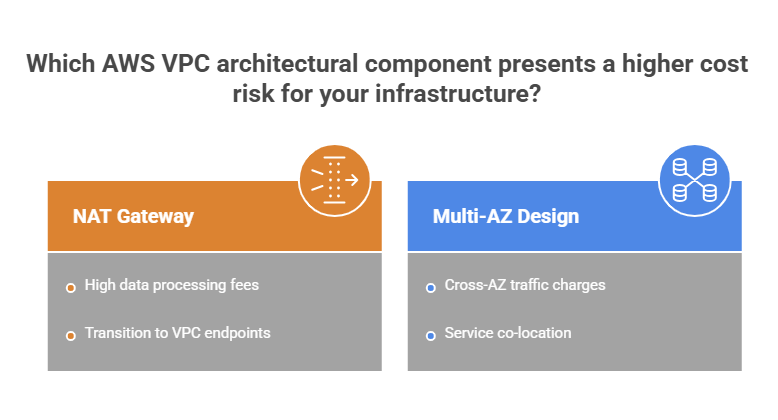
In real-world environments, VPC costs tend to grow based on the following patterns:
- Traffic volume – the more data flows through NAT, load balancers, or across AZs, the higher the cost;
- Architecture design – inefficient service placement can increase cross-AZ and external traffic;
- Connectivity choices – reliance on NAT vs. private endpoints significantly impacts cost structure;
- Always-on components – load balancers, endpoints, and gateways incur continuous baseline costs;
- Traffic patterns – frequent inter-service communication (especially in microservices) can silently increase spend.
| AWS VPC Capabilities vs Cost Risks | ||
| Capability | Cost Risk | Optimization |
| NAT Gateway | High data processing cost | → Use VPC endpoints → Reduce outbound traffic → Optimize routing paths |
| Multi-AZ design | Cross-AZ traffic | → Minimize inter-AZ communication → Co-locate dependent services |
| Public endpoints | Uncontrolled external access | → Use private endpoints → Limit internet exposure |
| Over-segmentation | Complex routing & overhead | → Simplify architecture → Reduce unnecessary layers |
| Idle resources | Unused IPs & components | → Release unused IPs → Audit resources regularly |
| High inter-service traffic | Internal data transfer cost | → Optimize microservices communication → Reduce chatty interactions |
AWS VPC Cost Optimization Strategies
To optimize AWS VPC spending, we recommend focusing on traffic efficiency and architectural design:
- Replace NAT traffic with VPC endpoints – use private connectivity to reduce data processing charges;
- Minimize cross-AZ traffic – design services to communicate within the same AZ where possible;
- Optimize routing paths – ensure traffic flows directly without unnecessary hops;
- Consolidate endpoints and services – avoid redundant networking components;
- Reduce outbound data transfer – keep data processing within the same region and network;
- Monitor network usage continuously – identify unexpected traffic patterns early.
Quick Wins for AWS VPC Cost Optimization | |||
| Strategy | Effort | Savings Impact | Speed |
| Replace NAT with endpoints | Medium | Very high | Fast |
| Reduce cross-AZ traffic | Medium | High | Fast |
| Optimize routing | Low | Medium | Immediate |
| Remove unused IPs | Low | Low | Immediate |
| Monitor traffic patterns | Low | High | Immediate |
Additionally, beyond foundational steps, more advanced strategies can significantly improve long-term efficiency:
- Design traffic-aware architectures – align service placement with communication patterns to reduce unnecessary data transfer;
- Implement private connectivity models – reduce reliance on public internet routing and NAT gateways;
- Continuously analyze traffic flows – use monitoring tools to identify inefficiencies and bottlenecks;
- Optimize microservices communication – reduce chatty service interactions that increase network cost;
- Control baseline networking costs – review always-on components (load balancers, endpoints) regularly;
- Apply cost allocation and tagging – identify high-cost services and optimize accordingly.
Advanced Optimization Approaches for AWS VPC | |||
| Strategy | Effort | Savings Impact | Speed |
| Design traffic-aware architectures | High | Very high | Medium |
| Implement private connectivity models | Medium | High | Medium |
| Continuously analyze traffic flows | Medium | High | Ongoing |
| Optimize microservices communication | High | High | Medium |
| Control baseline networking costs | Low | Medium | Fast |
| Apply cost allocation and tagging | Low | Medium | Fast |
Step-by-Step AWS VPC Setup & Governance Checklist
From what we’ve seen in real-world setups, getting VPC right isn’t about creating subnets—it’s about designing efficient, scalable network architecture from the start.
The checklist below reflects the key steps that separate cost-efficient network designs from those that become complex and expensive over time.
| Step-by-Step AWS VPC Setup & Governance Checklist |
| 1. Define network strategy |
| ✅ Identify application architecture (multi-tier, microservices, hybrid) ✅ Define connectivity requirements (internet, private, hybrid) ✅ Estimate traffic patterns and volume ✅ Define security and compliance needs |
| 2. Design VPC structure |
| ✅ Define CIDR range ✅ Plan subnet segmentation (public/private) ✅ Distribute subnets across AZs (multi-AZ design) ✅ Avoid overlapping IP ranges ✅ Ensure high availability (no single points of failure) |
| 3. Configure DNS & naming |
| ✅ Enable DNS resolution and hostnames in VPC ✅ Configure Route 53 (public/private zones) ✅ Define consistent naming conventions |
| 4. Configure routing |
| ✅ Set up route tables ✅ Define the internet and private routing paths ✅ Design for efficient and minimal traffic paths ✅ Keep routing simple and predictable |
| 5. Set up connectivity |
| ✅ Configure Internet Gateway ✅ Set up NAT Gateway (if needed) ✅ Evaluate NAT vs VPC endpoints trade-offs ✅ Implement VPC endpoints where possible ✅ Configure hybrid connectivity (VPN / Direct Connect if required) |
| 6. Implement security controls |
| ✅ Configure security groups ✅ Define network ACLs ✅ Restrict inbound/outbound access ✅ Apply least privilege principles ✅ Enable AWS WAF (for public endpoints if needed) ✅ Consider AWS Shield for DDoS protection ✅ Regularly audit security configurations |
| 7. Optimize data flow |
| ✅ Minimize cross-AZ traffic ✅ Reduce unnecessary external calls ✅ Align service placement with communication patterns ✅ Optimize service-to-service communication |
| 8. Monitor and observe |
| ✅ Replace NAT traffic where possible ✅ Consolidate networking components ✅ Optimize routing paths ✅ Review architecture regularly |
| 9. Implement governance |
| ✅ Apply tagging strategy ✅ Enable audit logging (CloudTrail) ✅ Enforce network policies ✅ Ensure compliance requirements |
| 10. Test and continuously improve |
| ✅ Validate network performance ✅ Simulate traffic scenarios ✅ Review cost trends ✅ Optimize based on real usage ✅ Continuously refine architecture |

We can unlock discounts on 10,000+ tools you already use.
How Spendbase can offset VPC costs
One of the most direct ways to reduce VPC-related expenses is through AWS credits – and this is where Spendbase provides immediate value. By helping companies secure free AWS credits (up to $100,000 in cloud spend coverage), Spendbase can offset a significant portion of networking costs: including NAT Gateway usage, data transfer, load balancers, you name it.
For startups and scaling teams, these credits act as a financial buffer, allowing you to run production-grade VPC architectures without bearing the full cost from day one. In particular, here’s how exactly it helps:
- Reduces upfront cloud infrastructure expenses;
- Extends financial runway for startups and scaling teams;
- Enables teams to build production-grade architectures without immediate cost pressure.
The best part: as an official AWS partner, Spendbase handles the AWS application process end-to-end. Reach out to see if you’re eligible for credits.


Get discounts on your team’s favorite apps
Find deals for 10%, 30%, or even 70% off in our discount marketplace.
Check Discounts



