











AWS CloudTrail Explained for Security, Audits, and Daily Ops

AWS CloudTrail is the AWS service that records activity in your account, including who did what, when it happened, and where the request came from. If your cloud estate feels like a city at night, CloudTrail is the streetlight that shows what moved through it, helping to monitor AWS activity.
That record helps you in four places that matter fast: security, audits, troubleshooting, and team visibility.
When a role changes, a bucket gets read, or an API call fails at scale, you can trace the actions taken instead of guessing, utilizing CloudTrail’s detailed logs.
Below, you’ll see how AWS CloudTrail works, which features matter in daily work, how Insights spots unusual behavior, what pricing looks like in 2026, how setup works, where CloudWatch and Kubernetes fit, and what real teams use it for.
How AWS CloudTrail works behind the scenes
CloudTrail sits between your AWS account activity and your logs.
When someone or some service makes an AWS API call, CloudTrail records the event in the management console, creating a comprehensive CloudTrail event history. That event can stay visible in Event history, get delivered to S3 through a trail, or land in CloudTrail Lake for deeper search and retention.
By default, CloudTrail records management events, which cover control plane actions such as creating IAM roles or changing security groups.
Data events and network activity events are optional, because they can get noisy and raise cost.
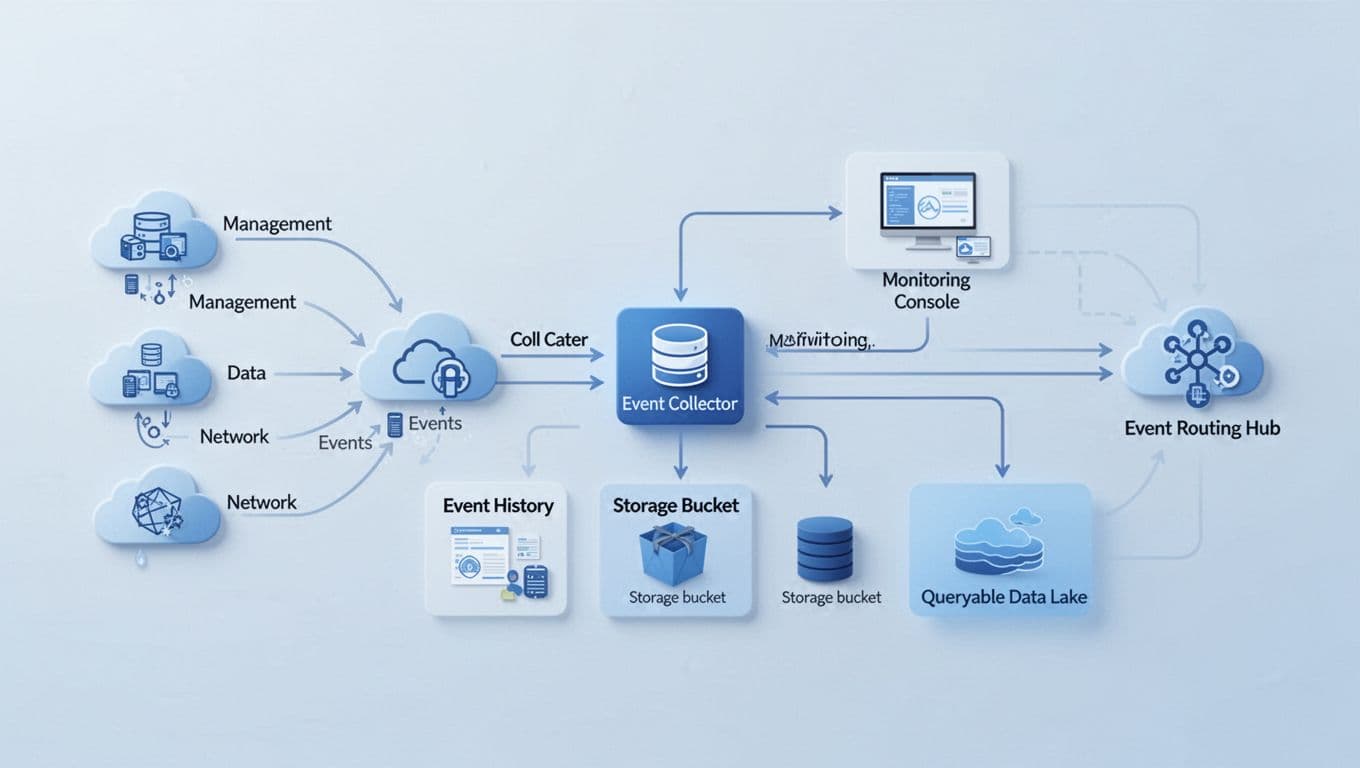
The core parts of CloudTrail architecture
You can think of CloudTrail in three layers:
- Event history shows recent management events in the console, for up to 90 days, at no charge.
- Trails CloudTrail can deliver events to an S3 bucket for retention, sharing, and downstream analysis, integrating seamlessly with Amazon Athena.
- CloudTrail Lake stores events in a queryable format for investigations across longer time ranges.
CloudTrail also plugs into other AWS services. For example, you can send logs to CloudWatch Logs for alerts, or use EventBridge to trigger automation when certain actions appear.
AWS explains the pricing and free event history on its CloudTrail pricing page.
The three event types you can track
The event types matter because they shape both visibility and cost.
| Event type | What it captures | Plain example | Default? |
|---|---|---|---|
| Management events | Control plane changes | Creating an IAM role | Yes |
| Data events | Resource-level activity | Reading an object in S3 | No |
| Network activity events | API activity over private paths | Calls through VPC endpoints | No |
Network activity events are newer and easy to overlook. Yet they matter if you rely on private access paths and want a clearer record of traffic that never touches the public internet.
See how much you can save on your stack
Pick your team’s tools!
Click to select one or more tools.


What’s your company size?
Just click to select.
What’s your business email?
We'll send you calculations right away
The email is flying to your inbox!
Beyond discounts, you may qualify for up to $100K in AWS credits.

The AWS CloudTrail features that matter most in daily work
Most teams don’t use every CloudTrail feature. You usually care about a small set that saves time when something breaks or when an auditor asks for proof.
Event history is your quickest starting point. It helps when you need to answer, “Who changed this today?” Trails matter once you want retention, multi-account collection, and delivery to S3.
Log file validation helps you prove logs haven’t been changed after delivery to the Event Data Store. For larger teams, org-wide visibility cuts blind spots across many AWS accounts.
CloudTrail Lake is useful when S3 logs become a haystack. Instead of sifting through raw files, you can query activity over time. AWS also supports SQL-based investigation, which makes incident review much faster than manual log hunting.
A simple trade-off table makes the choice clearer:
| AWS CloudTrail Lake feature enhances event data management. | Main upside | The main downside of using CloudTrail is the potential complexity in managing the log data effectively. |
|---|---|---|
| Event history | Fast, free, built-in view | Limited to recent management events |
| Trails to S3 | Durable retention and sharing | Raw logs need more tooling to analyze effectively, especially when integrating with Amazon CloudWatch Logs. |
| CloudTrail Lake | Easier querying and investigations | Extra ingestion and retention cost |
CloudTrail Lake, search, and longer-term investigation
CloudTrail Lake makes more sense when your team does audits, forensics, or trend review. You can query months of activity and compare behavior over time, which is hard to do with raw JSON files alone.
There is one fresh 2026 wrinkle.
As of April 2026, AWS has announced that CloudTrail Lake will stop accepting new customers after May 31, 2026, so you should check current AWS guidance before building around it long-term.
CloudTrail integrations that make alerts and response faster
CloudTrail captures events, but it doesn’t do everything by itself; it works best when combined with other AWS services like Amazon Athena and CloudWatch Logs. Amazon S3 keeps the records, Amazon CloudWatch helps you alert, and EventBridge helps you automate response to events.
That division matters in real life. If someone disables logging, changes an IAM policy, or accesses a sensitive resource, you want more than a log entry in AWS CloudTrail Lake. You want a rule, an alert, or an automated action.
What CloudTrail Insights finds, and why it helps you spot trouble early
CloudTrail Insights looks for unusual patterns in API activity. Instead of reading every event one by one, you get a signal when behavior breaks from the normal baseline.
That can mean a sudden spike in failed API calls, a burst of writes after weeks of calm, or unusual access to sensitive data.
In late 2025, AWS expanded Insights so it can detect anomalies in data events, not only management events, as shown in the AWS launch update for Insights on data events.

AWS also states that Insights builds its baseline from the previous 28 days of collected events in CloudTrail, then updates that baseline daily, as described in the AWS CloudTrail API reference.
When CloudTrail Insights is worth turning on
Insights is often worth the extra spend if you have a lean security team, a small DevOps bench, or strict audit pressure. It gives you earlier warning without forcing someone to stare at logs all day.
If your team is small, anomaly detection can save more time than it costs.
Still, high-volume environments should weigh the value against event volume, because Insights charges by analyzed events.
Why AWS CloudTrail matters for security, compliance, and cost control
CloudTrail gives you evidence. That matters when a board asks about access, when finance wants clearer accountability, or when a customer audit lands in your inbox on Friday afternoon.
For CTOs and developers, the win is speed. You can trace changes, tie actions to identities, and cut incident review time.
For CFOs and founders, the win is lower guesswork. Basic management event logging is free, while deeper visibility costs more, so you can scale usage with intent instead of switching everything on at once, following best practices for cost management.
If you’re a startup, this is also where budget planning meets security hygiene. Spend on the logs that matter, then look at up to $100,000 AWS discounts or broader AWS credits options for growing teams if cloud visibility is rising with product growth.
The biggest benefits you get from CloudTrail
You get practical gains that map to real jobs:
- Faster proof during audits and customer reviews
- Shorter incident timelines during security events
- Cleaner accountability across multi-account AWS setups
- Better root-cause analysis after config changes
- More control over logging scope and spend can be achieved through the AWS CLI.
The trade-offs to know before you enable every event
The main risk is over-collection of data from the CloudTrail console. Data events can explode in volume, especially with busy S3 buckets or Lambda-heavy systems. You may also create noisy logs that hide the few actions you care about.
Start with high-value services, then expand. Amazon S3 buckets with sensitive data, IAM changes, and critical production services usually come first in event monitoring.
Free virtual cards for non-EU residents
Open in 1 working day, issue 100 virtual cards, and get up to 1.25% cashback.
Get a free account
Amazon CloudTrail pricing, without the confusion
The pricing model is simple at first glance, then gets slippery once you add optional event types, making it important to understand the AWS CloudTrail API reference.
AWS says one copy of management events per region delivered to S3 is free. After that, extra copies of management events cost more when using the CloudTrail API.
$2.00 per 100,000 events. Data events cost $0.10 per 100,000 events. Network activity events cost $0.10 per 100,000 events. Data aggregations cost $0.03 per 100,000 events analyzed. Insights costs $0.35 per 100,000 events analyzed in the CloudTrail Lake event data stores..
Here’s the short version:
| Cost area for tracking AWS CLI usage and CloudTrail events. | 2026 price |
|---|---|
| First copy of management events to S3 | Free |
| Extra copies of management events | $2.00 per 100,000 events |
| Data events | $0.10 per 100,000 events |
| Network activity events | $0.10 per 100,000 events |
| Data aggregations | $0.03 per 100,000 events analyzed |
| Insights | $0.35 per 100,000 events analyzed |
CloudTrail Lake has two broad pricing paths. The one-year extendable option starts at $0.75 per GB ingested For CloudTrail events, with extra retention after year one, ensure proper API usage monitoring. The seven-year option starts higher but includes long retention and gets cheaper at high volume.
AWS documents the full pricing model on the official CloudTrail pricing page, and you can review actual spend in Cost Explorer for CloudTrail usage provides insights into API usage for better budgeting..
How to estimate your CloudTrail costs before they surprise you
Start with free management events. Then enable data events only for critical services. After that, watch spend by usage type in Cost Explorer.
Also remember that S3 storage and CloudWatch Logs are separate line items. CloudTrail cost rarely lives alone.
How to set up AWS CloudTrail and start using it fast
Setup is short if you keep the first pass narrow.
- Open CloudTrail in the AWS Console to access your CloudTrail event history.
- Check Event history for immediate recent management activity.
- Create a trail and choose an S3 bucket.
- Pick event types, starting with management events, to refine your CloudTrail event history.
- Add data events only for sensitive services in the AWS management console.
- Turn on Insights if anomaly detection will save you time.
Accessing CloudTrail in your AWS account
You need the right IAM permissions to view or configure CloudTrail in the management console. Once inside, Event history gives you a useful first window into recent account activity. That view is good for spot checks, but trails and Lake work better for retention and wider analysis.
Sending AWS CloudTrail events to CloudWatch
Teams send CloudTrail logs to CloudWatch Logs so they can build alerts, dashboards, and metric filters. A common alert watches for risky actions like policy changes or trail deletion attempts. That shortens response time, though Amazon CloudWatch adds cost for monitoring.
Top AWS CloudTrail use cases, with real-world examples
CloudTrail earns its keep when you can connect a log record to a business outcome.
| Use case | Event type | Business value |
|---|---|---|
| Security investigation | Management or data | Faster incident response |
| Compliance audit | Management | Clear audit evidence is provided by AWS CloudTrail and Amazon S3. |
| Change-related outage review is facilitated by examining events in CloudTrail for better incident response. | Management | Quicker root-cause analysis |
Security investigations and access reviews
A startup notices unusual reads from a private S3 bucket holding customer exports. CloudTrail data events show which role accessed the objects, from which source, and when the burst began, giving valuable log data for analysis. The team rotates credentials, tightens the bucket policy, and closes the review in hours instead of days using the AWS Command Line Interface.
Audit prep and outage troubleshooting
In one audit case, a fintech team used CloudTrail logs to prove when IAM permissions changed and who approved the rollout. That turned a painful evidence scramble into a clean timeline.
In an outage case, a developer traced a production failure to a security group change made 14 minutes before errors spiked. CloudTrail didn’t fix the outage, but it cut out the guesswork.
Why CloudTrail matters in Kubernetes and Amazon EKS
If you run Kubernetes on AWS, CloudTrail gives you the AWS-side story around EKS. It records control plane actions, cluster updates, IAM role changes, Secrets Manager access, autoscaling actions, and other AWS API calls tied to your cluster.
That visibility matters when pods look healthy but the cluster still behaves oddly, making it crucial to monitor AWS activity. CloudTrail can show that an IAM policy changed, a node group scaled, or an EKS API action fired at the wrong moment, highlighting critical events in CloudTrail.

It doesn’t replace Kubernetes audit logs. You still need those for in-cluster actions. CloudTrail fills the gap on the AWS side, where many real causes begin, providing information about CloudTrail events in Amazon Web Services.

We can unlock discounts on 10,000+ tools you already use.
Conclusion
CloudTrail gives you a clean record of account activity, and that record lowers guesswork when security issues, audits, or outages hit. The strongest move is usually the simplest one: turn on a trail for key accounts, keep management events first, add only high-value data events, and review costs as your usage grows.
When your cloud grows faster than your memory of last week’s changes, AWS CloudTrail gives you the timeline you need.


Get discounts on your team’s favorite apps
Find deals for 10%, 30%, or even 70% off in our discount marketplace.
Check Discounts



