










As machine learning adoption accelerates, the challenge is no longer just building models. Most importantly, it’s also about managing everything around them: teams must handle data pipelines, training environments, experiment tracking, deployment, and monitoring, all while keeping infrastructure costs under control.
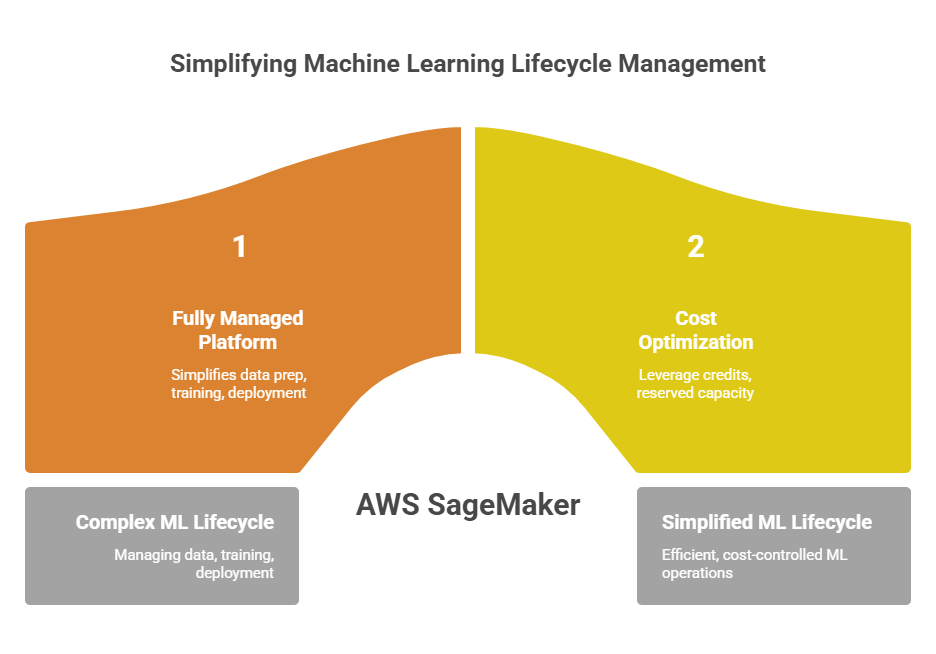
AWS SageMaker is designed to simplify this complexity. In this guide, we’ll review how well it delivers on that promise – exploring SageMaker’s capabilities and efficiency, highlighting the key factors that drive costs, outlining practical strategies to help teams optimize performance and spend during scaling, and more.
Key Highlights
> AWS SageMaker simplifies machine learning lifecycle management. It provides a fully managed platform for data preparation, model training, deployment, monitoring, MLOps workflows, etc.
> Compute usage is the primary cost driver. Training jobs, inference endpoints, notebook instances, and large GPU workloads can quickly increase cloud spending if not carefully managed.
> Financial optimization improves ML economics. Leveraging AWS credits, reserved capacity, and cost optimization tools like Spendbase can significantly reduce infrastructure costs during experimentation and scaling.
See how much you can save on your stack
Pick your team’s tools!
Click to select one or more tools.


What’s your company size?
Just click to select.
What’s your business email?
We'll send you calculations right away
The email is flying to your inbox!
Beyond discounts, you may qualify for up to $100K in AWS credits.

What Is AWS SageMaker
AWS SageMaker is Amazon Web Services’ fully managed machine learning platform designed to help developers and data scientists build, train, and deploy ML models faster. Its unique capability lies in providing an end-to-end ML lifecycle environment within a single platform – which, in turn, eliminates the need to assemble multiple infrastructure components manually.
This way, unlike traditional machine learning workflows that require numerous separate tools, SageMaker integrates all stages into a unified ecosystem: data preparation, training, tuning, deployment, monitoring, you name it. As a result, teams can move from experimentation to production more efficiently, all while maintaining scalability and governance.
| Traditional ML Setup | AWS SageMaker |
| Manual GPU cluster setup | Fully managed infrastructure provisioning |
| Custom environments required | Prebuilt containers for ML frameworks |
| Custom APIs and servers for deployment | Managed inference endpoints |
| Manual scaling of training and inference resources | Automatic scaling |
| Custom monitoring solutions | Built-in monitoring tools |
| Custom orchestration for ML workflows | Integrated MLOps pipelines |
Additionally, here’s one of AWS SageMaker’s biggest advantages (from an architectural perspective) – it integrates deeply with the AWS ecosystem and connects naturally with a range of services:
- Amazon S3 (for data storage)
- AWS Glue (data preparation)
- Amazon Athena (analytics)
- AWS Lambda (serverless processing)
- Amazon CloudWatch (monitoring)
Core Capabilities of AWS SageMaker
From our observations of AWS SageMaker capabilities, it stands out because it removes much of the infrastructure complexity that typically slows down machine learning projects. Below are the specific features that enable this, and how exactly they work.
Managed training infrastructure
Managed training infrastructure is one of the biggest operational advantages of AWS SageMaker – eliminating the manual compute clusters provisioning. From an operational standpoint, this removes a large portion of the infrastructure burden that typically slows down ML experimentation.
In practice, this means:
> Distributed training scales automatically across multiple nodes;
> Popular ML frameworks are already integrated into the training environment;
> Training instances automatically start and terminate when jobs finish.
Integrated MLOps workflows
Another crucial area: AWS SageMaker includes several built-in components designed specifically for automating deployment pipelines. For example:
- SageMaker Pipelines allows teams to build automated ML workflows that orchestrate data preparation, training, evaluation, deployment steps, etc.
- Model Registry stores and versions trained models (+ enabling approval workflows before production deployment).
- Experiment tracking helps data scientists compare training runs and monitor model performance metrics.
- Automated deployment pipelines make it possible to promote validated models into production endpoints with minimal manual intervention.
Flexible deployment models
AWS SageMaker provides several inference modes designed to support different prediction workloads and operational requirements. Depending on latency needs, traffic patterns, and processing complexity, teams can choose the deployment option that best fits their application architecture and cost model.
See the summary of the main SageMaker inference modes in the table below.
| Inference Mode | Use Case | Typical Scenarios |
| Real-time inference | APIs requiring immediate predictions | – Recommendation systems – Fraud detection – Personalization engines – Credit scoring APIs |
| Serverless inference | Low-traffic or intermittent workloads | – Internal ML tools – Periodic predictions – Experimental/low-volume apps |
| Batch inference | Large offline prediction jobs | – Marketing segmentation – Risk scoring for millions records – Scheduled analytics jobs |
| Async inference | Long-running prediction requests | – Image or video processing – Document analysis – Large NLP models |
This flexibility allows teams to match infrastructure with real-world demand.
Automated Model Optimization
SageMaker provides built-in tools that automate model experimentation and performance optimization. For example:
- Hyperparameter tuning jobs – automatically run multiple training experiments using different hyperparameter configurations, identify the best-performing model based on predefined evaluation metrics.
- Automatic model training experiments – track and compare different training runs (parameters, datasets, results, etc.).
- Distributed training support – enables training workloads to run across multiple compute instances simultaneously (thus, reducing training time for large datasets or complex models).
Built-in ML Algorithms and Framework Support
Another great benefit, AWS SageMaker supports most of the frameworks already used by machine learning teams, which simplifies adoption.
In particular, supported environments include (TensorFlow, PyTorch, Scikit-learn, and XGBoost, to name a few.
Besides, AWS SageMaker also provides prebuilt Docker containers optimized for training and inference, which allows teams to deploy models without building custom environments from scratch.
Exploring Top AWS SageMaker Use Cases
From our experience, AWS SageMaker is a versatile machine learning platform designed to support a wide range of AI and ML applications across industries.
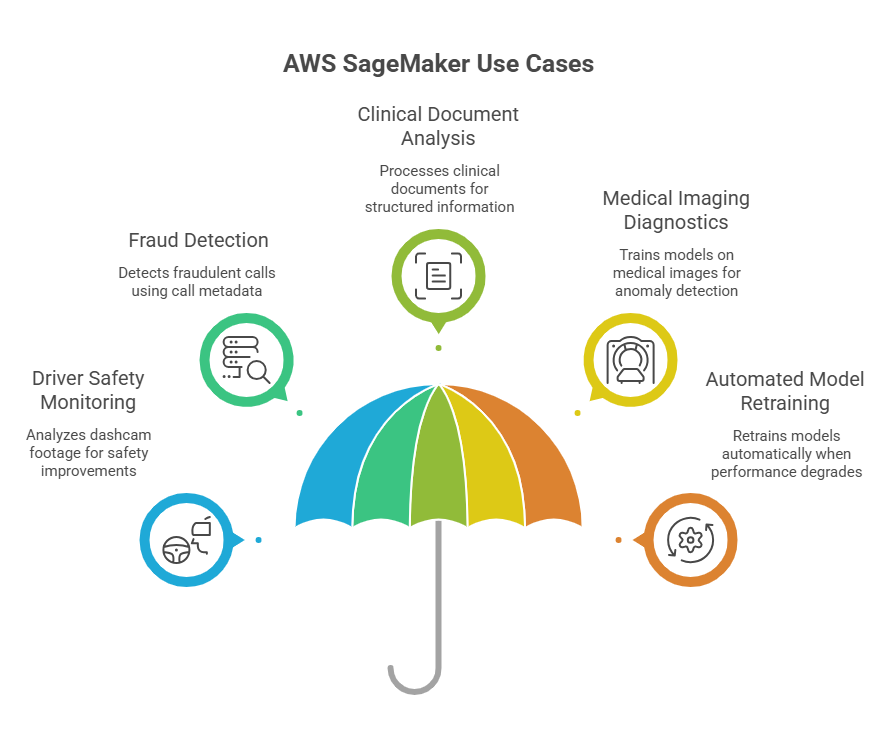
Diving in, some of the real-world use cases of AWS SageMaker, as highlighted in AWS documentation and blog resources, are the following:
- Driver safety monitoring and fleet optimization, where AWS SageMaker is used to train computer vision models that analyze dashcam footage from commercial vehicles;
- Fraud detection in call center operations – highlighting how SageMaker is used to build a machine learning model that analyzes call metadata to detect fraudulent calls;
- Clinical document analysis in healthcare, with AWS SageMaker processing large volumes of clinical trial documents and extracting structured information for accelerated document review;
- Medical imaging diagnostics support using SageMaker to train deep learning models on annotated medical images to help detect fractures or anomalies in diagnostic imaging;
- Automated model retraining with drift detection, where AWS SageMaker pipelines and model monitoring detect data drift and automatically retrain and redeploy models when performance degrades.
Besides, we did our own testing for some typical use cases of AWS SageMaker – particularly, the ones where it’s expected to provide substantial operational advantages. See our findings below.
✅ Case #1: Large-scale model training
This case focuses on training machine learning models on very large datasets – such workloads typically require substantial computational power and often involve multiple GPU instances working together in a distributed training environment. In traditional setups, configuring and managing these GPU clusters requires significant operational effort. Therefore, we decided to put AWS SageMaker to the test.
Our testing showed that SageMaker automatically provisions and configures the necessary GPU infrastructure for distributed training – in our experiments, launching a distributed training job required only specifying the instance type, number of instances, and training configuration.
In this case, AWS SageMaker successfully handled the creation and orchestration of the underlying GPU cluster, including the following:
- Automatically initialized the instances;
- Configured the networking between nodes;
- Started the training process without any manual infrastructure setup.
Assessment Highlights | |
| Primary Value | Distributed model training |
| Compute behavior | GPU-based training clusters |
| Scalability | Automatic cluster scaling |
| Operational benefit | No infrastructure provisioning |
✅ Case #2: Real-time inference APIs
In this case, we examined the deployment of trained machine learning models as APIs that return predictions in real time. Specifically, we focused on a fraud detection scenario, where machine learning models must analyze transactions and return predictions in real time – in these environments, prediction latency is critical because decisions must be made within milliseconds while handling a large volume of requests.
During our experiments, the trained model was deployed using SageMaker endpoints, which expose prediction functionality through REST APIs. The deployment process mainly involved selecting the model artifact, defining the instance type, and configuring the endpoint settings. Once deployed, SageMaker automatically created the infrastructure required to serve predictions.
In this scenario, AWS SageMaker successfully handled the deployment and operation of the real-time inference environment, particularly by:
- Provisioning the compute instances required to process prediction requests;
- Exposing the fraud detection model through a managed REST API endpoint;
- Dynamically scaling the endpoint capacity based on incoming transaction traffic.
From our observations, the main advantage was the ability to deploy a production-ready fraud detection API without building custom serving infrastructure. Most importantly, our tests showed that SageMaker endpoints can handle high request volumes while maintaining low response latency.
Assessment Highlights | |
| Primary Value | Real-time model inference |
| Compute behavior | Managed inference endpoints |
| Scalability | Automatic endpoint scaling |
| Operational benefit | Managed API infrastructure |
✅ Case #3: MLOps platforms
With this case, we aimed at investigating the use of AWS SageMaker as a platform for organizing and managing machine learning workflows across multiple teams.
During the evaluation, we implemented structured workflows using SageMaker pipelines and monitored training experiments through integrated tracking features. The platform allowed us to record multiple training runs, compare model performance, and maintain versioned model artifacts prior to deployment.
In this scenario, AWS SageMaker did the following successfully: 1) recorded and organized experiment results automatically, 2) stored and managed model versions in a centralized registry, 3) enabled automated workflows for model training and deployment.
Based on our experience, the primary advantage lies in the consolidation of ML lifecycle management within a single platform. By combining experimentation tools, version control, and deployment automation, SageMaker helps establish consistent and repeatable machine learning processes across teams.
Based on our experience, the main advantage is the consolidation of ML lifecycle management within a single platform, including:
- Experiment tracking;
- Model version management;
- Automated training and deployment pipelines;
- Deployment governance and approval processes.
Assessment Highlights | |
| Primary Value | ML workflow standardization |
| Compute behavior | Managed ML pipelines |
| Scalability | Automated workflow orchestration |
| Operational benefit | Centralized lifecycle management |
Free virtual cards for non-EU residents
Open in 1 working day, issue 100 virtual cards, and get up to 1.25% cashback.
Get a free account
When AWS SageMaker May Not Be the Best Fit
Meanwhile, consider this: despite its powerful capabilities, AWS SageMaker is not always the optimal solution for every machine learning workload. In some cases, simpler architectures or alternative tools may provide a more efficient approach – like in the cases we’ve pointed below.
❌ Small-scale ML experiments
For very small datasets or early experimentation stages, SageMaker may introduce unnecessary complexity. For cases like this, it is faster and more cost-efficient to run lightweight models locally or using notebook-based environments (like Jupyter or Google Colab).
❌ Extremely low-latency inference workloads
SageMaker endpoints are optimized for scalable inference, but some real-time systems require extremely low latency (f.e., high-frequency trading systems, real-time ad bidding platforms, high-performance embedded ML systems, etc.)
In these scenarios, we would instead advise using custom inference services deployed on dedicated infrastructure or specialized edge environments (to ensure better performance).
❌ Highly customized ML infrastructure
Some advanced ML architectures require highly specialized environments that may not align perfectly with SageMaker’s managed abstractions. For example:
> Internally developed GPU orchestration frameworks typically require low-level infrastructure control and custom scheduling mechanisms that are not supported by AWS SageMaker’s managed training environment.
> Distributed training architectures often rely on custom communication protocols or tightly optimized cluster configurations that require more direct control over networking and compute resources.
> Machine learning workloads designed for proprietary hardware accelerators may not be compatible with SageMaker because the service supports only a predefined set of instance types.
In cases like these, we’ve seen teams commonly prefer building custom infrastructure using EC2 clusters, Kubernetes, or container orchestration platforms.
How AWS SageMaker Works
In short, AWS SageMaker structures the machine learning lifecycle into several coordinated stages, and each stage is supported by dedicated managed services (which reduce operational complexity). Let’s review exactly what it looks like, step by step.
Stage 1: Data preparation and feature engineering
Everything typically starts with raw data: Machine Learning pipelines typically begin with raw datasets stored in Amazon S3, data lakes, or integrated data sources. From experience, this is often the most time-consuming part of the process – since, before training a model, this raw data must be cleaned, transformed, and structured into features suitable for machine learning algorithms.
With AWS SageMaker data preparation makes this step much more manageable. You don’t have to build custom pipelines from scratch – instead, you can rely on built-in tools that help you prepare datasets in a consistent and scalable way (see details in the table below). To learn more details about picking the right tool, check out the official AWS SageMaker documentation.
| Key SageMaker Data Preparation Tools | ||
| Tool | Purpose | Key Benefits |
SageMaker Data Wrangler | Visual interface for preparing ML data | → No-code interface for feature engineering → Built-in data profiling and quality checks → Prebuilt data transformations → Export steps into reusable pipelines |
| SageMaker Feature Store | Centralized feature repository | → Reuse features across models → Ensure training–inference consistency → Versioned feature management → Low-latency access for real-time ML |
| SageMaker Processing Jobs | Managed data processing infrastructure | → Large-scale preprocessing support → Automatic compute provisioning → Custom scripts and containers → Integration with S3 data lakes |
Built-in connectors | Integration with S3, Redshift, Athena, Snowflake | → Direct data source connections → Reduced ETL complexity → Access to analytics warehouses → Unified data preparation workflows |
How Data Preparation Works
Step 1. Data ingestion
Data is typically pulled from Amazon S3, databases, streaming pipelines, or analytics systems. SageMaker can directly access these datasets through IAM-managed permissions.
Step 2. Data cleaning and transformation
Using Data Wrangler, teams can apply transformations that can be then exported as reusable processing pipelines – for example:
- Handling missing values;
- Normalizing numeric features;
- Encoding categorical variables;
- Removing outliers;
- Aggregating time-series data.
Step 3. Feature engineering and management
Amazon SageMaker Feature Store allows teams to maintain a consistent feature repository. This guarantees that training and inference pipelines use the same feature definitions, plus eliminates common problems such as training-serving skew.
Step 4. Feature storage
Engineered features are stored in Feature Store, where they are versioned and organized for reuse and easy accessibility across multiple models and teams.
Step 5. Dataset generation
Once features are finalized, SageMaker exports structured datasets for training and evaluation. These datasets are typically stored in Amazon S3, where they can be used by training jobs, hyperparameter tuning experiments, downstream ML pipelines, etc.
Stage 2: Model training
Once datasets are prepared, the next stage is training machine learning models using managed compute infrastructure.
AWS SageMaker training jobs automatically provision and manage the necessary compute resources. Particularly, its training infrastructure capabilities include:
- Managed compute provisioning. SageMaker automatically launches and manages the required training instances;
- Distributed training. Training workloads can scale across multiple GPU or CPU nodes to accelerate large model training;
- Spot training support. It implies using spare AWS compute capacity to significantly reduce training costs;
- Automatic scaling. Training clusters scale based on workload requirements and model complexity;
- Managed training lifecycle. Instances automatically start when training begins and terminate after completion to avoid unnecessary costs.
Stage 3: Hyperparameter tuning
Hyperparameters define how your model learns from data – and in practice, finding the right combination often means testing far more options than you initially expect. That’s precisely where AW SageMaker becomes so essential.
SageMaker automates this process using automatic hyperparameter optimization, which in turn enables efficient experimentation across multiple training runs. In practice, it looks like this:
> You define search – in particular, which hyperparameters should be optimized and specify the possible value ranges.
> Parallel training runs. SageMaker launches multiple training jobs simultaneously using different hyperparameter combinations.
> Performance evaluation. Each model run is evaluated using defined metrics such as accuracy, loss, or F1 score.
> Best model selection. SageMaker identifies the configuration that produces the best-performing model.
Example: Tuned Parameters | |
| Algorithm | Tuned Parameters |
XGBoost | – Learning rate – Tree depth – Subsample ratio – Column sampling |
Neural networks | – Learning rate – Batch size – Number of layers – Dropout rate – Hidden units |
Random forest | – Number of trees – Maximum depth – Minimum samples per split – Feature subset size |
Stage 4: Model deployment
After training and optimization, models must be deployed to production environments where they can generate predictions. Amazon SageMaker supports multiple deployment strategies depending on application requirements, allowing organizations to balance latency, scalability, and operational cost.
Deployment Options
AWS SageMaker provides several deployment approaches depending on how predictions are consumed. Based on our experience, we recommend following these suggestions:
> Real-time endpoints are best when speed matters. If your application needs instant responses (like fraud detection or recommendations), this is the go-to option.
> Serverless inference works well for unpredictable usage. It still supports near real-time responses, but is optimized for cost (especially when traffic is low or spiky).
> Batch inference is the clear choice for large-scale offline processing. When you need to score entire datasets rather than respond to individual requests, this is the most efficient approach.
> Asynchronous inference sits somewhere in between. It’s designed for heavier workloads that don’t require immediate responses.
| Use Case | Real-time endpoints | Serverless inference | Batch inference | Async inference |
| Live user-facing predictions | ✔️ | ✔️ | ❌ | ❌ |
| Fraud detection | ✔️ | ✔️ | ❌ | ❌ |
| Personalization / recommendations | ✔️ | ✔️ | ❌ | ❌ |
| Spiky / low-traffic workloads | ❌ | ✔️ | ❌ | ✔️ |
| Large-scale offline scoring | ❌ | ❌ | ✔️ | ✔️ |
| Scheduled batch jobs | ❌ | ❌ | ✔️ | ✔️ |
| Long-running inference | ❌ | ❌ | ❌ | ✔️ |
| Large payload processing | ❌ | ❌ | ❌ | ✔️ |
Real-Time Inference Architecture
Real-time inference architecture in AWS SageMaker defines how trained machine learning models are exposed as low-latency, production-ready services that can generate predictions on demand. It focuses on delivering fast, reliable responses while automatically handling infrastructure, scaling, and traffic distribution.
This architecture includes the following components:
- Endpoint configuration, which defines the model version, container environment, and compute resources;
- Endpoint (API) – receives prediction requests from applications and routes them to the model;
- Auto scaling, to dynamically adjusts the number of instances based on traffic;
- Load balancing, for distribution of incoming requests across instances to ensure consistent performance.
Deployment Workflow
The deployment process typically follows several steps:
#1 – Model packaging. Trained model artifacts are stored in Amazon S3 for deployment.
#2 – Container configuration. An inference container is defined to handle runtime dependencies and prediction logic.
#3 – Endpoint creation. SageMaker deploys the model as a managed API endpoint.
#4 – Traffic routing. Applications send prediction requests to the deployed endpoint.
#5 – Autoscaling. SageMaker dynamically adjusts infrastructure capacity based on request volume.
AWS SageMaker Pricing Overview
AWS SageMaker pricing follows a pay-as-you-go model, meaning users pay only for the resources they consume while running machine learning workloads.
In practice, costs are primarily driven by compute usage, but several additional components contribute to the overall cost depending on how SageMaker is used. See the cost breakdown in the table below.
| Pricing Component | Behavior | Typical Pricing |
| Training instances | GPU/CPU compute for model training | Varies by instance type |
| Real-time inference endpoints | Running prediction APIs | Charged per instance-hour |
| Serverless inference | Charged per request & compute time | Usage-based |
| Notebook instances | Development environments | Charged per hour |
| Processing jobs | Data transformation compute | Instance-hour pricing |
| Data storage (S3) | Training datasets and models | $0.023/GB/month |
To better understand the potential operational cost of running machine learning workloads on AWS SageMaker, let’s examine a representative cost scenario. With this scenario below, we assumed a typical workflow in which models are periodically trained using GPU instances, deployed as real-time inference endpoints, and supported by notebook environments for development and experimentation.
| Pricing Area | Scenario Usage | Estimated Monthly Cost |
| Training jobs | GPU cluster training (~100 hrs | $350 |
| Inference endpoints | 2 × ml.m5.large instances | $140 |
| Notebook instances | Development environment | $60 |
| Data storage | 2 TB dataset | $46 |
| Data transfer | API responses | $20 |
| Total | $616 |
What Drives SageMaker Costs
With the above-mentioned pricing breakdown, it is also important to consider how SageMaker costs typically scale in real-world deployments. In particular:
- GPU training jobs often involve expensive distributed training on high-performance GPU instances;
- Always-on inference endpoints lead to high compute costs because instances remain active to support real-time predictions;
- Large datasets often force increased storage requirements (and, thus, higher data processing costs);
- High experiment frequency lead to repeated training runs that consume additional compute resources;
- Data transfer often generates extra costs through large volumes of API responses or cross-region data movement.
Common Cost Pitfalls in SageMaker
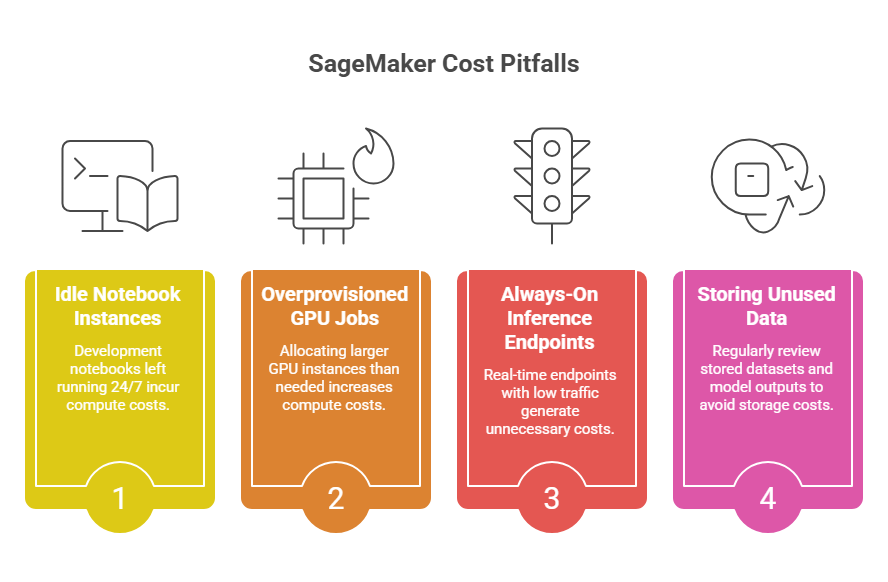
From our observations, many organizations experience cost increases due to inefficient ML workflows. To avoid it, consider these aspects:
> Idle notebook instances running continuously
Watch out for development notebooks left running 24/7, as SageMaker charges for compute while the instance is active, even if it is not being used.
> Overprovisioned GPU training jobs
Avoid allocating larger GPU instances or more nodes than necessary, as distributed training configurations can quickly increase compute costs.
> Always-on inference endpoints with low traffic
Be cautious when keeping real-time endpoints active with minimal request volume, since instances continue running and generating costs.
> Storing unused datasets and model artifacts
Regularly review stored datasets and model outputs to avoid paying for large volumes of unused storage.
SageMaker Cost Optimization Best Practices
Cost efficiency requires both technical optimization and operational discipline. To optimize Amazon SageMaker spending, consider these quick-win strategies:
- Stop idle notebooks – identify inactive SageMaker or notebook environments, shut down unused sessions, implement automatic idle timeouts, monitor notebook usage through cost dashboards;
- Use Spot training instances – configure SageMaker training jobs to use Spot instances, analyze workload tolerance for interruptions, combine with checkpointing to resume training, significantly reduce training infrastructure costs;
- Switch to serverless inference – evaluate endpoint traffic patterns, move low-traffic or unpredictable workloads to serverless inference, eliminate always-on instances, automatically scale compute based on request volume;
- Right-size training clusters – review current instance types used for training, benchmark model performance across smaller instance configurations, reduce unnecessary GPU usage where possible, align compute capacity with workload requirements.
| Quick Wins for BigQuery Cost Optimization | |||
| Strategy | Effort | Savings | Impact Speed |
| Stop idle notebooks | Low | High | Immediate |
| Use Spot training instances | Medium | Very high | Fast |
| Switch to serverless inference | Low | High | Immediate |
| Right-size training clusters | Medium | High | Fast |
Meantime, for a more in-depth optimization, follow these action steps:
- Implement pipeline automation – design automated ML workflows using SageMaker Pipelines, standardize data preparation and training stages, reduce manual experimentation cycles, automatically trigger retraining when new data arrives;
- Establish experiment governance – track experiments using SageMaker Experiments, enforce consistent naming and tagging for training jobs, monitor experiment results across teams, prevent duplicated experiments and unnecessary compute usage;
- Apply model lifecycle policies – define retention rules for model artifacts, archive inactive models to lower-cost storage, remove outdated model versions, keep only production-ready and actively tested models accessible;
- Implement pipeline automation – design automated ML workflows using SageMaker Pipelines, standardize data preparation and training stages, reduce manual experimentation cycles, automatically trigger retraining when new data arrives;
- Establish experiment governance – track experiments using SageMaker Experiments, enforce consistent naming and tagging for training jobs, monitor experiment results across teams, prevent duplicated experiments;
- Apply model lifecycle policies – define retention rules for model artifacts, archive inactive models to lower-cost storage, remove outdated model versions, keep only production-ready and actively tested models accessible.
| Advanced Optimization Strategies | |||
| Strategy | Effort | Savings | Impact Speed |
| Pipeline automation | Medium | High | Medium-term |
| Experiment governance | Medium | High | Medium-term |
| Model lifecycle policies | Low | Medium | Fast |
| Training job optimization | Medium | High | Medium-term |
| Efficient inference architecture | Medium | High | Medium-term |
| Data lifecycle management | Low | Medium | Fast |
Monitoring SageMaker Efficiency: Key Considerations
After deployment, it’s important to maintain model reliability: remember that data patterns change over time, which can cause models to degrade or produce less accurate predictions.
To avoid this, AWS SageMaker supports several monitoring mechanisms that help teams maintain reliable ML systems, including:
- Data drift detection;
- Model quality monitoring;
- Endpoint metrics;
- Latency monitoring;
- Logging and observability.
SageMaker also provides tools that help manage models throughout their lifecycle: SageMaker Model Registry, SageMaker Pipelines, SageMaker Experiments, Amazon CloudWatch integration, you name it.
A must-know aspect for anyone considering adopting AWS SageMaker: to get consistent value from it, teams need continuous monitoring that keeps performance high while preventing unnecessary spend. Key metrics to track include:
- Training job duration (dataset size, model complexity, compute resources, and pipeline optimization);
- GPU utilization (batch size, data loading speed, model architecture efficiency);
- Inference latency (model size, endpoint configuration, instance type, load conditions, etc.);
- Endpoint request rate (application traffic patterns, user demand);
- Dataset growth (f.e., ingestion pipelines, data sources, retention strategy).
Getting Started With AWS SageMaker
To build reliable and cost-efficient ML systems, organizations must define clear workflows, structure datasets properly, configure training infrastructure, and choose the right deployment strategy for inference. Follow a step-by-step guide below to do exactly that.
Step-by-Step AWS SageMaker Setup & Governance Checklist |
| 1. Define the ML workflow |
| ✅ Define training frequency ✅ Estimate dataset size ✅ Assess model complexity ✅ Specify inference requirements |
| 2. Prepare datasets |
| ✅ Separate raw and processed datasets ✅ Compress large training datasets ✅ Organize data by experiment or model |
| 3. Configure Training Environments |
| ✅ Choose CPU instances for small or lightweight models ✅ Use GPU instances for deep learning workloads ✅ Deploy multi-GPU clusters for large-scale distributed training |
| 4. Deploy inference endpoints |
| ✅ Deploy real-time endpoints for API-based predictions ✅ Run batch inference jobs for large datasets ✅ Enable serverless inference for unpredictable traffic |
| 5. Implement monitoring & observability |
| ✅ Enable data drift detection ✅ Set up model quality monitoring (ground truth vs predictions) ✅ Track endpoint metrics (request rate, errors, resource usage) ✅ Monitor latency (p50, p95, p99) ✅ Configure logging (CloudWatch logs, inference logs) ✅ Set up alerts for anomalies and failures |

We can unlock discounts on 10,000+ tools you already use.
Long-Term Cloud Cost Strategy: How Spendbase Helps Reduce AWS SageMaker Costs
As machine learning adoption increases, infrastructure spending typically grows alongside it.
Organizations can maintain sustainable ML budgets by combining several strategies: architectural optimization, efficient compute usage, automated cost monitoring, you name it. Among these strategies, one stands out as particularly effective from both a cost and effort perspective: cloud credit programs.
With Spendbase, you can secure up to $100,000 in AWS credits – and thus, freeing teams from cloud expenses and enabling them to experiment and scale machine learning workloads without financial risks.

Additionally, Spendbase helps companies reduce cloud & SaaS costs through the following solutions and services:
- Up to $300,000 in GCP, Azure, and AWS credits in total;
- DevOps support for cloud infrastructure optimization;
- Vendor discounts – 10–50% off your SaaS stack or more;
- Spend management platform for shadow IT elimination;
- Digital banking services and corporate cards that help you better control spending.
If you’re looking to scale ML without letting costs spiral, it’s worth exploring how much you can actually save. Get in touch with Spendbase to unlock available credits and start optimizing your cloud spend today.


Get discounts on your team’s favorite apps
Find deals for 10%, 30%, or even 70% off in our discount marketplace.
Check Discounts



