










AWS Storage Gateway Explained for Hybrid Storage Teams

You don’t always need to rip out your storage stack to move closer to AWS.
AWS Storage Gateway gives you a middle path. It connects your local systems to AWS storage, so your apps can keep using familiar file, block, or tape workflows while your data lives in the cloud.
That matters when you’re trying to cut hardware spend, keep fast access for active data, and avoid a long migration project. If you lead tech, finance, or both, this is often the practical option between “keep buying boxes” and “rewrite everything.”
The key question is simple: how do you extend storage without breaking what already works? That starts with how the gateway sits between your apps and AWS.
How AWS Storage Gateway bridges your local systems with the cloud
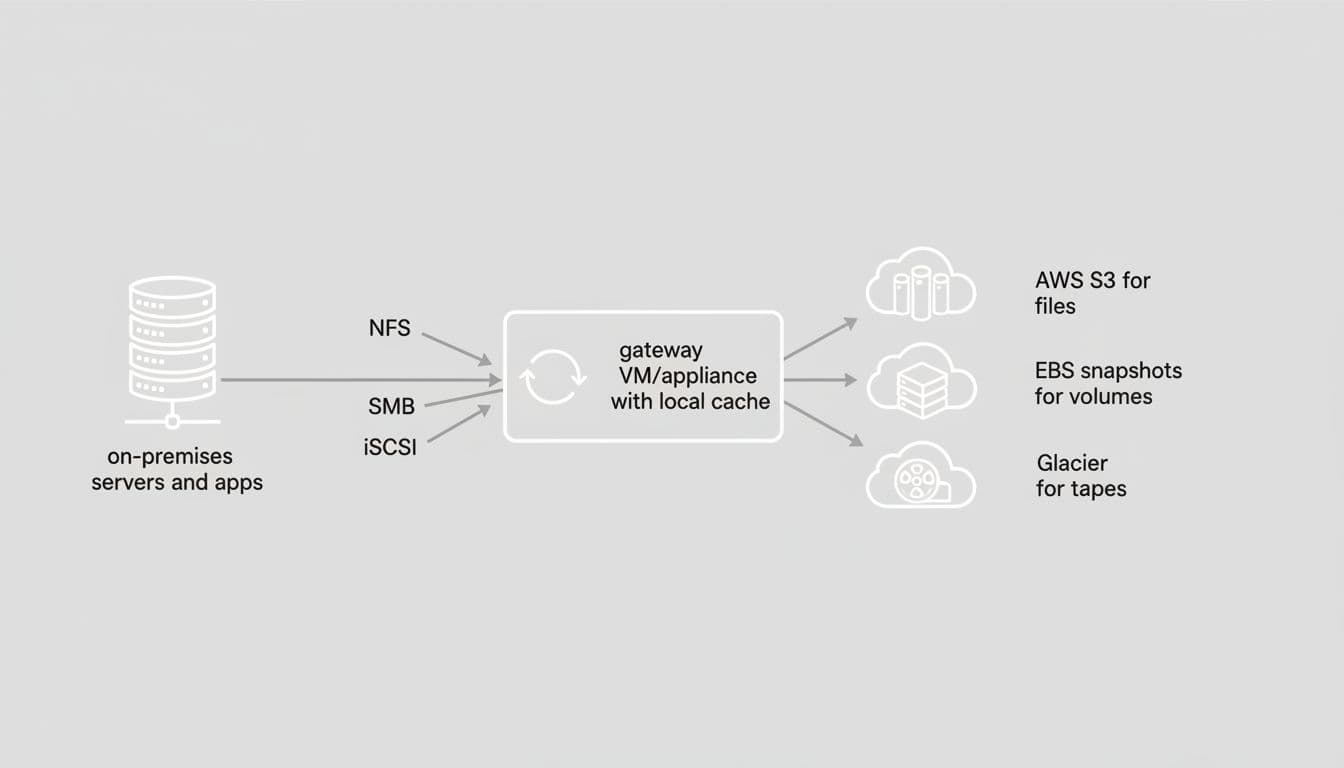
At a high level, the gateway is a translator and traffic cop. You deploy a gateway virtual appliance, usually as a VM, inside your environment.
Your apps talk to that gateway through familiar protocols. The gateway then stores data in AWS and keeps a local cache for the files or blocks you touch most.
That design changes the feel of cloud storage. To your existing app, it can still look like network storage or a local target. In the background, the durable copy lives in AWS. You get room to grow without another round of storage hardware.
What problems it solves for growing teams
Growth often hits storage first. Your backups get bigger. Your file share fills up. Disaster recovery stays on the to-do list because another array or tape library costs too much.
The gateway helps in a few plain ways:
- You can extend on-premises storage without a big capital purchase.
- You can keep older apps running without rewriting them for object APIs.
- You can shift backup and archive data into AWS for better durability.
- You can recover faster because your copies already sit in AWS.
For many teams, that means lower upfront spend and fewer rushed hardware refreshes. AWS explains the current setup flow and deployment choices in its updated Storage Gateway walkthrough.
Where the local cache fits in
The cache is the part your users notice. Hot data stays close to the app, so common reads stay fast. Cold data sits in AWS, where storage scales far past what you can fit in a closet rack.
Picture a backup workflow. Your backup software writes to the gateway appliance. Recent restore points stay local in the cache. Older backup data lands in AWS, where you keep it longer at lower cost.
If your apps still speak SMB, NFS, or iSCSI, the gateway lets them keep talking that way.
See how much you can save on your stack
Pick your team’s tools!
Click to select one or more tools.


What’s your company size?
Just click to select.
What’s your business email?
We'll send you calculations right away
The email is flying to your inbox!
Beyond discounts, you may qualify for up to $100K in AWS credits.

The main types of AWS Storage Gateway you should know
Not every gateway type solves the same problem. One handles file-based access, one handles block storage, and one mimics a tape library for old backup tools. Your choice depends on how your apps expect to store and retrieve data.
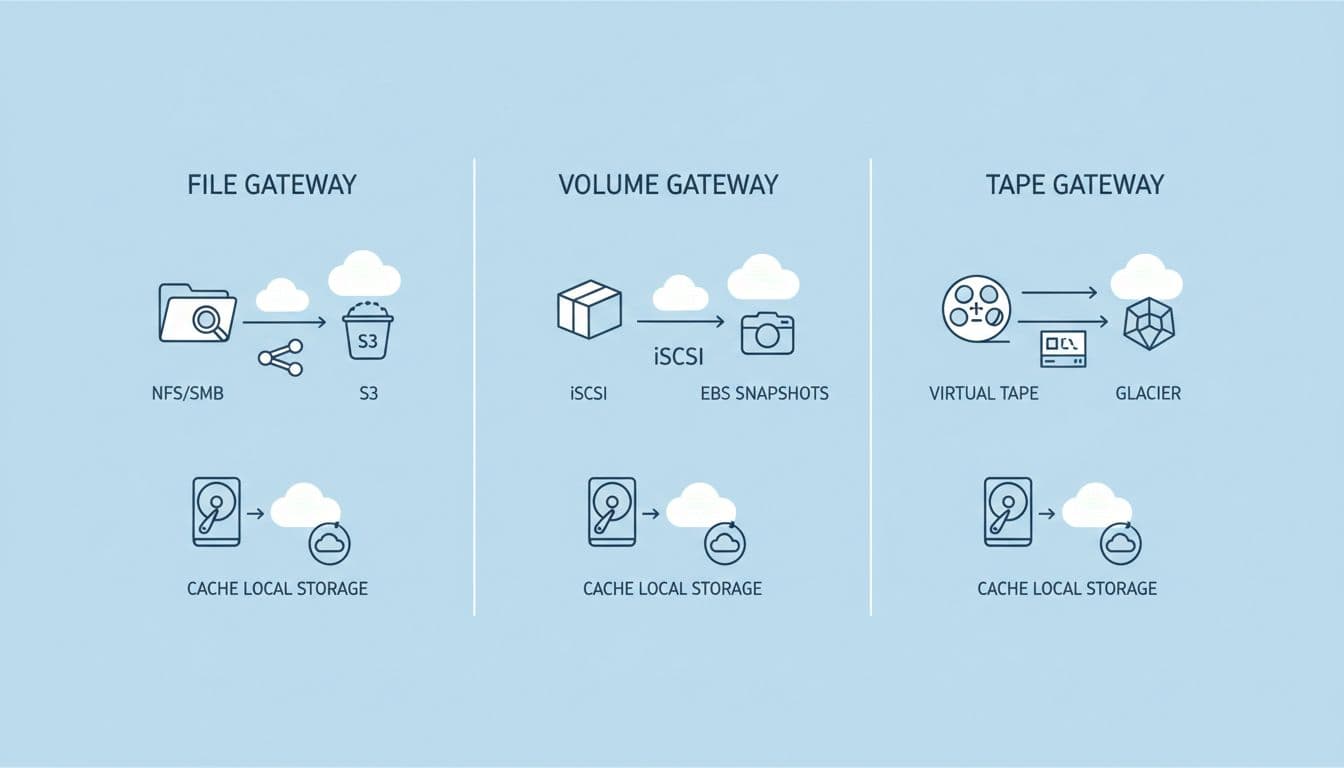
File Gateway is the best-known option. It exposes a file share over NFS or SMB, then stores files as objects in Amazon S3. If your team works with shared folders, backup targets, or analytics data pipelines, this is usually the first gateway type to evaluate.
This is where terms like S3 File Gateway and Amazon S3 File Gateway show up. They mean the gateway writes file-based data into an Amazon S3 bucket, even though your users still see files and folders.
Volume Gateway for block storage and backups
Volume Gateway is for block storage. Your app sees iSCSI volumes, not a file system. You can run cached volumes, where primary data is in AWS and hot data stays local, or stored volumes, where the main copy stays local and AWS holds snapshots.
That setup works well for backup and disaster recovery. A line-of-business app can keep its block device workflow, while snapshots protect data in the AWS cloud.
Tape Gateway for virtual tape backup workflows
Tape Gateway gives older backup software a virtual tape library. If your team still uses tape-based jobs, you can keep the same habit without the same physical mess. Active virtual tape can sit in S3 storage, while older copies move into Amazon S3 Glacier classes for cheaper retention.
One fresh note for 2026: AWS materials now also mention Amazon FSx File Gateway. Still, most buyers start with file gateway, volume gateway, or tape gateway because those map to the common hybrid storage cases.
How it works behind the scenes and what it supports
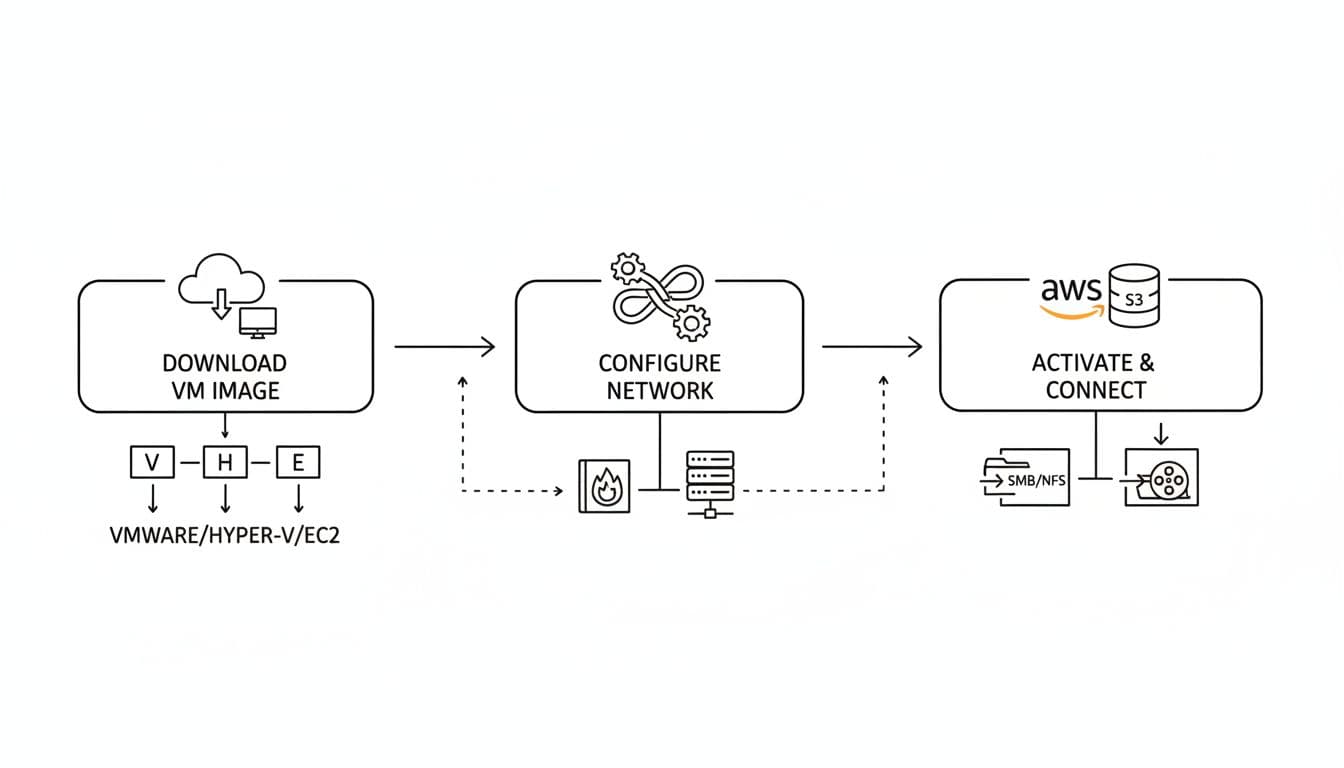
Most teams deploy the gateway as a virtual machine, not a hardware appliance. You can run the storage gateway VM on VMware, Hyper-V, Linux KVM, or as an Amazon EC2 instance inside an Amazon VPC. After gateway activation, you assign local disks for cache and upload buffer, connect it to AWS, and then configure storage through the console web interface.
As of April 2026, AWS hasn’t announced a major feature reset for Storage Gateway. The recent S3 File Gateway release notes mainly show maintenance fixes, including January 2026 updates for rename handling, SMB behavior, and log rotation.
This quick table shows the usual deployment fit:
| Environment | Form factor | Typical fit |
|---|---|---|
| VMware | Virtual machine | Existing data center virtualization |
| Hyper-V | Virtual machine | Windows-heavy shops |
| Linux KVM | Virtual appliance | Linux-based private infrastructure |
| Amazon EC2 | EC2 instance | Cloud-connected or edge-style setup |
For setup details, AWS keeps a step-by-step getting started guide.
The protocols your apps keep using
Protocol support is the quiet selling point. You don’t force every app to learn AWS S3 APIs on day one.
| Protocol | What your app sees | Common use |
|---|---|---|
| NFS | Network file system mount | Linux file share access |
| SMB | Server Message Block share | Windows files and folders |
| iSCSI | Block storage target | App volumes and backup targets |
Because of that, the gateway provides access to files and blocks with fewer app changes. You can create a file share, keep SMB and NFS workflows, and still use Amazon S3 as the durable backend.
Why teams use AWS Storage Gateway instead of moving everything at once
The business case is simple. You grow storage without another major hardware cycle. You keep active data near the app, but colder data moves into AWS for durability and cost control. Your team also gets an easier path to backup, archiving, and disaster recovery.
The business upside you can expect
If you’re watching budgets, this often shifts spend from capital expense to usage-based expense. If you’re watching risk, it reduces the odds that a failed array turns into a bad week.
A good real-world example comes from Whole Foods Market. In its customer story on File Gateway and Amazon S3, the company says it cut overhead by moving from managing 500-plus IAM users to a single role for store uploads.
Another case, Exact Sciences, used the gateway to move lab data into AWS for processing while reducing local infrastructure strain.
Where it still has tradeoffs
You should keep the downsides in view.
Pros
- It fits legacy apps.
- It reduces local storage pressure.
- It improves backup and recovery options.
Cons
- Performance depends on network design and local cache size.
- It isn’t the best fit for every high-I/O workload.
- A direct cloud-native build may be simpler for new apps.
Free virtual cards for non-EU residents
Open in 1 working day, issue 100 virtual cards, and get up to 1.25% cashback.
Get a free account
Pricing, cost monitoring, and how to keep spending under control
Storage Gateway pricing is not one line item. You pay for gateway usage, the AWS storage behind it, requests, and sometimes transfer or snapshot-related charges. Your bill also changes with storage class choices such as S3 Standard or archival tiers.
No major 2026 pricing reset has surfaced for this service. The cost model still comes down to what you store, how often data moves, and where you keep long-term copies.
| Cost driver | What raises it | What helps control it |
|---|---|---|
| Stored data | More retained data in S3 storage | Lifecycle older data to archive tiers |
| Data movement | Frequent writes and restores | Reduce churn, tune backup windows |
| Snapshots and archive | Long retention and many versions | Set retention rules and review them |
If you’re trying to shrink your AWS bill, Spendbase offers AWS discounts up to $100,000, and eligible startups may qualify for free AWS credits up to $100K. That can matter when backup growth starts to snowball.
How to monitor usage without guessing
A small monthly review beats a surprise invoice. Check these items:
- Gateway and storage growth in AWS Billing
- CloudWatch alarms for throughput, cache health, and upload issues
- Snapshot and archive retention drift
- Restore activity that spikes transfer costs
Common use cases and a simple decision guide
You usually reach for AWS Storage Gateway when you need hybrid access, staged migration, or backup modernization. It’s common in older Windows environments, VM backup stacks, branch offices, and teams that need cloud-based storage without changing every workflow at once.
| If you need… | Best option | Why |
|---|---|---|
| Shared folders and file share access | File Gateway | Uses NFS or SMB, stores data in Amazon S3 |
| iSCSI block storage and snapshots | Volume Gateway | Fits app volumes and DR copies |
| Virtual tape for old backup tools | Tape Gateway | Replaces physical tape libraries |
| New cloud-native object access | Direct Amazon S3 | No gateway layer needed |
Real-world examples that make the value clear
A manufacturing firm can deploy storage gateway to keep a Windows SMB file share local while archiving older design files in AWS. A healthcare lab can send sequencing output into S3 through a gateway server, then process it in the cloud. An operations team can replace physical tapes with virtual tape and stop shipping media off-site.
When AWS Storage Gateway is the right choice, and when it is not
Choose it when you have legacy protocols, hybrid operations, or a phased cloud plan. Skip it when your app already writes straight to aws s3, or when you need the low-latency profile of Amazon EBS for compute-attached block storage. Also note one 2026 wrinkle: AWS introduced S3 Files, which may reduce the need for file gateway in narrow NFS-only cases.
If you’re comparing services, AWS publishes a useful storage decision guide.
How AWS Storage Gateway compares with Amazon S3
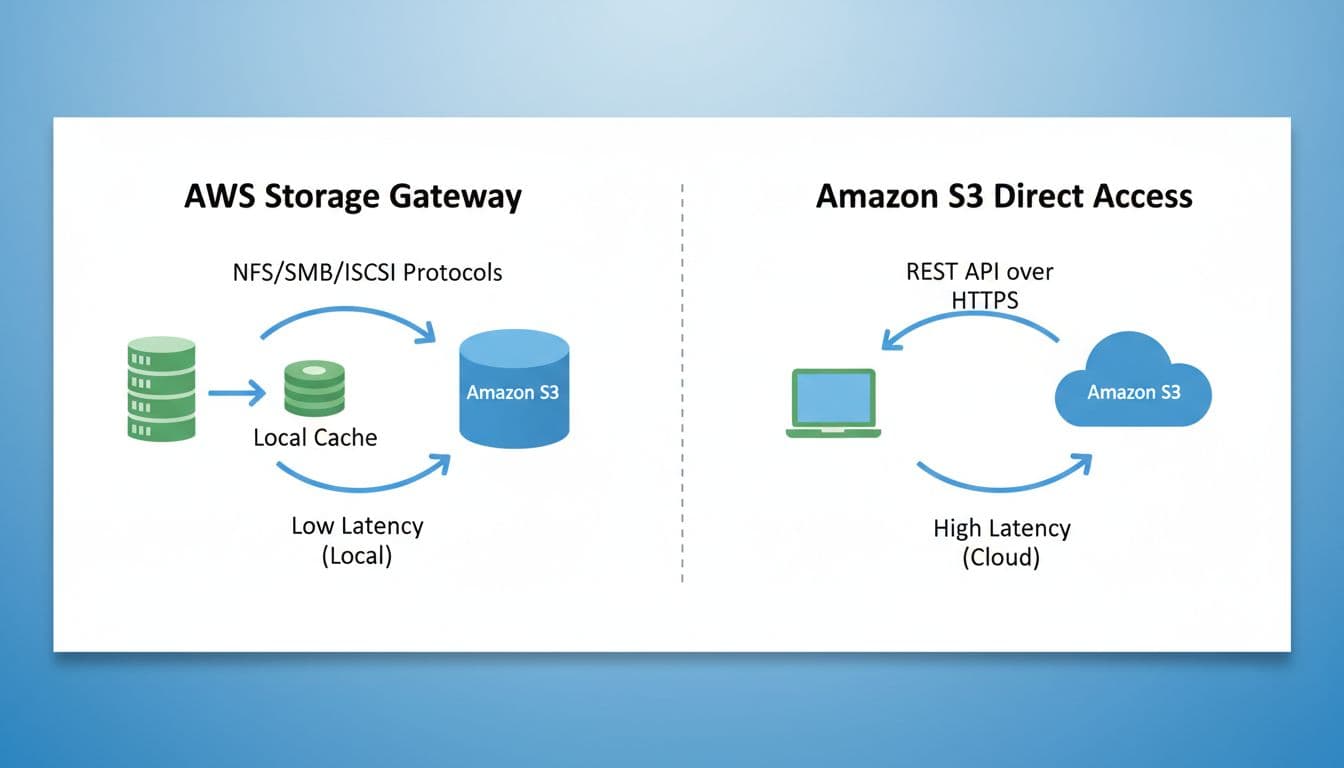
Amazon S3 is object storage. The gateway is the bridge that lets older systems reach that storage through familiar interfaces.
| Factor | AWS Storage Gateway | Amazon S3 |
|---|---|---|
| Access method | NFS, SMB, iSCSI through a gateway | API-based object access |
| Latency feel | Faster for hot local data | Depends on direct cloud access |
| Best use case | Hybrid and legacy workloads | Cloud-native apps and data lakes |
| Setup | Deploy the gateway and configure storage | Create buckets and use SDKs or tools |
The fastest way to remember the difference
Amazon S3 is the storage vault. AWS Storage Gateway is the front desk that helps your current systems reach it without learning a new language.

We can unlock discounts on 10,000+ tools you already use.
Conclusion
If your storage problems are piling up but your apps can’t change overnight, AWS Storage Gateway is a practical answer. It lets you connect on-premises systems to AWS, keep familiar protocols, and move durable copies into the cloud without a painful rewrite.
The best fit depends on your workflow. File gateway fits file shares, volume gateway fits block-based apps and backups, and tape gateway fits older backup software. Before you deploy, look at your pain points, your network, and your growth curve. That is what turns a good hybrid design into a smart one.


Get discounts on your team’s favorite apps
Find deals for 10%, 30%, or even 70% off in our discount marketplace.
Check Discounts



